
1. Uvod
This manual provides essential information for the safe and correct installation, operation, and maintenance of the ALLIANCE LAUNDRY SYSTEMS MC7 I/O Control Board, model SP553405P. Please read this manual thoroughly before attempting any installation or service to ensure proper function and to prevent potential damage or injury.
The SP553405P is a genuine ALLIANCE LAUNDRY SYSTEMS OEM part designed to fit compatible Alliance Laundry Systems washers. It replaces part numbers SP553405 and W10712234.
2. Sigurnosne informacije
UPOZORENJE: Opasnost od strujnog udara. Isključite napajanje prije servisiranja.
Always follow local electrical codes and safety regulations. Installation and service should only be performed by qualified personnel. Failure to follow these instructions could result in serious injury or death.
- Ensure the appliance is disconnected from the power supply before beginning any work.
- Nosite odgovarajuću osobnu zaštitnu opremu (OZO), kao što su zaštitne naočale i rukavice.
- Handle the control board with care to avoid damage from electrostatic discharge.
- Do not operate the appliance with damaged or missing components.
3. Proizvod je gotovview
The MC7 I/O Control Board (SP553405P) is a critical component for managing the functions of your Alliance Laundry Systems washer. It processes inputs from various sensors and controls outputs to motors, valves, and other operational parts.
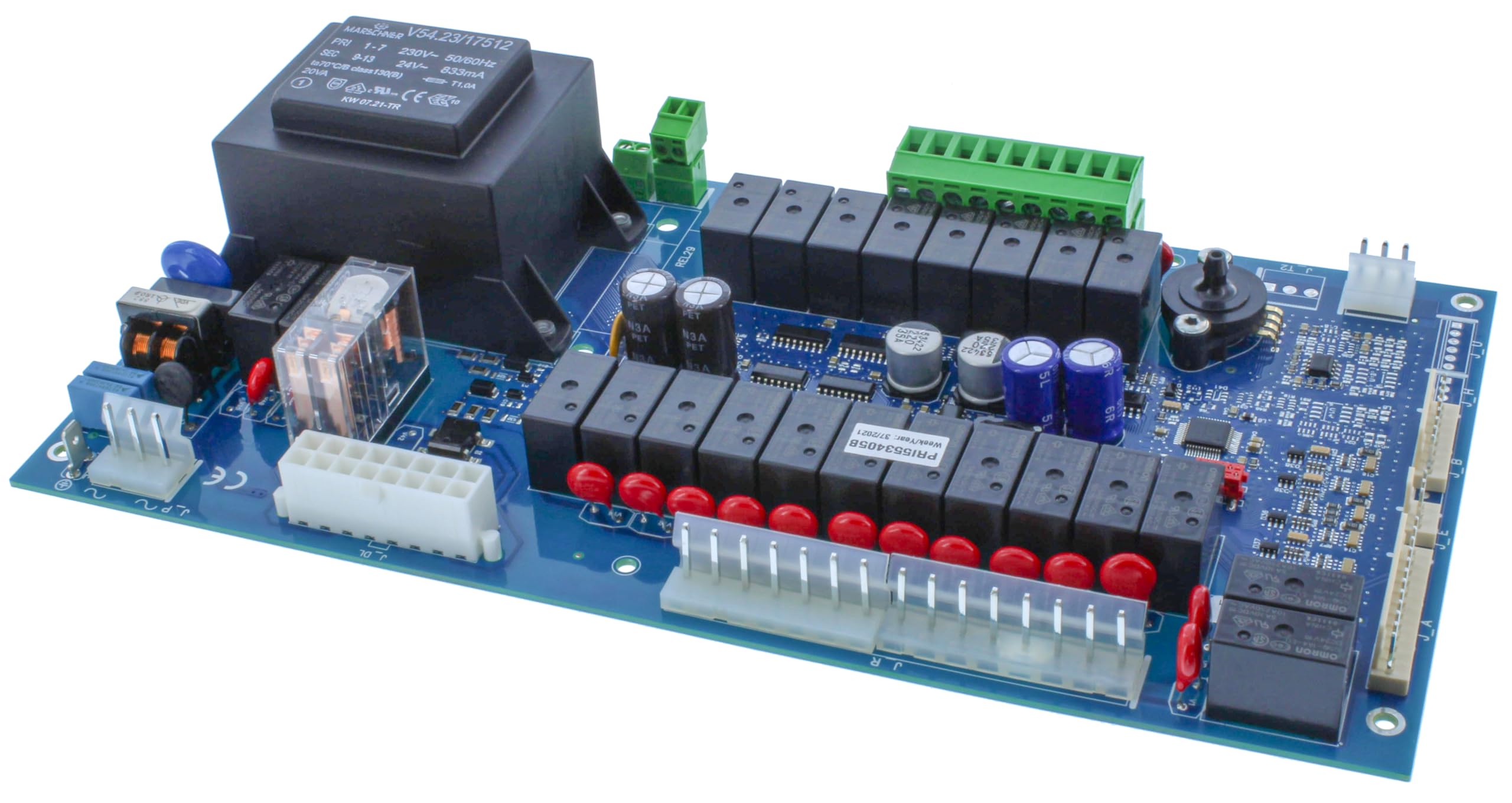
Figure 1: ALLIANCE LAUNDRY SYSTEMS MC7 I/O Control Board (SP553405P). This image shows the front view of the control board with various connectors and electronic components.
This genuine OEM part ensures compatibility and optimal performance with your Alliance Laundry Systems appliance.
4. Instalacija (Podešavanje)
4.1 Potreban alat
- Set odvijača (Phillips i ravni)
- Igličasta kliješta
- Multimetar (za testiranje, opcionalno, ali se preporučuje)
- Antistatička narukvica (preporučeno)
4.2 Koraci instalacije
- Odspojite napajanje: Locate the circuit breaker for the washer and turn off the power. Verify power is off using a multimeter.
- Ploča za kontrolu pristupa: Depending on your washer model, you may need to remove the top panel or front access panel to reach the control board. Refer to your specific washer's service manual for detailed access instructions.
- Veze dokumenata: Before disconnecting any wires, take clear photos or make a diagram of all wire connections to the existing control board. This is crucial for correct reassembly.
- Odvojite žice: Carefully disconnect all wire harnesses and connectors from the old control board. Note their positions.
- Uklonite staru ploču: Odvijte ili otkopčajte staru upravljačku ploču s njezinih nosača.
- Instalirajte novu ploču: Position the new SP553405P control board in the same location and secure it with the original screws or clips.
- Ponovno spajanje žica: Using your photos or diagram, carefully reconnect all wire harnesses and connectors to the new control board. Ensure all connections are secure and correctly seated.
- Ponovno sastavljanje uređaja: Replace any panels removed to access the control board.
- Vrati snagu: Ponovno uključite prekidač.
- Funkcionalnost testiranja: Perform a test cycle on the washer to ensure the new control board is functioning correctly.
5. Operacija
The MC7 I/O Control Board itself does not have user-operable controls. Its function is to interpret commands from the user interface (e.g., buttons, dials) and execute the corresponding actions within the washer. For specific operational instructions regarding your washer's cycles, settings, and features, please refer to your washer's user manual.
Upon successful installation, the control board should seamlessly integrate with your washer's existing operational system.
6. Održavanje
The ALLIANCE LAUNDRY SYSTEMS MC7 I/O Control Board (SP553405P) is designed to be maintenance-free under normal operating conditions. However, periodic inspection of the board and its connections can help ensure longevity and prevent issues.
6.1 Smjernice za inspekciju
- Vizualna provjera: Periodically (e.g., annually, or if accessing the control panel for other reasons), visually inspect the control board for any signs of damage, such as burn marks, swollen components, or loose connections.
- Integritet veze: Ensure all wire harnesses and connectors are firmly seated and free from corrosion.
- Čistoća: Keep the area around the control board free from dust, lint, and moisture. Use a soft, dry brush or compressed air to gently clean the board if necessary, ensuring power is disconnected first.
CAUTION: Do not use liquid cleaners directly on the control board.
7. Rješavanje problema
If your washer is experiencing issues after replacing the control board, or if new issues arise, consider the following troubleshooting steps. Always disconnect power before performing any checks inside the appliance.
| Simptom | Mogući uzrok | Otopina |
|---|---|---|
| Washer does not power on | No power to appliance; loose connection to control board; faulty control board (unlikely if new) | Check circuit breaker. Verify all wire connections to the control board are secure. Ensure the main power cord is plugged in. |
| Specific functions not working (e.g., no fill, no spin) | Incorrect wiring; faulty component connected to the board; software issue (if applicable) | Review wiring diagrams and ensure all connections are correct. Test the specific component (e.g., water inlet valve, motor) if possible. Consult your washer's service manual. |
| Prikazani kodovi grešaka | Indicates a specific fault within the washer system | Refer to your washer's user manual or service manual for the meaning of the error code and recommended troubleshooting steps. |
| Povremeni rad | Loose connections; environmental factors (e.g., humidity, temperature fluctuations) | Check all connections for tightness. Ensure the appliance is in a suitable environment. |
If troubleshooting steps do not resolve the issue, it is recommended to contact a qualified service technician or ALLIANCE LAUNDRY SYSTEMS customer support.
8. Specifikacije
| Atribut | Detalj |
|---|---|
| Proizvođač | ALLIANCE LAUNDRY SYSTEMS |
| Broj dijela | SP553405P |
| Zamjenjuje brojeve dijelova | SP553405, W10712234 |
| Težina artikla | 3 funti |
| Dimenzije paketa | 12 x 9 x 8 inča |
| Količina pakiranja artikla | 1 |
| ASIN | B0CXRP1ZXB |
| Prvo dostupno | 11. ožujka 2024 |
9. Informacije o jamstvu
ALLIANCE LAUNDRY SYSTEMS provides a limited warranty for its genuine OEM parts. The specific terms and duration of the warranty may vary. Please retain your proof of purchase for warranty claims.
For detailed warranty information, please refer to the documentation included with your original appliance or visit the official ALLIANCE LAUNDRY SYSTEMS website. This control board is intended for use as a replacement part and its warranty typically aligns with the standard parts warranty provided by the manufacturer.
10. Korisnička podrška
For technical assistance, service inquiries, or to purchase additional genuine ALLIANCE LAUNDRY SYSTEMS parts, please contact ALLIANCE LAUNDRY SYSTEMS customer support or an authorized service provider.
You can typically find contact information on the ALLIANCE LAUNDRY SYSTEMS official webweb-mjestu ili u originalnom korisničkom priručniku vašeg uređaja.
Mrežni resursi: www.alliancelaundry.com
When contacting support, please have your appliance model number, serial number, and the part number (SP553405P) ready.