
1. Uvod
This manual provides comprehensive instructions for the installation, operation, and maintenance of your Lloyd's Smart Full HD 1080P Video Intercom System. This system is designed to provide secure access control for your home or office, allowing you to monitor, communicate with, and grant access to visitors remotely.
Prije upotrebe proizvoda pažljivo pročitajte ovaj priručnik kako biste osigurali ispravan rad i sigurnost. Sačuvajte ovaj priručnik za buduću upotrebu.
2. Sigurnosne informacije
Kako biste spriječili oštećenje proizvoda ili ozljede sebe ili drugih, molimo vas da se pridržavate sljedećih sigurnosnih mjera opreza:
- Prije instalacije ili održavanja provjerite je li sva struja isključena.
- Instalaciju treba izvršiti kvalificirani električar ako niste upoznati s električnim ožičenjem.
- Ne izlažite proizvod ekstremnim temperaturama, vlazi ili izravnoj sunčevoj svjetlosti.
- Koristite samo priloženi adapter za napajanje i dodatnu opremu.
- Držite proizvod dalje od vode i drugih tekućina.
- Ne pokušavajte sami rastavljati ili popravljati uređaj. Za pomoć se obratite korisničkoj podršci.
3. Sadržaj paketa
Provjerite jesu li svi artikli prisutni u paketu:
- 1 x Monitor (7'' Color LCD Touchscreen)
- 1 x Outdoor Unit (Doorbell with Camera and Keypad)
- 1 x korisnički priručnik
- 1 x Kućište
- 1 x Rain Cover Bracket
- 1 x Recessed Box
- 1 x AC / DC adapter
- 1 x nosač za montažu
- Wall Plugs and Mounting Screws
- 3 x konektora
- 1 x Allen Screwdriver
- 4 x Priključni kabeli

Slika 3.1: Gotovoview of the Lloyd's Smart Video Intercom System components and packaging.
4. Proizvod je gotovview
4.1. Monitor (Indoor Unit)
- Prikaz: 7-inch color LCD touchscreen with 1020 x 600 px resolution.
- Prilagodljive postavke: Brightness, contrast, and volume.
- Funkcije: Hands-free intercom, call transfer (requires additional monitor), date, time, and weather display.
- Skladištenje: Integrated memory for up to 30 photos, supports up to 128 GB memory card (not included).
- Povezivost: 2.4 GHz Wi-Fi for stable connection in large areas.
4.2. Outdoor Unit (Doorbell)
- Fotoaparat: 2MP Full HD (1920x1080) resolution.
- Noćni vid: Yes, with LED numeric panel.
- Viewkut kretanja: 120 stupnjeva.
- Detekcija pokreta: Detection distance of less than or equal to 3 meters.
- Audio: 2-way audio with adjustable microphone and speaker volume.
- Kontrola pristupa: Works with a 12 VDC electric lock (not included), supports 4-6 digit password entry.
- Tamper Button: Sends alerts to your smartphone and triggers an alarm if the outdoor unit is forced.
- Izdržljivost: IP65 rating for indoor or outdoor use.
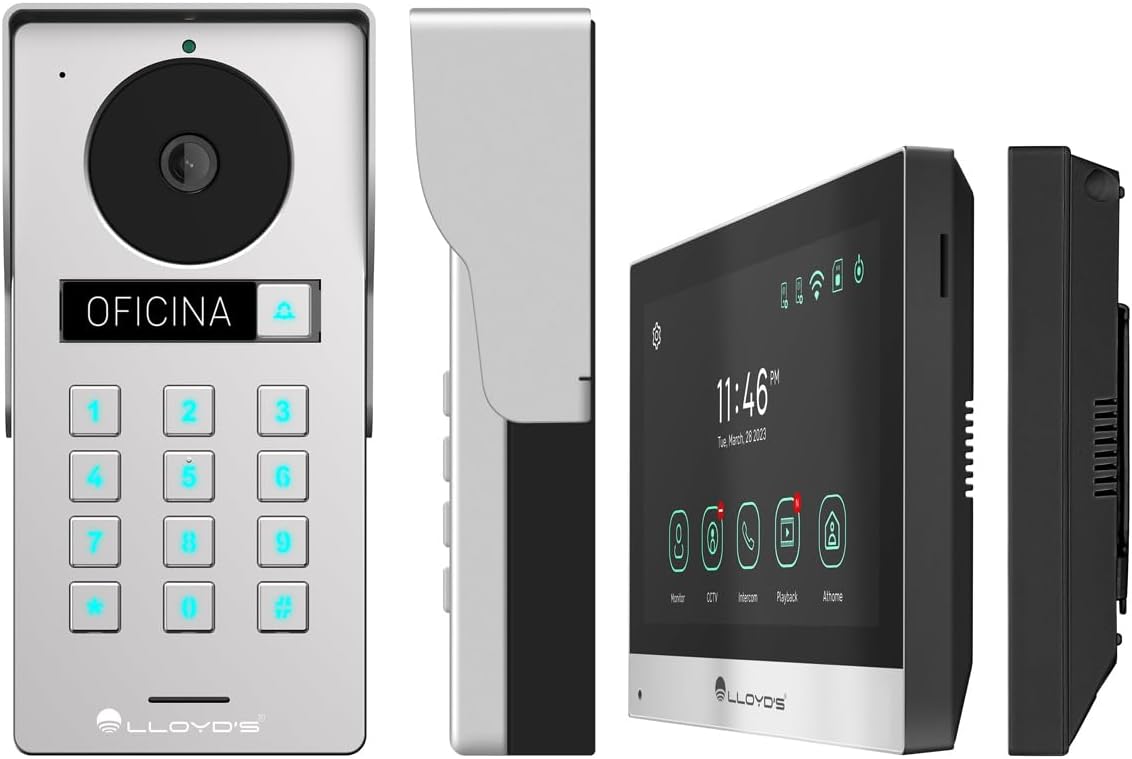
Slika 4.1: Detaljno views of the outdoor unit and monitor.

Figure 4.2: Key features of the Lloyd's Smart Video Intercom System.
5. Postavljanje i instalacija
5.1. Ožičenje i montaža
The system requires a wired connection between the monitor and the outdoor unit. The maximum operating distance is 50 meters using a 4-wire cable (0.5 mm² not included). Follow the wiring diagram provided in the quick start guide for correct connections.
- Outdoor Unit Mounting: Choose a suitable location near your entrance, ensuring clear camera view and easy access to the keypad. Use the provided mounting bracket, wall plugs, and screws. The unit is IP65 rated for outdoor use.
- Montaža monitora: Install the monitor indoors at a convenient height for viewing and interaction. Use the mounting bracket and screws.
- Priključak za napajanje: Connect the AC/DC adapter to the monitor and a power outlet.
- Priključak električne brave (opcionalno): If using an electric lock (12 VDC, not included), connect it to the outdoor unit as per the wiring diagram.
5.2. Aplikacija i Wi-Fi veza
To utilize smart features, download the Lloyd's smart home application on your smartphone (compatible with Android 5.0+ and iOS 11+).
- Power on the monitor and outdoor unit.
- On the monitor, navigate to the Wi-Fi settings and connect to your 2.4 GHz Wi-Fi network.
- Open the Lloyd's app on your smartphone and create an account or log in.
- Follow the in-app instructions to add your new video intercom system. This typically involves scanning a QR code displayed on the monitor or manually entering device details.
- Once connected, you will receive notifications and can control the system remotely via the app.
6. Upute za rad
6.1. Answering Calls and Communication
- When a visitor presses the doorbell button, the monitor will ring, and you will receive a notification on your smartphone.
- On the monitor, tap the "Answer" icon to establish two-way audio and video communication.
- On your smartphone, open the app and tap the incoming call notification to answer.
- The intercom communication time is 60 seconds.

Figure 6.1: Communicate with visitors from anywhere using the app or monitor.

Figure 6.2: Receive instant notifications on your smartphone and monitor.
6.2. Otvaranje vrata
- Iz aplikacije: During a call, tap the "Unlock" icon in the app to open the connected electric lock.
- From the Monitor: During a call, tap the "Unlock" icon on the monitor's touchscreen.
- From the Outdoor Unit: Visitors can enter a pre-set 4-6 digit password on the numeric keypad to open the door.
6.3. Detekcija i snimanje pokreta
- The system automatically captures photos and videos when motion is detected within 3 meters of the outdoor unit or when someone rings the doorbell.
- You will receive real-time alerts on your smartphone via the app when motion is detected.
- Review recorded events and snapshots through the app or on the monitor.
- The monitoring time for motion detection is 30 seconds.

Figure 6.3: Receive motion detection alerts directly on your smartphone app.

Figure 6.4: Automatic photo and video capture for events.
6.4. Proširenje sustava
The system supports expansion for enhanced security and convenience:
- Up to 2 additional Outdoor Units (Doorbell)
- Up to 3 additional Monitors
- Up to 2 additional Cameras
- Up to 2 additional Sensors
(Additional units and sensors are not included and must be purchased separately.)
You can also integrate the system with other Lloyd's smart home products to create customized routines and share device access with family members.
7. Održavanje
- Čišćenje: Use a soft, dry cloth to clean the monitor screen and outdoor unit. Do not use abrasive cleaners or solvents.
- Ažuriranja softvera: Periodically check the Lloyd's app for firmware updates to ensure optimal performance and security.
- Upravljanje pohranom: If using a memory card, regularly back up important recordings and delete old files za oslobađanje prostora.
8. Rješavanje problema
| Problem | Mogući uzrok | Otopina |
|---|---|---|
| No image or sound from outdoor unit. | Loose wiring, power issue, unit malfunction. | Check all cable connections. Ensure power adapter is properly connected. Restart the system. |
| Wi-Fi connection unstable or disconnected. | Weak Wi-Fi signal, incorrect password, router issues. | Ensure the monitor is within Wi-Fi range. Re-enter Wi-Fi password. Restart your router. |
| Cannot open door via app/monitor. | Electric lock not connected, lock malfunction, wiring issue. | Verify electric lock connection and functionality. Check wiring between outdoor unit and lock. |
| Nema upozorenja o detekciji pokreta. | Motion detection disabled, incorrect sensitivity, app notification settings. | Enable motion detection in app settings. Adjust sensitivity. Check smartphone notification permissions for the app. |
| Loša kvaliteta videa. | Dirty camera lens, poor lighting, network bandwidth. | Očistite leću kamere. Osigurajte odgovarajuće osvjetljenje. Provjerite brzinu interneta. |
9. Specifikacije
| Značajka | Detalj |
|---|---|
| Broj modela | LC-1373 |
| Zaslon monitora | 7-inch Color LCD Touchscreen |
| Razlučivost monitora | 1020 x 600 px |
| Outdoor Unit Camera Resolution | 2MP Full HD (1920x1080) |
| Viewing kut | 120 stupnja |
| Domet noćnog vida | Do 10 metara |
| Domet detekcije pokreta | ≤ 3 metara |
| Bežično povezivanje | Wi-Fi od 2.4 GHz |
| Skladištenje | Integrated (30 photos), supports up to 128 GB MicroSD (not included) |
| Napajanje | 12 VDC (via AC/DC adapter) |
| Potrošnja energije (pripravnost) | 4W |
| Potrošnja energije (radna) | 10 W |
| Operating Distance (Wired) | Up to 50m (with 0.5 mm² 4-wire cable) |
| Ingress Protection (Outdoor Unit) | IP65 |
| Monitor Dimensions (H x W x D) | 12.4 cm x 18 cm x 2.1 cm |
| Dimenzije vanjske jedinice (V x Š x D) | 18 cm x 8.7 cm x 3.2 cm |
| Kompatibilni uređaji | Android 5.0 ili noviji, iOS 11 ili noviji |

Figure 9.1: Dimensions of the Monitor and Outdoor Unit.
10. Jamstvo i podrška
For warranty information, please refer to the warranty card included with your product or visit the official Lloyd's website. If you encounter any issues or require technical assistance, please contact Lloyd's customer support.
Korisnička podrška: Refer to the contact information provided on the product packaging or the official Lloyd's webmjesto.
Mrežni resursi: Posjetiti Lloyd's Official Store on Amazon za dodatne informacije o proizvodu i podršku.
11. Službeni videozapisi proizvoda
No official seller videos were provided for this product in the available data.