
Uvod
The M-VAVE SMK-25 MINI is a compact and portable 25-key USB MIDI keyboard controller designed for music production on Mac and PC. It features velocity-sensitive keys, assignable controls, pitch and modulation functions, and versatile connectivity options including USB and Bluetooth. This manual provides detailed instructions for setting up, operating, maintaining, and troubleshooting your device.

Image: The M-VAVE SMK-25 MINI MIDI Keyboard Controller, showcasing its compact design and 25 velocity-sensitive keys.
Postavljanje
1. Uključivanje
The SMK-25 MINI features a built-in rechargeable battery. To power on the device, press and hold the power button located on the side or top panel until the indicator light illuminates.
2. USB veza
For a wired connection to your computer (Mac or PC), use the provided USB-C cable. Connect one end to the USB-C port on the SMK-25 MINI and the other end to an available USB port on your computer. The device is plug-and-play, requiring no additional drivers for basic functionality.

Image: Illustration of the plug-and-play USB connection process for the MIDI keyboard controller to a computer.
3. Bluetooth veza
Za bežično povezivanje putem Bluetootha:
- Ensure the SMK-25 MINI is powered on.
- Pritisnite tipku BT button on the controller to activate Bluetooth pairing mode. The Bluetooth indicator light will flash.
- On your computer or mobile device, navigate to Bluetooth settings and select "SMK-25 MINI" from the list of available devices.
- Nakon povezivanja, Bluetooth indikatorska lampica će početi stalno svijetliti.
4. Software Setup (DAW Compatibility)
The SMK-25 MINI is compatible with various Digital Audio Workstations (DAWs) such as Ableton Live, GarageBand, Logic Pro, Studio One, Cubase, Pro Tools, and Reason Studios. After connecting the controller, open your preferred DAW and ensure the SMK-25 MINI is recognized as a MIDI input device in the software's preferences or settings.

Image: The M-VAVE SMK-25 MINI shown with various DAW logos, indicating broad software compatibility.
Upute za rad
1. Osnovne kontrole
- Tipke osjetljive na brzinu: The 25 keys respond to how hard you press them, allowing for dynamic expression in your playing.
- Pitch Bend Buttons: Koristite POJAČAJ SE i PITCH DOLJE buttons to momentarily raise or lower the pitch of notes.
- Modulation Button: The MOD button can be assigned to control various parameters within your DAW or instrument, such as vibrato or filter cutoff.
- Sustain Button: Pritisnite tipku SUS button to sustain notes, similar to a piano sustain pedal. An external sustain pedal can also be connected via the 3.5mm port.
- Pomak oktave: Koristite OC+ i OC- buttons to shift the keyboard's octave range up or down.
- Customization Knob: The rotary knob typically controls volume or can be assigned to other MIDI CC parameters for real-time control.

Slika: Krupni plan view of the M-VAVE SMK-25 MINI's control panel, highlighting the pitch, mod, sustain, arpeggiator, and octave shift buttons.
2. Napredne značajke
- Arpeggiator: Pritisnite tipku ARP button to activate the arpeggiator. You can then use the keys and other controls to adjust arpeggio patterns, tempo, gate length, and octave range. Refer to your DAW's manual for specific arpeggiator synchronization settings.
- Smart Chord & Scale Modes: The SC/CH button enables Smart Chord and Smart Scale modes. These modes assist in playing harmonically correct notes and chords within a selected scale, simplifying music creation.
Održavanje
To ensure the longevity and optimal performance of your M-VAVE SMK-25 MINI, follow these maintenance guidelines:
- Čišćenje: Use a soft, dry cloth to clean the surface of the controller. Avoid abrasive cleaners, solvents, or waxes.
- Skladištenje: Uređaj čuvajte na hladnom i suhom mjestu, dalje od izravne sunčeve svjetlosti, ekstremnih temperatura i visoke vlažnosti.
- Rukovanje: Handle the controller with care. Avoid dropping it or subjecting it to strong impacts.
- Njega baterije: Za optimalan vijek trajanja baterije, izbjegavajte često potpuno pražnjenje baterije. Redovito punite uređaj, posebno ako će se skladištiti dulje vrijeme.
Rješavanje problema
| Problem | Mogući uzrok | Otopina |
|---|---|---|
| Uređaj se ne uključuje. | Problem s niskom baterijom ili napajanjem. | Charge the device using the USB-C cable. Ensure the power button is pressed correctly. |
| No sound or MIDI input in DAW. | Neispravna veza ili postavke softvera. | Verify USB or Bluetooth connection. Check your DAW's MIDI input settings to ensure the SMK-25 MINI is selected and enabled. |
| Bluetooth veza ne uspijeva. | Pairing mode not active or interference. | Osigurajte BT button is pressed and flashing. Move closer to the host device. Try restarting both devices. |
| Tipke ne reagiraju ili su nekonzistentne. | Problem sa softverom ili fizička prepreka. | Restart your DAW and the controller. Ensure no debris is lodged under the keys. |
Tehnički podaci
| Značajka | Detalj |
|---|---|
| Model | SMK-25 MINI |
| Broj tipki | 25, Velocity-Sensitive |
| Povezivost | USB-C, Bluetooth |
| MIDI portovi | 3.5mm MIDI Out (TRS Type A compatible) |
| Sustain pedal ulaz | 3.5mm (shared with MIDI Out) |
| Kontrole | Pitch Up/Down, Mod, Sustain, Arpeggiator, Smart Chord/Scale, Octave Up/Down, Customization Knob |
| Baterija | Built-in, 780 mAh Lithium |
| Vrijeme punjenja | Otprilike 5 sata |
| Radno vrijeme | Otprilike 30 sata |
| Vrijeme pripravnosti | Otprilike 40 sata |
| Kompatibilni uređaji | PC, Mac, tablet, pametni telefon |
| Dimenzije | 15.12 x 5.63 x 2.64 inča (približno) |
| Težina | 1.2 funti (približno) |
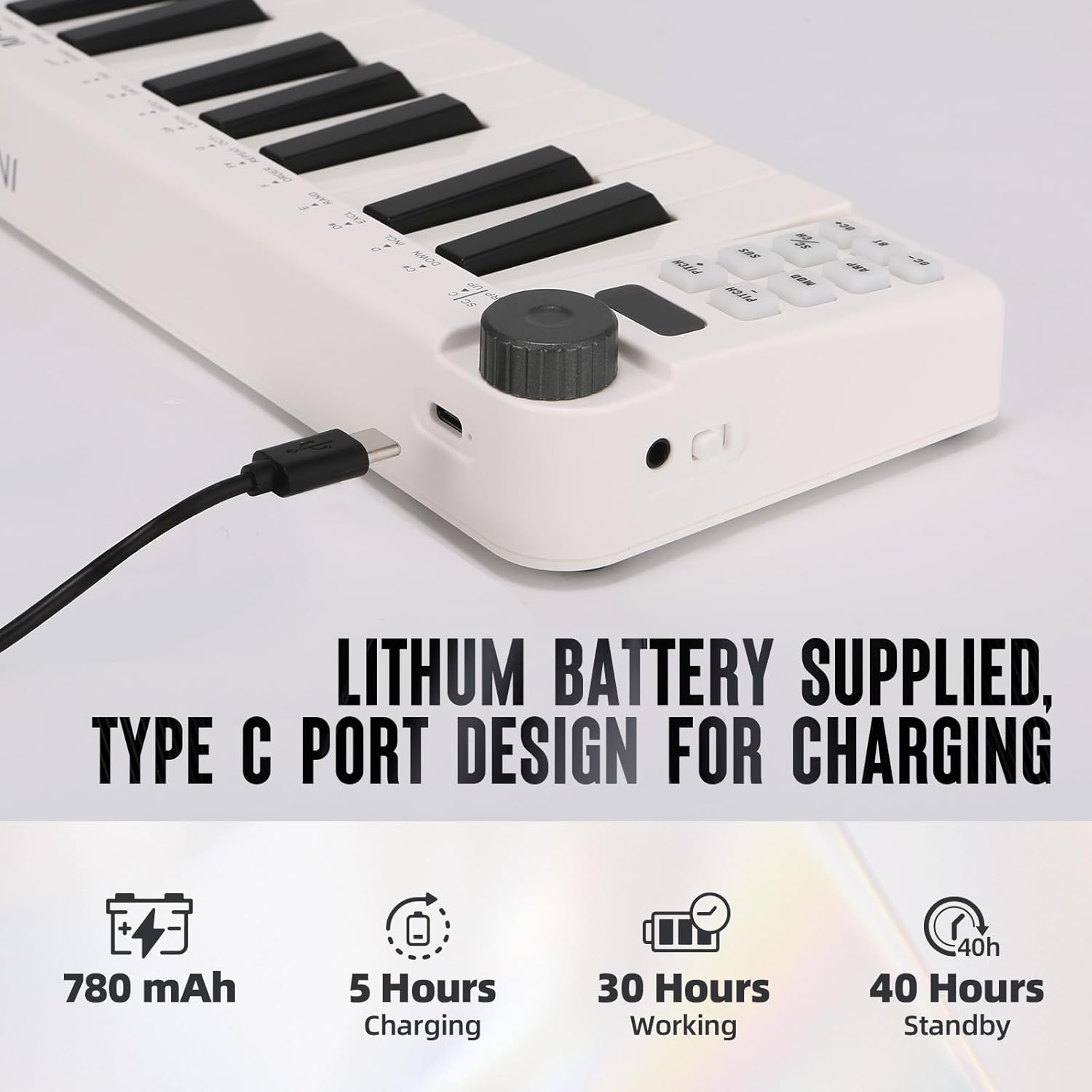
Image: Visual representation of the M-VAVE SMK-25 MINI's battery capacity, charging time, working time, and standby time.
Jamstvo i podrška
M-VAVE products are designed for reliability and performance. For warranty information, technical support, or service inquiries, please refer to the official M-VAVE webweb-mjesto ili izravno kontaktirajte njihovu korisničku podršku. Sačuvajte račun kao dokaz o kupnji za slučaj zahtjeva za jamstvo.
M-VAVE aims to provide high-quality audio equipment and instruments. For assistance, their professional sales support team can address questions within 24 hours.
Posjetite M-VAVE Store on Amazon za više informacija.