
1. Uvod
This manual provides instructions for the NYXI Striker Retro Mechanical Gaming Keyboard (Model: CA01). This keyboard features multi-device connectivity, hot-swappable switches, RGB backlighting, and a customizable display screen. It is compatible with Windows, macOS, and iOS systems.

Image 1.1: The NYXI Striker Retro Mechanical Gaming Keyboard, showcasing its GameCube-inspired design and full layout.
2. Sadržaj paketa
Provjerite jesu li svi artikli prisutni u paketu:
- NYXI Striker Retro Mechanical Gaming Keyboard
- Izvlakač ključeva
- USB kabel (USB-C na USB-A)
- Additional Switches (5x Red, 5x Blue)
- 2.4GHz Wireless Receiver (stored in keyboard compartment)

Image 2.1: All components included with the NYXI Striker Retro Mechanical Gaming Keyboard.
3. Proizvod je gotovview
The NYXI Striker keyboard features a 97-key layout with several distinct components:
- Poklopci tipki: Dual-color keycaps for a comfortable typing experience.
- Mehanički prekidači: Hot-swappable switches for customization.
- RGB pozadinsko osvjetljenje: Per-key RGB illumination with various effects.
- Zaslon zaslona: A pixelated dot matrix screen for animations and status.
- Valjak za volumen: A dedicated roller for audio adjustment.
- Connectivity Switch: Located on the side/back for switching between wired, 2.4G, and Bluetooth modes.
- USB-C priključak: Za žično povezivanje i punjenje.
- 2.4GHz Receiver Compartment: A dedicated slot to store the wireless receiver.
- Prilagodljive noge: Tri-stage tilt stands for ergonomic positioning.

Slika 3.1: Vrh view of the keyboard, showing the full key layout and integrated display screen.

Slika 3.2: Bočni profesionalacfile tipkovnice.

Image 3.3: Location of the 2.4GHz wireless receiver compartment.

Image 3.4: Three-level adjustable tilt stand for ergonomic comfort.
4. Postavljanje
4.1 Početno punjenje
Before first use, connect the keyboard to a USB power source using the provided USB-C cable to ensure it is fully charged. The keyboard can be used while charging in wired mode.
4.2 Načini povezivanja
The NYXI Striker keyboard supports three connection modes: Bluetooth 5.0, 2.4GHz wireless, and USB wired. Use the switch located on the keyboard to select your desired mode.
- USB ožičeni način rada:
- Set the mode switch on the keyboard to the wired (USB) position.
- Connect the USB-C end of the cable to the keyboard and the USB-A end to your computer.
- Vaš operativni sustav će automatski prepoznati tipkovnicu.
- 2.4GHz bežični način rada:
- Retrieve the 2.4GHz USB receiver from its compartment on the keyboard.
- Set the mode switch on the keyboard to the 2.4G wireless position.
- Priključite 2.4 GHz USB prijemnik u slobodni USB priključak na vašem računalu.
- Tipkovnica bi se trebala automatski povezati.
- Bluetooth 5.0 način rada:
- Set the mode switch on the keyboard to the Bluetooth position.
- The keyboard supports up to 5 Bluetooth channels. Press Fn + 1/2/3/4/5 to select a Bluetooth channel. The display screen will indicate the selected channel.
- Za ulazak u način rada za uparivanje pritisnite i držite Fn + 1/2/3/4/5 for 3-5 seconds until the indicator light flashes rapidly or the display screen shows a pairing icon.
- Na svom uređaju (računalu, tabletu, telefonu) idite na postavke Bluetootha i potražite nove uređaje.
- Select "NYXI Striker" from the list of available devices to pair.
- Once paired, the indicator light will become solid, and the display screen will confirm the connection.

Image 4.1: Compatible operating systems for the keyboard.
5. Upute za rad
5.1 Uključivanje/isključivanje
The keyboard powers on automatically when connected via USB or when a wireless mode is selected and the battery has charge. To conserve battery, ensure the keyboard is switched off when not in use for extended periods.
5.2 Prebacivanje između uređaja/načina rada
To switch between connected Bluetooth devices, press Fn + 1/2/3/4/5 to select the desired paired channel. To switch between wired, 2.4G, and Bluetooth modes, use the physical switch on the keyboard.
5.3 Upravljanje RGB pozadinskim osvjetljenjem
The keyboard features 22 RGB lighting modes. Use the following key combinations to control the backlighting:
- Fn + lijevi Ctrl: Prođite kroz različite RGB svjetlosne efekte.
- Fn + strelica gore/dolje: Podesite razine svjetline.
- Fn + strelica lijevo/desno: Adjust lighting effect speed.

Image 5.1: RGB Hybrid Underglow lighting in action.
5.4 Display Screen Operation
The integrated display screen can show various animations and status indicators. Use the NYXI Driver App for advanced customization of the display screen content.
5.5 Valjak za volumen
Rotate the dedicated roller on the top right of the keyboard to adjust the system volume. Pressing the roller typically mutes/unmutes audio.
6. Ključne značajke
The NYXI Striker keyboard is designed with several advanced features to enhance your user experience:
- Veza s više uređaja: Supports Bluetooth 5.0, 2.4GHz wireless, and USB wired modes. It also features a built-in five-channel mode for seamless switching between multiple devices (Windows, Android, macOS, iOS, iPad systems).
- Hot-Swappable and Gasket Structure: The keyboard supports hot-swappable switches, allowing for easy replacement without soldering. Its gasket structure, constructed with PC+ABS material, provides a soft and elastic typing feel, reducing noise and improving overall acoustics.
- Personalized Aesthetics: Features 22-color RGB backlighting with various glow modes and effects. The display screen supports 4 dynamic matrix display modes, which can be customized further via software.
- NYXI Driver App - Macro Customization: A dedicated software application allows for extensive macro customization, key remapping, and lighting management. This app supports wired, 2.4G, and Bluetooth connections for flexible setup.
- Dizajn udobnosti: Integrates a precision volume roller, anti-slip silicone pads for stability, and a three-stage tilt stand for adjustable ergonomic comfort during extended use.

Image 6.1: Gasket structure for enhanced typing experience.

Image 6.2: Hot-swappable PCB for easy switch replacement.
6.1 Using the NYXI Driver App
The NYXI Driver App provides advanced customization options for your keyboard. Download the application from the official NYXI webmjesto.
- Prilagođavanje makroa: Create and assign complex macros to keys.
- Postavke osvjetljenja: Fine-tune RGB effects, colors, and animations.
- Display Screen Customization: Upload custom images or animations to the dot matrix display.

Image 6.3: NYXI Driver App interface for macro customization.
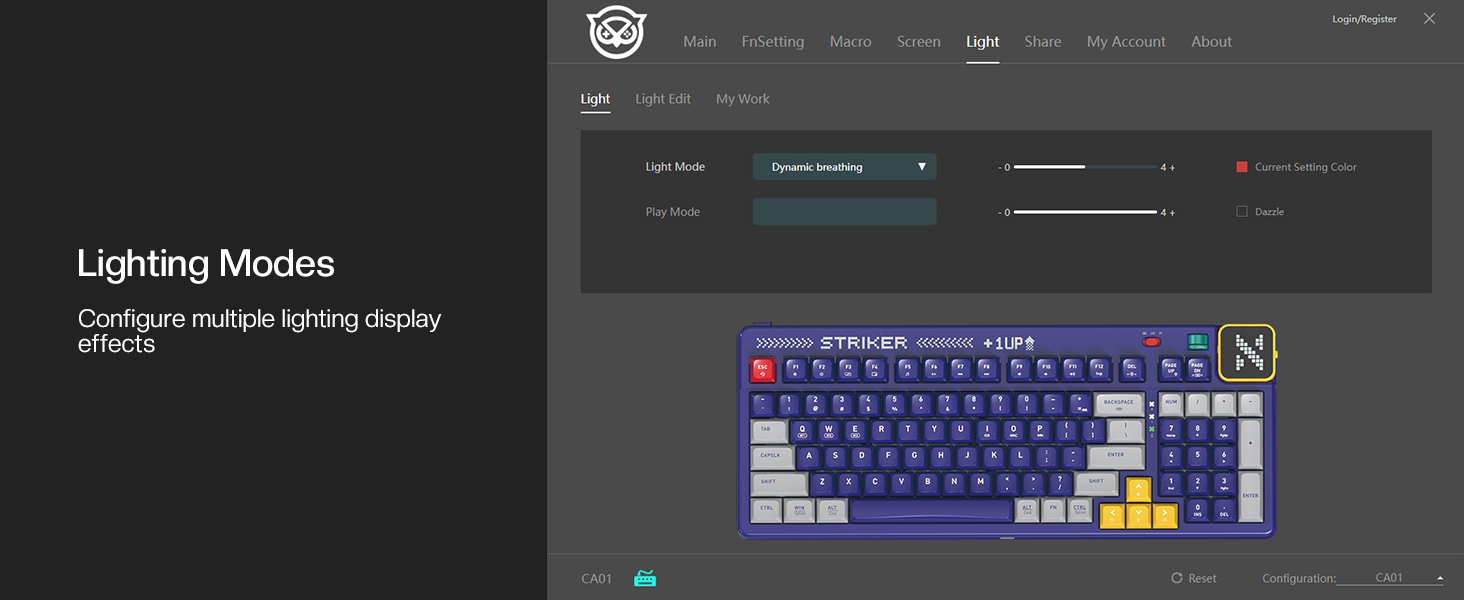
Image 6.4: NYXI Driver App interface for lighting mode configuration.

Image 6.5: NYXI Driver App interface for dot matrix screen customization.
7. Održavanje
7.1 Čišćenje
- Za brisanje površine tipkovnice koristite meku, suhu krpu.
- For deeper cleaning, use the provided keycap puller to remove keycaps and clean dust or debris with compressed air.
- Avoid using harsh chemicals or abrasive materials that could damage the keyboard finish or keycap legends.
7.2 Skladištenje
Store the keyboard in a cool, dry place away from direct sunlight and extreme temperatures. If storing for an extended period, ensure the keyboard is fully charged and then powered off.
8. Rješavanje problema
- Tipkovnica ne reagira:
- Ensure the keyboard is powered on and the correct connectivity mode (wired, 2.4G, or Bluetooth) is selected.
- For wireless modes, check battery level. Recharge if necessary.
- For 2.4GHz, ensure the receiver is properly plugged into a USB port.
- For Bluetooth, ensure it is paired correctly and the selected channel (Fn + 1-5) matches the paired device. Try re-pairing.
- Try connecting via USB wired mode to rule out wireless issues.
- RGB lights not working/displaying correctly:
- Ensure RGB is enabled (check the NYXI Driver App if installed).
- Promjenjujte načine osvjetljenja pomoću Fn + lijevi Ctrl.
- Podesite svjetlinu pomoću Fn + strelica gore.
- Ključevi se ne registriraju:
- If a specific key is not working, the switch might be faulty. Utilize the hot-swappable feature to replace the switch with one of the spares provided.
- Pazite da ispod tipke ili prekidača nema ostataka.
- Problemi s povezivanjem (kašnjenje, prekidi veze):
- For wireless modes, ensure the keyboard is within range of the receiver/device and there are no significant obstructions.
- Minimizirajte smetnje od drugih bežičnih uređaja.
- Ensure the keyboard's battery is sufficiently charged.
If issues persist, please refer to the Warranty & Support section for further assistance.
9. Specifikacije
| Značajka | Detalj |
|---|---|
| Broj modela | CA01 |
| Tehnologija povezivanja | 2.4G bežično, Bluetooth 5.0, USB-C žičano |
| Opis tipkovnice | Mehanički |
| Broj tipki | 97 tipki |
| Kompatibilni uređaji | macOS, Windows 7 or later, iOS |
| Posebne značajke | Backlit (RGB), Customizable Display Keys, Gasket Structure, Hot-Swappable |
| Podrška boja pozadinskog osvjetljenja tipkovnice | RGB (22 modes) |
| Stil | NGC Retro |
| Dimenzije proizvoda | 38.91 x 15.44 x 3.3 cm (15.32 x 6.08 x 1.3 cm) |
| Težina artikla | 3.56 funti (1.61 kg) |
| Proizvođač | NYXI |
10. Jamstvo i podrška
10.1 Informacije o jamstvu
NYXI products are covered by a limited warranty against defects in materials and workmanship. Please refer to the official NYXI website or your purchase documentation for specific warranty terms and conditions, including duration and coverage details.
10.2 Korisnička podrška
For technical assistance, troubleshooting, or warranty claims, please contact NYXI customer support through their official website. You may need to provide your product model number (CA01) and proof of purchase.
Thank you for choosing the NYXI Striker Retro Mechanical Gaming Keyboard.