
Uvod
This manual provides comprehensive instructions for the ProtoArc EK01 Plus Ergonomic Wireless Backlit Keyboard. Please read this guide carefully to ensure proper setup, operation, and maintenance of your device. Keep this manual for future reference.
Sadržaj paketa
Provjerite jesu li svi artikli prisutni u paketu:
- ProtoArc EK01 Plus Ergonomic Wireless Backlit Keyboard
- Naslon za zapešće
- USB-C kabel za punjenje
- 2.4G USB prijemnik
- korisnički priručnik
Proizvod gotovview
The ProtoArc EK01 Plus is a full-size ergonomic keyboard designed to enhance typing comfort and reduce muscle strain. Its split and curved keyframe design promotes a natural hand and wrist posture.
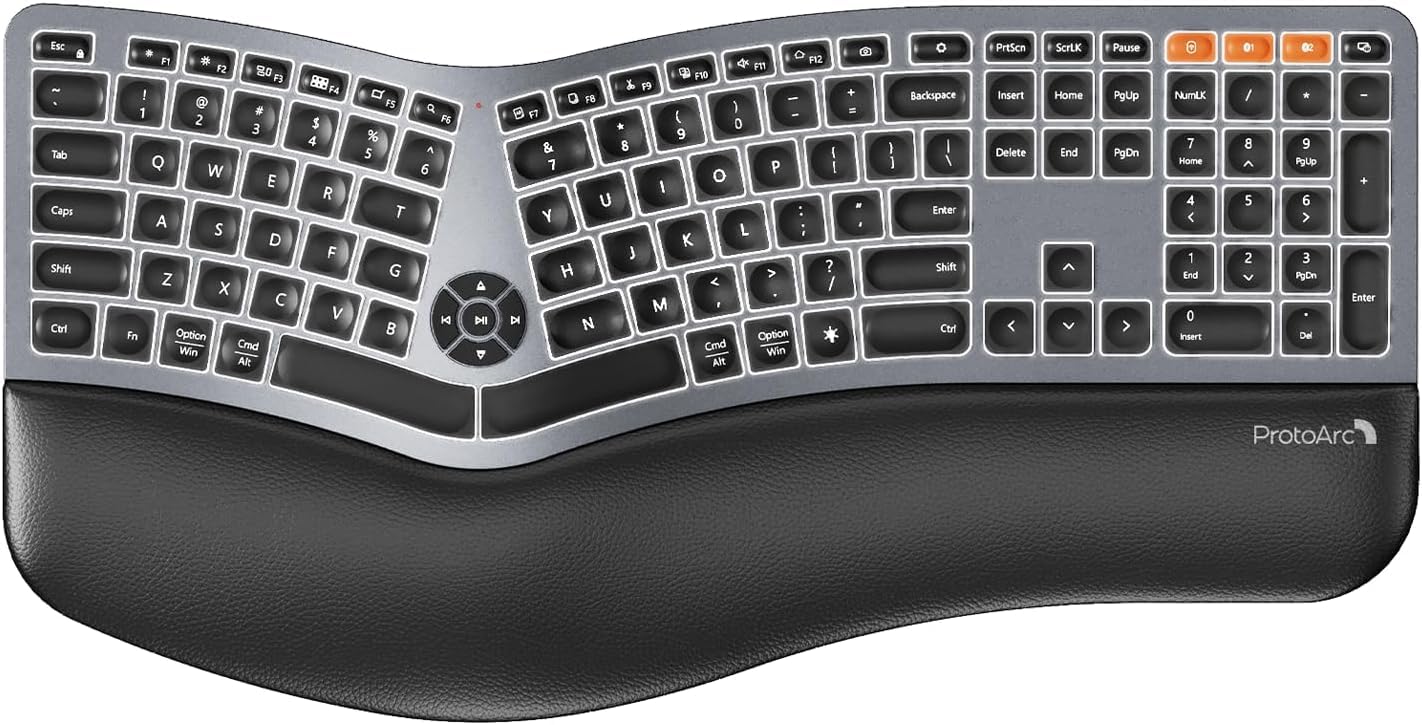
Image 1: ProtoArc EK01 Plus Ergonomic Wireless Backlit Keyboard. This image displays the full keyboard with its split design, integrated wrist rest, and key layout.
Ključne karakteristike:
- Ergonomic Full-Size Design: Features a split, curved keyframe and integrated wrist rest to minimize muscle fatigue and promote proper posture.
- Adjustable Tilt Feet: Four adjustable tilt feet allow customization of the keyboard angle for optimal comfort.
- Podesivo pozadinsko osvjetljenje: Soft white LED backlighting with three adjustable brightness levels (low-medium-high) for comfortable typing in various lighting conditions.
- Povezivost s više uređaja: Connects to up to three devices simultaneously via Bluetooth and 2.4G USB. Easily switch between devices with a dedicated key.
- USB-C punjivo: Equipped with a 2000 mAh rechargeable lithium battery for extended use.
- Automatski način mirovanja: Enters sleep mode after 60 minutes of inactivity to conserve power, waking up within 3 seconds upon key press.
- Kompatibilnost: Widely compatible with Windows 7/8/10, Mac OS X 10.12 or higher, and Android 4.3 or higher.
Postavljanje
1. Punjenje tipkovnice
- Pronađite USB-C priključak za punjenje na tipkovnici.
- Connect the provided USB-C cable to the keyboard and the other end to a USB power source (e.g., computer USB port, wall adapter).
- Indikator punjenja će svijetliti. Nakon što je potpuno napunjeno, svjetlo može promijeniti boju ili se ugasiti.
2. Povezivanje s uređajima
The keyboard supports both 2.4G USB and Bluetooth connectivity.
2.1. 2.4G USB Connection
- Locate the 2.4G USB receiver (dongle). It is usually stored in a compartment on the keyboard or in the packaging.
- Priključite USB prijamnik u slobodni USB priključak na računalu.
- Uključite tipkovnicu pomoću prekidača za napajanje.
- Tipkovnica bi se trebala automatski povezati s vašim uređajem.
2.2. Bluetooth veza (do 3 uređaja)
- Uključite tipkovnicu.
- Press and hold one of the Bluetooth channel keys (e.g., BT1, BT2, ili BT3) 3-5 sekundi dok indikatorska lampica ne zatreperi, što označava način uparivanja.
- Na svom uređaju (računalu, tabletu, pametnom telefonu) omogućite Bluetooth i potražite nove uređaje.
- Select "ProtoArc EK01 Plus" (or similar name) from the list of available devices.
- Slijedite upute na zaslonu kako biste dovršili postupak uparivanja. Indikatorska lampica prestat će treptati nakon povezivanja.
- Repeat these steps for up to two additional Bluetooth devices using the other Bluetooth channel keys.
Operacija
1. Prebacivanje između uređaja
To switch between connected devices, simply press the corresponding connection key:
- Pritisnite 2.4G za prebacivanje na uređaj spojen putem USB prijemnika.
- Pritisnite BT1 to switch to the first Bluetooth device.
- Pritisnite BT2 to switch to the second Bluetooth device.
- Pritisnite BT3 to switch to the third Bluetooth device.
2. Podešavanje pozadinskog osvjetljenja
The keyboard features a soft white LED backlight with three brightness levels.
- To cycle through brightness levels (low, medium, high, off), press the dedicated backlight key (refer to keyboard layout for specific key).
3. Sleep Mode and Power Saving
To conserve battery life, the keyboard will automatically enter sleep mode after 60 minutes of inactivity. To wake the keyboard, press any key. The keyboard will be ready for use within 3 seconds.
4. Adjustable Tilt
The keyboard includes four adjustable tilt feet. Extend or retract these feet to customize the typing angle to your preference, ensuring comfortable wrist positioning whether sitting or standing.
Održavanje
1. Čišćenje tipkovnice
- Prije čišćenja isključite tipkovnicu iz svih uređaja i izvora napajanja.
- Koristite mekanu krpu koja ne ostavlja dlačice dampvodom ili blagom otopinom za čišćenje obrišite površinu tipkovnice.
- Izbjegavajte korištenje jakih kemikalija, abrazivnih sredstava za čišćenje ili otapala jer mogu oštetiti završnu obradu tipkovnice.
- Za čišćenje između tipki koristite komprimirani zrak za uklanjanje prašine i ostataka.
2. Briga o bateriji
- Redovito punite tipkovnicu kako biste održali zdravlje baterije.
- Izbjegavajte često potpuno pražnjenje baterije.
- Ako tipkovnicu skladištite dulje vrijeme, napunite je na otprilike 50% prije skladištenja.
Rješavanje problema
| Problem | Mogući uzrok | Otopina |
|---|---|---|
| Tipkovnica ne reagira | Low battery; Keyboard off; Incorrect connection mode; USB receiver not plugged in (2.4G); Bluetooth not paired. | Charge the keyboard; Turn on the keyboard; Switch to the correct connection mode (2.4G, BT1/2/3); Ensure USB receiver is securely plugged in; Re-pair Bluetooth. |
| Kašnjenje ili odgođeni unos | Smetnje; Udaljenost od prijemnika/uređaja; Slaba baterija. | Move closer to the receiver/device; Ensure no strong interference sources nearby; Charge the keyboard. |
| Pozadinsko osvjetljenje ne radi | Pozadinsko osvjetljenje isključeno; Baterija je prazna. | Press the backlight key to adjust brightness; Charge the keyboard. |
| Ne može se povezati putem Bluetootha | Keyboard not in pairing mode; Device Bluetooth off; Already connected to 3 devices. | Ensure keyboard is in pairing mode (flashing indicator); Enable Bluetooth on your device; Disconnect from an existing Bluetooth device if maximum reached. |
Tehnički podaci
| Marka | ProtoArc |
| Broj modela | EK01 Plus |
| Tehnologija povezivanja | Bluetooth, 2.4G USB |
| Opis tipkovnice | Ergonomic, Full Size, Split Design |
| Posebne značajke | Ergonomic, Full Size, Wrist Rest, Backlit, Rechargeable |
| Boja | Svemirska siva |
| Podrška za boju pozadinskog osvjetljenja | Monochromatic (White LED) |
| Materijal | Plastični |
| Izvor napajanja | Napajanje baterijom (2000 mAh litijeva baterija) |
| Tip prekidača | Membrana |
| Raspored tipkovnice | QWERTY (UK layout for this variant) |
| Broj tipki | 117 |
| Kompatibilni uređaji | Laptop, PC, Tablet, Windows/Mac/Android |
| Težina artikla | 1.6 kilogram |
| Dimenzije (približno) | 48 cm (duljina) x 25 cm (širina) |
Jamstvo i podrška
For warranty information and technical support, please refer to the ProtoArc official website or contact their customer service. Details are typically provided on the product packaging or the official brand store.
ProtoArc Official Store: Visit ProtoArc Store on Amazon