
1. Uvod
Thank you for choosing the Ingco CSDLI08025 8V Cordless Screwdriver. This manual provides essential information for the safe and efficient operation, maintenance, and troubleshooting of your new tool. Please read these instructions carefully before use and keep them for future reference.
The Ingco CSDLI08025 is a versatile 8V cordless screwdriver designed for various tasks, including furniture assembly, drawer installation, and general DIY projects. It features a powerful 220 RPM motor, 6 Nm of torque, an integrated LED work light, and comes with 17 essential accessories for immediate use.
2. Sigurnosne upute
Uvijek slijedite osnovne sigurnosne mjere kako biste smanjili rizik od požara, strujnog udara i osobnih ozljeda.
- Sigurnost radnog područja: Radno mjesto održavajte čistim i dobro osvijetljenim. Nered ili tamna područja mogu uzrokovati nesreće. Ne koristite električne alate u eksplozivnim atmosferama, kao što je prisutnost zapaljivih tekućina, plinova ili prašine.
- Električna sigurnost: Izbjegavajte kontakt tijela s uzemljenim površinama (npr. cijevima, radijatorima, štednjacima, hladnjacima). Ne izlažite električne alate kiši ili vlazi.
- Osobna sigurnost: Uvijek nosite zaštitu za oči. Koristite zaštitu za sluh prilikom duljeg rada. Odjenite se prikladno; izbjegavajte široku odjeću ili nakit. Držite kosu, odjeću i rukavice dalje od pokretnih dijelova.
- Upotreba i njega alata: Ne forsirajte električni alat. Koristite odgovarajući električni alat za svoju primjenu. Isključite utikač iz izvora napajanja i/ili izvadite bateriju iz električnog alata prije bilo kakvih podešavanja, promjene pribora ili pohranjivanja električnog alata.
- Sigurnost baterije: Recharge only with the charger specified by the manufacturer. Do not use battery packs other than those specifically designated for the tool. Do not open, crush, or expose the battery to fire or high temperatures.
3. Sadržaj paketa
Prilikom raspakiranja provjerite jesu li svi predmeti prisutni:
- 1 x Ingco CSDLI08025 8V Cordless Screwdriver
- 1 x USB kabel za punjenje
- 1 x kućište za pohranu
- 10 x 25mm Cr-V Screwdriver Bits (SL4, SL6, PH1, PH2, PH3, PZ1, PZ2, PZ3, T20, T25)
- 1 x 60mm Bit Connector/Extension
- 4 x HSS Drill Bits with Hex Shank (2.0mm, 2.5mm, 3.0mm, 4.0mm)
- 1 x CRV PH2 Screwdriver Bit
- 1 x CRV 6 Screwdriver Bit
4. Proizvod je gotovview
Familiarize yourself with the main components of your Ingco CSDLI08025 cordless screwdriver:

Slika 1: Diagram showing the Ingco CSDLI08025 cordless screwdriver with labeled components: self-locking chuck, LED light, on/off switch, rotation button (forward/reverse), and USB port.
- Samoblokirajuća stezna glava: Za brzu i sigurnu izmjenu bitova.
- LED svjetlo: Osvjetljava radno područje za bolju vidljivost u tamnim prostorima.
- Prekidač za uključivanje/isključivanje: Activates and deactivates the screwdriver.
- Rotation Button (Forward/Reverse): Controls the direction of rotation for driving or removing screws.
- USB priključak: Za punjenje unutarnje baterije.
- Podesiva ručka: Allows the tool to be used in a pistol grip or straight configuration for versatility.
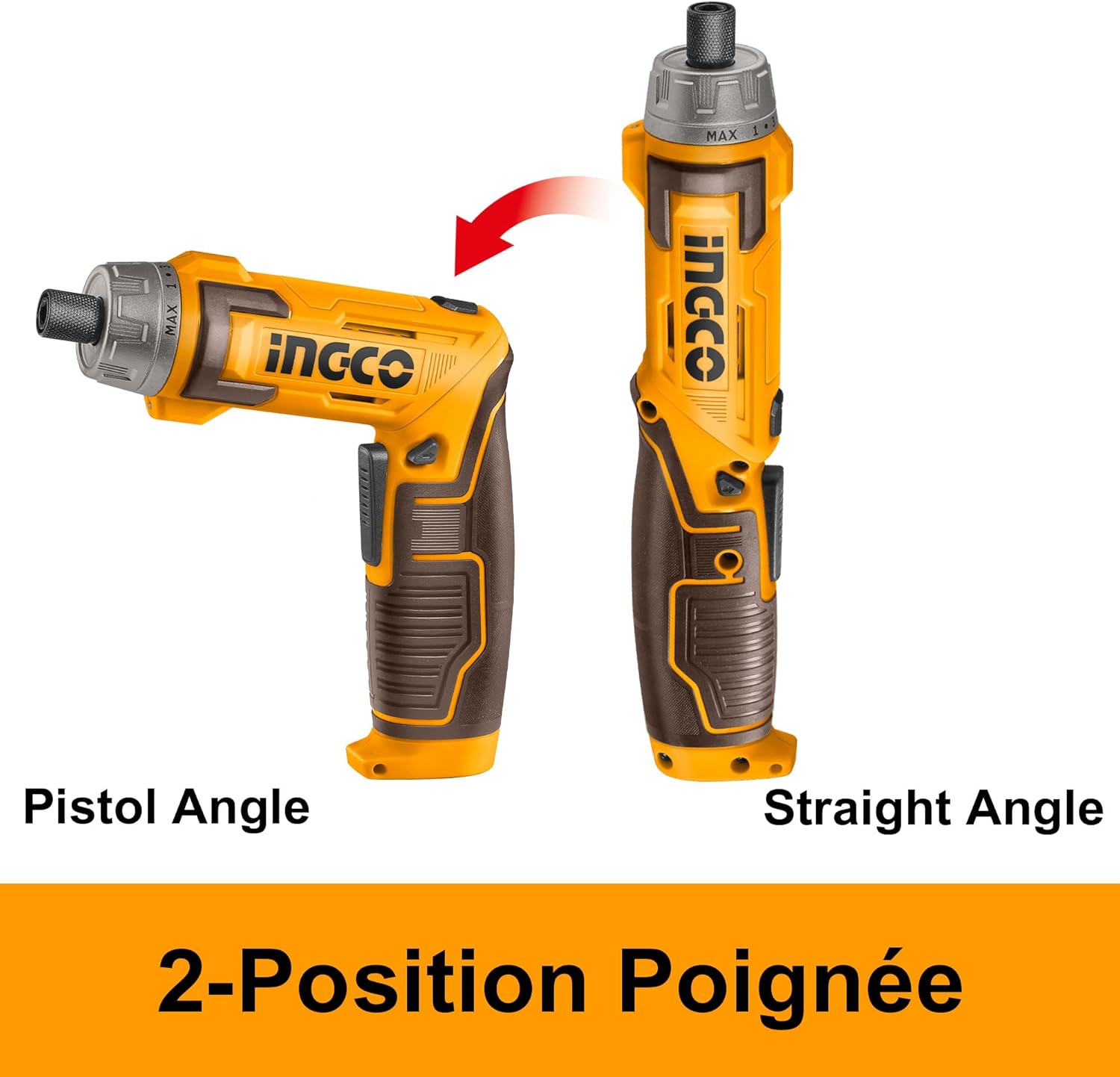
Slika 2: Illustration demonstrating the two-position handle of the Ingco CSDLI08025 screwdriver, showing both pistol grip and straight configurations.
5. Postavljanje
5.1. Punjenje baterije
The screwdriver is powered by an integrated Lithium-ion battery. Before first use, fully charge the battery.
- Pronađite USB priključak za punjenje na odvijaču.
- Connect the provided USB charging cable to the screwdriver's USB port.
- Drugi kraj USB kabela priključite u kompatibilni USB adapter za napajanje (nije uključen) ili USB priključak s napajanjem.
- Allow the battery to charge until the charging indicator (if present) shows a full charge. Charging time may vary.
5.2. Ugradnja/izmjena bitova
The self-locking chuck allows for quick and easy bit changes.
- Ensure the screwdriver is turned off and the rotation button is in the neutral (locked) position.
- Insert the desired hex shank bit directly into the chuck until it clicks into place.
- Za uklanjanje svrdla, povucite prirubnicu stezne glave prema naprijed i izvucite svrdlo.
6. Upute za rad
6.1. Uključivanje/isključivanje
Press the On/Off switch to activate the screwdriver. Release the switch to turn it off.
6.2. Selecting Rotation Direction
Use the rotation button (forward/reverse switch) to select the desired direction:
- Push the button to the left for forward rotation (driving screws).
- Push the button to the right for reverse rotation (removing screws).
- Ensure the button is in the center position when not in use to prevent accidental activation.
6.3. Adjusting Handle Position
The handle can be adjusted for different working angles:
- Čvrsto držite odvijač.
- Gently twist the handle to unlock its position.
- Adjust the handle to either the pistol grip or straight configuration.
- Twist the handle back to lock it in the desired position.
6.4. Korištenje LED svjetla
The integrated LED light automatically activates when the screwdriver is in operation, illuminating your work area. It can also function as a flashlight to light up dark corners or confined spaces.

Slika 3: Close-up of the Ingco CSDLI08025 cordless screwdriver in use, highlighting the activated LED light illuminating the work area in a dimly lit space.
6.5. Screwdriving and Drilling
Select the appropriate bit for the task. For screwdriving, ensure the bit fits snugly into the screw head to prevent stripping. For drilling, use the provided HSS drill bits and apply steady, even pressure.

Slika 4: A person wearing safety gear using the Ingco CSDLI08025 cordless screwdriver to drive a screw into a wooden beam, demonstrating its application.

Slika 5: A hand holding the Ingco CSDLI08025 cordless screwdriver in its straight configuration, driving a screw into an overhead wooden surface.
7. Održavanje
Redovito održavanje osigurava optimalne performanse i produžuje vijek trajanja vašeg alata.
- Čišćenje: Keep the tool's ventilation openings clean to prevent overheating. Wipe the tool with a soft, damp tkanina. Ne koristite jake kemikalije ili abrazivna sredstva za čišćenje.
- Njega baterije: Store the battery in a cool, dry place away from direct sunlight. Do not store the battery in a discharged state for extended periods.
- Održavanje bita: Clean bits after use. Replace worn or damaged bits to ensure efficient operation and prevent damage to fasteners.
- Skladištenje: Store the screwdriver and its accessories in the provided storage case in a dry, secure location out of reach of children.
8. Rješavanje problema
Ako naiđete na probleme, pogledajte sljedeće uobičajene probleme i rješenja:
| Problem | Mogući uzrok | Otopina |
|---|---|---|
| Odvijač se ne uključuje. | Baterija je ispražnjena. | Napunite bateriju do kraja. |
| Screwdriver lacks power. | Niska napunjenost baterije. | Napunite bateriju. |
| Bit isklizne ili skida glavu vijka. | Neispravna veličina bita ili istrošeni bit. | Use the correct bit size for the screw. Replace worn bits. |
| Handle does not lock in position. | Handle not twisted to lock. | Ensure the handle is twisted firmly to lock it after adjustment. |
Ako problem i dalje postoji nakon isprobavanja ovih rješenja, obratite se korisničkoj podršci.
9. Specifikacije
Technical specifications for the Ingco CSDLI08025 8V Cordless Screwdriver:

Slika 6: A detailed image of the Ingco CSDLI08025 cordless screwdriver with an overlay of its technical specifications, including voltage, speed, torque, and included accessories.
| Značajka | Detalj |
|---|---|
| Broj modela | CSDLI08025 |
| Marka | Ingco |
| Voltage | 8 volti |
| Brzina bez opterećenja | 220 okretaja u minuti |
| Maks. Zakretni moment | 6 Newton metara |
| Postavke zakretnog momenta | 15+1 |
| Veličina Chucka | Maks. 25 mm |
| Šesterokutni prihvat | 6.35 mm (1/4") |
| Izvor napajanja | Napajanje na baterije |
| Vrsta baterije | Litij-ionski |
| Materijal | Plastični |
| Dimenzije proizvoda (D x Š x V) | 25 x 24 x 7 cm |
| Težina artikla | 1.16 kilogram |
| Preporučena upotreba | Furniture assembly, drawer installation, DIY projects |
10. Jamstvo i podrška
For warranty information or technical support, please refer to the documentation provided with your purchase or contact your retailer. Keep your proof of purchase for any warranty claims.