
1. Uvod
Hvala na kupnjiasing the Minetom BL-HW02 Outdoor RGB Christmas Laser Light Projector. This device is designed to create dynamic and decorative light displays for various occasions, both indoors and outdoors. Featuring multiple color combinations, motion effects, and remote control operation, it offers a versatile lighting solution. Please read this manual thoroughly before use to ensure proper operation and safety.
2. Sigurnosne informacije
- Sigurnost za oči: Do not look directly into the laser light beam. Direct exposure to laser light can cause eye damage.
- Izvor napajanja: Osigurajte da izvor napajanja odgovara voltage requirements specified on the product label. Use only the provided power adapter.
- Upotreba na otvorenom: While the projector is IP65 waterproof, ensure the power adapter and connections are protected from water exposure.
- Montaža: Install the projector securely to prevent it from falling or being dislodged by wind or other environmental factors.
- Djeca i kućni ljubimci: Keep the device out of reach of children and pets to prevent accidental damage or injury.
- Temperatura: Do not operate the device outside its specified temperature range (-30°F to 104°F).
- Održavanje: Ne pokušavajte sami otvarati ili popravljati uređaj. Za sve servisne radove obratite se kvalificiranom osoblju.
3. Sadržaj paketa
Provjerite jesu li svi artikli prisutni u paketu:
- Minetom RGB Christmas Laser Light Projector
- RF daljinski upravljač
- Prizemni ulog
- Okrugla baza
- Power Adapter (with 16.4ft extension cord)
- Korisnički priručnik (ovaj dokument)
4. Postavljanje
4.1 Choosing an Installation Method
The projector offers three installation options: ground-mounted, wall-mounted, or placed on a flat surface.
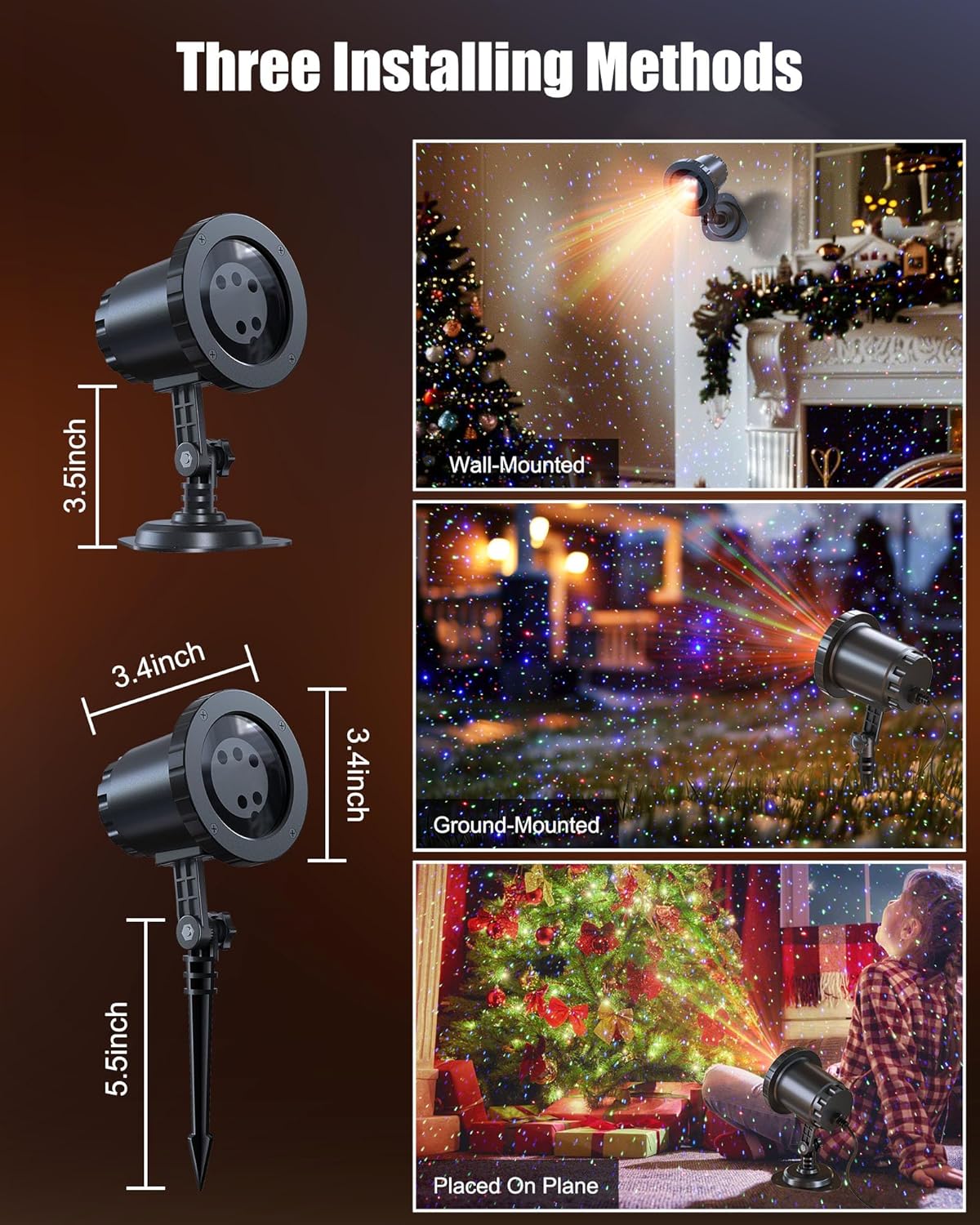
Image: The Minetom laser light projector can be installed in three ways: wall-mounted, ground-mounted, or placed on a flat surface using the included accessories.
- Ground-Mounted: Attach the ground stake to the projector. Insert the stake firmly into soft ground in your desired outdoor location.
- Zidni: Attach the round base to the projector. Secure the base to a wall using appropriate screws (not included) for a stable installation.
- Placed on Plane: Attach the round base to the projector. Place the projector on any stable, flat surface indoors or outdoors.
4.2 Priključak za napajanje
- Connect the projector to the provided power adapter.
- Use the 16.4ft extension cord to reach a suitable outdoor power outlet.
- Osigurajte da su svi spojevi sigurni i zaštićeni od vlage.
- Uključite adapter za napajanje u uzemljenu električnu utičnicu.
5. Upute za rad
Once powered on, the projector will begin its default light show. Use the RF remote control to customize the display.
5.1 Funkcije daljinskog upravljača
The RF remote control allows you to manage various settings from a distance. Ensure 2*AAA batteries (not included) are installed in the remote.

Image: RF Remote Control layout with functions for each button.
| Gumb | Funkcija |
|---|---|
| UKLJUČENO/ISKLJUČENO | Uključuje ili isključuje projektor. |
| 2H / 4H / 6H | Sets the timer for 2, 4, or 6 hours. |
| (H) Restore | Restores to default timing (6 hours on, 18 hours off). |
| Ciklus boja | Cycles through Green, Blue, Red-Green, Blue-Green, Red-Blue, Red-Green-Blue, and Red-Green-Blue cycle. |
| Način disanja | Activates a slow fade-in/fade-out effect. |
| Jumping Mode | Activates a rapid color change effect. |
| S0 (Static) | Sets the light display to static (no motion). |
| S- / S+ | Adjusts rotation speed (S- for slow, S+ for fast). |
| R/G/B | Selects Red, Green, or Blue light individually. |
| R/G/B Breathing | Activates breathing mode for individual Red, Green, or Blue colors. |
| R/G/B Strobe | Activates strobe mode for individual Red, Green, or Blue colors. Press sequentially to adjust speed (Slow, Medium, Fast, Stop). |
| R/G/B Steady | Sets individual Red, Green, or Blue colors to steady (non-flashing). |
5.2 XNUMX kombinacija boja
The projector supports various color combinations to create diverse effects.

Slika: pramples of the 7 available color combinations.
- crvena
- zelena
- Plava
- Crvena Zelena
- Crvena Plava
- Zelena Plava
- Crveno Zeleno Plavo
6. IP65 ocjena vodootpornosti
The projector body is designed with an IP65 waterproof rating, ensuring reliable performance in various weather conditions such as snow, rain, dust, and intense sunlight. It is cold-proof, operating effectively from -30°F to 104°F.

Image: The projector operating in rainy and snowy conditions, highlighting its IP65 waterproof and cold-proof features.
7. Coverage Area
The projector can cover a significant area, illuminating indoor ceilings, walls, or outdoor walls, gardens, lawns, trees, and rooftops. From a distance of 32.8 feet, it can cover approximately 3229.17 square feet.

Image: Coverage area chart illustrating how the projected area expands with increased distance from the surface.
8. Održavanje
- Čišćenje: Gently wipe the projector lens and body with a soft, dry cloth. Do not use abrasive cleaners or solvents.
- Skladištenje: Kada se ne koristi, projektor čuvajte na hladnom i suhom mjestu, dalje od izravne sunčeve svjetlosti i ekstremnih temperatura.
- Pregled kabela: Periodically check the power cord and adapter for any signs of damage. Discontinue use if damage is found.
9. Rješavanje problema
| Problem | Otopina |
|---|---|
| Projektor se ne uključuje. |
|
| Daljinski upravljač ne reagira. |
|
| Svjetlosni izlaz je slab ili neravnomjeran. |
|
| Multiple projectors interfere with each other. |
|
10. Specifikacije
| Značajka | Detalj |
|---|---|
| Broj modela | BL-HW02 |
| Marka | Minetom |
| Boja | Crveno Zeleno Plavo |
| Materijal | Plastični |
| Vrsta završetka | Projektor |
| Vrsta izvora svjetlosti | Svjetleća dioda |
| Izvor napajanja | Električni na kabel |
| Vrsta montaže | Podni nosač, zidni nosač |
| Dimenzije proizvoda | 2.75 cm D x 2.75 cm Š x 11.02 cm V |
| Težina artikla | 14 unci |
| Kut snopa | 120 stupnja |
| Ocjena vodootpornosti | IP65 |
| Radna temperatura | -30°F do 104°F |
| Coverage Area (approx.) | 3229.17 sq ft at 32.8 ft distance |
11. Jamstvo i podrška
For warranty information or technical support, please refer to the contact details provided at the point of purchase or visit the official Minetom webstranicu. Sačuvajte račun kao dokaz o kupnji.