
1. Uvod
Thank you for choosing the Hama DR2002BT Digital Radio. This device offers a comprehensive audio experience with FM, DAB/DAB+ digital radio reception, and Bluetooth connectivity. Its user-friendly design, featuring large buttons and a clear 4.3-inch TFT color display, makes it suitable for all users. This manual will guide you through the setup, operation, and maintenance of your new digital radio.
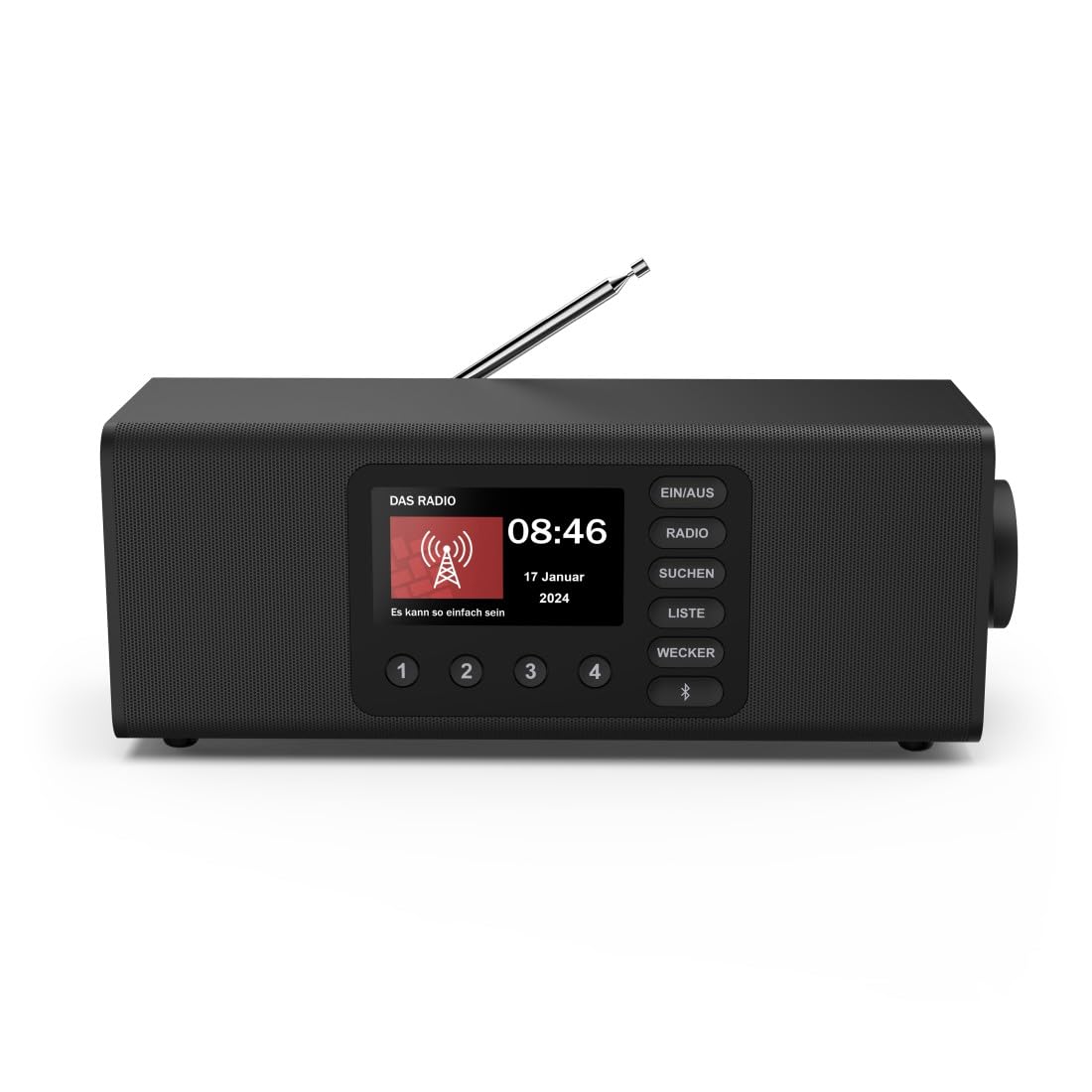
Slika: prednja strana view of the Hama DR2002BT Digital Radio, showcasinnjegov zaslon i upravljačke tipke.
2. Sigurnosne informacije
Please read these safety instructions carefully before using the device. Keep this manual for future reference.
- Ne izlažite uređaj vlazi, kiši ili ekstremnim temperaturama.
- Izbjegavajte postavljanje uređaja blizu izvora topline ili na izravnu sunčevu svjetlost.
- Ne otvarajte uređaj casing. Popravke smije obavljati samo kvalificirano osoblje.
- Koristite samo isporučeni strujni adapter.
- Osigurajte odgovarajuću ventilaciju oko uređaja.
3. Sadržaj paketa
Prilikom raspakiranja provjerite jesu li svi predmeti prisutni:
- Hama DR2002BT Digital Radio
- Adapter napajanja
- korisnički priručnik
4. Proizvod je gotovview
4.1 Kontrole i zaslon na prednjoj ploči

Image: Front panel of the radio highlighting the display and control buttons, with icons for Bluetooth, DAB+, and Alarm functions.
The front panel features a 4.3-inch TFT color display, large control buttons, and a rotary knob for easy navigation and selection. Key buttons include:
- EIN/AUS (ON/OFF): Uključuje ili isključuje uređaj.
- RADIO: Switches between FM and DAB/DAB+ modes.
- SUCHEN (SEARCH): Pokreće skeniranje stanica.
- LISTE (LIST): Pristupa popisu dostupnih stanica.
- WECKER (ALARM): Konfigurira postavke alarma.
- Bluetooth tipka: Aktivira način uparivanja putem Bluetootha.
- Unaprijed postavljene tipke (1-4): Brzi pristup pohranjenim omiljenim stanicama.
- Okretni gumb (LAUTSTÄRKE/NAVIGIEREN): Controls volume and navigates menus.
4.2 Veze na stražnjoj ploči
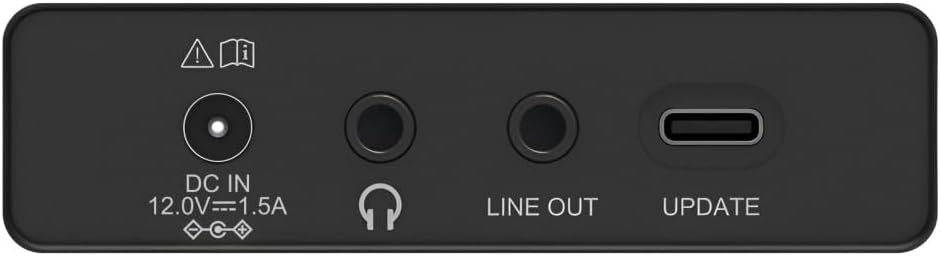
Image: Close-up of the rear panel showing the DC IN, Headphone, Line Out, and UPDATE (USB-C) ports.
Stražnja ploča pruža osnovne mogućnosti povezivanja:
- DC IN 12.0V --- 1.5A: Power input for the external adapter.
- Priključak za slušalice (3.5 mm): Za privatno slušanje.
- POSTROJE SE: Audio output for connecting to external amplifiers ili govornici.
- UPDATE (USB-C): Za ažuriranje firmvera.
- Teleskopska antena: For FM and DAB/DAB+ reception.

Slika: Stražnja strana view of the Hama DR2002BT Digital Radio with its telescopic antenna extended for optimal signal reception.
5. Postavljanje
5.1 Priključak za napajanje
- Spojite priloženi adapter za napajanje na DC IN priključak na stražnjoj strani radija.
- Uključite strujni adapter u odgovarajuću utičnicu.
- Radio će se automatski uključiti ili ući u stanje pripravnosti.
5.2 Pozicioniranje antene
For optimal FM and DAB/DAB+ reception, fully extend the telescopic antenna. Position the radio near a window if reception is poor.
5.3 Početno postavljanje (Prva upotreba)
Upon first power-on, the radio may guide you through an initial setup process, including language selection and an automatic DAB station scan. Follow the on-screen prompts.
6. Upute za rad
6.1 Uključivanje/isključivanje
Pritisnite tipku EIN/AUS gumb za uključivanje ili isključivanje radija.
6.2 DAB/DAB+ Radio Mode
- Pritisnite tipku RADIO gumb za odabir DAB načina rada.
- If this is the first time in DAB mode or if you want to rescan, press SUCHEN za potpuno skeniranje dostupnih stanica.
- Use the rotary knob to navigate through the station list. Press the knob to select a station.
- Do view the station list, press the LISTE dugme.
6.3 Način FM radija
- Pritisnite tipku RADIO gumb za odabir FM načina rada.
- Pritisnite SUCHEN to automatically scan for the next available FM station.
- Alternatively, use the rotary knob to manually tune to a frequency.
6.4 Pohranjivanje i pozivanje unaprijed postavljenih postavki
The radio allows you to store up to 4 favorite stations using the dedicated preset buttons (1-4).
- Tune to the desired station (DAB or FM).
- Press and hold one of the preset buttons (1-4) until the display confirms the station has been saved.
- To recall a preset station, simply press the corresponding preset button (1-4).
6.5 Bluetooth rad

Slika: prednja strana view of the radio with Bluetooth and stereo speaker icons, indicating its wireless audio streaming capability.
The Hama DR2002BT can stream audio from your smartphone, tablet, or laptop via Bluetooth 5.0.
- Press the Bluetooth button on the front panel to enter Bluetooth pairing mode. The display will show a pairing indicator.
- On your external device (smartphone, tablet), enable Bluetooth and search for available devices.
- Select "Hama DR2002BT" from the list of devices to pair.
- Once paired, you can play audio from your device, and it will be output through the radio's speakers.
6.6 Funkcija budilice

Image: A person waking up with the Hama DR2002BT Digital Radio placed on a bedside table, illustrating its alarm clock functionality.
The radio features two independent alarm settings.
- Pritisnite tipku WECKER gumb za pristup postavkama alarma.
- Use the rotary knob to select Alarm 1 or Alarm 2.
- Configure the alarm time, source (buzzer or radio station), and repetition (once, daily, weekdays, weekends, or specific days).
- Press the rotary knob to confirm each setting.
- To quickly activate/deactivate an alarm, press the WECKER button and use the rotary knob to toggle the alarm status.

Image: A person interacting with the Hama DR2002BT Digital Radio, demonstrating its ease of use for setting functions like alarms or tuning stations.
7. Održavanje
To ensure the longevity and optimal performance of your Hama DR2002BT Digital Radio, follow these maintenance guidelines:
- Čišćenje: Use a soft, dry, lint-free cloth to clean the exterior of the radio. Do not use abrasive cleaners, waxes, or solvents.
- Prah: Regularly dust the device to prevent accumulation in vents and ports.
- Skladištenje: Ako radio skladištite dulje vrijeme, isključite ga iz napajanja i pohranite na hladnom i suhom mjestu.
- Antena: Pažljivo rukujte teleskopskom antenom kako biste izbjegli savijanje ili lomljenje.
8. Rješavanje problema
Ako naiđete na probleme s radiom, pogledajte sljedeće uobičajene probleme i rješenja:
| Problem | Mogući uzrok | Otopina |
|---|---|---|
| Nema struje | Adapter za napajanje nije spojen; Utičnica je neispravna | Check power adapter connection; Try a different power outlet. |
| Slab radio prijem (DAB/FM) | Antenna not extended; Weak signal area; Interference | Fully extend the telescopic antenna; Reposition the radio (e.g., near a window); Perform a new station scan. |
| Bluetooth uparivanje nije uspjelo | Bluetooth not enabled on external device; Radio not in pairing mode; Device too far | Ensure Bluetooth is on and visible on your device; Press the Bluetooth button on the radio; Move devices closer (within 10m). |
| Nema zvuka | Glasnoća preniska; Utišavanje uključeno; Odabran pogrešan izvor | Increase volume using the rotary knob; Check if mute is active; Ensure the correct mode (DAB, FM, Bluetooth) is selected. |
| Alarm se ne oglašava | Alarm not activated; Incorrect alarm time/day set | Verify alarm is enabled in settings; Check alarm time and repetition settings. |
9. Specifikacije

Image: Diagram showing the dimensions of the Hama DR2002BT Digital Radio: 35 cm (width), 12.5 cm (depth), and 13 cm (height).
| Značajka | Detalj |
|---|---|
| Broj modela | DR2002BT (00054298) |
| Recepcija | DAB, DAB+, FM |
| Bluetooth verzija | 5.0 |
| Izlazna snaga (RMS) | 10 W (Stereo) |
| Prikaz | 4.3" TFT zaslon u boji |
| Veze | 3.5mm Jack (Headphone), USB-C (Update), Line Out, DC IN |
| Napajanje | Vanjski adapter za napajanje |
| Dimenzije (Š x D x V) | 35 x 12.5 x 13 cm |
| Težina | 1788 gram |
| Materijal | Plastični |
| Boja | Crna |
| Dodatne značajke | Alarm Function (2 alarms), Direct Selection Keys |
10. Jamstvo i podrška
Hama GmbH & Co KG provides a warranty for this product. Please refer to the warranty card included in your package or visit the official Hama webstranicu za detaljne uvjete jamstva.
For technical support, troubleshooting assistance, or spare parts, please contact Hama customer service or visit their webstranica. Dostupnost rezervnih dijelova u EU zajamčena je 7 godine.
- Proizvođač: Hama GmbH & Co KG
- Zemlja podrijetla: Njemačka
- Dostupnost rezervnih dijelova za EU: 7 godina