
Uvod
This manual provides comprehensive instructions for the ECONTROLLY EUR7729KE0 Replacement Remote Control. This remote is designed to function as a direct replacement for various Panasonic DVD HDD TV Recorders, offering full functionality without the need for complex programming.
Kompatibilni modeli:
- UR7729KE0
- EUR7721X10
- DMR-EH50
- DMR-E55K
- DMR-EH50S
- DMR-E55P9
- DMR-E55S
- DMR-ES10
- DMR-EH50P
- DMR-EH60
This replacement remote control covers all functions of the original remote, ensuring a seamless user experience.
Postavljanje
Ugradnja baterije
The EUR7729KE0 remote control requires two AAA batteries (not included) for operation. Please follow these steps to install the batteries:
- Pronađite odjeljak za baterije na stražnjoj strani daljinskog upravljača.
- Pomaknite poklopac odjeljka za baterije prema dolje i podignite ga.
- Umetnite dvije AAA baterije, pazeći da pozitivni (+) i negativni (-) terminali budu ispravno poravnati s oznakama unutar odjeljka.
- Vratite poklopac odjeljka za baterije tako da ga gurnete natrag na mjesto dok ne klikne sigurno.

Stražnji view of the ECONTROLLY EUR7729KE0 remote control with the battery cover removed, showing the compartment for two AAA batteries.
Bilješka: Uvijek zamijenite obje baterije istovremeno novima. Nemojte miješati stare i nove baterije ili različite vrste baterija.
Upute za rad
To operate the remote control, point it directly at the infrared sensor on your Panasonic DVD HDD TV Recorder. Ensure there are no obstructions between the remote and the device.
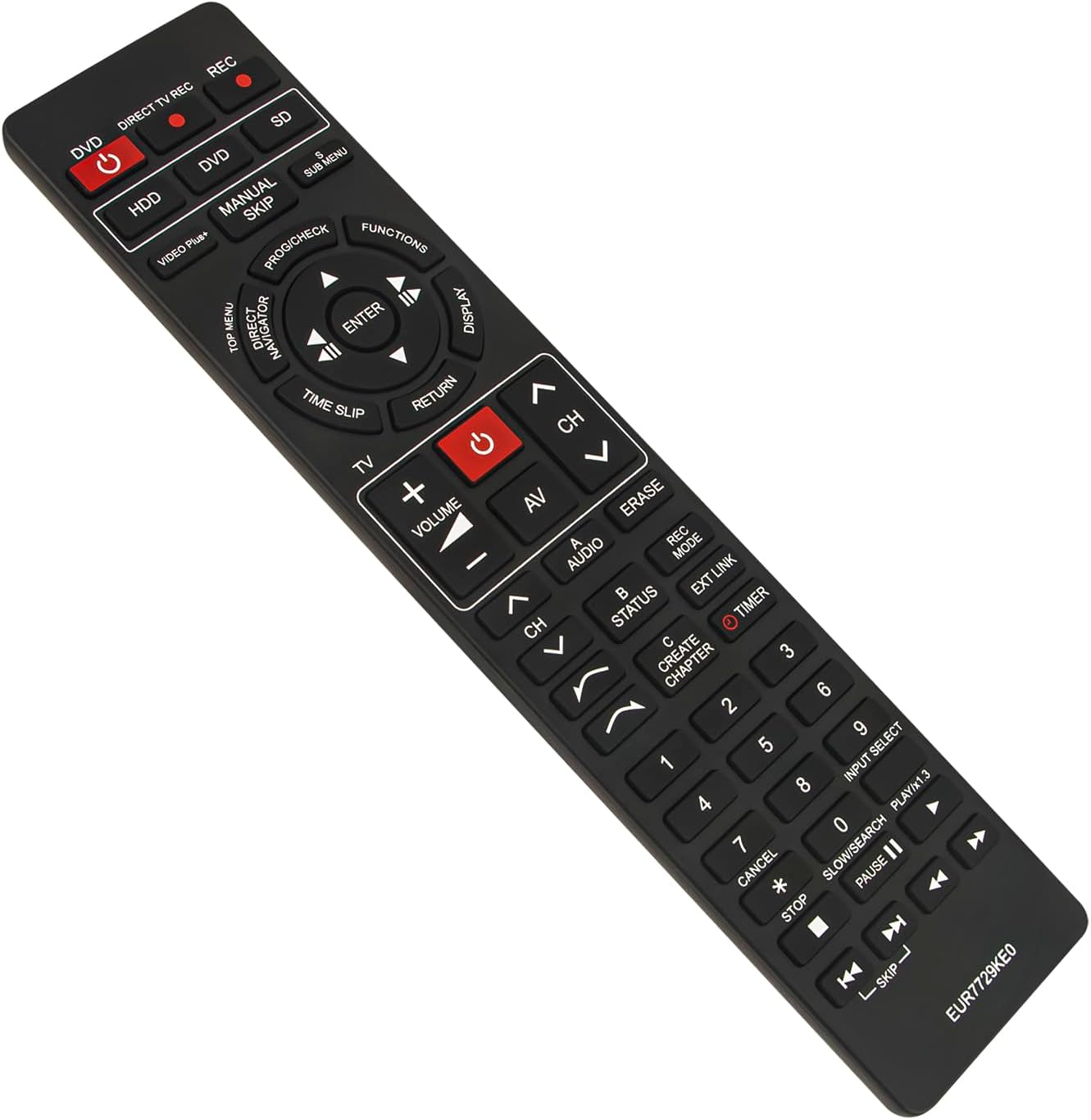
Ispred view of the ECONTROLLY EUR7729KE0 replacement remote control, showing all buttons and their labels.
Ključne funkcije završeneview:
- Power Buttons (DVD, HDD, DIRECT TV REC, REC, SD): Used to power on/off or select specific modes for the respective components.
- Brojčani gumbi (0-9): For direct channel selection, inputting numbers, or menu navigation.
- Volumen (+/-): Podešava glasnoću zvuka.
- Channel (CH ^/v): Mijenja kanale gore ili dolje.
- Navigacijska tipka (gore, dolje, lijevo, desno, ENTER): Koristi se za navigaciju izbornicima i potvrdu odabira.
- Playback Controls (PLAY/x1.3, PAUSE, STOP, SKIP, SLOW/SEARCH): Standardne kontrole za reprodukciju medija.
- MENU Buttons (TOP MENU, SUB MENU, DIRECT NAVIGATOR): Access various menu options for DVD, HDD, or TV functions.
- Special Function Buttons (PROG/CHECK, FUNCTIONS, DISPLAY, TIME SLIP, RETURN, AV, AUDIO, ERASE, STATUS, REC MODE, EXT LINK, CREATE CHAPTER, TIMER): These buttons provide access to advanced features specific to your Panasonic recorder, such as recording options, chapter creation, and display settings. Refer to your recorder's manual for detailed use of these functions.

Comparison image showing the ECONTROLLY EUR7729KE0 replacement remote control on the left and an original Panasonic remote control on the right, highlighting their similar button layouts.
Održavanje
Čišćenje
Za čišćenje daljinskog upravljača koristite meku, suhu krpu. Za tvrdokornu prljavštinu, laganoampOperite krpu vodom ili blagom otopinom za čišćenje. Izbjegavajte korištenje abrazivnih sredstava za čišćenje, alkohola ili otapala jer mogu oštetiti površinu daljinskog upravljača ili unutarnje komponente.
Skladištenje
Daljinski upravljač čuvajte na hladnom i suhom mjestu, dalje od izravne sunčeve svjetlosti i ekstremnih temperatura. Ako se daljinski upravljač neće koristiti dulje vrijeme, preporučuje se uklanjanje baterija kako biste spriječili curenje i moguća oštećenja.
Rješavanje problema
- Daljinski ne reagira:
- Provjerite jesu li baterije ispravno umetnute s ispravnim polaritetom (+/-).
- Zamijenite baterije novima.
- Ensure there are no obstructions between the remote control and the device's infrared sensor.
- Make sure you are pointing the remote directly at the device.
- Neki gumbi ne rade:
- This remote is designed to replicate all functions of the original. If specific buttons are not working, ensure your device is in the correct mode (e.g., DVD mode for DVD functions).
- Clean the remote's surface, as dirt or debris might be interfering with button presses.
If the issue persists after following these steps, please refer to the support section for further assistance.
Tehnički podaci
| Marka | EKONTROLA |
| Naziv modela | EUR7729KE0 |
| Boja | Crna |
| Posebna značajka | Nije potrebno programiranje |
| Kompatibilni uređaji | DVD HDD TV Recorder (Panasonic DMR-EH50, etc.) |
| Tehnologija povezivanja | Infracrveni |
| Vrsta kontrolera | Kontrola gumba |
| Maksimalni domet | 33 stopa |
| Težina artikla | 1 unci |
| Dimenzije predmeta (D x Š x V) | 5"D x 2"Š x 0.6"V (otprilike 22.4 cm x 5 cm x 1.5 cm) |

Image displaying the dimensions of the ECONTROLLY EUR7729KE0 remote control: approximately 22.4 cm (8.82 inches) in length and 5 cm (1.97 inches) in width.
Jamstvo i podrška
This ECONTROLLY product has been tested to ensure proper functionality before shipping. As a replacement remote control, it is designed for immediate use without additional setup.
For further assistance, compatibility inquiries, or troubleshooting that is not covered in this manual, please contact ECONTROLLY customer support through the retailer's platform where the product was purchased. Provide your product model number (EUR7729KE0) and a detailed description of your issue for efficient support.