
Uvod
This manual provides detailed instructions for the safe and efficient operation of your Longer Ray5 20000mW Laser Engraver with Air Assist Kit. Please read this manual thoroughly before using the device to ensure proper setup, operation, and maintenance. Retain this manual for future reference.
Sigurnosne informacije
UPOZORENJE: Laser engravers are powerful tools that can cause serious injury if not used correctly. Always follow these safety guidelines:
- Always wear appropriate laser safety goggles when operating the machine.
- Nikada ne gledajte izravno u lasersku zraku ili u njen odraz.
- Osigurajte da je radni prostor dobro prozračen kako bi se uklonili isparenja i dim.
- Držite zapaljive materijale dalje od puta lasera.
- Ne ostavljajte stroj bez nadzora tijekom rada.
- Uvjerite se da je stroj postavljen na stabilnu, ravnu površinu.
- Držite djecu i kućne ljubimce dalje od radnog područja.
- Isključite napajanje prije bilo kakvog održavanja ili podešavanja.
- Upoznajte se s postupcima isključivanja u hitnim slučajevima.
Sadržaj paketa
Provjerite jesu li sve komponente prisutne u paketu:
- Longer Ray5 20000mW Laser Engraver Unit
- Pumpa za pomoć zraku
- Air Assist Nozzle and Tubing
- Adapter napajanja
- USB kabel
- Zaštitne naočale
- Korisnički priručnik (ovaj dokument)
- Materijal Samples (may vary)

Image: Air assist kit components including the pump, nozzle, and tubing.
Postavljanje
- Raspakiranje: Pažljivo izvadite sve komponente iz pakiranja.
- Skupština: Follow the included quick start guide for assembling the main laser engraver frame and attaching the laser module.
- Air Assist Installation:
- Connect the air assist pump to the designated port on the laser module using the provided tubing.
- Ensure the air assist nozzle is securely attached to direct airflow to the engraving/cutting point.
- Priključak za napajanje: Spojite adapter za napajanje na graver, a zatim na odgovarajuću utičnicu.
- Povezivanje s računalom: Connect the engraver to your computer via USB, or prepare for Wi-Fi/TF card connection.

Image: The Longer Ray5 laser engraver with the air assist pump connected and ready for operation.
Upute za rad
1. Softver i povezivost
The Longer Ray5 supports various software and connection methods:
- Kompatibilan softver: LaserGRBL and LightBurn.
- Operativni sustavi: Supports Windows 7+, MacOS, and Linux.
- Načini povezivanja: Wi-Fi, USB, App, and TF card.
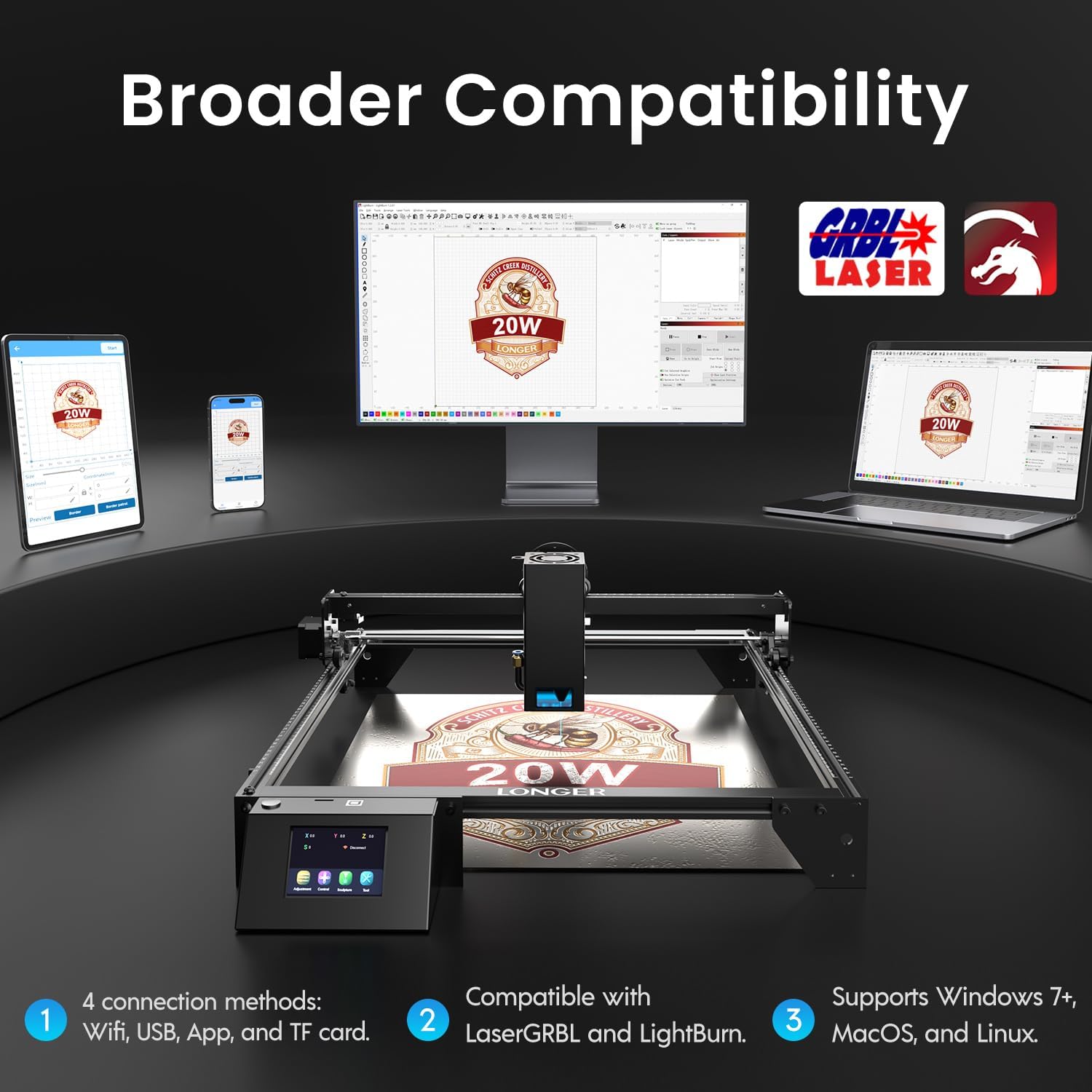
Image: Display showing the Longer Ray5's compatibility with LaserGRBL and LightBurn software, and various connection options including Wi-Fi, USB, App, and TF card across Windows, MacOS, and Linux operating systems.
2. Mogućnosti graviranja i rezanja
The 20W diode laser offers high-efficiency performance for various materials.
- Rezanje: Capable of cutting up to 25mm of wood and 35mm of acrylic. It can also cut 0.05mm metal.
- Graviranje: Engrave hundreds of colors on metallic steel and a wide range of other materials.
- Materijali: Acrylic, metal, wood, stainless steel, and more.
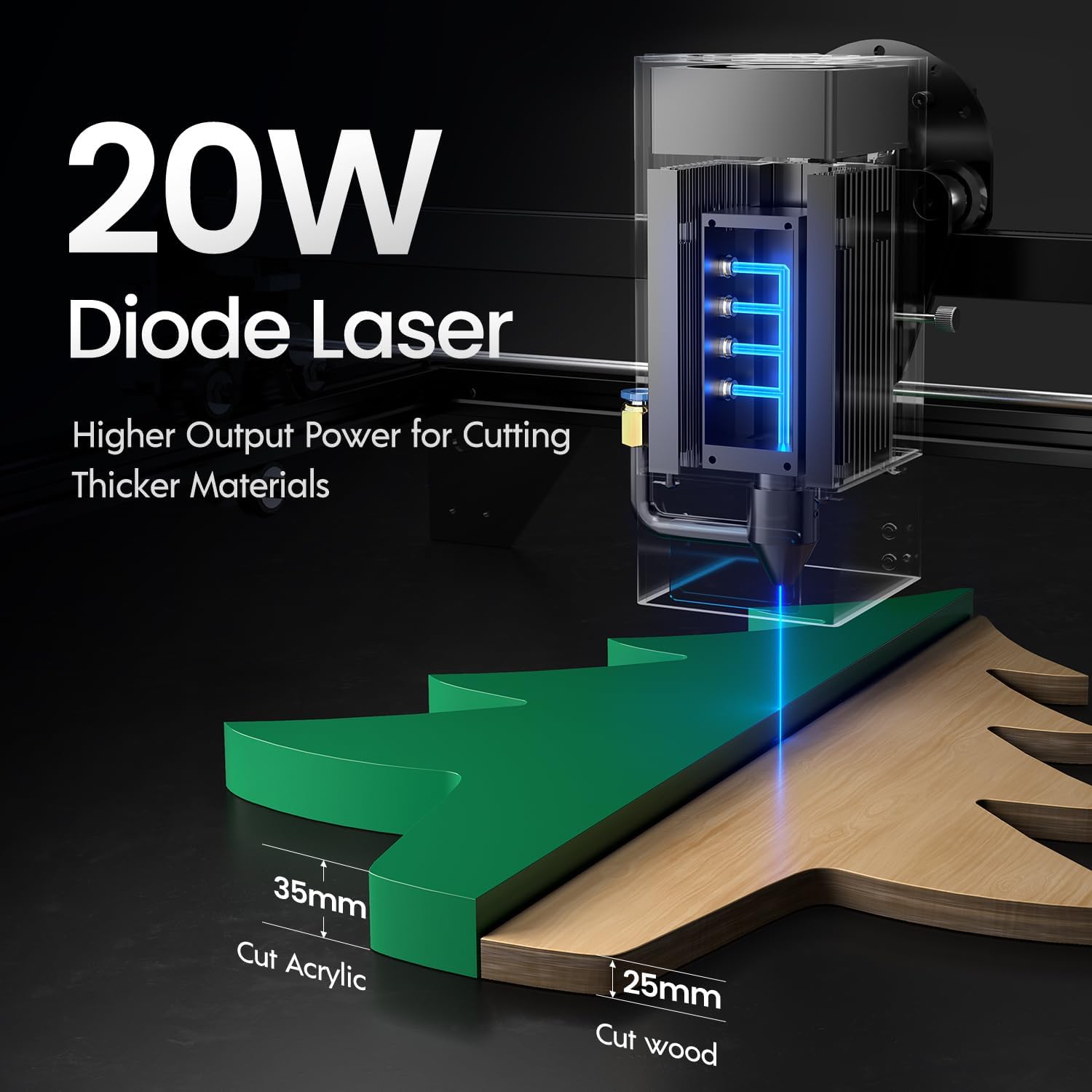
Image: Illustration demonstrating the 20W diode laser's capability to cut 25mm wood and 35mm acrylic.

Slika: pramples of engraving capabilities, showcasing over 380 colors on metallic surfaces and other DIY artworks.

Image: A collection of various items demonstrating the versatile material selection for engraving and cutting, including wood, metal, and acrylic.
3. Funkcija zračne pomoći
The integrated air assist kit significantly improves cutting and engraving quality.
- Enhanced Cutting: The adjustable airflow (10-30L/min) suppresses smoke and dust, preventing laser energy attenuation and ensuring cleaner, smoother edges.
- Reduced Yellowing: Air assist helps prevent charring and yellowing on materials during laser processing, especially for wood and acrylic.

Image: A visual comparison showing the benefits of air assist, resulting in cleaner cuts and reduced processing time (e.g., 12 minutes with air assist vs. 20 minutes without).
4. Neprekidni rad
The Longer Ray5 is designed for powerful continuous working capacity, supporting 24/7 continuous engraving. A single computer can control multiple machines.

Image: Depiction of multiple Longer Ray5 machines working simultaneously, illustrating continuous operation and the ability for one computer to control several units.
Održavanje
Redovito održavanje osigurava optimalne performanse i produžuje vijek trajanja vašeg laserskog gravera.
- Očistite lasersku leću: Povremeno čistite lasersku leću mekom krpom koja ne ostavlja dlačice i otopinom za čišćenje leća kako biste održali kvalitetu snopa.
- Očistite ostatke: Remove any accumulated dust or debris from the work area and machine components.
- Provjerite remene i šine: Inspect drive belts for tension and wear. Keep linear rails clean and lubricated as per manufacturer recommendations.
- Pomoćni zračni filter: If your air assist pump has a filter, clean or replace it regularly to ensure efficient airflow.
- Ažuriranja firmvera: Provjerite proizvođača webweb-mjesto za sva dostupna ažuriranja firmvera za poboljšanje performansi ili dodavanje značajki.
Rješavanje problema
Ovaj odjeljak obrađuje uobičajene probleme s kojima se možete susresti.
| Problem | Mogući uzrok | Otopina |
|---|---|---|
| Laser ne pali | Power not connected, software error, laser module fault. | Check power connections. Verify software settings. Contact support if laser module is suspected faulty. |
| Loša kvaliteta graviranja/rezanja | Incorrect focus, dirty lens, wrong power/speed settings, material issues, no air assist. | Adjust laser focus. Clean the laser lens. Optimize power/speed settings for the material. Ensure air assist is active. |
| Stroj se ne spaja na računalo | USB cable issue, driver not installed, Wi-Fi configuration error. | Try a different USB port/cable. Install necessary drivers. Reconfigure Wi-Fi connection. |
| Prekomjerni dim/isparenja | Insufficient ventilation, air assist not active or weak. | Ensure proper ventilation. Check air assist pump and tubing for blockages. Increase air assist flow. |
Tehnički podaci
| Značajka | Detalj |
|---|---|
| Broj modela | ZRAKA5 |
| Izlazna snaga lasera | 20000 mW (20 W) |
| Vrsta lasera | Diodni laser |
| Cutting Depth (Wood) | Do 25 mm |
| Cutting Depth (Acrylic) | Do 35 mm |
| Metal Cutting Capability | 0.05 mm |
| Air Assist Flow | 10-30 L/min (Adjustable) |
| Zaslon osjetljiv na dodir | 3.5 inča |
| Povezivost | Wi-Fi, USB, App, TF Card |
| Kompatibilan softver | LaserGRBL, LightBurn |
| Podržani OS | Windows 7+, MacOS, Linux |
| Proizvođač | Više |
| Datum prve dostupnosti | 1. kolovoza 2024 |
Jamstvo i podrška
For warranty information and technical support, please refer to the official Longer webweb-mjesto ili se izravno obratite njihovoj korisničkoj službi. Sačuvajte račun kao dokaz o kupnji za slučaj zahtjeva za jamstvo.
Mrežni resursi: Posjetite Longer Store on Amazon za dodatne informacije o proizvodu i podršku.