
1. Uvod
The Nexxt Solutions Smart Wi-Fi Indoor Pan and Tilt Camera (NHC-P710) provides advanced home security and monitoring capabilities. Featuring 2K HD resolution, motion detection, night vision, and two-way audio, this camera allows for comprehensive surveillance and remote interaction. Its 355-degree rotatable design ensures wide coverage, making it an ideal solution for monitoring your home, pets, or loved ones.
This manual provides detailed instructions for setting up, operating, and maintaining your camera to ensure optimal performance and security.

Figure 1.1: Nexxt Solutions Smart Wi-Fi Indoor Pan and Tilt Camera (NHC-P710) and packaging.
2. Što je u kutiji
Molimo Vas da prilikom otvaranja paketa provjerite jesu li sve komponente prisutne i u dobrom stanju:
- Indoor PTZ Wi-Fi camera
- Strujni adapter
- USB tip-C kabel
- 1 nosač za montažu
- 2 vijka
- 2 betonska sidra
- Vodič za brzo postavljanje
3. Vodič za postavljanje
3.1. Priprema za instalaciju
- Provjerite je li vaša Wi-Fi mreža 2.4 GHz. Ova kamera ne podržava Wi-Fi od 5 GHz.
- Place the camera within range of your Wi-Fi router.
- Download the Nexxt Home app from the App Store (iOS) or Google Play Store (Android).
3.2. Uključivanje kamere
- Connect the USB Type-C cable to the camera's power port.
- Priključite strujni adapter u standardnu električnu utičnicu.
- Pričekajte da indikatorska lampica kamere zatreperi, što znači da je spremna za uparivanje.
3.3. Adding the Camera to the Nexxt Home App
- Open the Nexxt Home app and log in or create a new account.
- Dodirnite ikonu "+" u gornjem desnom kutu za dodavanje novog uređaja.
- Select "Security Camera" or search for the NHC-P710 model.
- Follow the on-screen instructions to connect the camera to your Wi-Fi network. This typically involves scanning a QR code generated by the app with the camera's lens.
- Nakon povezivanja, možete imenovati svoju kameru i dodijeliti je određenoj prostoriji.

Figure 3.1: Simple setup process for the 2K HD Smart Wi-Fi Indoor Camera.
3.4. Montiranje kamere (opcionalno)
The camera can be placed on a flat surface or mounted to a wall or ceiling using the included mounting bracket.
- Odaberite prikladno mjesto za montažu, osiguravajući jasan view i pristup utičnici.
- Attach the mounting bracket to the desired surface using the provided screws and anchors.
- Securely attach the camera to the mounting bracket by twisting it into place.
4. Upute za rad
4.1. Uživo View i udaljeni pristup
Once connected, you can access the live video feed from your camera anytime, anywhere, using the Nexxt Home app on your smartphone.
- Open the Nexxt Home app and select your camera from the device list.
- The live feed will appear. You can switch between standard and HD resolution.
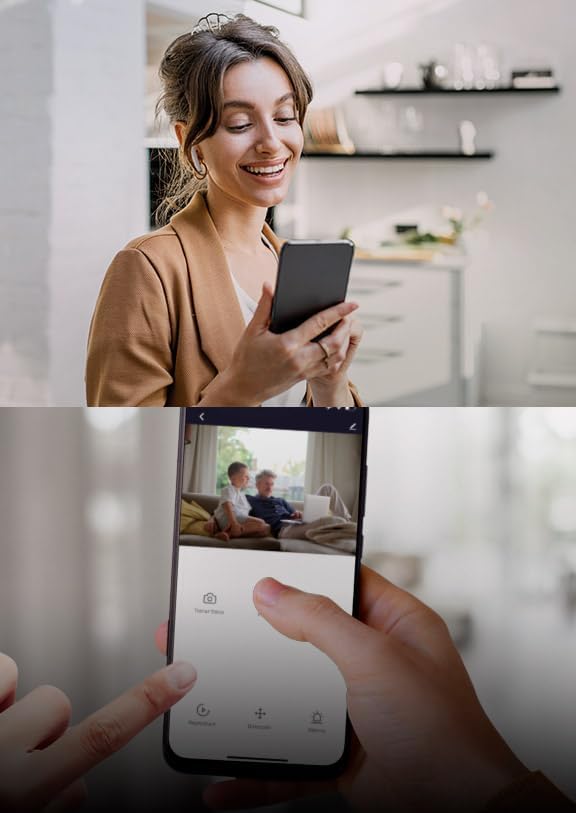
Slika 4.1: Daljinski upravljač viewing of the camera feed via the Nexxt Home app.
4.2. Kontrola panoramiranja i nagiba
The camera features a 355-degree rotatable design, allowing you to adjust its viewing kut na daljinu.
- U živo view interface of the app, use the directional controls (usually a joystick or arrow buttons) to pan (move horizontally) and tilt (move vertically) the camera lens.

Figure 4.2: The camera's 355-degree rotatable design for comprehensive coverage.
4.3. Dvosmjerni zvuk
The built-in microphone and speaker enable two-way communication.
- Dodirnite ikonu mikrofona u aplikaciji uživo view govoriti kroz kameru.
- Dodirnite ikonu zvučnika za slušanje zvuka iz okoline kamere.

Figure 4.3: Two-way communication feature.
4.4. Detekcija pokreta i upozorenja
The camera can detect motion and send instant alerts to your smartphone.
- Enable motion detection in the camera settings within the Nexxt Home app.
- Podesite razine osjetljivosti i postavite zone detekcije prema potrebi.
- Primajte push obavijesti na telefon kada se otkrije kretanje.

Figure 4.4: Advanced motion detection with an effective range of up to 32 feet.
4.5. Noćni vid
Integrated IR LEDs provide clear night vision, even in low light or complete darkness.
- Noćni vid se automatski aktivira u uvjetima slabog osvjetljenja.
- You can manually toggle night vision on/off in the app settings if desired.

Figure 4.5: Integrated IR LEDs allow clear night vision monitoring.
4.6. Local Storage (MicroSD Card)
The camera supports local storage via a microSD card (up to 128GB, not included).
- Insert a formatted microSD card into the camera's slot.
- Configure recording settings (continuous, event-triggered) in the Nexxt Home app.
- Review snimljeno footagizravno iz aplikacije.
5. Značajke višeview
The Nexxt Solutions Smart Wi-Fi Indoor Pan and Tilt Camera is equipped with a range of features designed for enhanced security and convenience:
- Full 2K HD Resolution: Provides sharp live streaming and video playback for clear monitoring.
- Napredno otkrivanje pokreta: Detects movement up to 32 feet with smart human body detection to minimize false alerts.
- 355-Degree Rotatable Design: Offers comprehensive activity monitoring with wide room coverage.
- Jasan noćni vid: Širok viewing angle and IR LEDs ensure clear visibility in low-light conditions.
- Dvosmjerni zvuk: Komunicirajte izravno putem kamere pomoću ugrađenog mikrofona i zvučnika.
- Podrška za lokalnu pohranu: Supports microSD cards up to 128GB for continuous or event-triggered recording.
- Daljinski pristup: View live feeds and manage settings from anywhere via the free Nexxt Home app on iOS or Android devices.
- Kompatibilnost s pametnim domom: Works with Amazon Alexa and Google Home for voice control and integration into your smart home ecosystem.

Figure 5.1: Key features of the Nexxt Solutions Smart Wi-Fi Camera.
6. Održavanje
Pravilno održavanje osigurava dugotrajnost i optimalne performanse vašeg fotoaparata.
- Čišćenje: Za čišćenje objektiva i tijela fotoaparata koristite meku, suhu krpu. Izbjegavajte upotrebu jakih kemikalija ili abrazivnih sredstava za čišćenje.
- Ažuriranja softvera: Regularly check the Nexxt Home app for firmware updates. Keeping your camera's software up-to-date ensures you have the latest features and security enhancements.
- Ciklus snage: If the camera experiences minor issues, try unplugging it from the power source for 10 seconds and then plugging it back in.
- MicroSD kartica: Ako koristite microSD karticu, povremeno provjeravajte njezin status u aplikaciji i razmislite o formatiranju svakih nekoliko mjeseci kako biste održali performanse.
7. Rješavanje problema
| Problem | Mogući uzrok | Otopina |
|---|---|---|
| Kamera izvan mreže | No power; Wi-Fi signal weak or disconnected; Router issues. | Check power connection; Move camera closer to router; Restart router; Re-add camera in app. |
| Ne mogu se spojiti na Wi-Fi | Incorrect Wi-Fi password; 5GHz network used; Too far from router. | Verify password; Ensure 2.4GHz network; Relocate camera. |
| Loša kvaliteta slike | Prljava leća; Nedovoljno osvjetljenje; Problemi s propusnošću mreže. | Clean lens; Ensure adequate lighting; Check internet speed. |
| Upozorenja o kretanju nisu primljena | Motion detection disabled; App notifications off; Incorrect sensitivity. | Enable motion detection in app; Check phone notification settings; Adjust sensitivity. |
| Problemi s dvosmjernim zvukom | Mikrofon/zvučnik isključen u aplikaciji; Latencija mreže. | Unmute audio in app; Check network connection. |
8. Specifikacije
| Značajka | Detalj |
|---|---|
| Naziv modela | Smart Wi-Fi camera (NHC-P710) |
| Unutarnja/vanjska upotreba | Zatvoreni |
| Rezolucija video snimanja | 2K HD |
| Protokol za povezivanje | Wi-Fi (2.4 GHz) |
| Izvor napajanja | Električni na kabel |
| Domet noćnog vida | 32 stopa |
| Metoda kontrole | Voice (Amazon Alexa, Google Home), App |
| Vrsta montaže | Zidni nosač (opcionalno) |
| Skladištenje | MicroSD kartica (do 128GB) |
| Dimenzije proizvoda | 2.7 x 2.7 x 4.3 inča |
| Težina artikla | 13.1 unci |
9. Jamstvo i podrška
For warranty information and technical support, please refer to the official Nexxt Solutions webweb-mjesto ili se izravno obratite njihovoj korisničkoj službi. Sačuvajte račun kao dokaz o kupnji za bilo kakve jamstvene zahtjeve.
Proizvođač: Sljedeća rješenja
Za dodatnu pomoć posjetite Trgovina Nexxt Solutions na Amazonu.