
1. Uvod
Hvala na kupnjiasing the RCA SP550BT Portable Speaker. This manual provides important information regarding the setup, operation, and maintenance of your new speaker. Please read it thoroughly before use and keep it for future reference.
The RCA SP550BT is a versatile portable speaker featuring 50W output, Bluetooth connectivity, USB playback, FM radio, AUX input, True Wireless Stereo (TWS) function, LED lights, and a microphone input for an enhanced audio experience.
2. Sadržaj paketa
Molimo provjerite paket za sljedeće stavke:
- RCA SP550BT Portable Speaker
- Daljinski upravljač
- Kabel za napajanje
- Korisnički priručnik (ovaj dokument)
3. Proizvod je gotovview
Familiarize yourself with the main components and features of your RCA SP550BT speaker.

Slika 3.1: Ispred view of the RCA SP550BT portable speaker. This image displays the speaker in an upright position, highlighting the top control panel and the three prominent speaker cones with red illumination.

Slika 3.2: Strana view of the RCA SP550BT portable speaker. This perspective shows the depth of the speaker and the integrated handle for portability.

Slika 3.3: Horizontalno view of the RCA SP550BT portable speaker. This image illustrates the speaker's design when placed on its side, emphasizing the speaker grille and LED lighting.
3.1 Daljinski upravljač
The included remote control allows for convenient operation of the speaker from a distance.
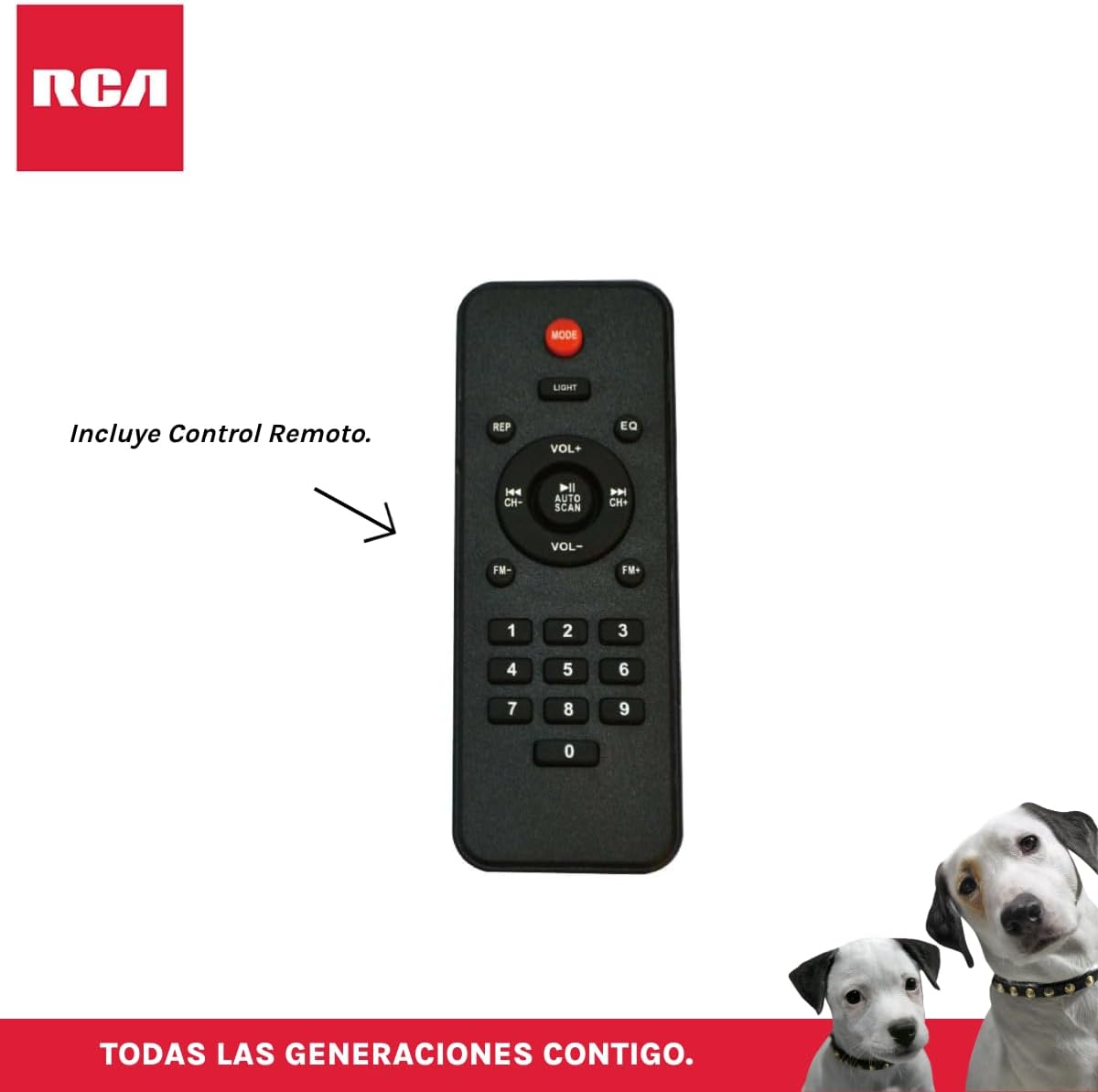
Slika 3.4: RCA SP550BT Remote Control. This image displays the full layout of the remote control, including buttons for power, mode selection, volume adjustment, track navigation, equalizer settings, and a numeric keypad.
4. Postavljanje
4.1 Priključak za napajanje
- Pazite da je zvučnik postavljen na stabilnu, ravnu površinu.
- Connect the power cable to the speaker's power input port.
- Plug the other end of the power cable into a standard electrical outlet (AC 100-240V, 50/60Hz).
- Press the power button on the speaker or remote control to turn it on.
5. Upute za rad
5.1 Uključivanje/isključivanje
- Za uključivanje zvučnika pritisnite tipku VLAST button on the control panel or the remote control.
- Za isključivanje zvučnika pritisnite tipku VLAST ponovno gumb.
5.2 Odabir načina
Pritisnite tipku NAČIN RADA button on the control panel or remote control to switch between Bluetooth, USB, FM, and AUX input modes.
5.3 Bluetooth uparivanje
- Uključite zvučnik i odaberite Bluetooth način rada pomoću NAČIN RADA button. The display will show "BLUE" and a pairing indicator will flash.
- Omogućite Bluetooth na svom mobilnom uređaju (pametnom telefonu, tabletu itd.).
- Tražiti "RCA SP550BT" in your device's Bluetooth list and select it to pair.
- Nakon uparivanja, zvučnik će ispustiti zvuk potvrde, a indikator Bluetootha će prestati treptati.
- Sada možete reproducirati zvuk s uređaja putem zvučnika.
5.4 Reprodukcija s USB-a
- Insert a USB flash drive (FAT32 format, max 32GB) containing MP3 audio files u USB priključak.
- Zvučnik će se automatski prebaciti u USB način rada i početi reproducirati prvu pjesmu. Ako ne, pritisnite NAČIN RADA gumb za odabir USB načina.
- Koristite REPRODUCIRAJ/PAUZIRAJ, PRETHODNI, i SLJEDEĆI buttons on the control panel or remote to control playback.
5.5 FM radio
- Turn on the speaker and select FM mode using the NAČIN RADA dugme.
- Pritisnite i držite REPRODUCIRAJ/PAUZIRAJ gumb (ili AUTO SKENIRANJE on remote) to automatically scan and save available FM stations.
- Koristite PRETHODNI i SLJEDEĆI tipke za navigaciju kroz spremljene stanice.
5.6 AUX ulaz
- Spojite vanjski audio uređaj (npr. MP3 player, prijenosno računalo) na AUX ulaz zvučnika pomoću 3.5 mm audio kabela (nije uključen).
- Odaberite AUX način rada pomoću NAČIN RADA dugme.
- Upravljajte reprodukcijom i glasnoćom s povezanog uređaja.
5.7 TWS (Pravi bežični stereo) funkcija
The TWS function allows you to connect two RCA SP550BT speakers wirelessly for a stereo sound experience.
- Ensure both SP550BT speakers are powered on and in Bluetooth mode, but not yet paired with any device.
- Na jednom od zvučnika pritisnite i držite TWS button (if available, or a dedicated TWS pairing button) until you hear a confirmation tone. The speakers will attempt to pair with each other.
- Once successfully paired, one speaker will act as the master (left channel) and the other as the slave (right channel).
- Now, pair your mobile device with the master speaker via Bluetooth as described in section 5.3.
5.8 LED svjetla
Pritisnite tipku SVJETLO button on the control panel or remote control to cycle through different LED light modes or to turn them off.
5.9 Korištenje mikrofona
Connect a wired microphone (not included) to the microphone input port on the speaker. Adjust the microphone volume using the dedicated knob (if available) or the main volume control.
6. Održavanje
- Čišćenje: Za čišćenje vanjske strane zvučnika koristite meku, suhu krpu. Nemojte koristiti abrazivna sredstva za čišćenje ili otapala.
- Skladištenje: Kada se zvučnik ne koristi dulje vrijeme, pohranite ga na hladnom i suhom mjestu, dalje od izravne sunčeve svjetlosti i ekstremnih temperatura.
- Izloženost vodi: Ovaj zvučnik nije vodootporan. Izbjegavajte izlaganje vodi ili prekomjernoj vlazi.
7. Rješavanje problema
Ako imate problema sa zvučnikom, pogledajte sljedeće uobičajene probleme i rješenja:
| Problem | Mogući uzrok | Otopina |
|---|---|---|
| Nema struje | Power cable not connected; Power outlet not working; Speaker off. | Check power cable connection; Try a different outlet; Press the POWER button. |
| Nema zvuka | Glasnoća je preniska; Odabran je pogrešan način rada; Uređaj nije pravilno spojen. | Povećajte glasnoću; Odaberite ispravan način unosa (Bluetooth, USB, AUX); Ponovno spojite uređaj. |
| Bluetooth uparivanje nije uspjelo | Speaker not in pairing mode; Device Bluetooth off; Speaker already paired. | Ensure speaker is in Bluetooth pairing mode; Turn on device Bluetooth; Disconnect from other devices. |
| USB reprodukcija ne radi | USB drive format incompatible; Corrupt files; USB drive not inserted correctly. | Ensure USB is FAT32 format; Check file integrity; Reinsert USB drive. |
| Slab prijem FM radija | Slab signal; Smetnje. | Relocate speaker; Extend antenna (if applicable). |
8. Specifikacije
| Značajka | Specifikacija |
|---|---|
| Model | SP550BT |
| Marka | RCA |
| Izlazna snaga zvučnika | 50 W (maksimalno) |
| Tehnologija povezivanja | Bluetooth, USB, AUX |
| Bežična tehnologija | Bluetooth |
| Način audio izlaza | Stereo |
| Vrsta zvučnika | Prijenosni, vanjski |
| Vrsta montaže | Stolni nosač |
| Metoda kontrole | Daljinski upravljač |
| Veličina zvučnika | 6.5 inča |
| Promjer niskotonca | 6.5 inča |
| Kapacitet baterije | 4400 Miliamp sati |
| Izvor napajanja | Električni kabel |
| Kompatibilni uređaji | Prijenosno računalo, MP3 player, pametni telefon, tablet |
| GTIN / UPC | 044476152061 |
9. Jamstvo i podrška
This product comes with a limited warranty. Please refer to the warranty card included in your package for specific terms and conditions. For technical support or service inquiries, please contact RCA customer service through their official webstranici ili podatke za kontakt koje ste dobili uz kupnju.
Note: Warranty terms may vary by region. Keep your proof of purchase for warranty claims.