
Uvod
This manual provides detailed instructions for the proper use and maintenance of your Deli 1700 240F Scientific Calculator. Please read this manual thoroughly before using the calculator to ensure correct operation and to maximize its lifespan. This calculator is designed for a wide range of mathematical and scientific computations, featuring a two-line display and 10+2 digits for enhanced functionality.
Postavljanje
1. Ugradnja baterije
The Deli 1700 240F Scientific Calculator operates on both solar power and two nonstandard batteries. For optimal performance, ensure batteries are installed correctly.
- Pronađite poklopac odjeljka za baterije na stražnjoj strani kalkulatora.
- Using a small screwdriver, carefully remove the screw and slide off the battery compartment cover.
- Insert two nonstandard batteries, ensuring the positive (+) and negative (-) terminals are aligned correctly as indicated inside the compartment.
- Vratite poklopac odjeljka za baterije i pričvrstite ga vijkom.
Note: The calculator also utilizes solar power. Ensure adequate light exposure for solar operation, especially when batteries are low or not installed.
2. Početno uključivanje
Pritisnite tipku [NA] button to turn on the calculator. The display should show '0' or a similar initial state. If the display does not appear, check battery installation or ensure sufficient light for solar power.
Upute za rad
The Deli 1700 240F features a two-line display, showing the input expression on the upper line and the result on the lower line. It supports 240 types of functions.

Image: The Deli 1700 Scientific Calculator's two-line display, illustrating its ability to show both input and results simultaneously. This image highlights the clear numerical output and function indicators.
1. Osnovne aritmetičke operacije
Unesite brojeve pomoću numeričke tipkovnice. Koristite [+], [-], [×], i [÷] tipke za zbrajanje, oduzimanje, množenje i dijeljenje. Pritisnite [=] da se dobije rezultat.
2. Znanstvene funkcije
The calculator includes various scientific functions accessible via the [SHIFT] ključ. Pritisnite [SHIFT] followed by the desired function key to activate its secondary function (indicated above the key).
- Trigonometrijske funkcije: [SIN], [COS], [TAN] i njihove inverzne funkcije ([SHIFT] + [SIN⁻¹], itd.).
- Logaritamske funkcije: [LOG] (baza 10) i [LN] (prirodni logaritam).
- Funkcije potencije i korijena: [x²], [√], [xʸ], [ʸ√x].
- Factorial: [x!].
3. Funkcije pamćenja
Spremite i pozovite vrijednosti pomoću memorijskih tipki:
- [M+]: Dodaje prikazanu vrijednost u memoriju.
- [M-]: Oduzima prikazanu vrijednost iz memorije.
- [MR]: Recalls the value from memory.
- [MC]: Briše memoriju.
4. Kutne jedinice
The calculator supports Degree (DEG), Radian (RAD), and Grad (GRA) angle units. Press [NAČIN RADA] repeatedly to cycle through the angle units. The current unit is indicated on the display.
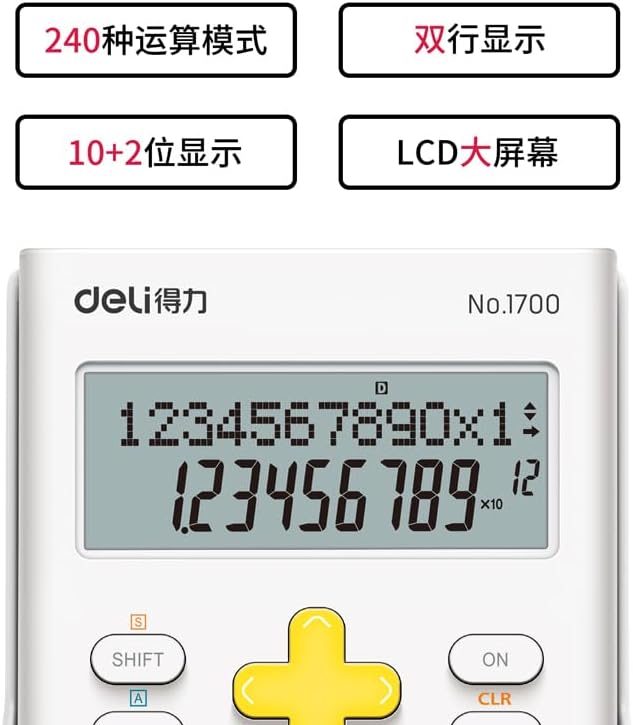
Slika: Detaljna view of the Deli 1700 Scientific Calculator's display and key layout. This image emphasizes the model number and the clarity of the 10+2 digit display, along with key labels like SHIFT and ALPHA.
Održavanje
1. Čišćenje
Za čišćenje kalkulatora koristite meku, suhu krpu. Nemojte koristiti abrazivna sredstva za čišćenje, otapala ili prskati izravno na kalkulator. Izbjegavajte prekomjernu vlagu.
2. Zamjena baterije
When the display becomes dim or calculations are incorrect, it may be time to replace the batteries. Follow the battery installation steps outlined in the Setup section. Always replace both batteries at the same time with new ones of the same type.
3. Skladištenje
Store the calculator in a cool, dry place away from direct sunlight and extreme temperatures. Avoid dropping the calculator or subjecting it to strong impacts.
Rješavanje problema
| Problem | Mogući uzrok | Otopina |
|---|---|---|
| Zaslon je prazan ili taman. | Low batteries or insufficient light for solar power. | Replace batteries or move to a brighter area. |
| Netočni rezultati izračuna. | Incorrect mode setting (e.g., angle unit) or input error. | Check angle unit (DEG/RAD/GRA). Clear all memory and re-enter calculation. Press [CLR] to clear current calculation. |
| Kalkulator ne reagira na pritiske tipki. | Temporary system error or very low power. | Pritisnite [NA]/[OFF] to restart. If issue persists, remove and reinsert batteries. |
Tehnički podaci
- Marka: Deli
- Model: 1700
- Naziv modela: 240F
- Vrsta kalkulatora: Inženjerski/znanstveni
- Vrsta zaslona: LCD, Two-line display
- Znamenke: 10+2 znamenke
- Izvor napajanja: Solar Powered & Battery
- Broj baterija: 2 Nonstandard Battery (required)
- Veličina zaslona: 1 Centimeter (approximate viewsposobno područje)
- Boja: Bijela
- Materijal kućišta: Plastični
- Proizvođač: Deli
Informacije o jamstvu
This Deli 1700 240F Scientific Calculator is covered by a standard manufacturer's warranty. Please refer to the packaging or contact your retailer for specific warranty terms and conditions. Keep your proof of purchase for warranty claims.
Korisnička podrška
For further assistance, technical support, or inquiries regarding your Deli 1700 240F Scientific Calculator, please contact Deli customer service through their official website or the contact information provided with your purchase. Ensure you have your model number (1700 240F) ready when contacting support.