
1. Postavljanje i instalacija
The DYONDER Wired PC Game Controller is designed for easy setup across multiple platforms. Follow these steps to get started:
1.1 Široka kompatibilnost
This controller is compatible with a variety of systems, including:
- Windows (Vista, 7, 8, 10, 11)
- PlayStation 3 (PS3)
- Android TV Box (Android 4.0 or higher with OTG function)
- Tesla
1.2 Plug & Play System
The controller features a simple Plug & Play system. No drivers are typically required for most compatible devices. Simply connect the controller to your device's USB port.
The integrated USB cable is 2 meters long, allowing for comfortable gaming from a distance.

Image: The controller supports multiple platforms, including Android and Windows 10/8/7.
2. Upute za rad
Familiarize yourself with the controller's features and functions for an optimal gaming experience.
2.1 Izgled kontrolera
The DYONDER controller features a standard layout with clearly labeled buttons and joysticks.
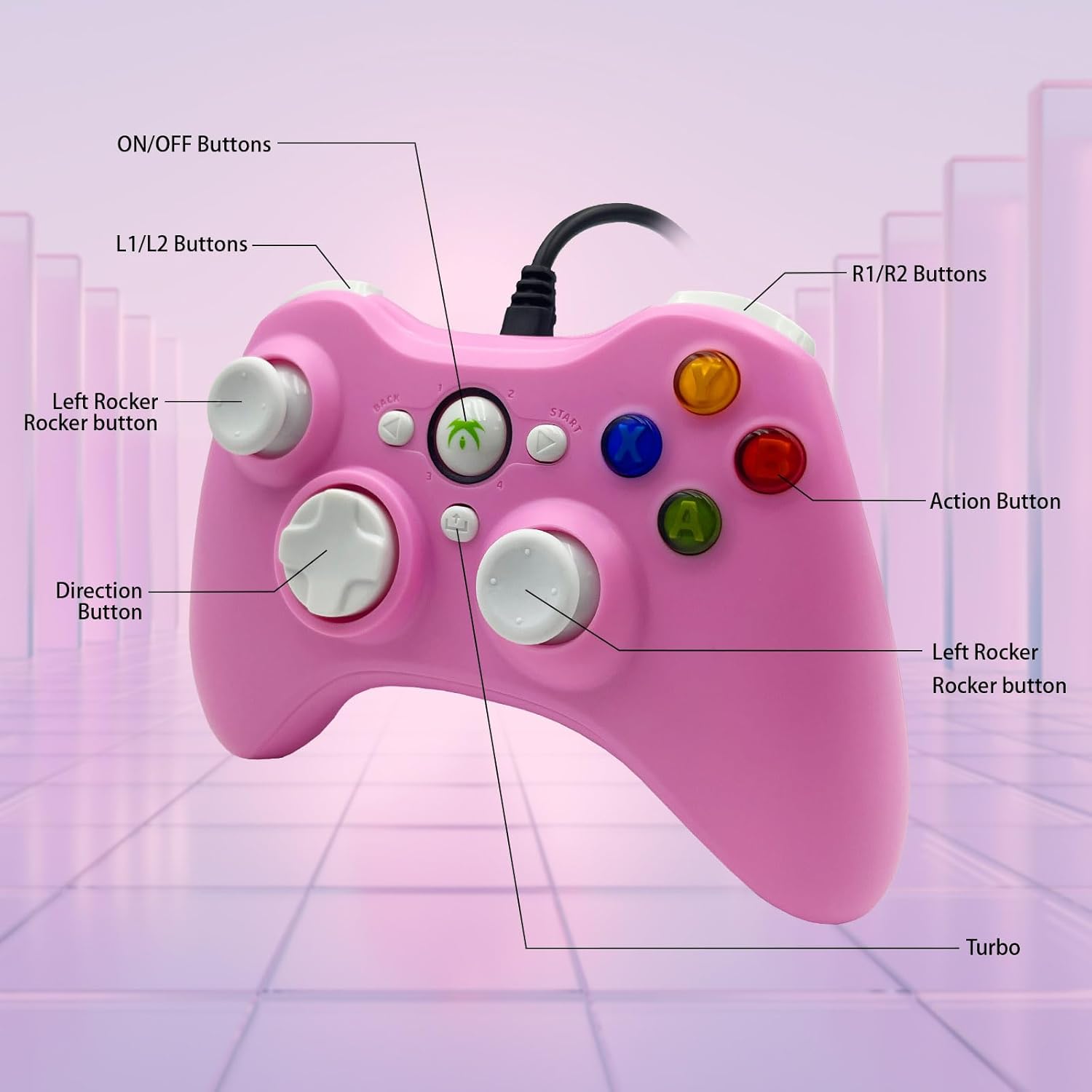
Image: Detailed diagram illustrating the various buttons and their labels on the controller, including ON/OFF, L1/L2, R1/R2, Left Rocker, Direction Button, Action Buttons, and Turbo button.
2.2 Turbo funkcija
The Turbo function allows for rapid-fire input of a designated button, reducing repetitive presses and giving you an advantage u brzim igrama.
- Za aktiviranje Turbo funkcije: Pritisnite i držite Turbo button, then press the desired action button (e.g., A, B, X, Y). The button will now rapidly fire when held.
- Za deaktiviranje Turbo funkcije: Pritisnite i držite tipku Turbo button again, then press the same action button.

Image: The Turbo button is highlighted, indicating its function for rapid-fire input.
2.3 Immersive Vibration Feedback
The controller is equipped with two vibrating motors located in the side grips. These motors provide clear feedback, enhancing the immersion and realism of your gaming experience by reacting to in-game events.
2.4 Ergonomic Design and Joysticks
The asymmetrical joystick design is ergonomically crafted for the most comfortable thumb position, ensuring an optimal feel during extended gaming sessions.
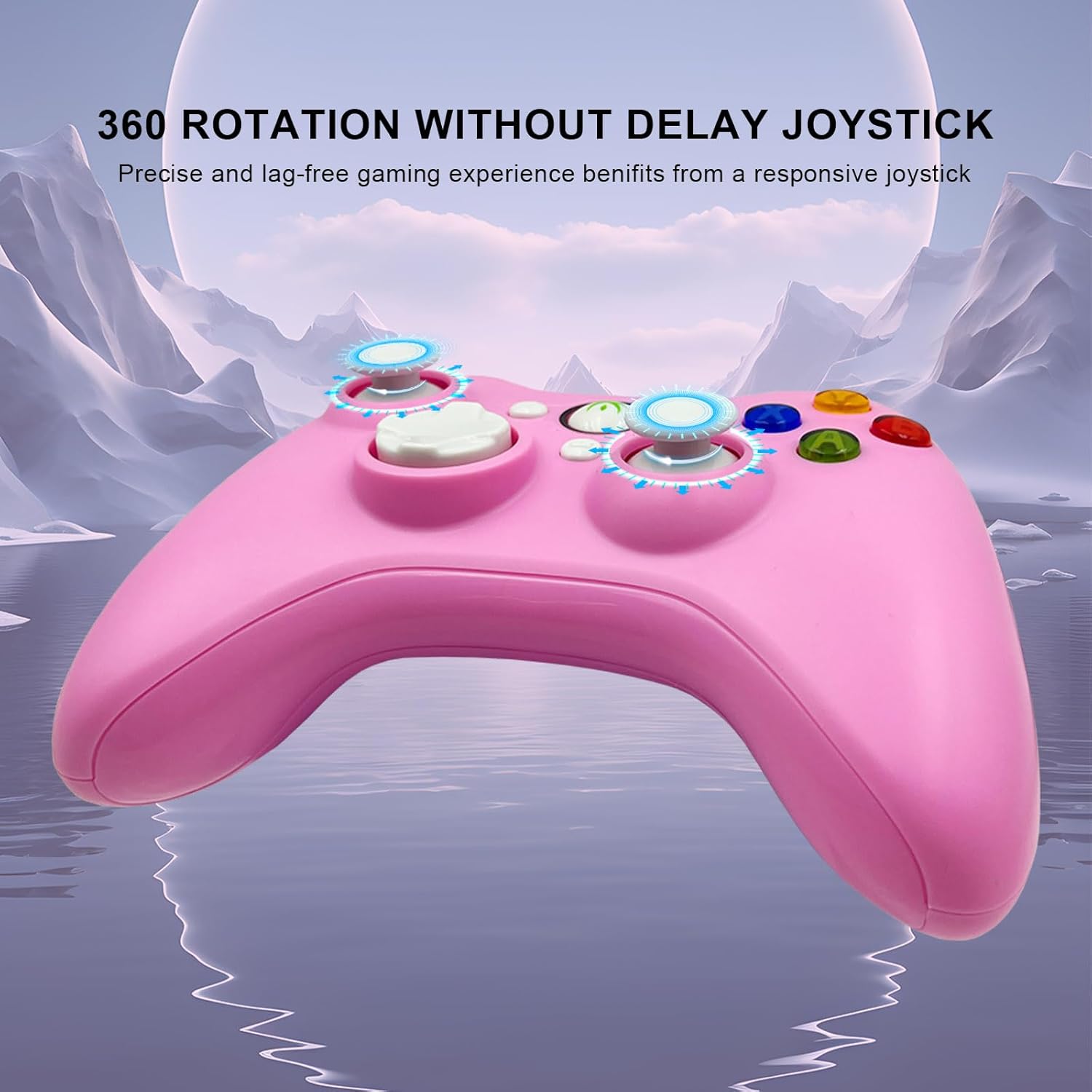
Image: The joysticks are designed for 360-degree rotation without delay, providing precise and lag-free gaming.
2.5 Hallovi linearni okidači
The Hall linear triggers provide precise and responsive input, particularly beneficial for racing games where nuanced acceleration and braking are crucial.

Image: The Hall linear triggers are shown, emphasizing their benefit for racing games.
3. Održavanje
Proper care and maintenance will extend the lifespan of your DYONDER Wired PC Game Controller.
- Čišćenje: Za brisanje kontrolera koristite meku, suhu krpu. Za tvrdokornu prljavštinu, laganoampisperite krpu vodom. Izbjegavajte upotrebu jakih kemikalija ili abrazivnih sredstava za čišćenje.
- Skladištenje: Store the controller in a cool, dry place away from direct sunlight and extreme temperatures. Avoid wrapping the cable too tightly to prevent damage.
- Rukovanje: Do not drop the controller or expose it to excessive force, as this can damage internal components.
4. Rješavanje problema
Ako naiđete na probleme s kontrolerom, pogledajte sljedeća uobičajena rješenja:
- Kontroler nije prepoznat:
- Provjerite je li USB kabel sigurno priključen i u kontroler i u uređaj.
- Try plugging the controller into a different USB port on your device.
- Ponovno pokrenite računalo ili igraću konzolu.
- For Android devices, ensure OTG functionality is enabled and your device supports it.
- Gumbi ili upravljačke palice ne reagiraju:
- Test the controller on a different game or application to rule out software-specific issues.
- Pazite da oko tipki ili upravljačke palice nema nakupljenih ostataka.
- If using on PC, check your game's controller settings to ensure it's properly configured.
- Vibracija ne radi:
- Provjerite podržava li igra koju igrate vibracijske povratne informacije.
- Provjerite postavke u igri kako biste bili sigurni da je vibracija uključena.
- Some older systems or emulators may not fully support vibration features.
Važno: If you encounter any persistent problems, please contact the seller for assistance before attempting to return the item.
5. Specifikacije
| Značajka | Detalj |
|---|---|
| Broj modela | B0DD613G32 |
| Povezivost | Žičani USB |
| Duljina kabela | 2 metara |
| Povratna informacija vibracijom | Dvostruki motori |
| Posebne značajke | Turbo Function, Hall Linear Triggers, Ergonomic Design |
| Kompatibilnost | Windows, PS3, Android TV Box (OTG), Tesla |
| Datum prve dostupnosti na Amazon.com.be | 8. travnja 2024 |
| Dostupnost rezervnih dijelova | Informacije nisu dostupne |
6. Podrška
For any questions, technical support, or issues not covered in this manual, please contact DYONDER customer support or the seller directly through your purchase platform. Providing your model number (B0DD613G32) will help expedite the support process.