
1. Uvod
This manual provides essential instructions for the safe and effective operation, setup, and maintenance of your ARCCAPTAIN 185A 3-in-1 Welding Machine. This versatile unit supports Flux Core MIG, Lift TIG, and Stick (MMA) welding processes, operating on a 110V power supply. Please read this manual thoroughly before using the welder to ensure proper function and safety.
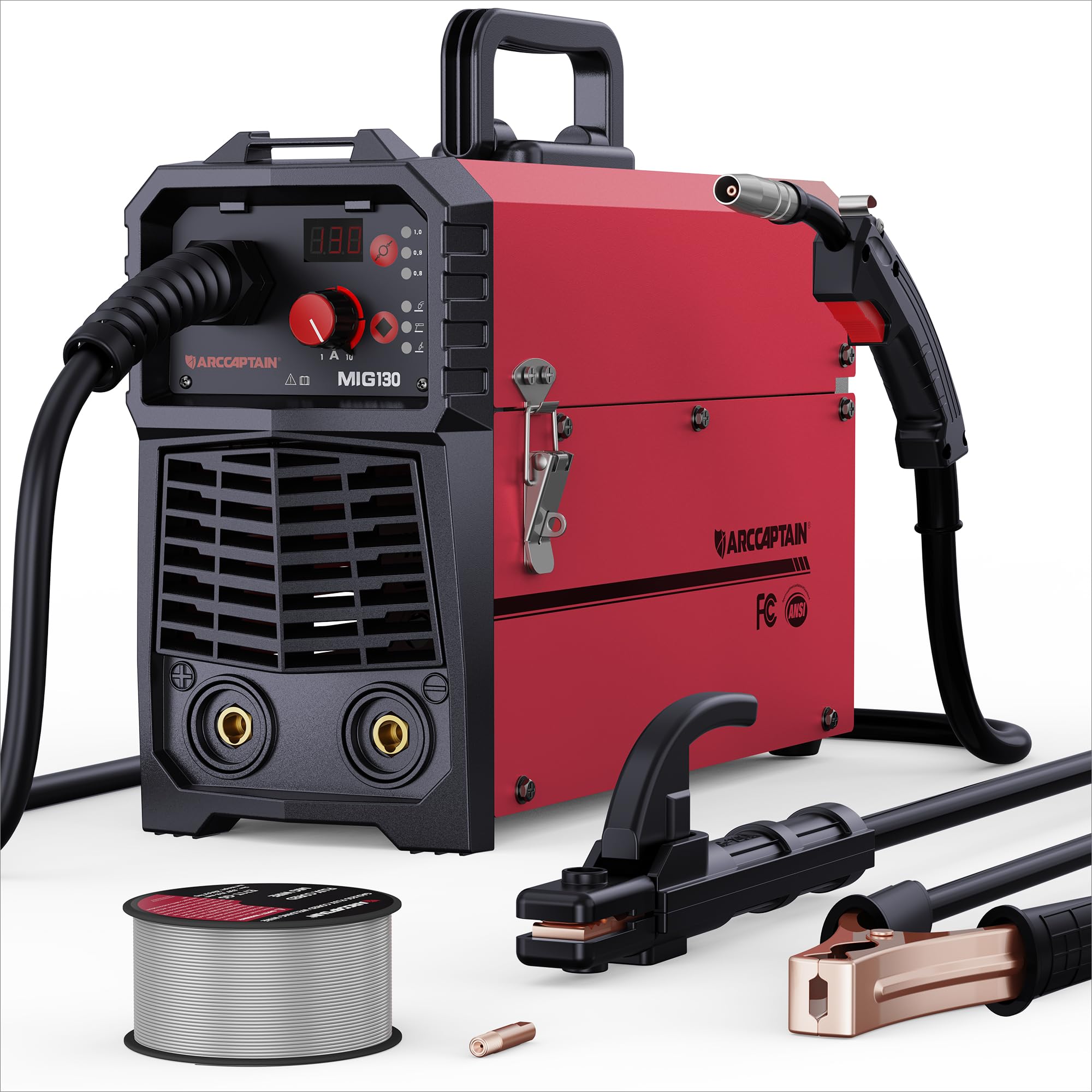
Figure 1: ARCCAPTAIN 185A 3-in-1 Welding Machine. This image displays the compact design of the welder, highlighting its control panel and connection points.
2. Sigurnosne informacije
Zavarivanje nosi značajne rizike. Uvijek se pridržavajte sljedećih sigurnosnih mjera opreza kako biste spriječili ozljede ili štetu.
- Elektro šok: Welding current can cause fatal electric shock. Ensure proper grounding, wear dry gloves, and inspect cables for damage. Never touch live electrical parts.
- Pare i plinovi: Welding fumes and gases can be hazardous to your health. Work in a well-ventilated area or use an approved respirator. Keep your head out of the fumes.
- Zrake luka: Arc rays can burn eyes and skin. Always wear a welding helmet with appropriate shade, safety glasses, and protective clothing (long sleeves, heavy gloves).
- Vatra i eksplozija: Iskre zavarivanja i vrući metal mogu uzrokovati požar. Zapaljive materijale držite podalje od područja zavarivanja. Imajte pri ruci aparat za gašenje požara.
- Vrući dijelovi: Welded materials and equipment can remain hot for extended periods. Use insulated gloves and allow parts to cool before handling.
- Buka: Excessive noise can damage hearing. Wear ear protection if noise levels are high.
- Pace Makers: Magnetska polja od visokih struja mogu utjecati na pacemakere. Prije zavarivanja posavjetujte se s liječnikom.
3. Sadržaj paketa
Provjerite jesu li sve dolje navedene stavke prisutne u vašem paketu:
- ARCCAPTAIN 185A Welding Machine
- Baklja MIG
- Uzemljenje Clamp s kabelom
- Electrode Holder (Stick) with Cable
- Flux Core Wire Spool (e.g., 2 lb .030" flux core wire)
- Contact Tips (e.g., spare .030" and .035" tips)
- Naramenica
- Korisnički priručnik (ovaj dokument)
4. Postavljanje
4.1 Priključak za napajanje
Connect the welder to a dedicated 110V AC power outlet. Ensure the circuit can handle the machine's maximum amperage (185A). Use an appropriate extension cord if necessary, ensuring it is rated for the required current and voltage.
4.2 Wire Installation (MIG/Flux Core)
- Otvorite odjeljak za dodavač žice.
- Postavite kalem žice na držač kalema, pazeći da se slobodno okreće.
- Feed the wire through the guide tube and into the drive roller mechanism.
- Close the drive roller tension arm, adjusting tension as needed (too loose will cause slipping, too tight will deform wire).
- Remove the contact tip from the MIG torch.
- With the welder powered on and in MIG mode, press the wire feed button (or trigger the torch) to feed the wire through the torch liner until it exits the torch nozzle.
- Reinstall the correct size contact tip for your wire diameter.
4.3 Prizemlje Clamp Veza
Spojite uzemljenje klamp cable to the appropriate terminal on the welder (usually marked with a ground symbol or "-"). Securely attach the ground clamp to the workpiece or a clean, bare metal portion of the work table. A good ground connection is critical for stable arc and weld quality.
4.4 Torch/Electrode Holder Connection
- MIG plamenik: Connect the MIG torch cable to the designated MIG connector on the front panel. Ensure it is securely tightened.
- Držač štapićaste elektrode: Za zavarivanje elektrodom, spojite kabel držača elektrode na pozitivni (+) priključak i uzemljenje.amp to the negative (-) terminal for most common electrodes (DCEN). Consult electrode manufacturer specifications for polarity.
- Podignite TIG plamenik: For Lift TIG, a separate TIG torch (not included) is required. Connect the TIG torch to the negative (-) terminal and the ground clamp to the positive (+) terminal (DCEP) for most applications.
5. Operacija
Before operating, ensure all safety precautions are followed and appropriate personal protective equipment (PPE) is worn.
5.1 Kontrolna ploča prekoview
The control panel typically features a mode selection button, current/voltage adjustment knobs, and a digital display. Refer to the specific layout on your machine for exact button functions.
5.2 MIG Welding (Flux Core)
- Select MIG mode on the control panel.
- Set the wire diameter and material type if your machine has this feature. The welder may automatically suggest initial settings.
- Podesite glasnoćutage and wire feed speed according to the material thickness and wire type. Start with recommended settings and fine-tune as needed.
- Position the MIG torch at the start of the weld joint, maintaining a consistent stick-out.
- Press the torch trigger to initiate the arc and begin welding. Maintain a steady travel speed and torch angle.
- Otpustite okidač za zaustavljanje zavarivanja.
5.3 Zavarivanje podizanjem TIG-a
Note: A TIG torch and appropriate consumables (tungsten electrode, gas lens, collet) are required and sold separately.
- Select Lift TIG mode.
- Spojite TIG plamenik i uzemljenjeamp s ispravnim polaritetom.
- Postavite željeno amperage for your material thickness.
- Gently touch the tungsten electrode to the workpiece to establish a circuit, then lift it slightly to initiate the arc.
- Održavajte konzistentnu duljinu luka i brzinu kretanja.
5.4 Stick (MMA) Welding
- Select Stick (MMA) mode.
- Spojite držač elektrode i uzemljenjeamp with correct polarity for your chosen electrode type.
- Umetnite elektrodu u držač.
- Postavite amperage based on the electrode diameter and material thickness.
- Udarite elektrodu o radni komad kako biste pokrenuli luk, a zatim održavajte konstantnu duljinu luka i brzinu kretanja.
6. Održavanje
Regular maintenance ensures optimal performance and extends the lifespan of your welding machine.
- Čišćenje: Periodically clean the interior of the machine using dry compressed air to remove dust and metal particles. Ensure the machine is unplugged before cleaning.
- Pregled kabela: Redovito pregledavajte sve kablove za zavarivanje, gorionik i uzemljenjeamp for cuts, fraying, or loose connections. Replace damaged components immediately.
- Potrošni materijal: Replace MIG contact tips, nozzles, and TIG tungstens/collets as they wear out. Ensure the correct size and type are used.
- Dodavač žice: Clean the drive rollers and wire guide tubes to prevent wire feeding issues. Check drive roller tension.
- Skladištenje: Aparat za zavarivanje čuvajte u čistom, suhom okruženju, zaštićenom od prašine i vlage.
7. Rješavanje problema
Uobičajene probleme i njihova moguća rješenja potražite u donjoj tablici.
| Problem | Mogući uzrok | Otopina |
|---|---|---|
| Nema struje za stroj | Power switch off, circuit breaker tripped, loose power cord | Turn on switch, reset breaker, check power cord connection |
| Nema luka | Poor ground connection, incorrect settings, damaged torch/electrode holder, wrong polarity | Ensure clean ground connection, verify settings, inspect cables, check polarity |
| Loša kvaliteta zavara (poroznost, prskanje) | Incorrect settings (voltage/WFS/amperage), dirty workpiece, worn consumables, improper technique | Adjust settings, clean workpiece, replace consumables, refine welding technique |
| Problemi s dovodom žice (MIG) | Incorrect drive roller tension, clogged liner, wrong contact tip size, tangled wire spool | Adjust tension, clean/replace liner, use correct tip, untangle wire |
| Overheating/Thermal overload | Exceeding duty cycle, insufficient ventilation | Allow machine to cool, ensure adequate airflow around the unit |
8. Specifikacije
Key technical specifications for the ARCCAPTAIN 185A Welding Machine:
- Model: Mig zavarivač
- Ulazni voltage: 110 V AC
- Izlazna struja: 185A (maks.)
- Postupci zavarivanja: MIG s fluksnom jezgrom, kontaktni TIG, elektroda (MMA)
- Proizvođač: ARCCAPETAN
- Dimenzije parcele: 52.83 x 31.62 x 22.86 cm
- Težina artikla: 3.18 kg
- ASIN: B0DF7XT858
9. Jamstvo i podrška
For warranty information, technical support, or service inquiries, please contact ARCCAPTAIN customer service. Details can typically be found on the official ARCCAPTAIN website or through your purchase documentation. Please have your model number (Mig Welder) and ASIN (B0DF7XT858) ready when contacting support.
You can visit the ARCCAPTAIN store for more information: ARCCAPTAIN Store