
1. Važne sigurnosne informacije
Prije upotrebe uređaja pažljivo pročitajte sve upute. Sačuvajte ovaj priručnik za buduću upotrebu. Nepoštivanje ovih uputa može uzrokovati strujni udar, požar ili ozljede.
- Ne pokušavajte koristiti ovu pećnicu s otvorenim vratima jer to može rezultirati štetnim izlaganjem mikrovalnoj energiji.
- Ne stavljajte nikakve predmete između prednje strane pećnice i vrata i ne dopustite da se prljavština ili ostaci sredstva za čišćenje nakupe na brtvenim površinama.
- Nemojte koristiti pećnicu ako je oštećena. Osobito je važno da se vrata pećnice dobro zatvaraju i da nema oštećenja na: (1) vratima (savijena), (2) šarkama i zasunima (slomljeni ili olabavljeni), (3) brtvama vrata i brtvenim površinama.
- Pećnicu ne smije podešavati ili popravljati nitko osim odgovarajuće kvalificiranog servisnog osoblja.
- Provjerite je li uređaj pravilno uzemljen.
- U ovom aparatu nemojte koristiti korozivne kemikalije ili pare.
- Uvijek koristite rukavice za pećnicu kada rukujete vrućim predmetima iz pećnice.
2. Proizvod je gotovview
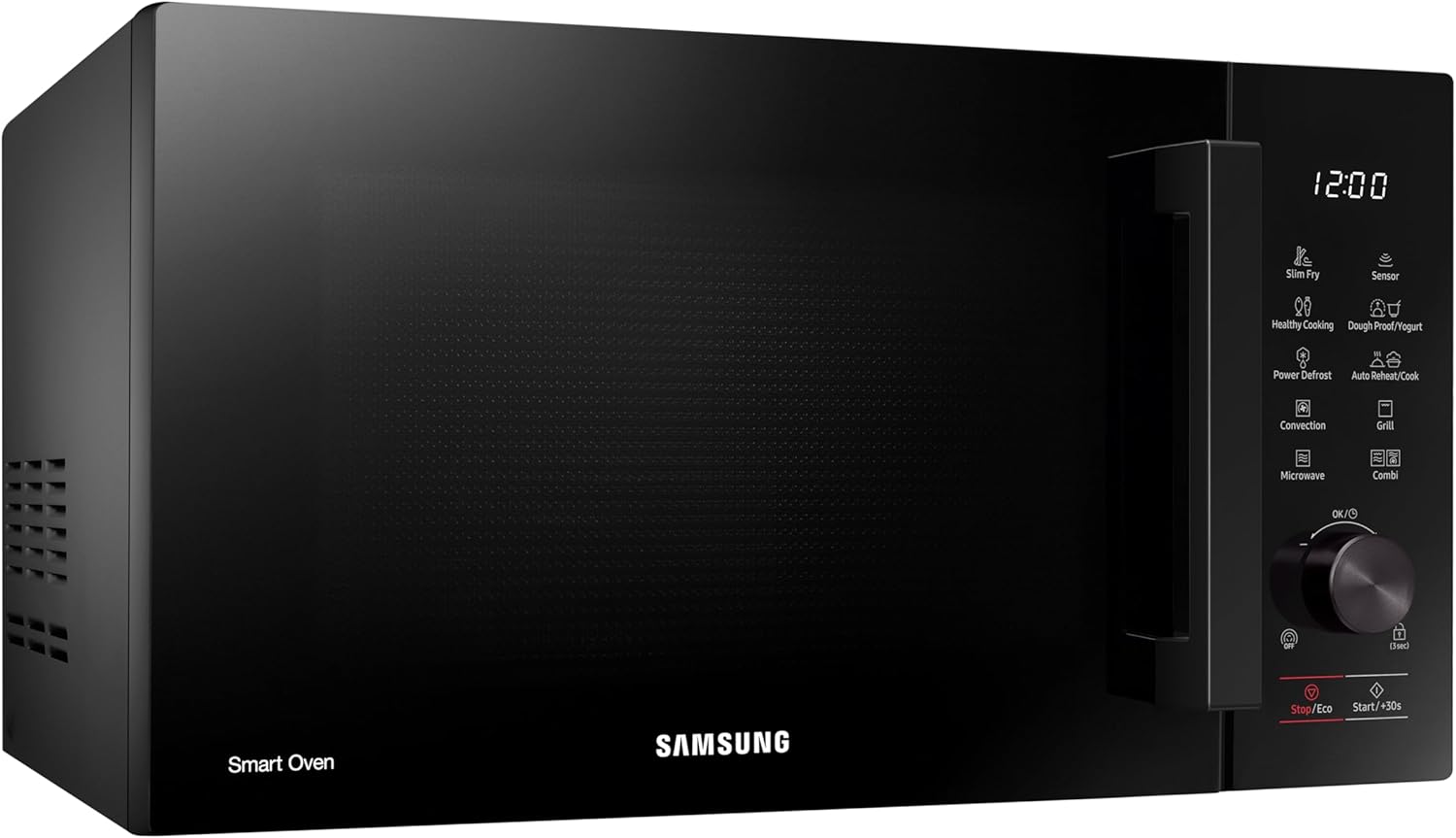
The Samsung MC28A5137KK/E1 is a 28-liter convection microwave oven designed for versatile cooking. It combines microwave, grill, and convection functions to offer a wide range of cooking possibilities.

Slika 2.1: Prednja strana view mikrovalne pećnice.
Ključne karakteristike:
- Senzorsko kuhanje: Automatically adjusts cooking time and power by detecting the moisture level of food, ensuring optimal texture and flavor.
- Tanko prženo: Utilizes hot air circulation to cook food, achieving a crispy exterior and juicy interior with minimal oil, offering a healthier frying alternative.
- Dough Proof/Yogurt Function: Provides the correct temperature environment for proofing homemade dough or making fresh yogurt.
- Eko način rada: Reduces energy consumption significantly in standby mode, minimizing power usage when the microwave is not actively in use.
- Funkcija odmrzavanja: Quickly and evenly thaws frozen foods, preserving their freshness and original texture.

Slika 2.2: Unutrašnjost view with ceramic enamel coating and glass turntable.

Slika 2.3: Detaljno view upravljačke ploče.
3. Postavljanje i instalacija
Pravilna instalacija osigurava siguran i učinkovit rad vaše mikrovalne pećnice.
3.1 Raspakiranje
- Uklonite sav materijal za pakiranje unutar i izvan pećnice.
- Provjerite pećnicu ima li oštećenja, poput udubljenja ili nepravilno postavljenih vrata. Nemojte koristiti pećnicu ako je oštećena.
- Ensure all accessories, including the glass turntable, roller ring, and wire rack, are present.
3.2 Postavljanje
- Postavite pećnicu na ravnu, stabilnu površinu koja može podnijeti njezinu težinu i najtežu hranu koja će se u njoj vjerojatno kuhati.
- Maintain a minimum clearance of 20 cm (8 inches) above the oven, 10 cm (4 inches) at the rear, and 5 cm (2 inches) on both sides for proper ventilation.
- Ne blokirajte ventilacijske otvore na pećnici.
- Držite pećnicu dalje od izvora topline i jakih magnetskih polja.
Slika 3.1: Bočna strana view illustrating ventilation requirements.
3.3 Električni priključak
- Plug the oven into a dedicated, properly grounded electrical outlet. Do not use an extension cord.
- Osigurajte voltage i frekvencija odgovaraju specifikacijama na naljepnici s karakteristikama pećnice.

Slika 3.2: Stražnji dio view showing power connection area.
4. Upute za rad
This section details how to use the various functions of your Samsung convection microwave oven.
4.1 Osnovno kuhanje u mikrovalnoj pećnici
- Stavite hranu u posudu prikladnu za mikrovalnu pećnicu na stakleni okretni tanjur.
- Dobro zatvorite vrata.
- Select the 'Microwave' function.
- Use the rotary dial to set the desired cooking time and power level.
- Press 'Start/+30s' to begin cooking.
4.2 Kuhanje s konvekcijom
Convection cooking uses a fan to circulate hot air, similar to a traditional oven.
- Place food on the wire rack (if applicable) or a heat-resistant dish.
- Odaberite funkciju 'Konvekcija'.
- Set the desired temperature and cooking time using the rotary dial.
- Press 'Start/+30s' to begin. The oven will preheat if necessary.
4.3 Funkcija roštilja
Funkcija roštilja idealna je za prženje i hrskavost hrane.
- Stavite hranu na rešetku.
- Select the 'Grill' function.
- Postavite željeno vrijeme kuhanja.
- Press 'Start/+30s' to begin.
4.4 Combi (Combination) Cooking
Combination mode uses both microwave and convection/grill functions for faster and more thorough cooking.
- Place food in an appropriate dish.
- Select the 'Combi' function.
- Choose the desired combination mode (e.g., Microwave + Convection, Microwave + Grill).
- Postavite temperaturu i vrijeme.
- Press 'Start/+30s' to begin.
4.5 Kuhanje senzorom
For automatic cooking based on food moisture:
- Stavite hranu u pećnicu.
- Select the 'Sensor Cook' function.
- Choose the appropriate food category (e.g., vegetables, potatoes).
- Press 'Start/+30s'. The oven will detect moisture and adjust cooking time automatically.
4.6 Slim Fry
To prepare healthier fried dishes:
- Place food on the Crusty Plate (if included) or a suitable dish. Add a small amount of oil if desired.
- Select the 'Slim Fry' function.
- Choose the food type and weight.
- Press 'Start/+30s'.
4.7 Dough Proof / Yogurt
For fermentation processes:
- Prepare your dough or yogurt mixture in a suitable container.
- Select the 'Dough Proof/Yogurt' function.
- Choose the desired program (e.g., pizza dough, bread dough, yogurt).
- Press 'Start/+30s'. The oven will maintain the optimal temperature.
4.8 Snažno odleđivanje
For quick and even defrosting:
- Stavite smrznutu hranu u posudu prikladnu za mikrovalnu pećnicu.
- Select the 'Power Defrost' function.
- Unesite težinu hrane.
- Press 'Start/+30s'. The oven will calculate the defrosting time.
4.9 Eko način rada
To activate Eco Mode, press the 'Stop/Eco' button. This reduces power consumption when the oven is not in use.
4.10 Sigurnosna brava za djecu
To activate the child safety lock, press and hold the 'Lock (3 sec)' button for 3 seconds. The lock indicator will appear on the display. To deactivate, press and hold the button again for 3 seconds.
5. Održavanje i čišćenje
Redovito čišćenje i održavanje produžit će vijek trajanja vaše mikrovalne pećnice.
5.1 Čišćenje unutrašnjosti
The ceramic enamel interior is designed for easy cleaning and scratch resistance.
- Nakon svake upotrebe obrišite unutrašnjost oglasnom krpomamp krpom za uklanjanje mrlja od hrane.
- Za tvrdokorne mrlje koristite blagi deterdžent i meku krpu. Izbjegavajte abrazivna sredstva za čišćenje ili abrazivne spužvice.
- To remove odors, place a bowl of water with lemon slices inside and microwave for a few minutes.
5.2 Čišćenje vanjskog dijela
- Obrišite vanjske površine mekom, damp tkanina.
- Nježno očistite upravljačku ploču mekom krpomamp krpom. Izbjegavajte prekomjernu vlagu.
5.3 Pribor za čišćenje
- The glass turntable and roller ring can be washed in warm, soapy water or in a dishwasher.
- Clean the wire rack and Crusty Plate (if included) with warm, soapy water.
6. Rješavanje problema
Ako imate problema s mikrovalnom pećnicom, pogledajte sljedeće uobičajene probleme i rješenja.
| Problem | Mogući uzrok | Otopina |
|---|---|---|
| Pećnica se ne pokreće | Kabel za napajanje nije uključen; Vrata nisu pravilno zatvorena; Osigurač je pregorio ili je isključen prekidač. | Provjerite je li kabel za napajanje sigurno priključen; Čvrsto zatvorite vrata; Provjerite osigurač kućanstva ili resetirajte prekidač. |
| Hrana se ne zagrijava | Incorrect cooking time/power level; Food not suitable for microwave; Door not closed properly. | Adjust time/power; Use microwave-safe dishes; Ensure door is fully closed. |
| Gramofon se ne okreće | Okretni tanjur ili valjkasti prsten nisu pravilno postavljeni; Prepreka ispod okretnog tanjura. | Ponovno postavite okretni tanjur i valjkasti prsten; Uklonite sve prepreke. |
| Neobični zvukovi | Posuda s hranom dodiruje stijenke pećnice; Okretni tanjur nije pravilno postavljen. | Ensure container does not touch walls; Re-seat turntable. |
| Svjetlo pećnice ne radi | Potrebno je zamijeniti žarulju. | Za zamjenu žarulje obratite se kvalificiranom servisnom osoblju. |
If the problem persists after attempting these solutions, contact Samsung customer support.
7. Specifikacije
- Broj modela:
- MC28A5137KK/E1
- Marka:
- Samsung
- Kapacitet:
- 28 litara
- Wattage:
- 900 vata
- Boja:
- Crna
- Materijal:
- Ceramic (Interior)
- Vrsta instalacije:
- Radna ploča
- Dimenzije proizvoda (D x Š x V):
- 47.6 cm x 52 cm x 31 cm (otprilike 18.74 x 20.47 x 12.2 cm)
- Posebne karakteristike:
- Child Safety Lock, Defrost, Eco Mode, Turntable, Scratch Resistant, Timer
- Uključene komponente:
- Crusty Plate, Wire Rack
8. Jamstvo i podrška
Za informacije o jamstvu i korisničku podršku pogledajte jamstveni list koji ste dobili s proizvodom ili posjetite službenu Samsungovu web-stranicu. website for your region. You can also contact Samsung customer service directly for assistance with product registration, troubleshooting, or service requests.
Samsungova služba za korisnike: Molimo posjetite www.samsung.com/support for contact details and support resources specific to your country.