
1. Uvod
Hvala na kupnjiasing the LONPOO Mini Hi-Fi Amplifter AMP-615B. This 2-channel stereo amplifier je dizajniran za pružanje visokokvalitetnog zvuka amplification for your passive speakers, offering versatile connectivity options including Bluetooth 5.3, Optical, Coaxial, USB, and AUX inputs. This manual provides detailed instructions for setup, operation, and maintenance to ensure optimal performance and longevity of your device.
2. Sigurnosne upute
- Izvor napajanja: Osigurajte amplifier is connected to a power supply within the specified voltage range (AC 100-240V ~ 50/60Hz).
- Ventilacija: Ne blokirajte ventilacijske otvore. Osigurajte dovoljan protok zraka oko uređaja kako biste spriječili pregrijavanje.
- Vlaga: Zadrži amplifier away from water, moisture, and high humidity environments. Do not operate with wet hands.
- toplina: Izbjegavajte postavljanje uređaja u blizinu izvora topline poput radijatora, grijalica, peći ili drugih uređaja koji proizvode toplinu.
- Čišćenje: Prije čišćenja isključite kabel za napajanje. Koristite suhu, meku krpu. Nemojte koristiti tekuća sredstva za čišćenje ili aerosolna sredstva za čišćenje.
- Servisiranje: Ne pokušavajte sami servisirati ovaj proizvod. Sve servise prepustite kvalificiranom servisnom osoblju.
- Plasman: Uređaj postavite na stabilnu, ravnu površinu kako biste spriječili njegov pad.
3. Sadržaj paketa
Carefully unpack the box and ensure all items listed below are present and in good condition. If any item is missing or damaged, please contact your retailer.

The package includes the LONPOO Mini Hi-Fi Amplifier, a remote control for convenient operation, an AC power cord, an optical cable for digital audio, and a quick start guide.
- 1x LONPOO Mini Hi-Fi AmpLifier (AMP-615B)
- 1x daljinski upravljač
- 1x kabel za izmjeničnu struju
- 1x Optički kabel
- 1x User Manual (Quick Start Guide)
4. Proizvod je gotovview
4.1 Prednja ploča

The front panel features Treble and Bass controls, a multi-function knob for volume and input selection, AUX IN, USB input, IR receiver, and an indicator light.
- TREBLE kontrola: Podešava razinu visokofrekventnog zvuka.
- Kontrola basa: Podešava razinu niskofrekventnog zvuka.
- Multi-Function Knob (VOLUME +/- / MODE / POWER ON/OFF):
- Rotate: Adjusts volume.
- Short Press: Cycles through input modes (Bluetooth, AUX, USB, Coaxial, Optical).
- Long Press: Powers the unit On/Off.
- AUX ULAZ (3.5 mm): Audio input for devices with a 3.5mm audio jack.
- USB ulaz: Za reprodukciju zvuka files from a USB flash drive (supports MP3, WAV formats).
- IR (Infrared) Receiver: Prima signale s daljinskog upravljača.
- Svjetlo indikatora: Displays the current status/input mode:
- Red: Standby (Power Off)
- Blue: Bluetooth Input
- Green: AUX Input
- Yellow: Coaxial Input
- Light Blue: Optical Input
4.2 Stražnja ploča
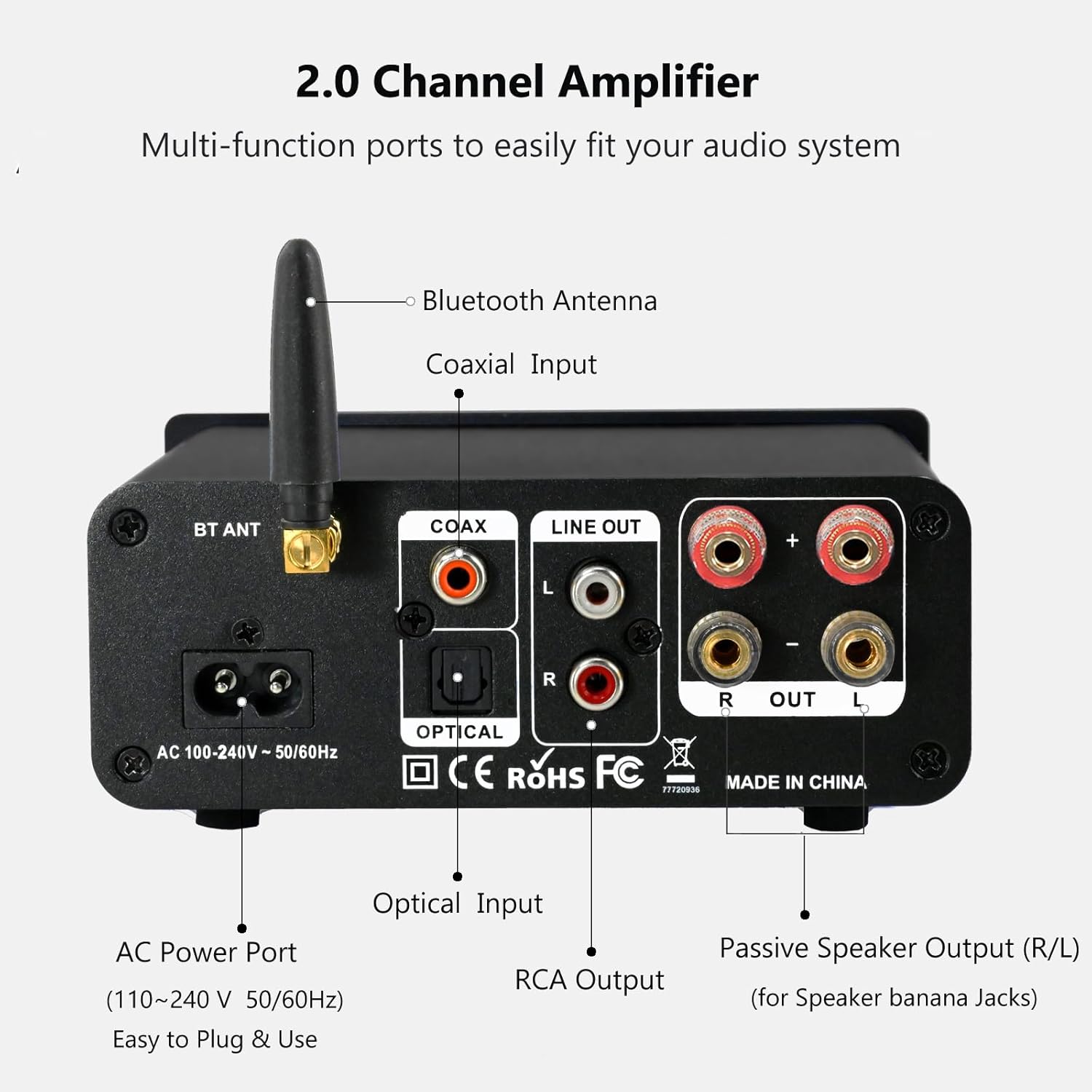
The rear panel provides connections for the Bluetooth antenna, Coaxial and Optical inputs, RCA Line Out, passive speaker outputs, and the AC power port.
- BT ANT (Bluetooth antena): Connect the included Bluetooth antenna for optimal wireless range and stability.
- COAX (Coaxial Input): Digital audio input for devices with a coaxial output.
- OPTICAL (Optical Input): Digital audio input for devices with an optical (Toslink) output.
- LINE OUT (RCA L/R): Analog audio output for connecting to powered speakers or a subwoofer.
- PASSIVE SPEAKER OUTPUT (R/L): Connect passive speakers using banana plugs or bare speaker wire.
- AC POWER PORT: Connect the supplied AC power cord (100-240V ~ 50/60Hz).
5. Postavljanje
5.1 Spajanje zvučnika

The LONPOO Mini Hi-Fi Amplifier seamlessly integrates with your home audio setup, providing clear sound to passive bookshelf speakers.
- Pasivni zvučnici: Spojite svoje pasivne zvučnike za policu s knjigama na PASSIVE SPEAKER OUTPUT (R/L) terminals on the rear panel. Ensure correct polarity (+ to + and - to -) for each speaker. You can use banana plugs or strip the speaker wire ends and insert them into the terminals.
- Powered Speakers/Subwoofer: If you wish to connect powered speakers or a subwoofer, use an RCA cable to connect them to the LINE OUT (RCA L/R) priključci na stražnjoj ploči.
5.2 Spajanje audio izvora
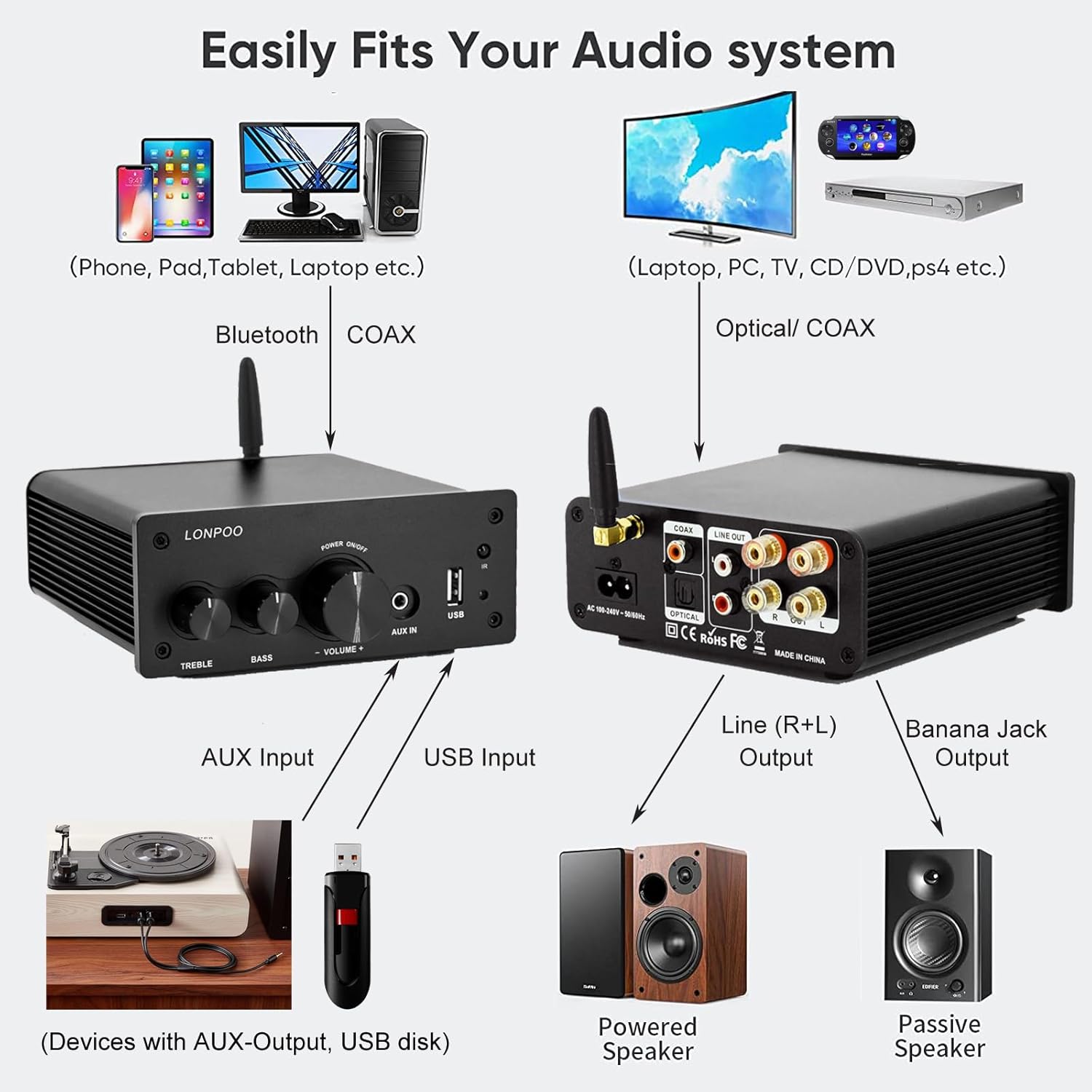
This diagram illustrates how the amplifier connects to a wide range of audio sources and output devices, including phones, PCs, TVs, CD players, powered speakers, and passive speakers.
- Bluetooth: Ensure the Bluetooth antenna is connected to the BT ANT luka.
- AUX ulaz: Connect your smartphone, tablet, or other audio device using a 3.5mm audio cable to the POMOĆNI IN priključak na prednjoj ploči.
- USB ulaz: Umetnite USB flash pogon koji sadrži MP3 ili WAV audio files u USB ulaz priključak na prednjoj ploči.
- Optički ulaz: Connect your TV, CD player, or game console with an optical output to the OPTIČKI port on the rear panel using the provided optical cable.
- Koaksijalni ulaz: Connect your TV, DVD player, or other audio source with a coaxial output to the NAGOVORITI priključak na stražnjoj ploči.
5.3 Priključak za napajanje
Spojite priloženi kabel za napajanje izmjeničnom strujom na MJENJAČNA LUKA on the rear panel of the amplifier, then plug the other end into a wall outlet.
6. Upute za rad
6.1 Uključivanje/isključivanje
Za napajanje ampLifier, dugi pritisak the Višenamjenski gumb on the front panel. The indicator light will illuminate. To power off, dugi pritisak the knob again.
6.2 Odabir ulaza
To select an audio input source, kratko pritisnite the Višenamjenski gumb. Each short press will cycle through the available inputs: Bluetooth, AUX, USB, Coaxial, and Optical. The Svjetlo indikatora will change color to reflect the active input mode (refer to Section 4.1 for color codes).
6.3 Podešavanje glasnoće
Zakrenite Višenamjenski gumb clockwise to increase the volume and counter-clockwise to decrease it.
6.4 Kontrola tona
Koristite SOPRANO i BASS knobs on the front panel to adjust the high and low frequencies of the audio output according to your preference.
6.5 Bluetooth uparivanje

Connect your smartphone or other Bluetooth-enabled devices wirelessly to the amplifier for convenient audio streaming.
- Ensure the Bluetooth antenna is securely connected.
- Uključite amplifier and select the Bluetooth input mode (the indicator light will turn blue).
- Na uređaju s omogućenom Bluetooth vezom (npr. pametnom telefonu, tabletu) potražite dostupne Bluetooth uređaje.
- Select "LONPOO AMP-615" from the list to pair.
- Nakon što se upari, amplifier will play a confirmation sound, and you can stream audio wirelessly.
6.6 Reprodukcija s USB-a

The amplifier supports direct audio input via 3.5mm AUX and USB, allowing for plug-and-play functionality with various devices.
Umetnite USB flash pogon u USB ulaz luka. The amplifier will automatically detect and begin playing supported audio files (MP3, WAV). Use the remote control for playback functions like play/pause, next/previous track.
6.7 Daljinski upravljač
Priloženi daljinski upravljač omogućuje praktično upravljanje amplifier from a distance. Functions include:
- Uključivanje/isključivanje
- Pojačavanje/stišavanje glasnoće
- Isključi zvuk
- Input Source Selection (BT, AUX, USB, COAX, OPT)
- USB Playback Controls (Play/Pause, Next/Previous Track)
7. Rješavanje problema
If you encounter any issues with your LONPOO Mini Hi-Fi Amplifier, please refer to the following troubleshooting guide:
| Problem | Mogući uzrok | Otopina |
|---|---|---|
| Nema zvuka |
|
|
| Loša kvaliteta zvuka (izobličenje, niska glasnoća) |
|
|
| Problemi s Bluetooth vezom |
|
|
| Optical/Coaxial audio dropouts or no sound |
|
|
| Pjevušenje ili zujanje |
|
|
8. Specifikacije
| Broj modela | AMP-615 |
| Izlazna snaga | 100W + 100W (200W total) |
| Kanali | 2.0 Stereo |
| Bluetooth verzija | 5.3 |
| Unosi | Bluetooth, Optical, Coaxial, USB, 3.5mm AUX |
| Izlazi | RCA Line Out (L/R), Passive Speaker Output (Banana Jack compatible) |
| Napajanje | AC 100-240V ~ 50 / 60Hz |
| Dimenzije (Š x V x D) | 132 mm x 55 mm x 140 mm (otprilike 5.19 x 2.16 x 5.51 inča) |
| Težina | 1.09 kg (približno 2.4 lbs) |
| Uključene komponente | Hi-Fi Amplifier, AC Cable, Remote Control, Optical Cable |
9. Održavanje
- Čišćenje: Isključite napajanje prije čišćenja. Za brisanje vanjske strane uređaja upotrijebite meku, suhu krpu. ampzaptivač. Ne koristite abrazivna sredstva za čišćenje ili otapala.
- Skladištenje: Ako pohranjujete ampAko uređaj ne koristite dulje vrijeme, isključite ga iz napajanja i pohranite na hladnom i suhom mjestu.
- Uprava za kabele: Provjerite jesu li svi kabeli uredno posloženi i nisu pod napetošću kako biste spriječili oštećenja.
10. Jamstvo i podrška
This product comes with a standard manufacturer's warranty. For specific warranty details, please refer to the documentation provided with your purchase or contact your retailer. For technical support, troubleshooting assistance, or inquiries regarding spare parts, please contact LONPOO customer service or your authorized dealer. Information regarding spare parts availability is currently unavailable.