
1. Uvod
The IMIKI FRAME LITE ST2 is a versatile smartwatch designed for daily use, offering a blend of style and functionality. It features a 1.96-inch IPS display, Bluetooth connectivity, and various health monitoring capabilities. This manual provides essential information for operating and maintaining your device.
2. Sadržaj paketa
Molimo provjerite jesu li svi artikli prisutni u vašem paketu:
- IMIKI FRAME LITE ST2 Smartwatch
- Magnetski kabel za punjenje
- korisnički priručnik
3. Uređaj prekoview
Familiarize yourself with the main components of your smartwatch.
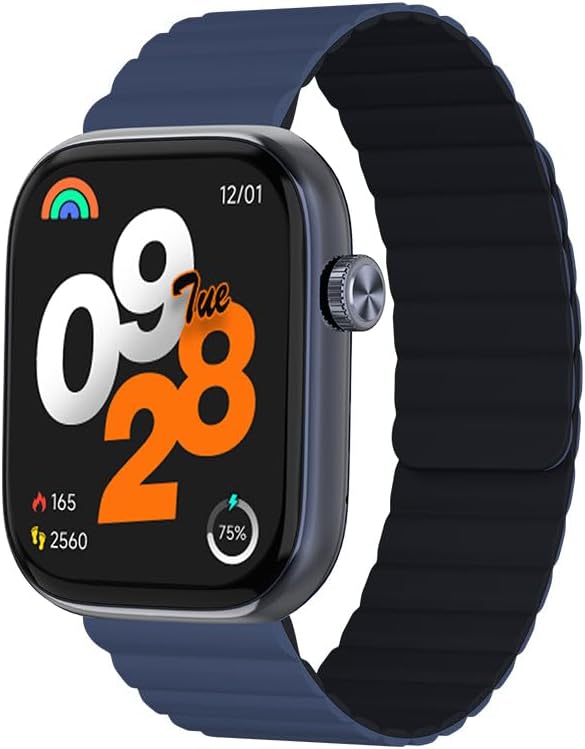
Slika 1: Ispred view of the IMIKI FRAME LITE ST2 Smartwatch, displaying the time, date, and activity metrics on its 1.96-inch IPS screen. The watch features a blue case and a blue magnetic strap.

Slika 2: Strana view of the IMIKI FRAME LITE ST2 Smartwatch, highlighting its slim profile and the integrated crown button for navigation and control.
4. Postavljanje
4.1 Punjenje pametnog sata
Before initial use, fully charge your IMIKI FRAME LITE ST2 Smartwatch.
- Spojite magnetski kabel za punjenje na utičnice za punjenje na stražnjoj strani pametnog sata.
- Uključite USB kraj kabela u standardni USB adapter za napajanje (nije uključen) ili USB priključak računala.
- The watch display will indicate charging status. A full charge takes approximately 2 hours.
A fully charged 250 mAh battery provides up to 15 days of typical use or 5 days of intensive use.
4.2 Instaliranje prateće aplikacije
To unlock the full features of your smartwatch, download and install the companion application on your smartphone.
- Scan the QR code provided in the quick start guide or search for the official IMIKI app in the Apple App Store (for iOS) or Google Play Store (for Android).
- Instalirajte aplikaciju na svoj pametni telefon.
- Slijedite upute na zaslonu za izradu računa i postavljanje vašeg profesionalca.file.
4.3 Uparivanje s vašim pametnim telefonom
Ensure Bluetooth is enabled on your smartphone and the smartwatch is sufficiently charged.
- Open the IMIKI companion app on your smartphone.
- U aplikaciji idite do odjeljka 'Uređaj' ili 'Dodaj uređaj'.
- The app will search for available devices. Select 'IMIKI FRAME LITE ST2' from the list.
- Potvrdite zahtjev za uparivanje i na pametnom telefonu i na pametnom satu ako se to od vas zatraži.
- Nakon uparivanja, pametni sat će sinkronizirati podatke s vašim telefonom.
5. Upravljanje pametnim satom
5.1 Osnovna navigacija
- Zaslon osjetljiv na dodir: Prijeđite prstom lijevo, desno, gore ili dolje za navigaciju kroz izbornike i obavijesti. Dodirnite za odabir stavki.
- Bočni gumb/Kruna: Press to wake the screen, return to the home screen, or access the app list. Rotate (if applicable) to scroll through lists.
5.2 Upravljanje pozivima
With Bluetooth 5.3 connectivity, you can manage calls directly from your smartwatch when paired with your smartphone.
- Odgovaranje na pozive: Dodirnite zelenu ikonu na zaslonu sata kada se prikaže dolazni poziv.
- Odbijanje poziva: Tap the red icon to reject an incoming call.
- Glasovni asistent: Access your smartphone's voice assistant directly from the watch for hands-free commands.
5.3 Praćenje zdravlja i kondicije
The IMIKI FRAME LITE ST2 is equipped with sensors to track your health and fitness activities.
- Nadziranje otkucaja srca: The optical sensor continuously monitors your heart rate. View podaci u stvarnom vremenu na satu ili u aplikaciji.
- Mjerenje kisika u krvi (SpO2): Izmjerite razinu zasićenosti krvi kisikom. Za točna očitanja provjerite je li sat čvrsto pričvršćen na zapešće.
- Načini vježbanja: Choose from 105 supported workout modes to track specific activities. The watch records statistics such as duration, calories burned, and heart rate during exercise.
- Praćenje spavanja: Monitor your sleep patterns, including deep sleep, light sleep, and wake times.
NIKADA Prilagodba
Personalize your smartwatch experience through the companion app.
- Lica za gledanje: Select from a variety of watch faces or create custom ones using the app.
- Postavke obavijesti: Manage which app notifications appear on your smartwatch.
6. Održavanje
6.1 Čišćenje
Regular cleaning helps maintain the smartwatch's appearance and functionality.
- Obrišite zaslon i tijelo sata mekom krpom koja ne ostavlja dlačice.
- Za tvrdokornu prljavštinu, lagano dampisperite krpu vodom. Izbjegavajte korištenje jakih kemikalija ili abrazivnih materijala.
- Povremeno čistite kontakte za punjenje kako biste osigurali pravilno punjenje.
6.2 Otpornost na vodu
The IMIKI FRAME LITE ST2 has an IP68 water resistance rating, meaning it is protected against dust ingress and can withstand immersion in water up to 1.5 meters for 30 minutes. It is suitable for daily use, such as hand washing or light rain. However, it is not recommended for swimming, diving, or exposure to high-pressure water.
6.3 Skladištenje
When not in use for extended periods, store the smartwatch in a cool, dry place. Ensure it has some charge to prevent deep discharge of the battery.
7. Rješavanje problema
Ako imate problema s pametnim satom, pogledajte sljedeća uobičajena rješenja:
- Sat se ne uključuje: Provjerite je li sat potpuno napunjen. Spojite ga na punjač na najmanje 10 minuta.
- Ne može se upariti sa pametnim telefonom:
- Provjerite je li Bluetooth omogućen na vašem telefonu.
- Provjerite je li sat unutar dometa vašeg telefona.
- Ponovno pokrenite i pametni sat i pametni telefon.
- Clear the Bluetooth cache on your phone (if applicable).
- Netočni zdravstveni podaci: Pazite da sat čvrsto prianja uz zapešće, ne prečvrsto ili prelabavo. Očistite senzor na stražnjoj strani sata.
- Obavijesti se ne prikazuju: Check notification settings in the companion app and on your smartphone. Ensure the app is running in the background.
- Zaslon ne reagira: Try restarting the smartwatch by pressing and holding the side button for several seconds.
8. Specifikacije
| Značajka | Specifikacija |
|---|---|
| Marka | IMIKI |
| Naziv modela | IMIKI FRAME LITE ST2 |
| Veličina zaslona | 1.96 inča |
| Vrsta zaslona | IPS |
| Tehnologija povezivanja | Bluetooth 5.3 |
| Kompatibilni uređaji | Smartphone (Android & iOS) |
| Kapacitet baterije | 250 mAh |
| Tipična upotreba Trajanje baterije | Do 15 dana |
| Intensive Usage Battery Life | Do 5 dana |
| Vrijeme punjenja | Otprilike 2 sata |
| Ocjena vodootpornosti | IP68 |
| Praćenje zdravlja | Blood Oxygen, Heart Rate |
| Načini vježbanja | 105 |
| Vrsta remena | Magnetski |
9. Jamstvo i podrška
For warranty information and customer support, please refer to the warranty card included in your product packaging or visit the official IMIKI webstranicu. Sačuvajte račun kao dokaz o kupnji.
If you require further assistance or have questions not covered in this manual, please contact IMIKI customer service through their official channels.