
1. Uvod
This instruction manual provides essential information for the safe and effective use of your GT POWER AC Adapter, model 602. This power supply is designed to be compatible with the Verizon WNC-CR200A Gateway Router. Please read this manual thoroughly before use and retain it for future reference.
2. Sigurnosne informacije
UPOZORENJE: Kako biste smanjili rizik od strujnog udara, požara ili ozljede, pridržavajte se sljedećih sigurnosnih mjera opreza:
- Ensure the power adapter is used with devices that match its voltage i trenutne specifikacije.
- Do not expose the adapter to water, rain, or excessive moisture.
- Ne rastavljajte niti modificirajte adapter. Za sve servisne radove obratite se kvalificiranom osoblju.
- Avoid placing the adapter in areas with poor ventilation or near heat sources.
- Inspect the adapter and cable for damage before each use. Do not use if damaged.
- Čuvati izvan dohvata djece.
- Isključite adapter iz utičnice kada ga ne koristite dulje vrijeme.
Ovaj adapter ima Over Voltage Protection (OVP), Over Current Protection (OCP), and Short Circuit Protection (SCP) to ensure safe operation.
3. Sadržaj paketa
- 1 x GT POWER AC adapter (Model 602)
4. Proizvod je gotovview
The GT POWER AC Adapter is a compact and reliable power supply designed for specific networking equipment. It converts standard AC wall power to the DC power required by your device.

Slika 4.1: Ispred view of the GT POWER AC Adapter, showing the power prongs and the output cable.

Slika 4.2: Strana view of the GT POWER AC Adapter, highlighting the barrel connector at the end of the output cable.
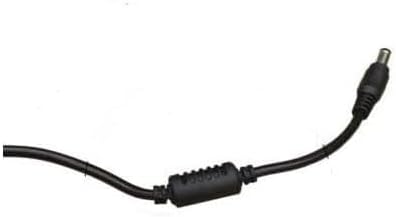
Slika 4.3: Krupni plan view of the barrel connector, which plugs into the compatible device.
5. Postavljanje
Follow these steps to properly connect your GT POWER AC Adapter to your Verizon WNC-CR200A Gateway Router.
- Provjerite kompatibilnost uređaja: Before connecting, ensure your device is a Verizon WNC-CR200A Gateway Router. The adapter is specifically designed for this model. You can often find the model number on a label at the bottom or back of your router.

Slika 5.1: Example of a Verizon WNC-CR200A Gateway Router's bottom label, indicating the model number for compatibility verification.
- Povežite se s uređajem: Insert the barrel connector of the GT POWER AC Adapter firmly into the power input port of your Verizon WNC-CR200A Gateway Router.
- Spojite na utičnicu: Plug the AC prongs of the adapter into a standard 100-240V AC wall outlet.
- Uključivanje: Once connected, your Verizon WNC-CR200A Gateway Router should power on automatically or can be turned on using its power button, if available.
6. Operativni
The GT POWER AC Adapter operates automatically once connected. It provides a stable power supply to your compatible device. No user interaction is required for its operation beyond initial connection.
- Ensure the adapter is always connected to a functioning power outlet.
- Avoid disconnecting the adapter during critical operations of your router to prevent data loss or system instability.
7. Održavanje
Proper maintenance ensures the longevity and safe operation of your AC adapter.
- Čišćenje: Disconnect the adapter from the power outlet and the device before cleaning. Use a soft, dry cloth to wipe the exterior. Do not use liquid cleaners or solvents.
- Skladištenje: When not in use, store the adapter in a cool, dry place, away from direct sunlight and extreme temperatures. Avoid tightly coiling the cable to prevent damage.
- Održavanje kabela: Do not bend, twist, or pull the cable excessively. Avoid placing heavy objects on the cable.
8. Rješavanje problema
If you encounter issues with your GT POWER AC Adapter, refer to the following common problems and solutions:
| Problem | Mogući uzrok | Otopina |
|---|---|---|
| Uređaj se ne uključuje. |
|
|
| Adapter je neobično vruć. |
|
|
9. Specifikacije
| Značajka | Detalj |
|---|---|
| Broj modela | 602 |
| Marka | GT POWER |
| Ulazni voltage | AC 100-240 V (50/60 Hz) |
| Izlazni voltage | DC 12V |
| Izlazna struja | 3A |
| Wattage | 36 vata |
| Vrsta konektora | Barel |
| Duljina kabela | 59 inča (otprilike 1.5 metra) |
| Zaštitne značajke | OVP (preko voltage zaštita), OCP (zaštita od preopterećenja strujom), SCP (zaštita od kratkog spoja) |
| Kompatibilni uređaji | Verizon WNC-CR200A Gateway Router CR200A WiFi6 NKR-LV65C-T3 |
10. Jamstvo i podrška
Ovaj GT POWER AC adapter dolazi s Jedna godina jamstva od datuma kupnje. Osim toga, 30-dnevno jamstvo povrata novca nudi se.
For technical support, warranty claims, or further assistance, please contact your retailer or the manufacturer directly. Please have your purchase information and product model number (602) available when contacting support.
For more information, you may refer to the seller's contact details provided at the point of purchase.