
1. Uvod
Thank you for choosing the Sharkoon AK6 RGB ATX PC Case. This manual provides essential information for the proper installation, operation, and maintenance of your new PC case. Please read this guide thoroughly before beginning the assembly process to ensure optimal performance and longevity of your components.
2. Sigurnosne informacije
- Always disconnect the power supply from the wall outlet before installing or removing any components inside the PC case.
- Handle tempered glass panels with care. They are fragile and can break if dropped or subjected to impact.
- Avoid exposing the case to extreme temperatures, humidity, or direct sunlight.
- Male dijelove i vijke držite izvan dohvata djece.
- Ensure proper grounding to prevent electrostatic discharge (ESD) damage to sensitive electronic components.
3. Sadržaj paketa
Molimo provjerite jesu li svi artikli prisutni u vašem paketu:
- Sharkoon AK6 RGB ATX PC kućište
- Accessory box (containing screws, cable ties, and other small parts)
- Korisnički priručnik (ovaj dokument)
4. Proizvod je gotovview
The Sharkoon AK6 RGB ATX PC Case is designed with a modern glass aesthetic, featuring seamless integration of tempered glass on the front and side panels. It includes four pre-installed 120mm addressable RGB PWM fans for optimal airflow and visual appeal. The case supports a wide range of components, including BTF motherboards, and offers ample space for high-performance hardware.

Figure 4.1: Front interior view of the Sharkoon AK6 RGB PC case, showcasing the pre-installed addressable RGB fans and the spacious main chamber.

Slika 4.2: Kutno view of the Sharkoon AK6 RGB PC case, highlighting the tempered glass side panel and the top mesh for ventilation.

Slika 4.3: Stražnji dio view of the Sharkoon AK6 RGB PC case, showing the I/O shield cutout, rear exhaust fan mount, and expansion slots.
Prednja I/O ploča
The front I/O panel is located on the side of the case and includes:
- Gumb za napajanje
- Gumb za resetiranje
- 2 x USB Ports (Type-A)
- 1 x USB Type-C priključak
- Audio Jacks (TRRS)
5. Postavljanje i instalacija
Follow these steps to install your components into the Sharkoon AK6 RGB PC Case.
5.1 Priprema slučaja
- Postavite kućište na ravnu, stabilnu površinu.
- Carefully remove the tempered glass side panel by unscrewing the thumb screws at the rear and gently pulling the panel away.
- Remove the rear metal side panel by unscrewing the thumb screws.
5.2 Instalacija matične ploče
The AK6 RGB supports Mini-ITX, Micro-ATX, ATX, and BTF motherboards.
- Install the I/O shield into the cutout at the rear of the case (if not pre-installed on your motherboard).
- Align your motherboard with the standoffs inside the case. Ensure all standoffs match the motherboard's mounting holes.
- Pričvrstite matičnu ploču odgovarajućim vijcima iz kutije s priborom.
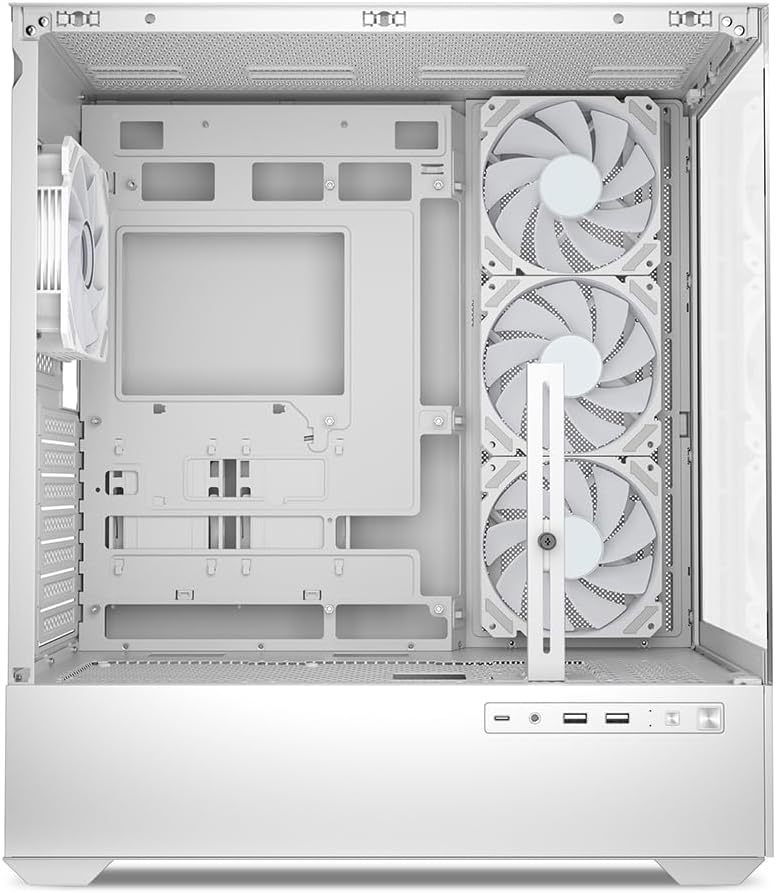
Slika 5.1: Unutrašnjost view of the Sharkoon AK6 RGB PC case, illustrating the motherboard tray, cable management cutouts, and front fan mounting points.
5.3 Instalacija napajanja
The case features a bottom-mount power supply design.
- Slide the power supply unit (PSU) into the dedicated compartment at the bottom rear of the case.
- Align the PSU with the screw holes at the rear of the case.
- Secure the PSU with the provided screws.
5.4 Instalacija uređaja za pohranu
The AK6 RGB supports up to two 3.5" HDDs or four 2.5" SSDs.
- Za 3.5" tvrde diskove: Locate the drive cages beneath the PSU shroud. Slide the HDD into a drive tray and secure it with screws.
- Za 2.5" SSD-ove: SSDs can be mounted on the dedicated brackets behind the motherboard tray or on the 3.5" drive trays using adapter screws.
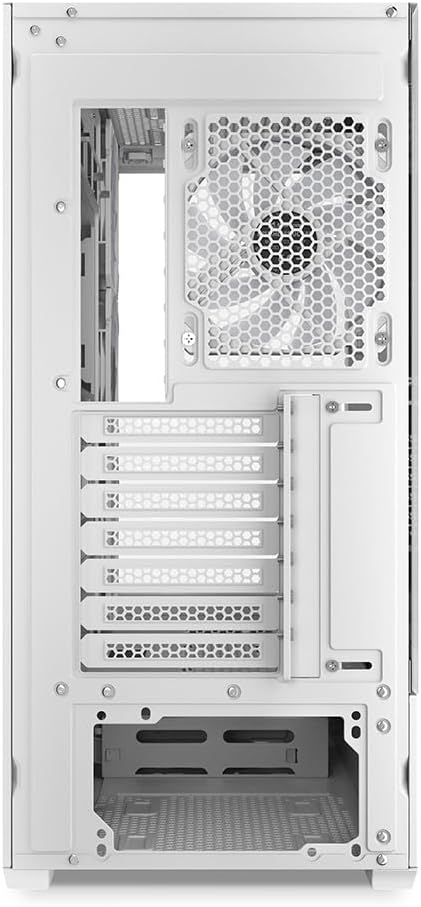
Figure 5.2: Rear interior view of the Sharkoon AK6 RGB PC case, detailing the drive cages for 3.5-inch HDDs and 2.5-inch SSDs, and the power supply shroud area.
5.5 Instalacija grafičke kartice i kartice za proširenje
- Uklonite potrebne poklopce utora za proširenje na stražnjoj strani kućišta.
- Insert your graphics card or other expansion cards into the appropriate PCIe slots on your motherboard.
- Secure the cards with screws. The case includes a rubberized graphics card support for larger cards.
5.6 CPU Cooler and Radiator Installation
The case supports CPU coolers up to 17 cm in height and allows for extensive liquid cooling setups.
- Instalirajte hladnjak procesora prema uputama proizvođača.
- For liquid cooling, the case can accommodate a 360mm radiator at the top and an additional 280mm radiator.
5.7 Upravljanje kabelima
Utilize the cable management cutouts and tie-down points behind the motherboard tray to route and secure cables. This improves airflow and aesthetics.
6. Upute za rad
6.1 Uključivanje
After all components are installed and cables are connected, replace the side panels. Connect the power cable to your PSU and a wall outlet, then press the power button on the front I/O panel to start your system.
6.2 RGB Fan Control
The AK6 RGB comes with four pre-installed addressable RGB PWM fans. These fans are connected to an RGB controller which also provides connections for up to four LED elements and four PWM fans. The RGB lighting can typically be controlled via your motherboard's RGB software (if compatible) or through a dedicated button on the case (if present and connected).
6.3 Optimizacija protoka zraka
The case is designed for ideal airflow, with three inverted fans drawing air from the side into the case. The top and rear fan mounts allow for additional exhaust fans. Ensure proper fan orientation for optimal cooling performance.

Slika 6.1: Nprample of a fully assembled system within the Sharkoon AK6 RGB PC case, featuring various components and active RGB lighting.
7. Održavanje
Regular maintenance helps ensure the longevity and performance of your PC components.
- Filteri za prašinu: Periodically clean the removable dust filters (e.g., on the top and bottom) to maintain optimal airflow and prevent dust buildup inside the case. Use compressed air or a soft brush.
- Staklene ploče: Kaljeno staklo čistite mekom krpom koja ne ostavlja dlačice i sredstvom za čišćenje stakla. Izbjegavajte abrazivne materijale koji bi mogli ogrebati površinu.
- Čišćenje interijera: Use compressed air to remove dust from internal components and fans. Ensure the system is powered off and unplugged before cleaning.
8. Rješavanje problema
If you encounter issues with your PC case, refer to the following common troubleshooting steps:
- Bez napajanja: Ensure the power supply is properly connected to the wall outlet and the motherboard. Check all internal power cables (24-pin ATX, 8-pin CPU, PCIe power).
- Ventilatori se ne okreću/RGB ne radi: Verify that all fan and RGB cables are correctly connected to the motherboard or the included RGB controller. Check your motherboard's BIOS/UEFI settings or RGB software for fan speed and lighting control.
- Front I/O Ports Not Functioning: Confirm that the front panel connectors (USB, audio, power/reset switches) are correctly plugged into the corresponding headers on your motherboard.
- Pregrijavanje: Ensure all fans are spinning correctly and oriented for proper airflow. Clean dust filters and internal components. Verify CPU cooler installation.
For further assistance, please contact Sharkoon support.
9. Specifikacije
| Značajka | Specifikacija |
|---|---|
| Marka | Sharkoon |
| Naziv modela | AK6 RGB |
| Broj modela | C-AK6W |
| Vrsta kućišta | ATX toranj |
| Boja | Bijela |
| Materijal | Kaljeno staklo |
| Kompatibilnost matične ploče | Mini ITX, Micro ATX, ATX, BTF |
| Vrsta montaže napajanja | Donji nosač |
| Metoda hlađenja | Zrak |
| Unaprijed instalirani ventilatori | 4 x 120mm Addressable RGB PWM Fans |
| Maksimalna visina CPU hladnjaka | 17 cm |
| Maksimalna duljina grafičke kartice | 41 cm (with rubberized support) |
| Maksimalna duljina PSU | 23.5 cm |
| Podrška radijatora | Top: up to 360mm, Additional: up to 280mm |
| Drive Bays | 2 x 3.5" HDD ili 4 x 2.5" SSD |
| Prednji I / O priključci | 2 x USB Type-A, 1 x USB Type-C, Audio (TRRS) |
| Težina artikla | 6.1 kilogram |
| Posebne značajke | RGB Lighting, Unique Glass Appearance, BTF Motherboard Support |
10. Jamstvo
Sharkoon products are manufactured to high quality standards. For detailed warranty information, please refer to the warranty card included with your product or visit the official Sharkoon webstranica. Jamstvo obično pokriva nedostatke u materijalima i izradi pri normalnoj uporabi.
11. Podrška
If you require technical assistance or have questions regarding your Sharkoon AK6 RGB ATX PC Case, please visit the official Sharkoon website for support resources, FAQs, and contact information. You may also find updated drivers or software for the RGB controller there.
Webstranica: www.sharkoon.com