
Uvod
Welcome to the user manual for your new Generic M59 Pro Max Smartwatch. This guide provides essential information on setting up, operating, maintaining, and troubleshooting your device. The M59 Pro Max Smartwatch is designed to enhance your daily life with features like advanced activity tracking, call support, smart notifications, and various sport modes.
Sadržaj paketa
Molimo provjerite jesu li svi sljedeći artikli uključeni u vaš paket:
- M59 Pro Max Smartwatch
- 7 Random Straps (Silicone, Rubber, Nylon)
- Kabel za bežično punjenje
- korisnički priručnik

Image: The M59 Pro Max Smartwatch and its accessories, including a variety of interchangeable straps, neatly arranged in its packaging.
Postavljanje
1. Punjenje pametnog sata
Before first use, fully charge your smartwatch. Place the smartwatch on the wireless charging cable. The screen will indicate charging status. A full charge typically takes 2-3 hours.
2. Uključivanje/isključivanje
- Za uključivanje: Pritisnite i držite bočnu tipku dok se zaslon ne osvijetli.
- Za isključivanje: Pritisnite i držite bočnu tipku, a zatim na zaslonu odaberite 'Isključi'.
3. Instalacija i uparivanje aplikacije
To unlock the full potential of your smartwatch, download the companion fitness tracker application on your smartphone or tablet. Refer to the Quick Start Guide for the specific app name or QR code.
- Download and install the app from your device's app store.
- Omogućite Bluetooth na svom pametnom telefonu.
- Open the app and follow the on-screen instructions to pair your M59 Pro Max Smartwatch. Ensure the smartwatch is powered on and near your phone during pairing.
Upute za rad
Osnovna navigacija
The M59 Pro Max features a 2-inch HD touchscreen display for intuitive interaction. Swipe left, right, up, or down to navigate through menus and access different functions. Tap to select items.
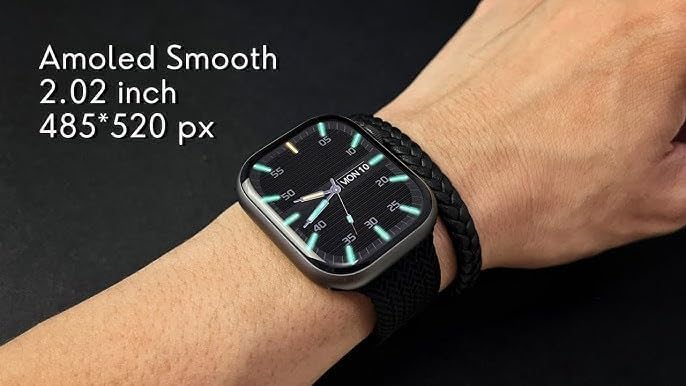
Image: The M59 Pro Max Smartwatch worn on a wrist, showcasing its vibrant 2.02-inch AMOLED display with a resolution of 485x520 pixels.
Pozivi i obavijesti
Once paired via Bluetooth, you can manage calls and receive notifications directly on your smartwatch.
- Upućivanje poziva: Use the dialer on the watch or access your phone's contacts through the watch interface.
- Primanje poziva: Odgovarajte ili odbijajte dolazne pozive izravno sa svog zapešća.
- Obavijesti: View messages, app alerts, and other notifications.
Fitness Tracking and Sport Modes
The smartwatch offers comprehensive fitness tracking and multiple sport modes.
- Praćenje aktivnosti: Prati korake, udaljenost i potrošene kalorije.
- Monitor otkucaja srca: Pruža podatke o otkucajima srca u stvarnom vremenu.
- Praćenje spavanja: Analyzes sleep patterns and duration.
- Sportski načini rada: Select from various activities like running, cycling, and more to track specific workout data.
NFC and GPT Features
The M59 Pro Max supports NFC for convenient transactions and GPT for enhanced interaction. Refer to the companion app for specific setup and usage instructions for these advanced features.
Održavanje
Čišćenje
Wipe the smartwatch and straps regularly with a soft, dry cloth. For stubborn dirt, a slightly damp Može se koristiti krpa. Izbjegavajte jake kemikalije ili abrazivne materijale.
Vodootpornost
The M59 Pro Max is water repellent. This means it can withstand splashes, sweat, and light rain. It is not suitable for swimming, showering, or diving. Avoid prolonged exposure to water.
Njega remena
The included straps are made of silicone, rubber, and nylon. Clean them according to their material type. Ensure straps are dry before reattaching to the watch.
Rješavanje problema
Ako imate problema s pametnim satom, pokušajte sljedeća rješenja:
- Smartwatch not powering on: Provjerite je li uređaj potpuno napunjen.
- Ne može se upariti sa pametnim telefonom: Make sure Bluetooth is enabled on your phone and the smartwatch is within range. Try restarting both devices.
- Netočni podaci o kondiciji: Ensure the watch is worn snugly on your wrist. Calibrate the app if available.
- Obavijesti se ne prikazuju: Check app permissions on your smartphone and ensure notifications are enabled for the companion app.
- Zaslon ne reagira: Try restarting the smartwatch.
For further assistance, please refer to the support section of the companion application or contact your retailer.
Tehnički podaci
| Naziv modela | M59 Pro Max |
| Naziv marke | Generički |
| Operativni sustav | Vlasnički OS |
| Veličina zaslona | 2 inča |
| Vrsta zaslona | OLED |
| Rezolucija | 240 x 280 |
| Tehnologija povezivanja | Bluetooth, Cellular (LTE) |
| Standard bežične komunikacije | Bluetooth |
| Značajke povezivanja | NFC, Bluetooth, Cellular |
| Posebne značajke | Advanced Activity Tracking, Call and Chat Support |
| Sastav baterije | Litij ion |
| GPS | Nema GPS-a |
| Oblik stavke | Krug |
| Vrsta materijala trake | Silicone, Rubber, Nylon |
| Razina vodootpornosti | Vodootporno |
| Sportska vrsta | Višestruki sportovi |
| Unos ljudskog sučelja | Zaslon osjetljiv na dodir |
| Podržana aplikacija | Praćenje fitnessa |
| Vrsta kontrolera | Glasovno upravljanje |
| Vrsta brojila | Heart Rate Monitor, Sleep Duration, Step Count |
| Vrsta zatvaranja | Kopča |
| Boja | Crna |
| Boja trake | Crna |
| Kompatibilni uređaji | Pametni telefon, tablet |
| Kompatibilni modeli telefona | All current smartphone models |
Jamstvo i podrška
Informacije o jamstvu
This product is provided without an explicit warranty. Please check with your retailer regarding their return and exchange policies.
Korisnička podrška
For any questions or issues not covered in this manual, please contact the retailer where you purchased the product or refer to the support section within the companion application.