
IFYOO IFYOO-G53-Black3
IFYOO G53 Wireless Vertical Ergonomic Mouse
Priručnik s uputama
Marka: IFYOO | Model: IFYOO-G53-Black3
1. Uvod
The IFYOO G53 Wireless Vertical Ergonomic Mouse is designed to provide superior comfort and enhance productivity. Its unique vertical design promotes a natural handshake position, reducing wrist strain and discomfort often associated with traditional mice. This tri-mode mouse offers versatile connectivity options and customizable features to adapt to various computing environments.

Figure 1.1: IFYOO G53 Wireless Vertical Ergonomic Mouse.
2. Ključne značajke
- Superior Ergonomic Design: Keeps your hand in a natural handshake position to reduce wrist stress and pain, helping to prevent Carpal Tunnel Syndrome.
- Trostruka povezivost: Supports 2.4GHz wireless, Bluetooth 5.1, and wired USB-C connections, allowing seamless switching between multiple devices.
- Podesivi DPI: Max 8400 DPI for smooth and accurate tracking, with multiple DPI settings (500, 1600, 2400, 3200, 4000, 4800, 8400) for precise control.
- Dinamičko RGB osvjetljenje: Features 9 RGB lighting modes for customizable visual effects, which can also be turned off. DPI changes are indicated by logo color.
- 5 Programmable Side Buttons: Boost productivity with shortcuts for forward/backward webpage navigation, changing lighting effects, opening file explorer, or returning to desktop. (Note: Some side button shortcuts may not work with Mac OS, iPad OS, and other operating systems, except for light switch, and are primarily supported on Windows 10/11).
- Punjiva baterija: Built-in 600mAh rechargeable battery with intelligent power saving. Charges via USB-C.

Figure 2.1: Ergonomic design promotes a natural hand position, reducing wrist strain.
3. Sadržaj paketa
Molimo provjerite jesu li svi artikli prisutni u paketu:
- 1x IFYOO G53 Wireless Vertical Ergonomic Mouse
- 1x Korisnički priručnik (ovaj dokument)
- 1x USB kabel za punjenje Type-C
- 1x 2.4 GHz USB Receiver (stored at the bottom of the mouse)
4. Postavljanje
4.1 Punjenje miša
Before first use, it is recommended to fully charge the mouse. Connect the provided USB-C cable to the charging port on the front of the mouse and the other end to a USB power source (e.g., computer USB port, USB wall adapter). The RGB lighting may indicate charging status.
4.2 Povezivanje s vašim uređajem
The G53 mouse offers three connection modes:
- 2.4GHz bežični način rada:
- Locate the 2.4 GHz USB receiver stored in the magnetic compartment at the bottom of the mouse.
- Priključite USB prijamnik u slobodni USB priključak na računalu.
- Slide the mode switch at the bottom of the mouse to the "2.4G" position. The mouse should connect automatically.
- Bluetooth (BT) način rada:
- Slide the mode switch at the bottom of the mouse to the "BT" position.
- On your device (Windows, Mac, iPad OS, Android), go to Bluetooth settings and search for new devices.
- Select "IFYOO G53" from the list of available devices to pair.
- Ožičeni način:
- Connect the provided USB-C cable to the mouse's charging port and the USB-A end to your computer's USB port.
- Slide the mode switch at the bottom of the mouse to the "Wired" position. The mouse will function as a wired device and charge simultaneously.

Figure 4.1: Seamless multi-device connectivity with 2.4G, Wired, and Bluetooth modes.
4.3 Driver Software (Windows Only)
To modify mouse configurations and customize buttons (excluding light switch), driver software is available for Windows OS only. Visit www.ifyoo.net to download the latest driver. This software allows for personalized profiles, macro settings, and advanced RGB control.

Figure 4.2: Professional driver software interface for Windows customization.
5. Upute za rad
5.1 Funkcije gumba
The IFYOO G53 mouse features 10 buttons for enhanced control:

Figure 5.1: Mouse layout and button overview.
- Lijeva tipka (1): Standardna funkcija lijevog klika.
- Scroll Wheel (2): Scroll up/down, middle-click.
- Desna tipka (3): Standardna funkcija desnog klika.
- Gumb DPI (4): Ciklično mijenja DPI postavke.
- Gumb za naprijed (5): Navigira naprijed u web preglednici/aplikacije.
- Backward Button (6): Navigacija unatrag web preglednici/aplikacije.
- Light Effect Button (7): Changes RGB lighting modes.
- File Resource Manager (8): Otvara se File Explorer (Windows only).
- BOSS Button (9): Returns to desktop (Windows only).
- Mode Indicator (10): Displays current connection mode.
- 2.4G Receiver (11): USB dongle for 2.4GHz wireless connection.
- Gumb za način rada (12): Switch between 2.4G, Wired, and BT modes.
Note: Due to system compatibility, functions of buttons 5, 6, 8, and 9 can only be used on Windows OS.
5.2 Podešavanje DPI osjetljivosti
Pritisnite tipku Tipka DPI (4) to cycle through the available DPI settings. Each change in DPI will typically be indicated by a change in the logo's LED color, allowing you to visually confirm your current sensitivity level.
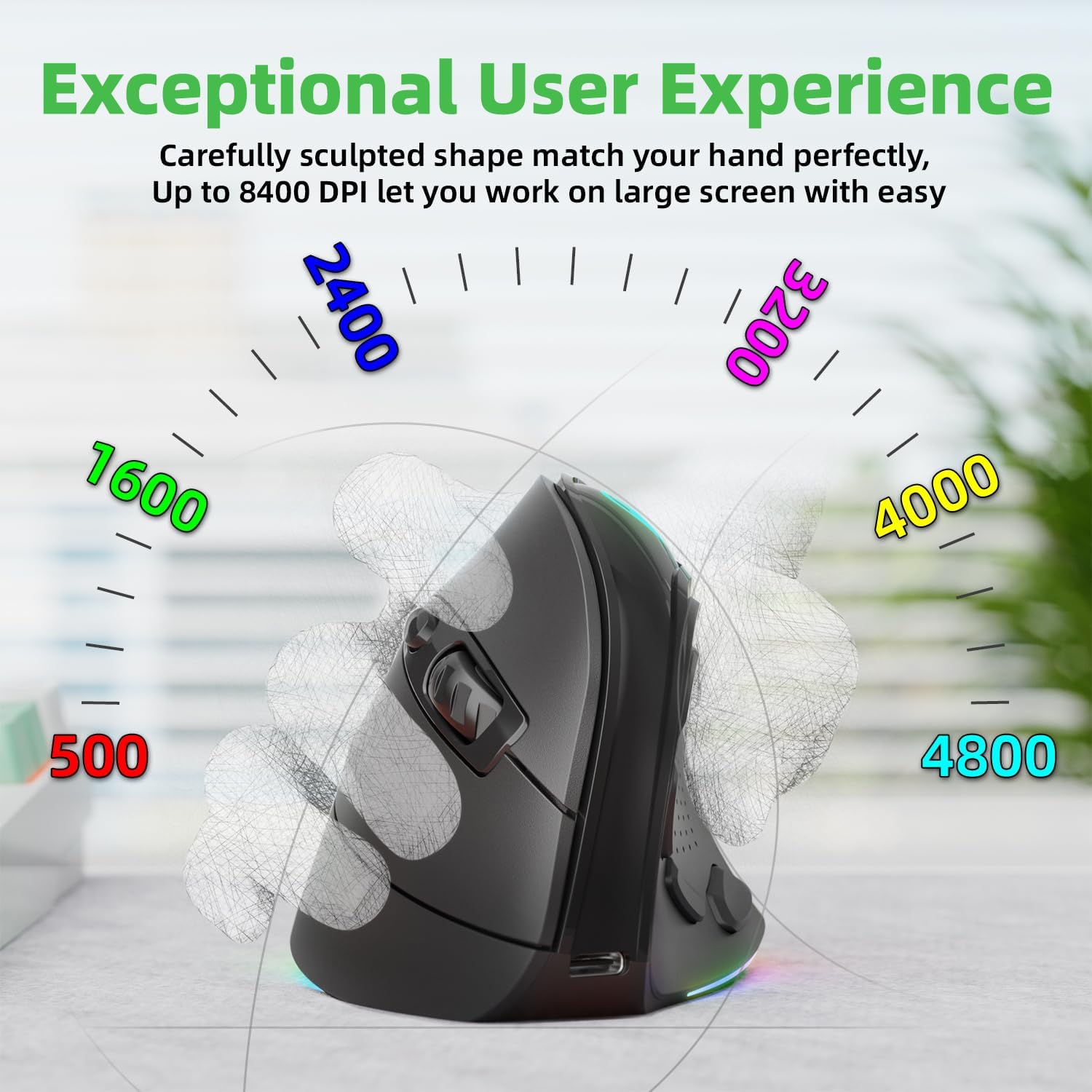
Figure 5.2: Adjustable DPI up to 8400, with logo color indicating current DPI.
5.3 Controlling RGB Lighting
Pritisnite tipku Light Effect Button (7) to cycle through the 9 dynamic RGB lighting modes. Continue pressing to find your preferred effect or to turn the lighting off.
6. Održavanje
- Čišćenje: Za čišćenje miša koristite meku, suhu krpu. Za tvrdokornu prljavštinu, lagano je očistiteampOperite krpu vodom ili blagom otopinom za čišćenje. Izbjegavajte jake kemikalije ili abrazivne materijale.
- Skladištenje: When not in use for extended periods, store the mouse in a cool, dry place. Ensure the 2.4 GHz receiver is stored securely in its compartment at the bottom of the mouse.
- Njega baterije: To prolong battery life, avoid fully discharging the mouse frequently. Charge it when the battery indicator is low.
7. Rješavanje problema
- Miš ne reagira:
- Provjerite je li miš napunjen.
- Check the connection mode switch (2.4G, Wired, BT) is in the correct position.
- For 2.4GHz, ensure the USB receiver is securely plugged in. Try a different USB port.
- Za Bluetooth, provjerite je li Bluetooth omogućen na vašem uređaju i je li miš uparen. Pokušajte ponovno upariti.
- In wired mode, ensure the USB-C cable is properly connected.
- Kretanje kursora je nepravilno ili sporo:
- Podesite postavku DPI pomoću gumba DPI.
- Provjerite je li senzor miša čist i bez prljavštine.
- Koristite miš na čistoj, nereflektirajućoj površini ili podlozi za miša.
- Side buttons not working (Mac OS/iPad OS):
- As noted, some side button functions (Forward, Backward, File Resource Manager, BOSS Button) are system-specific and primarily supported on Windows OS. The Light Effect Button should function across all compatible OS.
8. Specifikacije
| Marka | IFYOO |
| Broj modela | IFYOO-G53-Black3 |
| Tehnologija povezivanja | 2.4GHz Wireless, Bluetooth 5.1, Wired (USB-C) |
| Tehnologija detekcije pokreta | Optički |
| Broj gumba | 10 |
| DPI postavke | Up to 8400 (Adjustable) |
| Baterija | 600mAh Lithium Polymer (Rechargeable) |
| Priključak za punjenje | USB-C |
| Kompatibilnost | Windows 11/10/7/8, Mac OS, iPad OS, Android |
| Težina artikla | 8.4 unci |
| Dimenzije paketa | 5.87 x 4.49 x 3.31 inča |
| Zemlja podrijetla | Kina |
9. Jamstvo i podrška
9.1 Jednogodišnje jamstvo
IFYOO offers a 90-day free replacement and one-year warranty service from the date of purchase. If there are any problems with the product, please do not hesitate to contact us.
9.2 Korisnička podrška
- Službenik Webstranica: www.ifyoo.net
- Email službe za korisnike: cs@ifyoo.net (9:00 - 18:00 Monday to Friday)
- Manuals, Drivers, Firmware Updates: support.ifyoo.net
- Video vodiči: www.youtube.com/IFYOO
Ask a question about this manual
Ask about setup, troubleshooting, compatibility, parts, safety, or missing instructions. Manuals+ will review the question and use this page’s manual context to help answer it.