
1. Proizvod je gotovview
The MOBAPAD N1 HD is a versatile wireless controller designed for an enhanced gaming experience across multiple platforms. It features advanced technologies such as Hall Effect Joysticks for precise control, ALPS Dual-Axis Motors for immersive HD vibration, and six-axis motion control. This controller is compatible with Nintendo Switch, PC, iOS, and Android devices, offering seamless connectivity and responsive performance.

Slika: prednja strana view bežičnog kontrolera MOBAPAD N1 HD, prikazanoasing njegovim ergonomskim dizajnom i rasporedom tipki.
2. Ključne značajke
- Kompatibilnost s više platformi: Fully compatible with Nintendo Switch, PC, iOS, and Android devices, ensuring broad usability.
- Džojstici s Hall efektom: Provides smooth, precise, and durable control with minimal wear, ideal for accurate gaming.
- ALPS Dual-Axis Motors with HD Vibration: Delivers realistic and immersive haptic feedback for enhanced gameplay.
- Kontrola kretanja u šest osi: Built-in gyroscope enables enhanced motion control for compatible games.
- NFC for Amiibo Scanning: Supports NFC technology for scanning Amiibo figures on Nintendo Switch.

Image: The controller illustrating its immersive motion control capabilities with swirling lines around it.

Image: The controller positioned in front of a collection of Amiibo figures, highlighting its NFC scanning function.

Image: The controller shown alongside icons for Switch, Android/iOS, and PC, demonstrating its multi-device compatibility.
3. Postavljanje i povezivanje
Follow these steps to connect your MOBAPAD N1 HD controller to your desired device.
3.1. Povezivanje s Nintendo Switchom
- Na izborniku HOME odaberite Kontrolori, onda Promjena zahvata/redoslijeda.
- While the screen is displaying "Press L + R on the controller", press and hold the Početna tipka on the MOBAPAD N1 HD controller for 3-5 seconds until the player LEDs begin to flash.
- Nakon povezivanja, LED diode playera koje odgovaraju broju kontrolera ostat će upaljene.
3.2. Spajanje na računalo (Windows)
- Connect the controller to your PC using a USB-C cable. The controller will be recognized as a wired controller.
- For wireless connection, ensure your PC has Bluetooth enabled. Go to Bluetooth & other devices settings.
- Select "Add Bluetooth or other device" and choose "Bluetooth".
- Pritisnite i držite Početna tipka on the controller until the LEDs flash rapidly, indicating pairing mode.
- Select "MOBAPAD N1 HD" from the list of available devices.
3.3. Povezivanje s iOS/Android uređajima
- Omogućite Bluetooth na svom iOS ili Android uređaju.
- Idite na postavke Bluetootha i potražite nove uređaje.
- Pritisnite i držite Početna tipka on the controller until the LEDs flash rapidly.
- Select "MOBAPAD N1 HD" from the list of available devices to pair.
4. Upravljanje kontrolerom
Upoznajte se s rasporedom i funkcijama kontrolera za optimalno igranje.
4.1. Raspored gumba
- Lijeva analogna palica: For movement and camera control. Features Hall Effect technology.
- Desna analogna palica: For camera control and aiming. Features Hall Effect technology.
- D-pad: Directional input for menu navigation and specific game actions.
- Tipke A/B/X/Y: Standardne akcijske tipke.
- Tipke L/R: Gumbi za ramena.
- ZL/ZR gumbi: Okidački gumbi.
- Gumb minus (-): Typically for opening in-game menus or specific functions.
- Gumb plus (+): Typically for opening in-game menus or specific functions.
- tipka za početak: Returns to the system's home screen. Also used for pairing and NFC scanning.
- Tipka za snimanje: Takes screenshots or video clips (Nintendo Switch).
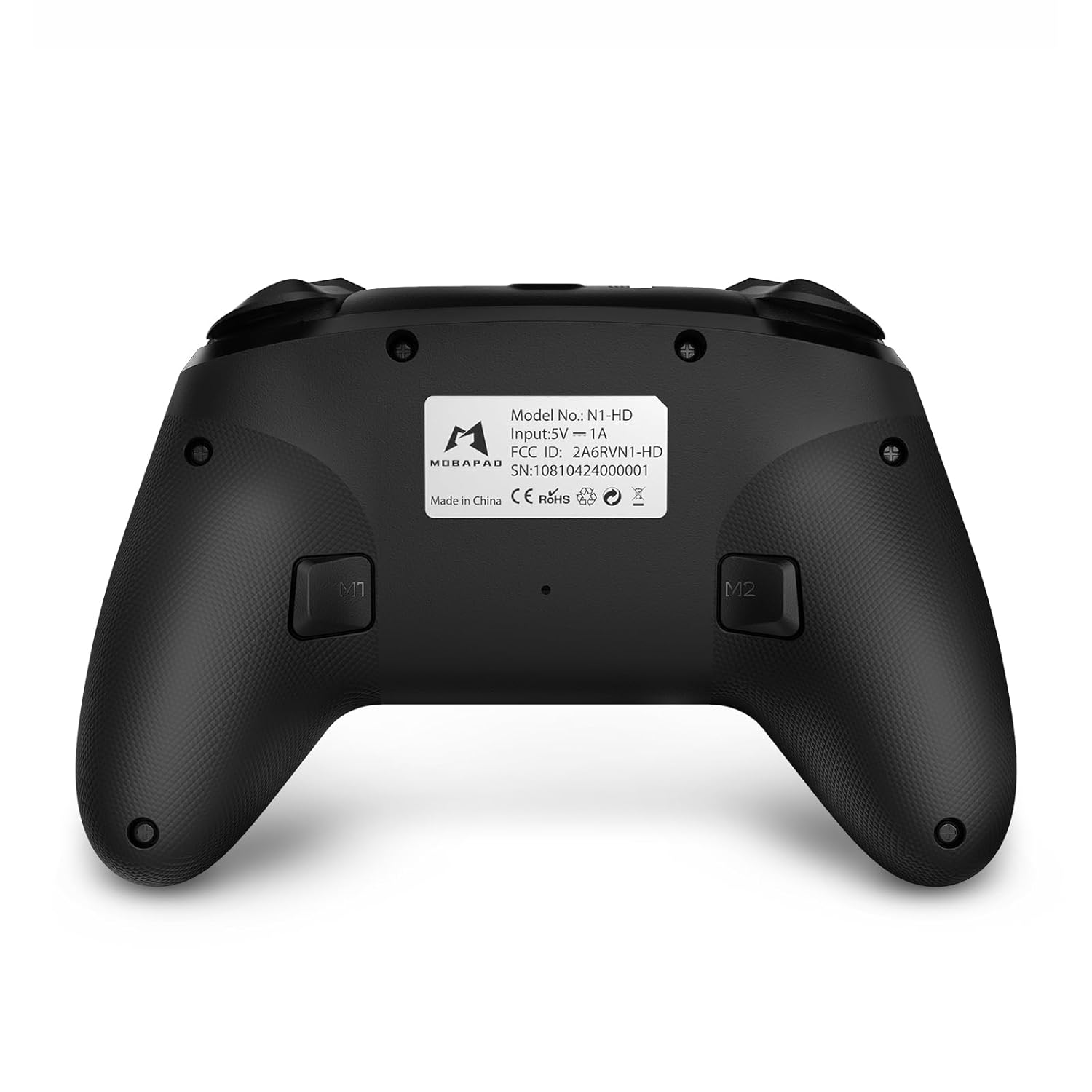
- M1/M2 tipke: Programmable back buttons for custom macros or remapping.
Slika: Detaljna prednja strana view of the MOBAPAD N1 HD controller, showing all buttons and joysticks.

Slika: Stražnja strana view of the MOBAPAD N1 HD controller, highlighting the M1 and M2 programmable buttons and product label.
4.2. NFC Functionality (Amiibo Scanning)
To use the NFC function for Amiibo scanning on Nintendo Switch:
- Ensure your controller is connected to the Nintendo Switch.
- In a compatible game, when prompted to scan an Amiibo, place the Amiibo figure directly over the Početna tipka area on the controller.
- Hold the Amiibo in place until the game registers the scan.
5. Održavanje i njega
Proper maintenance ensures the longevity and optimal performance of your controller.
- Čišćenje: Za brisanje kontrolera koristite meku, suhu krpu. Za tvrdokornu prljavštinu, laganoampnamočite krpu vodom. Izbjegavajte jake kemikalije ili abrazivne materijale.
- Skladištenje: Kontroler čuvajte na hladnom i suhom mjestu, dalje od izravne sunčeve svjetlosti i ekstremnih temperatura.
- Njega baterije: The controller contains a Lithium Ion battery. Avoid fully discharging the battery frequently. If storing for extended periods, charge the battery to about 50% to prolong its lifespan. Do not expose the battery to fire or extreme heat.
- Rukovanje: Izbjegavajte ispuštanje kontrolera ili izlaganje jakim udarcima, jer to može oštetiti unutarnje komponente.
6. Rješavanje problema
If you encounter issues with your MOBAPAD N1 HD controller, refer to the following common solutions.
| Problem | Mogući uzrok | Otopina |
|---|---|---|
| Kontroler se ne povezuje. | Low battery, out of range, incorrect pairing mode, interference. | Charge the controller fully. Ensure it is within range of the device. Re-enter pairing mode (hold Home button). Move closer to the device or away from other wireless devices. |
| Gumbi ili joystickovi ne reagiraju. | Software glitch, physical obstruction, damage. | Restart the controller and the connected device. Check for any debris around the buttons/joysticks. If issues persist, contact customer support. |
| Vibration is weak or absent. | Vibration setting off, game does not support vibration, motor issue. | Check in-game settings and system settings to ensure vibration is enabled. Verify if the game supports vibration feedback. |
| NFC scanning fails. | Incorrect placement, game not prompting scan, controller not connected. | Ensure the Amiibo is placed directly over the Home button area. Confirm the game is prompting for an Amiibo scan. Verify controller is properly connected to the Switch. |
7. Specifikacije
| Značajka | Detalj |
|---|---|
| Broj modela | Mobapad N1 HD Black |
| Dimenzije (D x Š x V) | 5.91 x 2.36 x 3.94 inča |
| Težina | 7.05 unci |
| Vrsta baterije | 1 litij-ionska baterija (uključena) |
| Povezivost | Bežično (Bluetooth), USB-C (žično) |
| Kompatibilnost | Nintendo Switch, PC, iOS, Android |
| Posebne značajke | Hall Effect Joysticks, ALPS Dual-Axis Motors, HD Vibration, Six-Axis Gyroscope, NFC |
8. Jamstvo i podrška
For warranty information or technical support, please contact MOBAPAD customer service. Refer to the official MOBAPAD webweb-mjesto ili u dokumentaciji o kupnji za specifične uvjete jamstva i kontaktne podatke.
You can visit the official MOBAPAD store on Amazon for more information: MOBAPAD Store