
1. Uvod
Welcome to the user manual for your Emerson CKSS7071 Sunrise Smartset Alarm Clock Radio. This device is designed to enhance your daily routine with its unique features, including a sunrise simulation, soothing sound options, Bluetooth connectivity, and an 8-color dimmable LED display. Please read this manual thoroughly to understand the full functionality and ensure proper use and care of your new alarm clock radio.
Isječak 1: Nadview of the Emerson CKSS7071 Sunrise Smartset Alarm Clock Radio. This video demonstrates the key features and design of the product.
2. Važne sigurnosne informacije
- Prije upotrebe uređaja pročitajte sve upute.
- Sačuvajte ove upute za buduću upotrebu.
- Ne koristite ovaj uređaj u blizini vode.
- Čistite samo suhom krpom.
- Ne blokirajte ventilacijske otvore. Instalirajte u skladu s uputama proizvođača.
- Ne instalirajte u blizini izvora topline kao što su radijatori, grijači, peći ili drugi uređaji (uključujući amplifiers) koji proizvode toplinu.
- Zaštitite kabel za napajanje od gaženja ili prignječenja, osobito na utikačima, utičnicama i na mjestu gdje izlaze iz uređaja.
- Koristite samo dodatke/dodatke koje je naveo proizvođač.
- Isključite ovaj uređaj iz struje tijekom grmljavinske oluje ili ako ga nećete koristiti dulje vrijeme.
- Sve servise prepustite kvalificiranom servisnom osoblju. Servisiranje je potrebno kada je uređaj oštećen na bilo koji način, kao što je oštećen kabel za napajanje ili utikač, prolivena je tekućina ili su neki predmeti upali u uređaj, uređaj je bio izložen kiši ili vlazi, ne radi normalno , ili je odbačeno.
3. Sadržaj paketa
Provjerite jesu li svi artikli prisutni prilikom otvaranja paketa:
- Emerson CKSS7071 Sunrise Smartset Alarm Clock Radio
- AC adapter za napajanje
- korisnički priručnik
4. Proizvod je gotovview
4.1 Prednja strana View

Slika 1: Ispred view of the alarm clock, featuring the digital time display and the sunrise simulation light panel.
The front of the unit features the main 1.2-inch LED time display and the large circular light panel for sunrise simulation and ambient lighting. Indicators for AM/PM, Alarm 1/2, and Bluetooth status are also visible.
4.2 strana View (Kontrole)
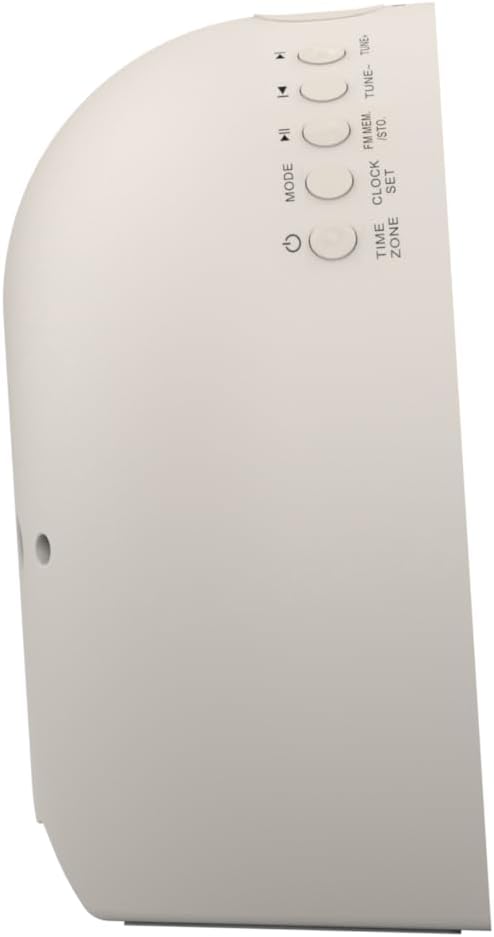
Slika 2: Strana view budilice, s istaknutim tipkama za upravljanje raznim funkcijama.
The side panel houses the primary control buttons, including Power, Mode, Clock Set, Time Zone, Tune/Skip, and Volume controls. These buttons are used for setting time, alarms, and navigating audio functions.
4.3 Stražnji View

Slika 3: Stražnji view of the alarm clock, showing the speaker grille and power connection port.
The rear of the unit features the main speaker grille and the power input port for connecting the AC adapter.
5. Postavljanje
5.1 Priključak za napajanje
- Plug the AC power adapter into the DC IN jack located on the back of the unit.
- Plug the other end of the adapter into a standard wall outlet (AC 100-240V, 50/60Hz).
- Jedinica će se automatski uključiti.
5.2 SmartSet Automatic Time Setting
The SmartSet system automatically sets the correct time and date as soon as you plug in the unit. It also maintains time and alarm settings during power disruptions or outages, provided the button cell battery is installed.
5.3 Ugradnja rezervne baterije
A button cell battery (CR2032, included) is required for battery backup. This ensures that time and alarm settings are retained during a power outage.
- Pronađite odjeljak za baterije na dnu uređaja.
- Otvorite poklopac odjeljka za baterije.
- Umetnite jednu gumbastu bateriju CR2032, pazeći na ispravan polaritet (+/-).
- Čvrsto zatvorite poklopac odjeljka za baterije.
6. Upute za rad
6.1 Ručno podešavanje sata
- Pritisnite i držite SET SATA dugme. Brojke sati će treptati.
- Koristite UGODITE -/+ tipke za podešavanje sata. Pritisnite SET SATA potvrditi.
- Znamenke minuta će bljeskati. Koristite UGODITE -/+ tipke za podešavanje minuta. Pritisnite SET SATA potvrditi.
- Nastavite ovaj postupak za postavljanje godine, mjeseca i dana.
- Pritisnite SET SATA ponovno za izlazak iz načina podešavanja vremena.
6.2 Postavljanje alarma (Alarm 1 i Alarm 2)
The unit features dual alarms. Follow these steps for each alarm:
- Pritisnite i držite ALARM 1 or ALARM 2 gumb. Znamenke sati alarma će bljeskati.
- Koristite UGODITE -/+ tipke za podešavanje sata alarma. Pritisnite odgovarajuću ALARM gumb za potvrdu.
- Znamenke minuta alarma će bljeskati. Koristite UGODITE -/+ buttons to adjust the alarm minutes. Press the respective ALARM gumb za potvrdu.
- Select the alarm source (Buzzer, FM Radio, or Soothing Sound). Press the respective ALARM gumb za potvrdu.
- Podesite glasnoću alarma pomoću GLASNOST -/+ buttons. Press the respective ALARM gumb za potvrdu.
- The alarm is now set. The alarm indicator (AL1 or AL2) will appear on the display.
6.3 Simulacija izlaska sunca
The sunrise simulation feature gradually brightens the light panel before your set alarm time, mimicking a natural sunrise to gently wake you.
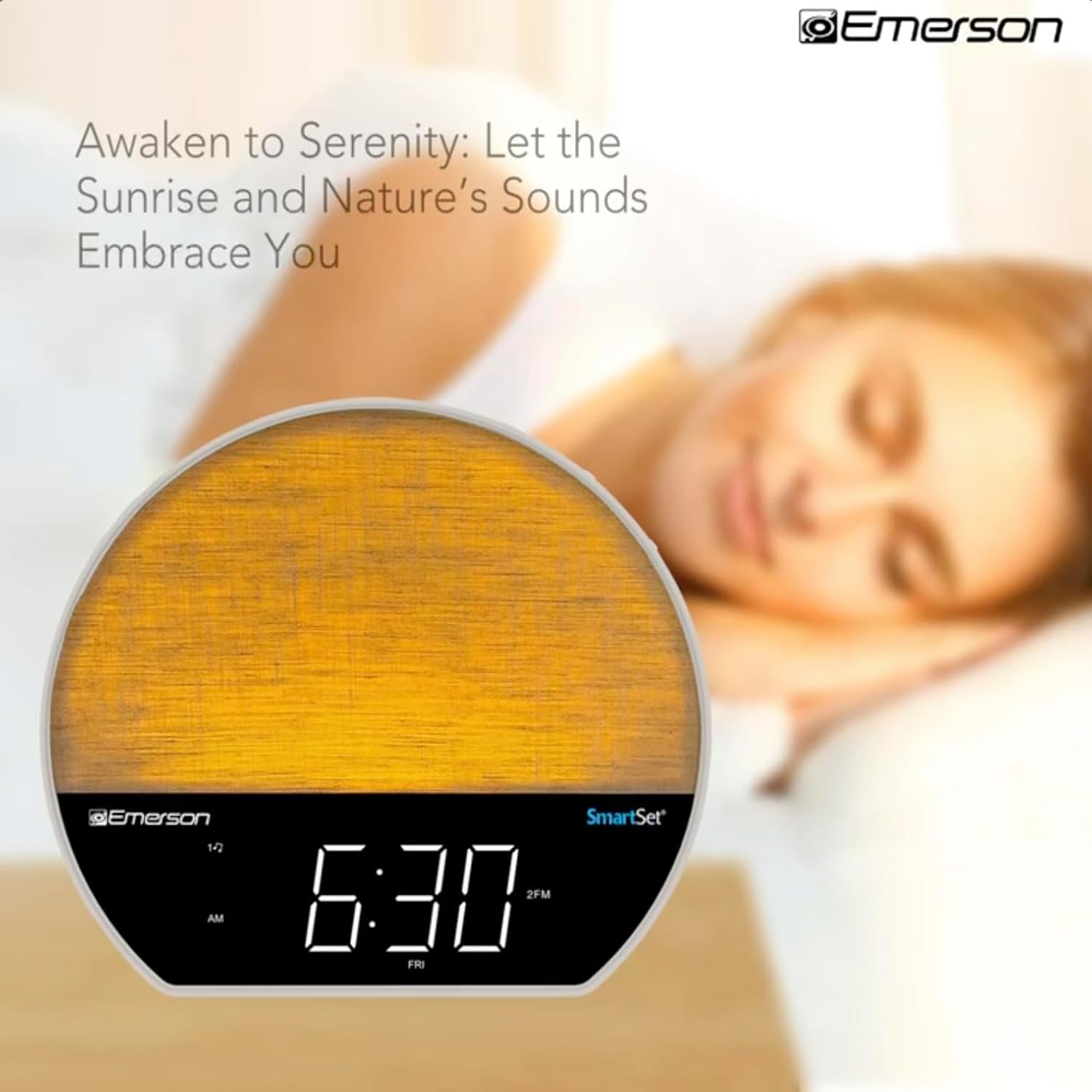
Slika 4: The alarm clock simulating a sunrise with a warm, increasing intenzitet svjetlosti.
To activate, ensure the sunrise option is selected during alarm setup. The light will begin to brighten 30 minutes before the alarm sounds.
6.4 Soothing Sounds and White Noise
The unit includes 6 soothing sounds and white noise to help with relaxation or waking up.
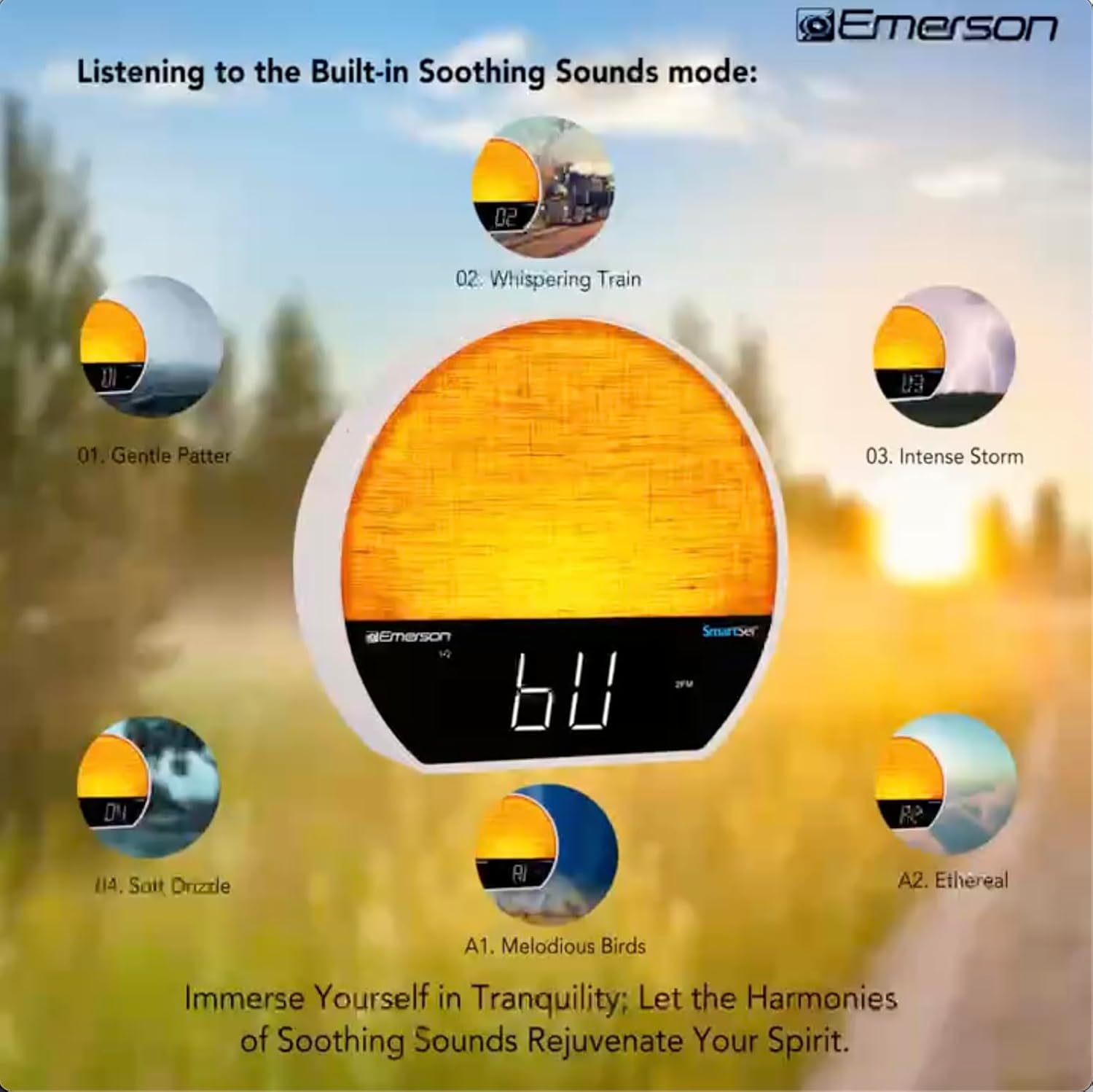
Slika 5: Visual representation of the six soothing sound modes available on the alarm clock.
- Pritisnite tipku NAČIN RADA button repeatedly until the Soothing Sound mode is selected.
- Koristite UGODITE -/+ buttons to cycle through the available sounds (e.g., Gentle Patter, Whispering Train, Intense Storm, Soft Drizzle, Melodious Birds, Ethereal, White Noise).
- Podesite glasnoću pomoću GLASNOST -/+ gumbi.
6.5 Bluetooth funkcija zvučnika
Connect your smartphone or other Bluetooth-enabled device to stream audio wirelessly.

Slika 6: The alarm clock in Bluetooth mode, paired with a mobile device for audio streaming.
- Pritisnite tipku NAČIN RADA button until 'BT' appears on the display, indicating Bluetooth mode.
- On your device, enable Bluetooth and search for 'Emerson CKSS7071'.
- Odaberite uređaj za uparivanje. Nakon uspješnog uparivanja oglasit će se zvuk potvrde.
- Sada možete reproducirati zvuk s uređaja putem zvučnika budilice.
6.6 Rad FM radija
Uključite svoje omiljene FM radio stanice.
- Pritisnite tipku NAČIN RADA gumb dok se na zaslonu ne pojavi 'FM'.
- Pritisnite tipku UGODITE -/+ buttons briefly to manually tune to a station.
- Pritisnite i držite UGODITE -/+ tipke za automatsko skeniranje sljedeće dostupne stanice.
- Za spremanje stanice pritisnite i držite FM MEM dok unaprijed postavljeni broj ne zatreperi. Koristite UGODITE -/+ za odabir unaprijed postavljenog broja, a zatim pritisnite FM MEM opet spasiti.
6.7 LED Decor and Dimmer Control
Customize the ambient light with 8 different colors and adjust the brightness.

Slika 7: The alarm clock demonstrating its 8-color dimmable LED decor options.
- Pritisnite tipku SVJETLO button to cycle through the 8 available colors or turn the light off.
- To adjust the brightness of the LED decor light, press and hold the SVJETLO button. The brightness will cycle through 5 levels. Release the button at your desired brightness.
6.8 Upravljanje prigušivanjem zaslona
Adjust the brightness of the 1.2-inch LED time display.

Slika 8: The alarm clock illustrating the five distinct levels of display luminescence.
Pritisnite tipku DIMER button (often combined with another function, refer to button labels) to cycle through 4 levels of display brightness (Bright, Moderate, Dim, Faint).
6.9 Tajmer za spavanje
Set a timer for the audio to automatically turn off after a specified duration.

Slika 9: The alarm clock set for a sunset sleep timer, providing a harmonious end to the day.
- While audio is playing (FM or Soothing Sound), press the SPAVATI dugme.
- Uzastopno pritisnite SPAVATI button to cycle through available sleep timer durations (e.g., 15, 30, 60, 90 minutes, or OFF).
- The audio will automatically turn off after the selected time.
6.10 Funkcija odgode
Kada se oglasi alarm, pritisnite tipku DRIJEMEŽ gumb (obično veliki gumb na vrhu) za privremeno utišavanje alarma na nekoliko minuta. Alarm će se ponovno oglasiti nakon razdoblja odgode.
7. Održavanje
7.1 Čišćenje
- Prije čišćenja uvijek isključite jedinicu iz utičnice.
- Koristite meku, suhu krpu za čišćenje vanjskih površina.
- Do not use liquid cleaners, abrasive cleaners, or chemical sprays, as these may damage the finish.
7.2 Zamjena baterije
If the time and alarm settings are not retained during a power outage, the button cell backup battery may need to be replaced. Follow the instructions in section 5.3 to replace the CR2032 battery.
8. Rješavanje problema
| Problem | Mogući uzrok | Otopina |
|---|---|---|
| Jedinica se ne uključuje. | Adapter za napajanje nije spojen ili je neispravan. | Provjerite je li AC adapter sigurno priključen u uređaj i ispravnu zidnu utičnicu. |
| Postavke vremena/alarma izgubljene nakon nestanka strujetage. | Backup battery is dead or not installed. | Install or replace the CR2032 button cell battery (see section 5.3). |
| Alarm se ne oglašava. | Alarm nije aktiviran ili je glasnoća preniska. | Ensure the alarm is set and activated (AL1/AL2 indicator on). Increase alarm volume. |
| Bluetooth uređaj se ne može upariti. | Unit not in Bluetooth mode or device too far. | Ensure the unit is in Bluetooth mode ('BT' displayed). Move your device closer to the unit. Try unpairing and re-pairing. |
| Slab FM radio prijem. | Antena nije ispružena ili ima smetnji. | Extend the FM wire antenna fully and reposition it for better reception. Avoid placing near other electronic devices. |
| Zaslon je previše svijetao/tam. | Display dimmer setting needs adjustment. | Pritisnite tipku DIMER button to cycle through brightness levels (see section 6.8). |
9. Specifikacije
| Značajka | Detalj |
|---|---|
| Broj modela | CKSS7071 |
| Izvor napajanja | AC 100-240V, 50/60Hz (via AC adapter) |
| Rezervna baterija | 1 x CR2032 Button Cell Battery (included) |
| Vrsta zaslona | 1.2-inch LED Display |
| Bluetooth verzija | V5.4 |
| Umirujući zvukovi | 6 Nature Sounds + White Noise |
| LED Decor Colors | 8 Dimmable Colors |
| Dimenzije proizvoda (Š x D x V) | 7.09 cm x 3.15 cm x 6.37 cm |
| Težina | Nije navedeno |
10. Informacije o jamstvu
Emerson products are manufactured to the highest quality standards. This product is covered by a limited warranty against defects in materials and workmanship for a period of one (1) year from the original date of purchase. This warranty does not cover damage caused by misuse, accident, unauthorized modification, or normal wear and tear. Proof of purchase is required for all warranty claims. Please retain your receipt.
11. Korisnička podrška
If you have any questions, require assistance, or experience issues with your Emerson CKSS7071 Sunrise Smartset Alarm Clock Radio, please contact our customer support team.
- Webstranica: Posjetite službeni Emerson webstranica za često postavljana pitanja i resurse podrške.
- Email: Pogledajte pakiranje proizvoda ili službene website for customer service email contact.
- Telefon: Pogledajte pakiranje proizvoda ili službene webstranica za telefonske brojeve korisničke službe.
Please have your model number (CKSS7071) and proof of purchase ready when contacting support.