
1. Proizvod je gotovview
The COUGAR FV150 RGB is a mid-tower gaming case designed for high-performance PC builds. It features a dual-chamber design, separating the main components from cables, storage drives, and the power supply unit (PSU) for a clean aesthetic and improved airflow. The case supports various motherboard form factors and offers extensive cooling options, including pre-installed ARGB fans.
Ključne karakteristike:
- Dvokomorni dizajn: Pruža jasan view of your build through glass panels while concealing cables and other components.
- GPU Support: Accommodates graphics cards up to 400mm in length, with options for vertical GPU orientation.
- Kompatibilnost matične ploče: Supports Mini-ITX, Micro-ATX, and ATX motherboards.
- Engineered Bottom Fan Bracket: Simplifies fan installation by allowing attachment prior to setup.
- Extensive Fan & Water Cooling Support: Multiple fan mounting points and radiator support up to 360mm.
- Seamless RGB Synchronization: Integrated universal fan hub for easy ARGB lighting control.
- Modern I/O Panel: Includes 2 x USB Type-A and 1 x USB 3.2 Type-C ports.
- Fleksibilna pohrana: Supports combinations of 3.5" HDDs and 2.5" SSDs.
- Magnetic Dust Filters: Located on the top and right side for easy maintenance.

Slika 1.1: Kutno view of the COUGAR FV150 RGB case, highlighting its dual-chamber design and pre-installed ARGB fans.
2. Postavljanje i instalacija
Follow these steps for proper installation of your PC components into the COUGAR FV150 RGB case.
2.1 Raspakiranje i početni pregled
- Pažljivo izvadite kutiju iz ambalaže.
- Inspect the case for any signs of damage during transit.
- Remove the tempered glass side panel by unscrewing the thumb screws, if present, or by releasing mehanizam zasuna.
2.2 Instalacija matične ploče
- Ensure the correct standoffs are installed for your motherboard form factor (Mini-ITX, Micro-ATX, or ATX).
- Place the I/O shield into the rear opening of the case.
- Carefully align your motherboard with the standoffs and I/O shield, then secure it with screws.
2.3 Instalacija jedinice za napajanje (PSU)
- The FV150 RGB supports bottom-mount PSUs.
- Slide the PSU into its designated compartment in the secondary chamber from the rear of the case.
- Secure the PSU with screws from the exterior rear of the case.
2.4 Instalacija pogona za pohranu
- Locate the drive bays in the secondary chamber.
- For 3.5" HDDs, slide the drive into the appropriate tray and secure it.
- For 2.5" SSDs, mount them to the designated brackets or trays.
2.5 Instalacija grafičke kartice (GPU)
- Uklonite potrebne poklopce utora za proširenje na stražnjoj strani kućišta.
- Insert your GPU into the PCIe slot on the motherboard and secure it with screws.
- The case supports GPUs up to 400mm. For vertical GPU mounting, a separate riser cable and bracket (not included) are required.
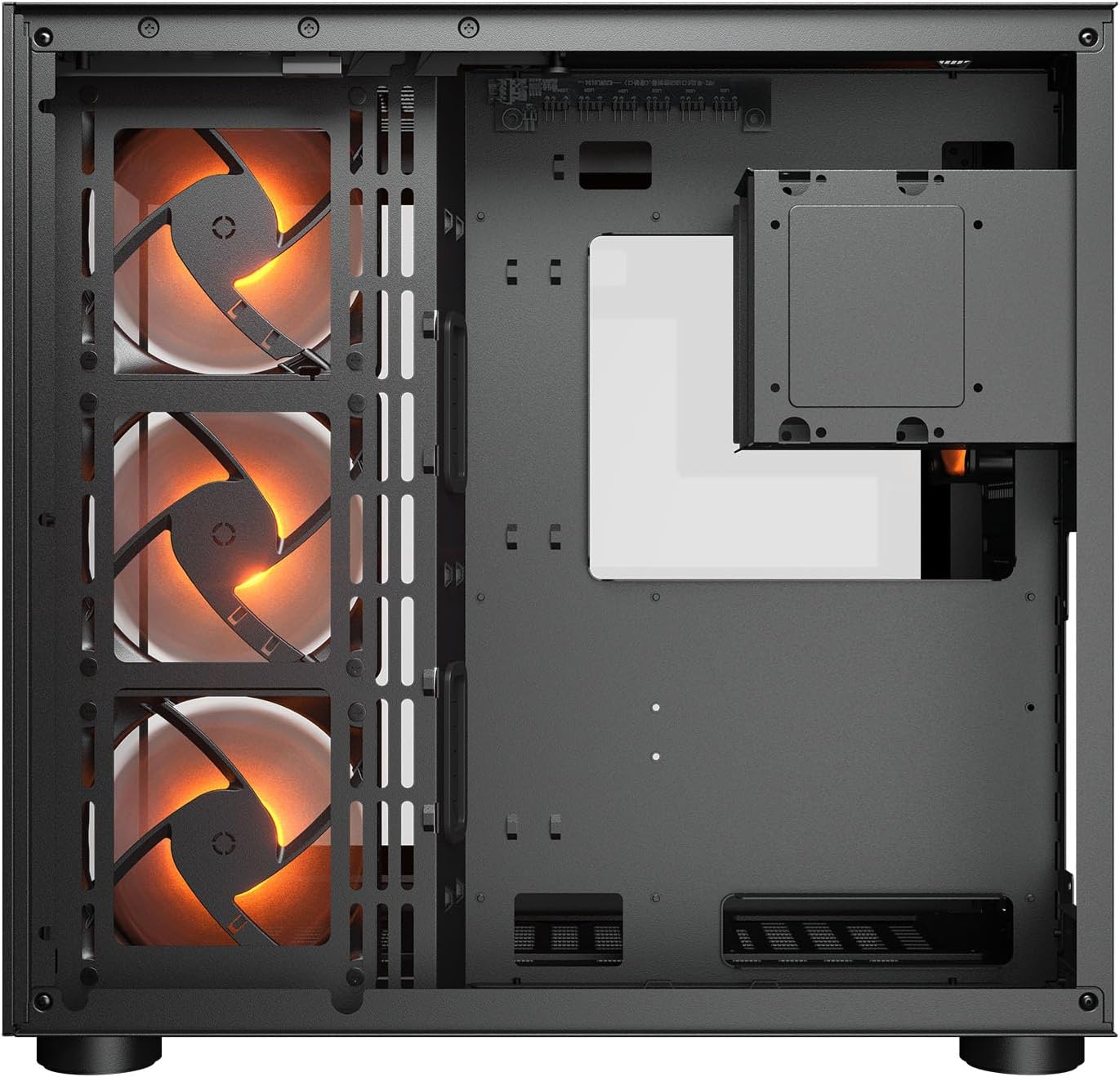
Slika 2.1: Unutarnje view illustrating the main chamber for motherboard and GPU installation, with pre-installed side fans.
2.6 Ugradnja ventilatora i radijatora
- The case comes with 3 x 120mm ARGB side fans and 1 x 120mm ARGB rear fan pre-installed.
- Additional fans can be installed at the top (3 x 120mm or 2 x 140mm) and bottom (3 x 120mm or 2 x 140mm).
- Utilize the engineered bottom fan bracket for easier installation of bottom fans.
- For water cooling, radiators up to 360mm can be mounted on the top and 240mm on the side.

Image 2.2: Top internal view, showing potential mounting locations for additional cooling fans or radiators.
2.7 Upravljanje kabelima
- Route all power and data cables through the cutouts to the secondary chamber.
- Iskoristite ample space and tie-down points in the secondary chamber to organize cables for optimal airflow and a clean appearance.
2.8 Connecting Front I/O Panel
- Connect the front panel cables (USB 3.2 Type-C, USB Type-A, audio, power, reset, LED) to the corresponding headers on your motherboard.
3. Upute za rad
Nakon što su sve komponente instalirane i spojene, možete uključiti sustav.
3.1 Uključivanje
- Provjerite je li prekidač PSU-a u položaju 'UKLJUČENO'.
- Press the power button on the front I/O panel of the case.
3.2 Upravljanje RGB rasvjetom
- The integrated universal fan hub allows for easy synchronization of ARGB lighting.
- Connect the hub to your motherboard's ARGB header (5V 3-pin) to control lighting effects via motherboard software.
- Alternatively, use the dedicated RGB button on the front I/O panel to cycle through pre-set lighting modes if not connected to a motherboard header.
4. Održavanje
Redovito održavanje pomaže u osiguravanju optimalnih performansi i dugovječnosti komponenti vašeg računala.
4.1 Čišćenje filtera za prašinu
- The COUGAR FV150 RGB features magnetic dust filters on the top and right side, along with a ventilated bottom cover.
- Gently remove the magnetic dust filters.
- Clean them using compressed air or by rinsing with water (ensure they are completely dry before reattaching).
- Periodically clean the ventilated bottom cover.
4.2 Opće čišćenje
- Use a soft, dry cloth to wipe down the exterior surfaces of the case.
- For tempered glass panels, use a glass cleaner and a microfiber cloth to avoid streaks.
- Izbjegavajte korištenje jakih kemikalija ili abrazivnih materijala koji bi mogli oštetiti završni sloj.
5. Rješavanje problema
Ovaj odjeljak nudi rješenja za uobičajene probleme s kojima se možete susresti.
5.1 Sustav se ne uključuje
- Check PSU: Ensure the power supply unit is properly connected to the wall outlet and the PSU switch is in the 'ON' position.
- Priključci prednje ploče: Provjerite je li kabel gumba za napajanje iz kućišta ispravno spojen na priključak na prednjoj ploči matične ploče.
- Internal Power Cables: Confirm all necessary power cables (24-pin ATX, 8-pin CPU, PCIe for GPU) are securely connected to the motherboard and components.
5.2 Ventilatori se ne okreću ili RGB ne radi
- Priključci ventilatora: Ensure all fan power cables are securely connected to the fan hub or motherboard headers.
- RGB Connections: Verify the ARGB cables are correctly connected to the fan hub and the hub is connected to a 5V 3-pin ARGB header on the motherboard.
- Software/Button: If connected to the motherboard, check your motherboard's RGB control software. If not, try pressing the RGB button on the case's I/O panel to cycle modes.
5.3 USB portovi ne rade
- Internal USB Headers: Confirm that the USB 3.0 and USB Type-C cables from the front I/O panel are correctly plugged into the corresponding headers on your motherboard.
- Motherboard Drivers: Ensure you have installed the latest chipset and USB drivers for your motherboard.
6. Specifikacije
Detailed technical specifications for the COUGAR FV150 RGB Gaming Case.

Image 6.1: Case dimensions for planning your setup.
| Značajka | Specifikacija |
|---|---|
| Naziv proizvoda | FV150 RGB |
| Faktor obrasca slučaja | Srednji toranj |
| Kompatibilnost matične ploče | Mini-ITX, Micro-ATX, ATX |
| Dimenzije (Š x V x D) | 300 x 400 x 415 mm (11.8" x 15.7" x 16.3") |
| I/O ploča | USB 3.2 Gen 2 Type-C x 1, USB-A 3.0 x 2, 4 Pole Headset Audio Jack, RGB Button |
| 3.5" Drive Bay | 2 |
| 2.5" Drive Bay | 1+1 (converted from 3.5" drive bays) |
| Utori za proširenje | 7+3 |
| Vertikalna GPU podrška | Da |
| Cooling Fan Support (Top) | 3 x 120 mm ili 2 x 140 mm |
| Cooling Fan Support (Bottom) | 3 x 120 mm ili 2 x 140 mm |
| Cooling Fan Support (Side) | 3 x 120 mm |
| Cooling Fan Support (Rear) | 1 x 120 mm |
| Pre-installed Fans (Side) | 3 x 120mm ARGB (Reversed) |
| Pre-installed Fans (Rear) | 1 x 120mm ARGB |
| Pre-installed Fan Speed | 1000 (± 10%) o / min |
| Pre-installed Fan Connector | 5V 3 Pin (ARGB) / 3 Pin (Fan) |
| Maksimalni broj ventilatora | 10 |
| Water Cooling Support (Top) | 360mm / 280mm / 240mm |
| Water Cooling Support (Side) | 240 mm / 120 mm |
| Water Cooling Support (Rear) | 120 mm |
| RGB Hub Sync with M/B | Da |
| Maks. Duljina grafičke kartice | 400 mm (15.7 in) |
| Maks. Visina CPU hladnjaka | 180 mm (7.1 in) |
| Maks. Duljina PSU-a | 210 mm (8.3 in) |
| Materijal | Metal |
| Težina artikla | 6.83 kilogram |
7. Informacije o jamstvu
COUGAR products are manufactured to the highest quality standards. This product is covered by a manufacturer's warranty against defects in materials and workmanship. The specific duration and terms of the warranty may vary by region and retailer. Please retain your proof of purchase for warranty claims.
For detailed warranty information, please refer to the official COUGAR webstranicu ili se obratite lokalnom prodavaču.
8. Podrška
If you encounter any issues or have questions regarding your COUGAR FV150 RGB Gaming Case that are not covered in this manual, please contact COUGAR customer support.
- Posjetite službeni COUGAR webstranica za često postavljana pitanja, preuzimanje upravljačkih programa i kontakt informacije za podršku.
- Contact your retailer for assistance with product returns or exchanges.