
Cleer Arc 3 Gaming
Cleer ARC 3 Gaming Earbuds User Manual
Model: Arc 3 Gaming
Uvod
Thank you for choosing the Cleer ARC 3 Gaming Earbuds. These true wireless open-ear headphones are designed to provide an immersive audio experience with ultra-low latency, optimized for gaming across various platforms. This manual provides comprehensive instructions for setting up, operating, maintaining, and troubleshooting your new earbuds to ensure optimal performance and longevity.
Proizvod gotovview i Ključne značajke
The Cleer ARC 3 Gaming Earbuds combine advanced audio technology with ergonomic design for extended comfort during gaming sessions and daily use. Key features include:
- Ultraniska latencija: Experience audio-video synchronization under 30ms for seamless gameplay, ideal for VR, PlayStation, PC, and Switch.
- Produljeno vrijeme igranja: Up to 50 hours of total playtime with the charging case (10 hours per earbud, plus 40 hours from case). A quick 5-minute charge provides 1.5 hours of play.
- Izuzetna kvaliteta zvuka: Features Dolby Atmos audio and Snapdragon Sound with 16.2mm drivers for spatial audio and optimized Dolby Atmos head tracking.
- Intuitive FHD Display & Touch Controls: The charging case features an FHD display for managing Dolby sound effects, EQ settings, and more. Earbuds offer touch controls.
- Široka kompatibilnost: Dual connections via 2.4GHz USB-C dongle and Bluetooth 5.4, compatible with PS4/5, Switch, Meta Quest 2/3, phones, laptops, and PCs.
- Uparivanje s više točaka: Connect to two devices simultaneously and switch seamlessly.
- Dizajn s otvorenim ušima: Provides situational awareness while delivering high-quality audio.
Komponente
The Cleer ARC 3 Gaming Earbuds package includes:
- Cleer ARC 3 Open-Ear Gaming Earbuds (Left and Right)
- Charging Case with FHD Display
- Dongle USB-C
- USB kabel za punjenje
- Korisnički priručnik (ovaj dokument)
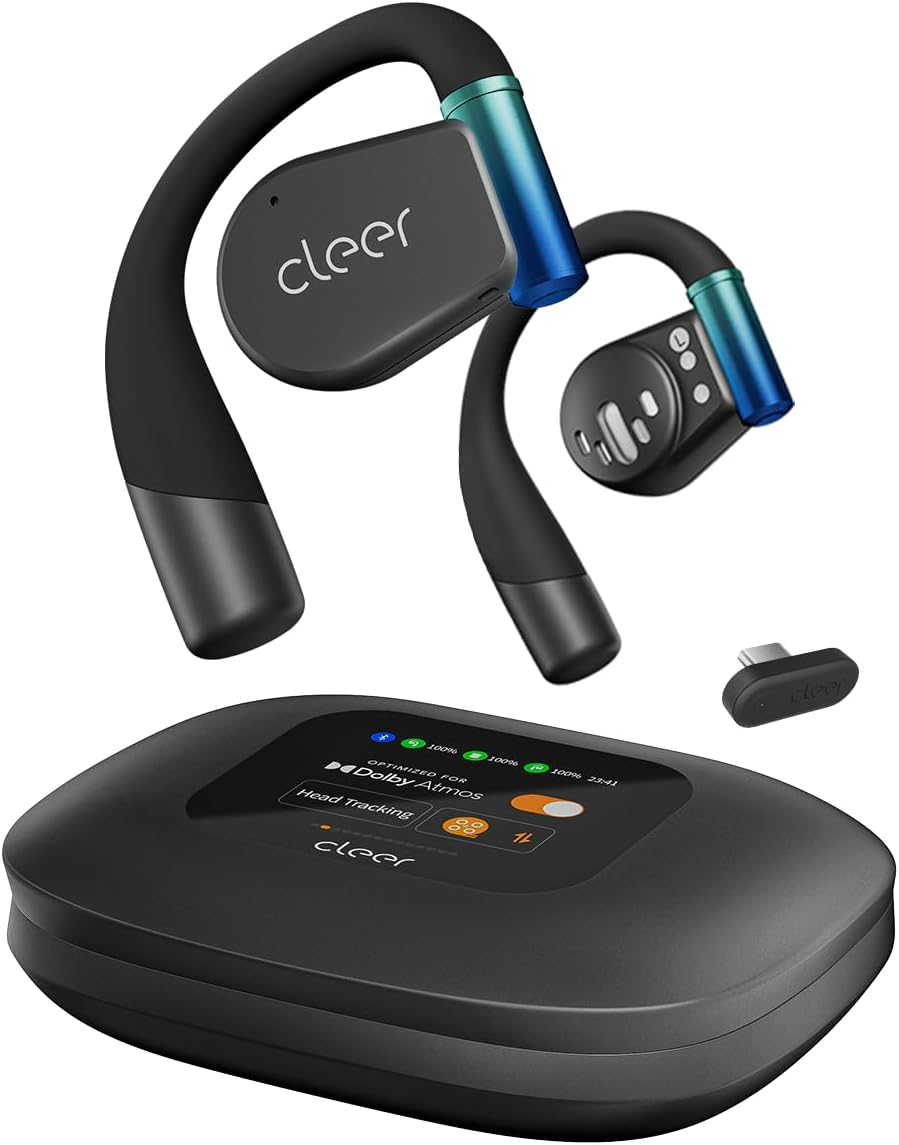
Image: The Cleer ARC 3 Gaming Earbuds, their smart charging case with a display, and the compact USB-C dongle. This image illustrates the main components included with the product.

Image: A person wearing the Cleer ARC 3 earbuds, highlighting their design and the "Powerful Sound Optimized for Dolby Atmos" feature. This demonstrates the earbuds in use and their audio capabilities.

Image: A close-up of the Cleer ARC 3 USB-C dongle, emphasizing its role in achieving ultra-low latency (under 30ms) with Bluetooth 5.4 connectivity. This image focuses on the connectivity technology.

Image: The Cleer ARC 3 earbuds inside their charging case, illustrating the impressive battery life of up to 50 hours total playtime, with details on quick charging. This highlights the product's endurance.

Image: A person wearing the Cleer ARC 3 earbuds, demonstrating their capability for "Crystal Clear Calls" through advanced voice capture and noise-cancelling microphones. This image focuses on communication features.

Image: The Cleer ARC 3 charging case display, surrounded by various gaming devices (PC, PS4/5, Switch, Meta Quest), illustrating the wide compatibility of the earbuds across multiple platforms. This image emphasizes versatility.

Image: The Cleer ARC 3 earbuds in their case next to a smartphone displaying the "Cleer+ App" interface, which allows for personalized controls and customized audio experiences. This image highlights the app integration.
Postavljanje i početno uparivanje
Before first use, ensure your Cleer ARC 3 earbuds and charging case are fully charged. Remove any protective films from the earbuds.
Punjenje slušalica i kućišta
- Stavite slušalice u kućište za punjenje.
- Connect the charging case to a power source using a USB-C cable. The FHD display on the case will indicate charging status.
- Kutija također podržava bežično punjenje.
Dongle Pairing (for PC, PS4/5, Switch, Meta Quest)

Image: A visual guide detailing the three steps for dongle pairing: plugging the dongle into a USB-C socket, long-pressing the MFB button on the dongle, and operating the headphones to enter pairing mode. This clarifies the dongle connection process.
- Korak 1: Plug the USB-C Dongle into your device (e.g., PC, PS5, Switch, Meta Quest).
- Korak 2: Long press the Multi-Function Button (MFB) on the Dongle until its LED starts flashing alternately between red and white. The Dongle is now ready for pairing.
- Korak 3: Operate the headphones to enter pairing mode. Place the headphones close to the Dongle. They will connect automatically. The LED of the Dongle will turn white (breathing).
Note: The Cleer dongle is not compatible with Xbox series. Xbox requires a different authorization.
Bluetooth Pairing (for Phones, Laptops)

Image: A diagram illustrating three methods for Bluetooth pairing the Cleer ARC 3 earbuds: first pairing by pressing the MFB for 2 seconds, touch pad pairing by tapping 5 times, and charging case pairing via the case's display. This provides multiple pairing options.
There are multiple ways to pair your Cleer ARC 3 earbuds via Bluetooth:
- Option 1: First Pairing
- Uklonite zaštitnu foliju sa slušalica.
- Press the MFB button on both earbuds for 2 seconds.
- Option 2: Touch Pad Pairing
- Tap the touch pad on either headphone 5 times and wait for the LED indicators to blink red and white.
- Option 3: Charging Case Pairing
- Place both headphones into the case and close the lid.
- Select "Pairing Mode" on the "Auxiliary" page of the charging case display.
- Otvorite kućište za punjenje.
After initiating pairing on the earbuds, select "Cleer ARC 3" from the list of available Bluetooth devices on your phone or laptop.
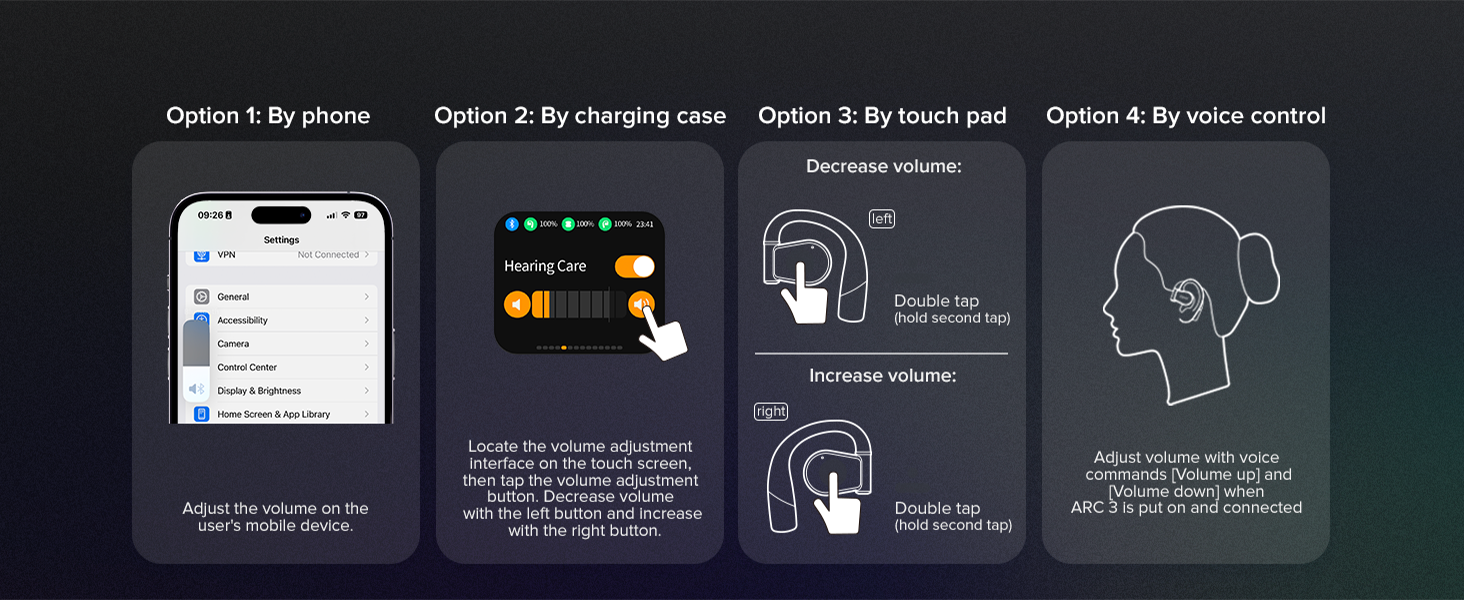
Image: A step-by-step guide for Bluetooth pairing the Cleer ARC 3 on a PC, including enabling Bluetooth, using touch pad pairing, and selecting the device from the list. This provides specific instructions for PC users.
Upute za rad
Kontrola glasnoće
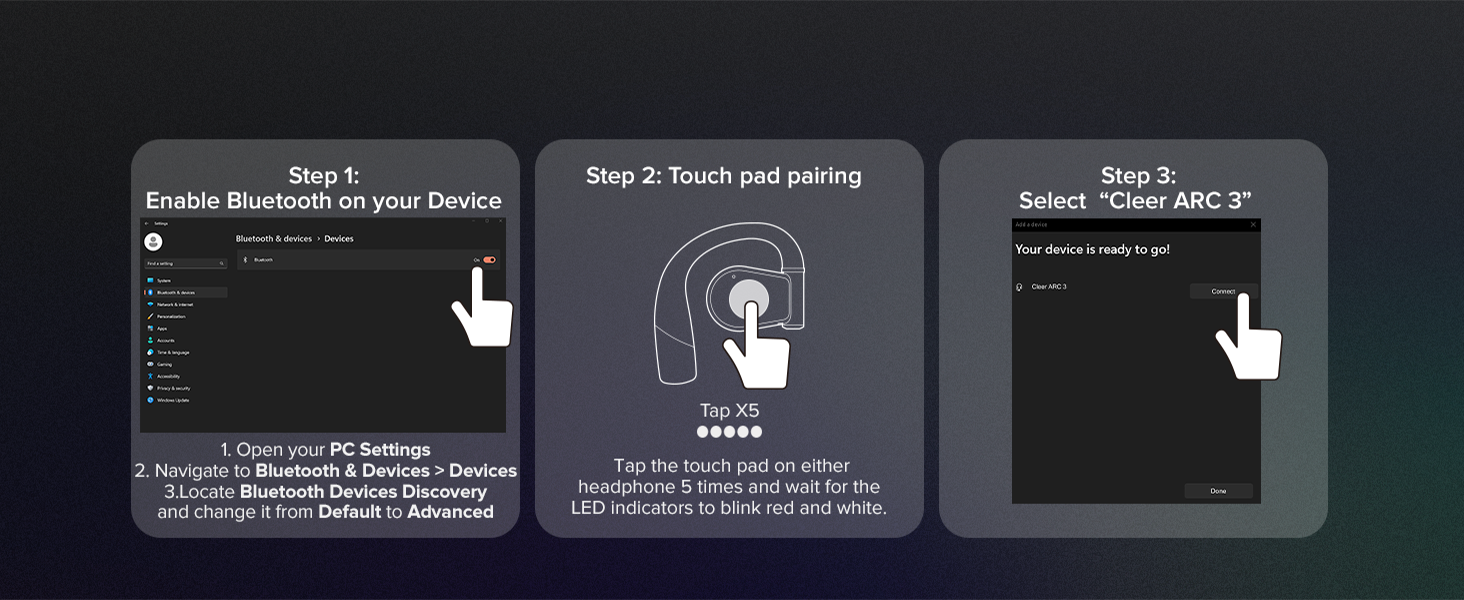
Image: A visual guide illustrating four methods for controlling volume on the Cleer ARC 3: via phone settings, the charging case display, earbud touch pads (double tap), and voice control. This offers comprehensive volume adjustment options.
You can adjust the volume of your Cleer ARC 3 Gaming Earbuds using several methods:
- By Phone/Device: Adjust the volume directly on your connected mobile device or computer.
- By Charging Case: Use the intuitive FHD display on the charging case to locate the volume adjustment interface. Tap the volume adjustment button, then use the left button to decrease and the right button to increase volume.
- By Touch Pad:
- Do smanjenje volume: Double tap the touch pad on the lijevo earbud (hold second tap).
- Do povećati volume: Double tap the touch pad on the pravo earbud (hold second tap).
- By Voice Control: Adjust volume using voice commands (e.g., "Volume up", "Volume down") when ARC 3 is worn and connected.
Using the Cleer+ App
The Cleer+ App allows for personalized controls and a customized audio experience. Download the app from your device's app store. Through the app, you can:
- Prilagodite postavke ekvilajzera.
- Manage Dolby sound effects and head tracking.
- Access motion control and intelligent voice control settings.
- Pratite razinu baterije.
- Update firmware for earbuds and dongle.

Image: The Cleer+ App icon alongside smartphone screens displaying the app's interface, which allows users to personalize controls and customize their audio experience. This highlights the software component of the product.
Dual Mode Operation (Game Mode / Music Mode)
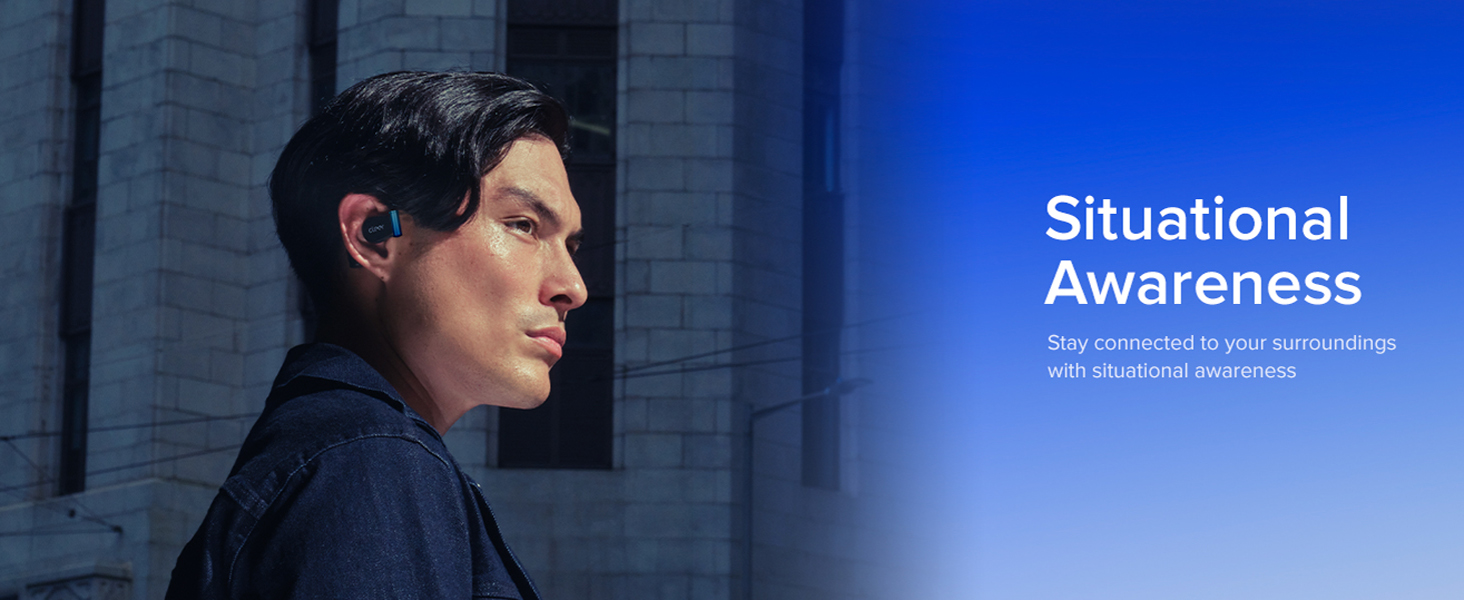
Image: A visual representation of the Cleer ARC 3's "Dual Mode" functionality, showing a "Game Mode" for ultra-low latency and a "Music Mode" for high-definition audio. This illustrates the versatility of the earbuds for different uses.
The Cleer ARC 3 supports two primary modes:
- Game Mode (Ultra-low Latency Mode): Optimized for gaming, providing audio-video synchronization under 30ms. This mode is typically active when connected via the USB-C dongle.
- Music Mode (High Definition Audio Mode): Provides high-fidelity audio for music listening. This mode is generally used when connected via Bluetooth.
Switching between modes may be managed automatically based on the connection type or manually via the Cleer+ App or charging case display.
Uparivanje u više točaka
Leverage Bluetooth 5.4 technology to connect your ARC 3 earbuds to two devices simultaneously. This allows for seamless switching between audio sources, such as listening to game audio via the dongle and taking a call on your smartphone via Bluetooth.
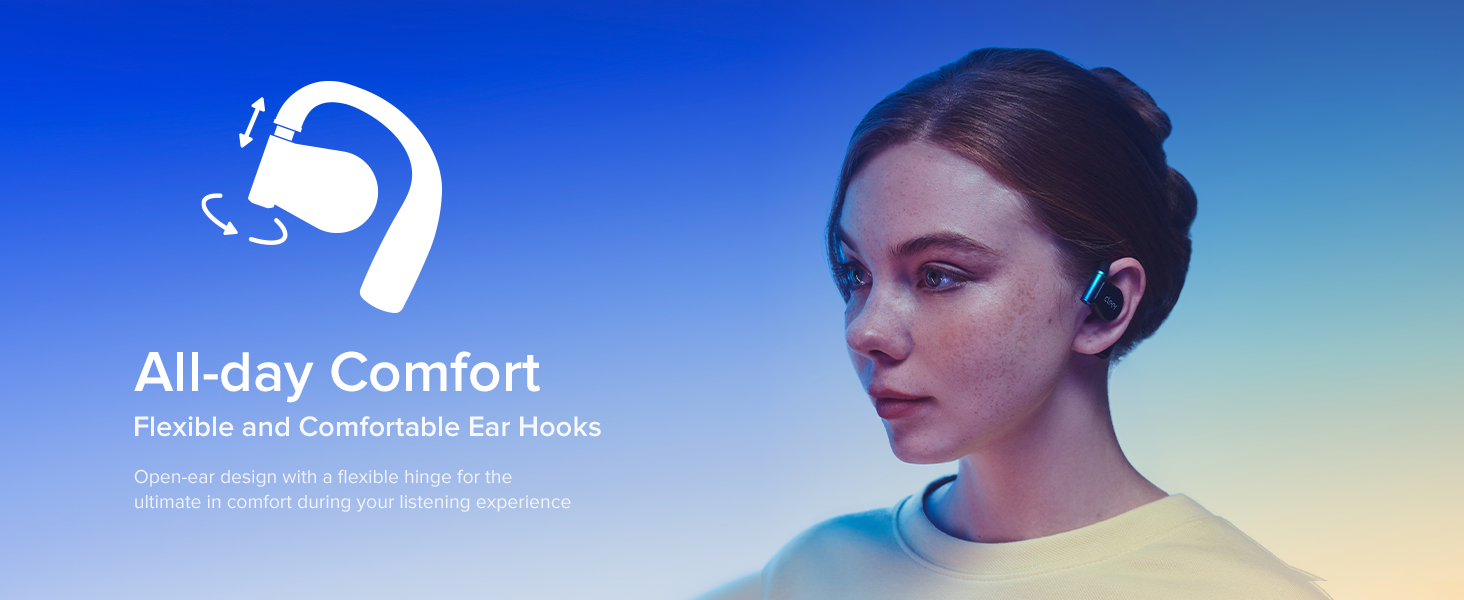
Image: A person simultaneously playing a game and engaging in a phone call, demonstrating the "Play & Chat At the Same Time" feature of the Cleer ARC 3 earbuds through multipoint pairing. This highlights the convenience of dual connectivity.
Održavanje i njega
Proper care ensures the longevity and optimal performance of your Cleer ARC 3 Gaming Earbuds.
- Čišćenje: Za čišćenje slušalica i kućišta za punjenje koristite meku, suhu krpu koja ne ostavlja dlačice. Nemojte koristiti abrazivna sredstva za čišćenje ili otapala.
- Vodootpornost: Slušalice su vodootporne. Izbjegavajte ih uranjanje u vodu ili izlaganje prekomjernoj vlazi. Temeljito ih osušite ako se smoče.
- Skladištenje: Kada se ne koriste, slušalice spremite u kutijicu za punjenje kako biste ih zaštitili i održali napunjenima.
- Temperatura: Izbjegavajte izlaganje slušalica ekstremnim temperaturama (vrućim ili hladnim).

Image: A close-up of the Cleer ARC 3 earbuds with small water droplets on their surface, visually representing their water-resistant feature. This image emphasizes the durability aspect of the product.
Rješavanje problema
If you encounter issues with your Cleer ARC 3 Gaming Earbuds, refer to the following common solutions:
| Problem | Moguće rješenje |
|---|---|
| Slušalice se ne uparuju/ne povezuju. |
|
| Nema zvuka ili je glasnoća niska. |
|
| Audio cutting in/out or distortion. |
|
| Charging case display not responding. |
|
Tehnički podaci
| Značajka | Detalj |
|---|---|
| Naziv modela | ARC 3 igranje |
| Bežična komunikacijska tehnologija | Bluetooth |
| Bluetooth verzija | 5.4 |
| Audio kašnjenje | Under 30 Milliseconds |
| Trajanje baterije (slušalice) | Do 10 sati |
| Ukupno vrijeme reprodukcije s kutijom | Do 50 sati |
| Brzo punjenje | 5 minuta punjenja za 1.5 sata reprodukcije |
| Vrsta audio upravljačkog programa | Dinamički upravljački program |
| Veličina audio upravljačkog programa | 16.2 milimetara |
| Frekvencijski raspon | 20Hz do 20,000Hz |
| Oblik slušalice | Otvoreno uho |
| Metoda kontrole | Aplikacija, dodir |
| Razina vodootpornosti | Otporan na vodu |
| Težina artikla | 4.6 unci (130.02 grama) |
| Kompatibilni uređaji | Cellphones, Desktops, Gaming Consoles (PS4/5, Switch, Meta Quest 2/3), Laptops, Tablets |
| Proizvođač | Jasnije |
| Boja | Crna |
Jamstvo i podrška
For detailed warranty information, please refer to the warranty card included with your product or visit the official Cleer website. For technical support, product registration, or further assistance, please contact Cleer customer service.
You can also find additional resources and a downloadable PDF user manual at: Cleer ARC 3 User Manual (PDF)
Visit the official Cleer Store for more products and information: Cleer Store on Amazon
Povezani dokumenti - Arc 3 Gaming
 |
Cleer ARC 3 Gaming Earbuds User Manual Comprehensive user manual for the Cleer ARC 3 Gaming Earbuds, including setup, Bluetooth and dongle pairing, touch controls, head motion features, and technical specifications. |
 |
Cleer ARC II Smart Open Ear True Wireless Headphones User Manual User guide for the Cleer ARC II Smart Open Ear True Wireless Headphones, detailing fitting instructions, app usage, Bluetooth pairing, earbud controls for playback and calls, head gesture controls, volume adjustments, LED indicator behavior, charging information, technical specifications, warranty details, and regulatory notices. |
 |
Cleer ARC II Sport Smart Open Ear True Wireless Headphones User Manual Comprehensive user manual for the Cleer ARC II Sport Smart Open Ear True Wireless Headphones, covering setup, features, controls, charging, sterilization, factory reset, LED behavior, specifications, maintenance, and warranty information. |
 |
Cleer ARC 3 Gaming AI Open Ear True Wireless Headphones User Manual Comprehensive user manual for Cleer ARC 3 Gaming AI Open Ear True Wireless Headphones, covering setup, features, controls, troubleshooting, specifications, and warranty information. |
 |
Cleer Clip Open Ear AI Headphones User Manual User manual for Cleer Clip open-ear headphones, covering setup, touch controls, charging, maintenance, and specifications. |
 |
Upute za uporabu Cleer ARC 3 otvorenih bežičnih slušalica Korisnički priručnik za Cleer ARC 3 otvorene bežične slušalice s detaljnim opisom postavljanja, prilagođavanja, kontrola, značajki poput Dolby Atmosa, punjenja, održavanja, rješavanja problema i jamstva. |
Ask a question about this manual
Ask about setup, troubleshooting, compatibility, parts, safety, or missing instructions. Manuals+ will review the question and use this page’s manual context to help answer it.