
Uvod
Welcome to the user manual for your Cleer ARC 3 Sports Pro Open Ear Headphones. These headphones are designed for comfort and high-quality audio, featuring an open-ear design, advanced sound technologies, and health tracking capabilities. This manual provides essential information for setup, operation, maintenance, and troubleshooting to ensure optimal performance and longevity of your device.
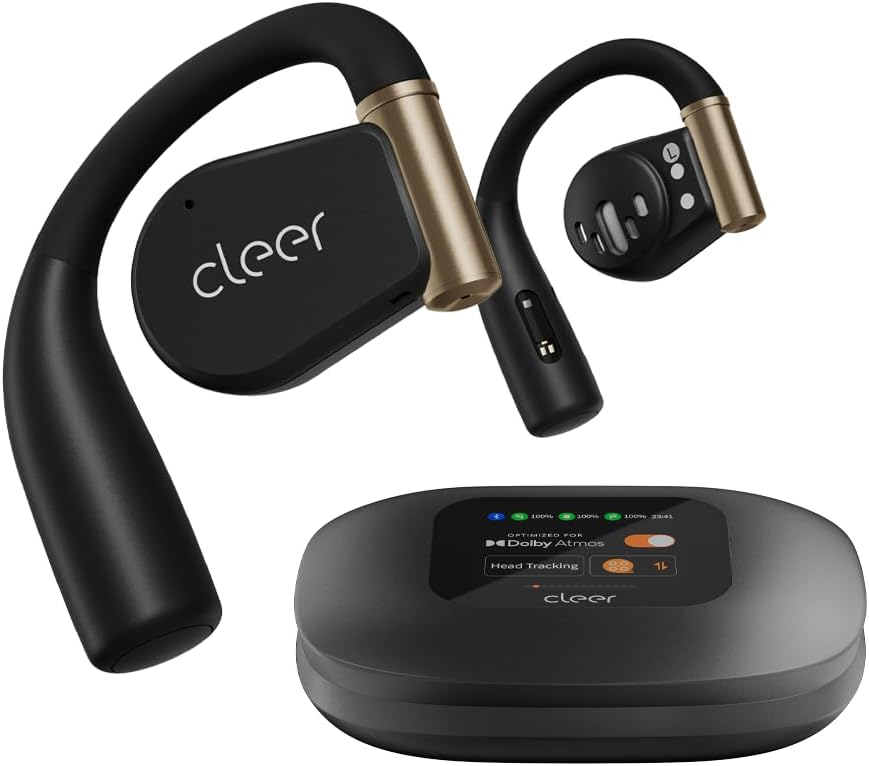
Image: Cleer ARC 3 Sports Pro headphones and their smart charging case.
Sadržaj paketa
Prije nego što započnete, provjerite jesu li svi artikli prisutni u paketu:
- Cleer ARC 3 Sports Pro Open Ear Headphones
- Kutija za punjenje
- Kabel za punjenje (USB-C na USB-A)
- korisnički priručnik
Postavljanje
1. Punjenje slušalica i kutijice
Before first use, fully charge your Cleer ARC 3 Sports Pro headphones and charging case. The charging case provides additional battery life for the headphones.
- Stavite slušalice u kućište za punjenje.
- Connect the USB-C end of the charging cable to the charging case and the USB-A end to a power adapter (not included) or a computer's USB port.
- The case's display will indicate charging status. A full charge takes approximately 2 hours.

Image: Visual representation of the 40-hour total battery life, including 8 hours from headphones and 32 hours from the charging case.
2. Početno uparivanje s uređajem
The Cleer ARC 3 Sports Pro headphones support Bluetooth 5.4 for stable connectivity and multi-point connection, allowing pairing with two devices simultaneously.
Option 1: First Pairing (Recommended)
- Remove the protective film from the headphones.
- Press and hold the Multi-Function Button (MFB) on both headphones for 2 seconds to enter pairing mode.
- On your device (smartphone, tablet, laptop), go to Bluetooth settings and select "Cleer ARC 3 Sports Pro" from the list of available devices.
Option 2: Touch Pad Pairing
- Tap the touch pad on either headphone 5 times.
- Wait for the LED indicators to blink red and white, indicating pairing mode.
- On your device, select "Cleer ARC 3 Sports Pro" from the Bluetooth device list.
Option 3: Charging Case Pairing
- Place both headphones into the charging case and close the lid.
- Open the charging case. On the case's display, navigate to the "Auxiliary" page and select "Pairing Mode."
- On your device, select "Cleer ARC 3 Sports Pro" from the Bluetooth device list.

Image: Step-by-step visual guide for three different pairing methods: first pairing, touch pad pairing, and charging case pairing.
3. Installing the Cleer+ App
For full functionality, including EQ settings, Dolby Sound Effects, and health tracking, download the Cleer+ app from your device's app store.
- Tražiti "Cleer+" in your app store.
- Preuzmite i instalirajte aplikaciju.
- Open the app and follow the on-screen instructions to connect your ARC 3 Sports Pro headphones.

Image: A user interacting with the Cleer+ app on a smartphone, demonstrating personalized workout plan creation based on real-time data.
Upute za rad
1. Nošenje slušalica
The ARC 3 Sports Pro features an adjustable, soft ear hook design for a secure and comfortable fit during various activities.
- Nježno postavite kukicu za uho preko uha.
- Adjust the earbud speaker to rest comfortably near your ear canal without entering it.
- Ensure a snug fit for optimal sound and heart rate tracking.

Image: A woman wearing the Cleer ARC 3 Sports Pro headphones, illustrating the open-ear design and comfortable, flexible ear hooks.
2. Kontrole
The headphones offer multiple control methods for convenience.
Touch Controls (on headphones)
The touch pads on each earbud allow for various functions:
- Reproduciraj/pauziraj: Jednokratno dodirivanje.
- Sljedeća pjesma: Dvaput dodirnite desnu slušalicu.
- Prethodni zapis: Dvaput dodirnite lijevu slušalicu.
- Odgovori/prekini poziv: Jednostruki dodir tijekom dolaznog poziva.
- Odbij poziv: Pritisnite i držite 2 sekunde tijekom dolaznog poziva.
- Aktiviranje glasovnog asistenta: Trostruko dodirivanje.

Image: A diagram showing a finger tapping the earbud's touch surface, indicating touch control functionality.
Kontrola glasnoće
Adjust volume using one of the following methods:
- Putem telefona: Adjust volume directly on your connected mobile device.
- Via Charging Case: Use the intuitive FHD display on the charging case to access volume controls.
- Via Touch Pad: Double tap and hold the second tap on the left earbud to decrease volume, or on the right earbud to increase volume.
- Putem glasovnog upravljanja: Use voice commands like "Volume up" or "Volume down" when connected.

Image: Visual guide demonstrating four different methods for adjusting volume on the Cleer ARC 3 Sports Pro headphones.
Smart Motion Control (for Calls)
Enable motion controls via the Cleer+ App for hands-free call management.
- Open the Cleer+ App.
- Tap [Motion Control] on the ARC 3 main page.
- Toggle the button to turn on/off [Call Control].
- Poziv za preuzimanje: Nod head twice.
- Prekini vezu/odbij poziv: Shake head twice.

Image: Instructions for activating and using smart motion controls for answering and rejecting calls through head gestures.
3. Zvučne značajke
The ARC 3 Sports Pro headphones offer advanced audio technologies for an immersive listening experience.
- Dolby Atmos & Snapdragon Sound: Experience crystal clear spatial audio with 16.2mm drivers. Optimized for Dolby Atmos head tracking.
- Automatska kontrola glasnoće: Automatically adjusts audio levels based on your surroundings for consistent listening.
- Jasna kvaliteta poziva: Features crystal clear voice capture and noise-cancelling microphones for calls.
Controlling Dolby Audio
You can enable or disable Dolby Audio through the following methods:
- Via Cleer+ App: Open the Cleer+ App and toggle the Dolby Audio setting on the main page.
- Via Charging Case: On the charging case's touch screen, locate the Dolby Audio interface and toggle the [OPTIMIZED FOR Dolby Atmos] button.
- Via Touch Pad: Tap and hold the touch pad of either headphone for more than 2 seconds.

Image: Visual instructions for enabling or disabling Dolby Audio using the Cleer+ app, the charging case display, or the headphone touch pads.
4. Praćenje zdravlja
The ARC 3 Sports Pro headphones include heart rate and blood oxygen detection, which can be tracked in real-time during workouts or daily activities via the Cleer+ App.
- Ensure the headphones are properly worn for accurate readings.
- Open the Cleer+ App to view your health metrics and create personalized workout plans.

Image: A man outdoors, demonstrating the use of the Cleer+ app for accurate workout heart rate tracking.
Održavanje
1. Čišćenje
Redovito čišćenje pomaže u održavanju performansi i higijene vaših slušalica.
- Obrišite slušalice i kutijicu za punjenje mekom, suhom krpom koja ne ostavlja dlačice.
- Avoid using abrasive materials, solvents, or cleaning sprays.
- The charging case features UV-C light sterilization for the earbuds when placed inside. Ensure the case is closed for this function.

Image: A diagram illustrating the UV-C sterilization process within the charging case for the earbuds.
2. Otpornost na vodu (IPX7)
The ARC 3 Sports Pro headphones are IPX7 waterproof, meaning they can withstand immersion in up to 1 meter of water for 30 minutes. This makes them resistant to sweat, rain, and accidental splashes.
- Nemojte namjerno uranjati kućište za punjenje jer nije vodootporno.
- After exposure to water, ensure the headphones are completely dry before placing them back in the charging case to prevent damage.

Image: A woman exercising, demonstrating the IPX7 sweat-resistant capability of the headphones for uninterrupted use during intense workouts.
Rješavanje problema
If you encounter issues with your Cleer ARC 3 Sports Pro headphones, refer to the following common solutions:
| Problem | Moguće rješenje |
|---|---|
| Slušalice se ne uparuju |
|
| Nema zvuka ili je mala glasnoća |
|
| Loša kvaliteta zvuka |
|
| Slušalice se ne pune |
|
| Heart rate tracking inaccurate |
|
Tehnički podaci
| Značajka | Detalj |
|---|---|
| Naziv modela | Cleer Audio ARC 3 Sports Pro |
| Tehnologija povezivanja | Bluetooth, bežični |
| Bluetooth verzija | 5.4 |
| Postavljanje uha | Otvoreno uho |
| Oblik slušalice | Kuka |
| Vrsta audio upravljačkog programa | Dinamički upravljački program (16.2 mm) |
| Frekvencijski raspon | 20 Hz - 20 000 Hz |
| Trajanje baterije (slušalice) | 8 sati (jedno punjenje) |
| Trajanje baterije (s kućištem) | Up to 40 Hours total (8 hrs + 32 hrs from case) |
| Vrijeme punjenja | 2 sata |
| Razina vodootpornosti | IPX7 (otporan na vodu) |
| Vrsta kontrole | Touch Control, Volume Control, App Control, Voice Control |
| Praćenje zdravlja | Heart Rate, Blood Oxygen Detection |
| Item Weight (Headphones) | 12 grams (per earbud) |
| Težina kutije za punjenje | 130 gram |
| Materijal | Metal, Plastika, Silikon |
| Kompatibilni uređaji | Mobiteli, stolna računala, prijenosna računala, tableti |
Jamstvo i podrška
Informacije o jamstvu
Cleer products are designed and manufactured to the highest quality standards. For specific warranty details, including coverage period and terms, please refer to the warranty card included with your product or visit the official Cleer webstranicu. Sačuvajte dokaz o kupnji za slučaj reklamacije.
Korisnička podrška
If you require further assistance or have questions not covered in this manual, please contact Cleer customer support:
- Mrežna podrška: Visit the official Cleer webstranica za često postavljana pitanja, članke podrške i obrasce za kontakt.
- Podrška e-poštom: Refer to your product packaging or the Cleer webweb-mjesto za odgovarajuću adresu e-pošte za podršku.
- Telefonska podrška: Check the Cleer webstranica za regionalne brojeve telefonske podrške.
When contacting support, please have your product model number (ARC 3 Sports Pro) and proof of purchase readily available.