
GenMachine Ren4000
GenMachine Mini PC AMD Ryzen 3 4300U (Ren4000) Instruction Manual
Model: Ren4000
1. Uvod
Thank you for choosing the GenMachine Mini PC AMD Ryzen 3 4300U. This compact and high-performance mini computer is designed for both home and office use, offering efficient multitasking, 4K visuals, and advanced connectivity. This manual provides essential information for setting up, operating, and maintaining your device.
2. Što je u kutiji
Provjerite jesu li svi artikli prisutni u vašem paketu:
- GenMachine Mini PC (R3 4300U 8G 256G)
- korisnički priručnik
- Adapter napajanja
- HDMI kabel
- Mounting Bracket (for VESA mounting)

3. Proizvod je gotovview (Hardver)
The GenMachine Mini PC features a compact design with various ports for connectivity and expansion.
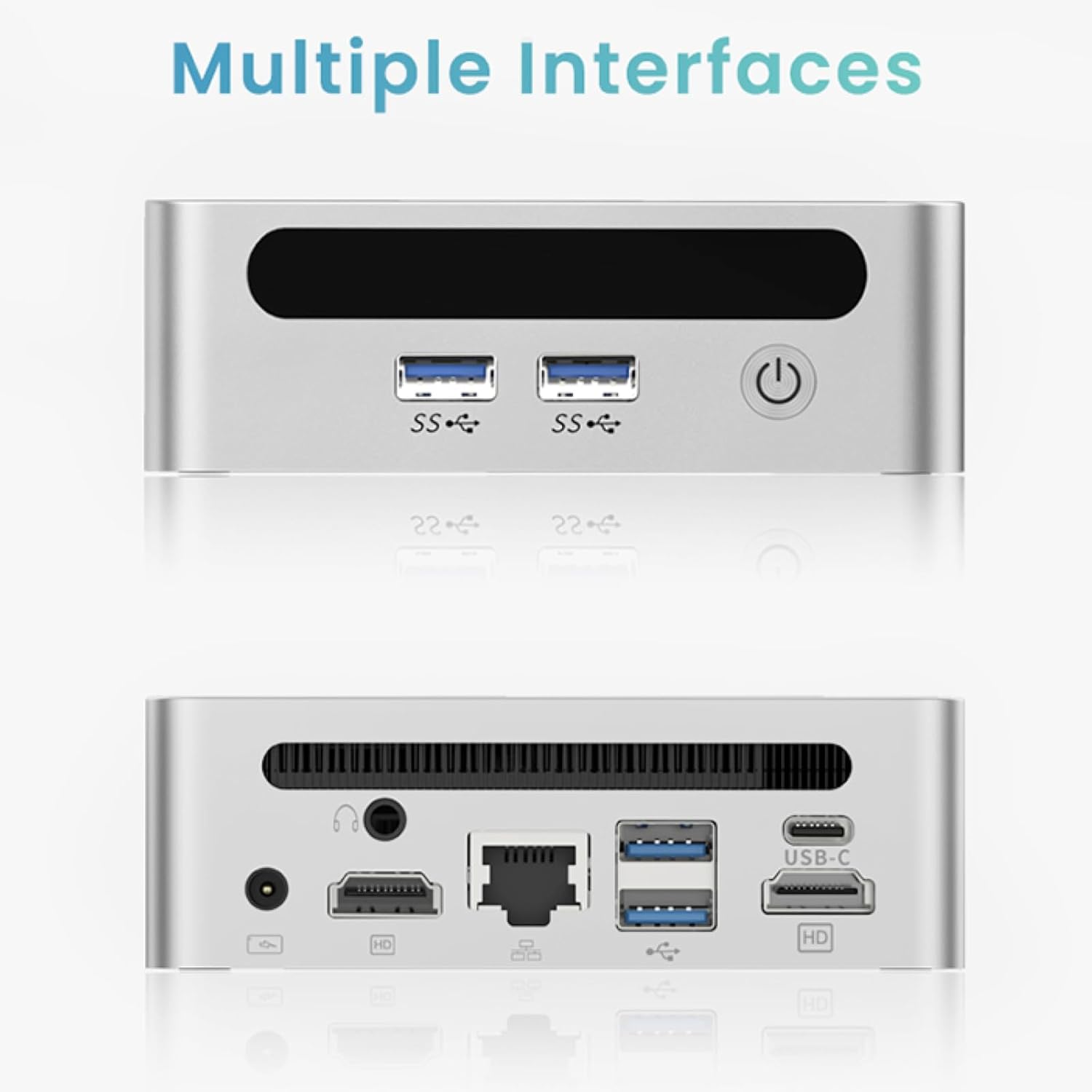
Prednja ploča
- Gumb za napajanje: Za uključivanje/isključivanje uređaja.
- USB 3.0 priključci (x2): Za brzi prijenos podataka i periferne veze.
- USB 2.0 priključak (x1): Za standardne periferne priključke.
Stražnja ploča
- DC ulazna snaga: Ovdje spojite priloženi adapter za napajanje.
- USB 2.0 priključak (x1): Za standardne periferne priključke.
- HDMI priključci (x2): For connecting displays, supporting up to 4K resolution.
- Ethernet (LAN) priključak: Za žičanu mrežnu vezu.
- 3.5 mm audio utičnica: Za slušalice ili zvučnike.
- Utor za Kensington Lock: Za osiguranje uređaja.
4. Vodič za postavljanje
Početna veza
- Isključite Mini PC i odspojite sve kablove.
- Connect your monitor(s) to the HDMI port(s) on the rear panel.
- Spojite tipkovnicu i miš na dostupne USB priključke.
- (Optional) For a wired network connection, plug an Ethernet cable into the LAN port.
- Connect the power adapter to the DC input port and then to a power outlet.
- Pritisnite gumb za napajanje na prednjoj ploči kako biste uključili Mini PC.
Operating System Setup (Windows 11)
Your GenMachine Mini PC comes with Windows 11 pre-installed. Upon first boot, you will be guided through the initial Windows setup process, including:
- Region and keyboard layout selection.
- Network connection (Wi-Fi 6 or Ethernet).
- Microsoft account sign-in or local account creation.
- Privacy settings configuration.
Slijedite upute na zaslonu kako biste dovršili postavljanje.
5. Performance and Usage
The AMD Ryzen 3 4300U processor, combined with 8GB DDR4 RAM and a 256GB SSD, provides robust performance for various tasks.
Ključne karakteristike:
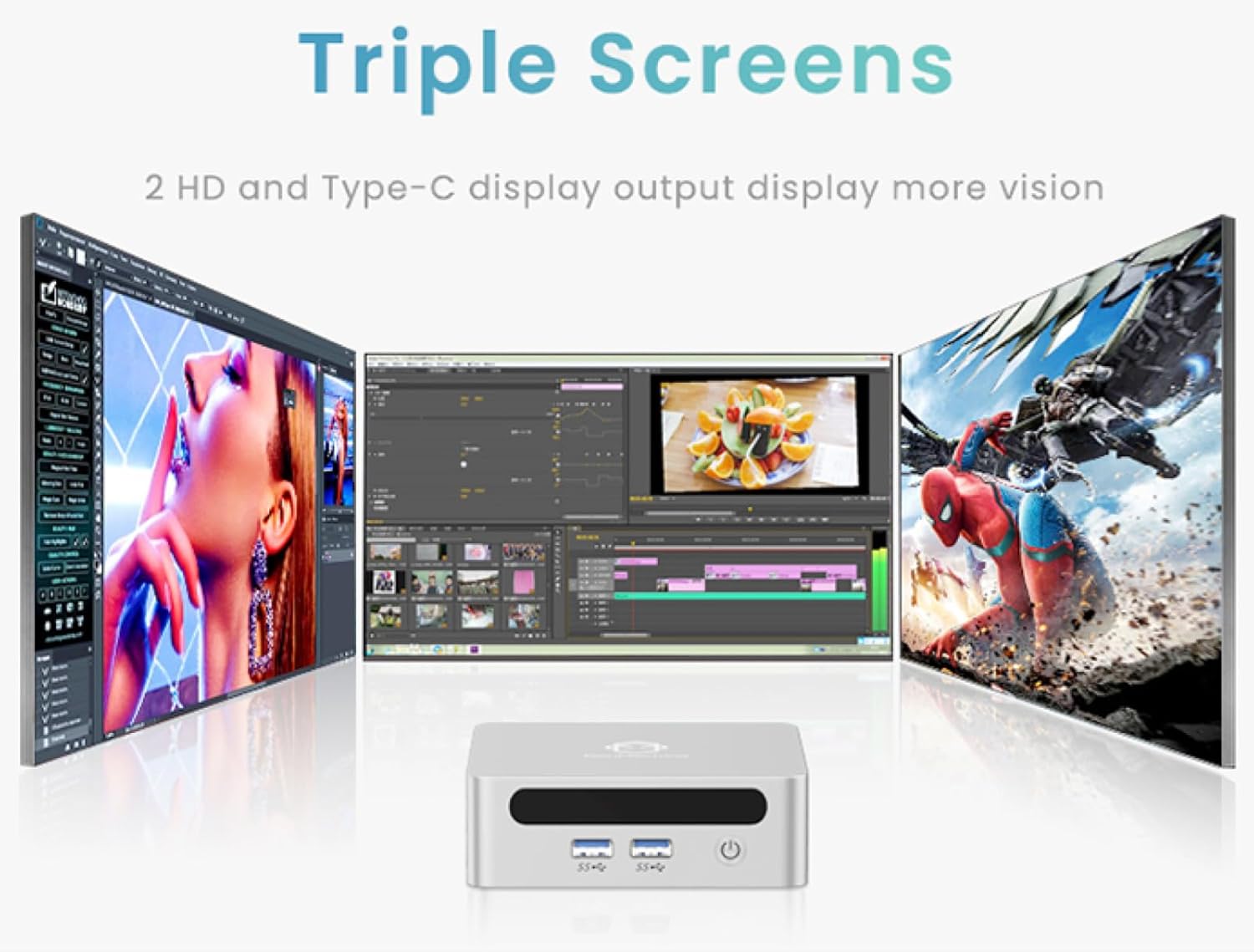
- 4K Ultra HD Visuals & Dual Display Support: Connect up to two 4K monitors for enhanced productivity or immersive entertainment.
- Wi-Fi 6 i Bluetooth 5.2: Enjoy faster and more stable wireless internet and seamless connectivity with Bluetooth peripherals.
- Kompaktan i tih dizajn: Its small footprint and ultra-quiet cooling system make it suitable for any workspace without distraction.

6. Upgrading Components (Maintenance)
The GenMachine Mini PC allows for easy upgrades of its RAM and SSD to further enhance performance or storage capacity.
Potrebni alati:
- Mali križni odvijač
- Plastic pry tool (optional, for opening the case)
- New SSD (M.2 2280 NVMe or 2.5-inch SATA SSD)
- New RAM (DDR4 SODIMM)
Postupak:
- Isključite Mini PC i odspojite sve kablove.
- Carefully remove the four rubber foot pads on the bottom of the Mini PC to reveal the hidden screws.
- Odvijte četiri vijka.
- Gently pry open the bottom plate along the edges. Be careful with the internal clips.
- Locate the existing SSD and RAM modules.
- To remove the SSD: If fixed by screws, unscrew them. If by clips, open the clips and pull out the original SSD.
- To remove RAM: Open the clips at both ends of the memory slot and pull out the original memory vertically.
- Insert the new SSD/RAM into the respective slots, ensuring they are properly seated and secured.
- Replace the bottom plate, aligning it with the clips and screw holes.
- Screw on the previously removed screws and reattach the foot pads.
7. Mogućnosti montaže
The GenMachine Mini PC can be mounted behind a VESA-compatible monitor using the included mounting bracket, saving desk space and creating a clean setup.

8. Specifikacije
| Značajka | Detalj |
|---|---|
| Procesor | AMD Ryzen 3 4300U (2.7 GHz) |
| OVAN | 8 GB DDR4 SDRAM |
| Skladištenje | 256GB 2280 SSD (PCIE x 16 interface) |
| Grafika | Integrirana AMD Radeon grafika |
| Operativni sustav | OS (Windows 11 pre-installed) |
| Povezivost | Wi-Fi 6, Bluetooth 5.2, Ethernet |
| Video izlaz | 2x HDMI (4K @ 60Hz), USB-C (DisplayPort Alt Mode) |
| USB priključci | 2x USB 3.0, 2x USB 2.0, 1x USB-C |
| Dimenzije | 6.26 x 6.26 x 3.6 inča |
| Težina | 2 funti |
9. Rješavanje problema
- Bez napajanja: Provjerite je li adapter za napajanje sigurno spojen i na Mini PC i na ispravnu utičnicu.
- Nema zaslona: Verify that the HDMI cable(s) are correctly connected to the monitor(s) and the Mini PC. Check monitor input source settings.
- No Internet (Wi-Fi): Ensure Wi-Fi is enabled in Windows settings and you are connected to the correct network.
- No Internet (Wired): Check the Ethernet cable connection and ensure your router is functioning correctly.
- Spora izvedba: Close unnecessary applications. Check for background updates. Consider upgrading RAM or SSD if issues persist.
10. Jamstvo i podrška
For warranty information, technical support, or service inquiries, please refer to the contact details provided in your product packaging or visit the official GenMachine webmjesto. Čuvajte račun za jamstvene zahtjeve.
Ask a question about this manual
Ask about setup, troubleshooting, compatibility, parts, safety, or missing instructions. Manuals+ will review the question and use this page’s manual context to help answer it.