
1. Uvod
This manual provides essential information for the safe and efficient operation of your Meizu mblu 21 smartphone. Please read it thoroughly before using the device.
The Meizu mblu 21 features a Prism Edge Design with a radiant gradient and a large immersive 6.79-inch HD display. It is equipped with a 13MP main camera and an 8MP front camera, powered by Android 14. The device includes a 4900mAh battery for extended use and supports 4G LTE connectivity, Dual-Band Wi-Fi, and Bluetooth 5.0.
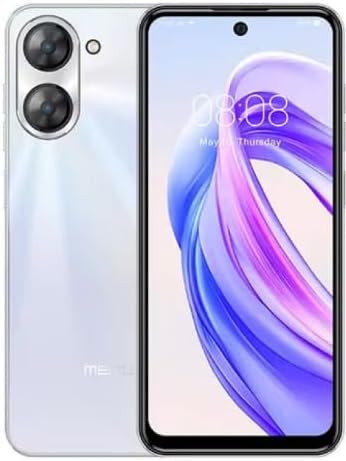
Slika 1.1: Prednja i stražnja strana view of the Meizu mblu 21 smartphone in White Diamond color.
2. Što je u kutiji
Provjerite jesu li svi artikli prisutni u paketu:
- Meizu mblu 21 Smartphone
- Adapter napajanja
- USB kabel
- Alat za izbacivanje SIM kartice
- Kratki vodič za početak

Figure 2.1: Meizu mblu 21 smartphone alongside its power adapter.
3. Postavljanje
3.1. Umetanje SIM kartica i MicroSD kartice
The Meizu mblu 21 supports Dual Nano SIM cards and a MicroSD card for expandable storage. Locate the SIM tray on the side of the device.
- Power off the device before inserting or removing SIM/MicroSD cards.
- Upotrijebite priloženi alat za izbacivanje SIM kartice kako biste otvorili ladicu za SIM karticu.
- Carefully place the Nano SIM cards and/or MicroSD card into the designated slots on the tray, ensuring correct orientation.
- Ladicu lagano gurnite natrag u uređaj dok se ne poravna.
3.2. Početno uključivanje i čarobnjak za postavljanje
- Pritisnite i držite tipku za napajanje dok se ne pojavi logotip Meizu.
- Follow the on-screen instructions to complete the initial setup, including selecting your language, connecting to a Wi-Fi network, and setting up your Google account.
4. Upravljanje vašim uređajem
4.1. Prikaz i navigacija
The 6.79-inch HD display features a 90Hz adaptive refresh rate for smooth visuals. Navigate the interface using touch gestures: tap, swipe, pinch-to-zoom.
4.2. Funkcije kamere
The device is equipped with a 13MP main camera and an 8MP front camera. Open the Camera application to capture photos and videos.
- 13MP Smart Camera: Ideal for capturing everyday moments with sharpness and true-to-life colors.
- Prednja kamera od 8 MP: Designed for clear selfies and video calls.
4.3. Sigurnosne značajke
- Side Unlock: A fast and secure fingerprint sensor integrated into the side power button for instant access.
- Smart Face Unlock: Use the front camera to unlock your device quickly and conveniently.
4.4. Povezivost
Your mblu 21 supports various connectivity options:
- 4G LTE: For mobile data connectivity. In the USA, this device is compatible with T-Mobile. Outside the USA, it works with any carrier worldwide.
- Dvopojasni Wi-Fi: Supports both 2.4GHz and 5GHz bands for seamless internet access.
- Bluetooth 5.0: For connecting wireless accessories with improved energy efficiency.
- VoLTE HD Calls: Enjoy sharper, clearer voice calls over LTE networks.

Figure 4.1: Key technology features of the Meizu mblu 21, including Android 14, Dual-Band Wi-Fi, Bluetooth 5.0, and VoLTE.
5. Održavanje
5.1. Briga o bateriji
The mblu 21 is equipped with a 4900mAh battery. To maximize battery lifespan:
- Izbjegavajte ekstremne temperature.
- Use only the provided power adapter or certified compatible chargers.
- Izbjegavajte često potpuno pražnjenje baterije.

Slika 5.1: Interno view of the Meizu mblu 21, showcasing the 4900mAh battery and internal components.
5.2. Čišćenje uređaja
Za čišćenje zaslona i kućišta telefona koristite meku krpu koja ne ostavlja dlačice. Izbjegavajte upotrebu jakih kemikalija ili abrazivnih materijala.
5.3. Ažuriranja softvera
Regularly check for and install software updates to ensure optimal performance and security. Updates can be found in the device's settings menu.
6. Rješavanje problema
If you encounter issues with your Meizu mblu 21, try the following solutions:
- Uređaj ne reagira: Pritisnite i držite gumb za napajanje oko 10-15 sekundi za prisilno ponovno pokretanje.
- Problemi s mrežnom povezivošću:
- Provjerite je li SIM kartica pravilno umetnuta.
- Uključivanje i isključivanje načina rada u zrakoplovu.
- Check network settings (APN, preferred network type).
- Brzo pražnjenje baterije:
- Zatvorite nekorištene aplikacije koje rade u pozadini.
- Smanjite svjetlinu zaslona.
- Disable unnecessary features like GPS or Bluetooth when not in use.
- Problemi s performansama:
- Clear cache and data of problematic apps.
- Oslobodite prostor za pohranu.
- Consider a factory reset (Note: This will erase all data on your device. Back up important data first.).
7. Specifikacije
| Značajka | Detalj |
|---|---|
| Naziv modela | mblu 21 |
| Broj modela | M416L |
| Operativni sustav | Android 14 |
| Veličina zaslona | 6.79 inča |
| Kapacitet pohrane memorije | 64 GB |
| Veličina instalirane RAM memorije | 4 GB |
| Kapacitet baterije | 4900 Miliamp sati |
| Glavna kamera | 13 MP |
| Prednja kamera | 8 MP |
| Bežični operater (SAD) | T-Mobile |
| Stanična tehnologija | 4G LTE |
| Tehnologije povezivanja | 4G, Dual-Band Wi-Fi, Bluetooth 5.0 |
| Težina artikla | 14 unci |
| Dimenzije paketa | 7 x 4 x 2 inča |
| Boja | White Diamond |
8. Jamstvo i podrška
Your Meizu mblu 21 smartphone comes with a manufacturer's warranty. Please refer to the warranty card included in your product packaging for specific terms and conditions.
For technical support, service, or further inquiries, please contact Meizu customer support through their official channels. Contact information can typically be found on the manufacturer's webmjestu ili u dokumentaciji proizvoda.