
Uvod
This manual provides essential information for the safe and efficient operation of your SCULPFUN S9 PRO 10W Laser Engraver. The S9 PRO features 10W laser beam shaping technology, offering a 0.06mm ultra-fine laser focus for strong cutting penetration and precision. It is capable of cutting materials such as 15mm thick wood and 10mm acrylic, and engraving ceramics and stainless steel. Please read this manual thoroughly before use to ensure proper setup, operation, and maintenance.

Sigurnosne informacije
Rad laserskog gravera uključuje potencijalne opasnosti. Pridržavajte se svih sigurnosnih smjernica kako biste spriječili ozljede ili oštećenja.
- Zaštita očiju: Always wear appropriate laser safety glasses when operating the machine. The integrated laser filter on the S9 PRO blocks 98% of ultraviolet light, allowing observation without additional safety glasses for bystanders, but direct laser exposure should always be avoided.
- Prekidač za napajanje: The machine is equipped with a secure power switch. Always turn off the machine when not in use or during maintenance.
- Siguran položaj: Utilize the fastening holes on the four feet and frame structure to secure the machine and data cables, preventing accidental movement.
- Površinska zaštita: Use the provided A4-sized steel pad to protect your work surface from laser damage.
- Ventilacija: Ensure adequate ventilation in your workspace to dissipate fumes produced during engraving and cutting.
- Zapaljivi materijali: Do not engrave or cut highly flammable materials without proper precautions.
- Djeca i kućni ljubimci: Keep children and pets away from the operating area. The laser point can attract attention, but direct exposure is dangerous.

Sadržaj paketa
Prilikom raspakiranja provjerite jesu li sve komponente prisutne:
- 1 x SCULPFUN S9 Pro 10 W Laser Engraver
- A4-sized steel pad
- Strujni adapter
- USB kabel
- Alati za montažu
- Korisnički priručnik (ovaj dokument)
Vodič za postavljanje
1. Skupština
The SCULPFUN S9 PRO features a fast assembly design, allowing for installation typically within 10 to 20 minutes. Follow the steps below:
- Korak 1: Assemble the main frame components.
- Korak 2: Attach the X-axis and laser module to the frame.
- Korak 3: Spojite sve potrebne kablove.
- Završiti: Provjerite jesu li svi spojevi sigurni i okvir stabilan.
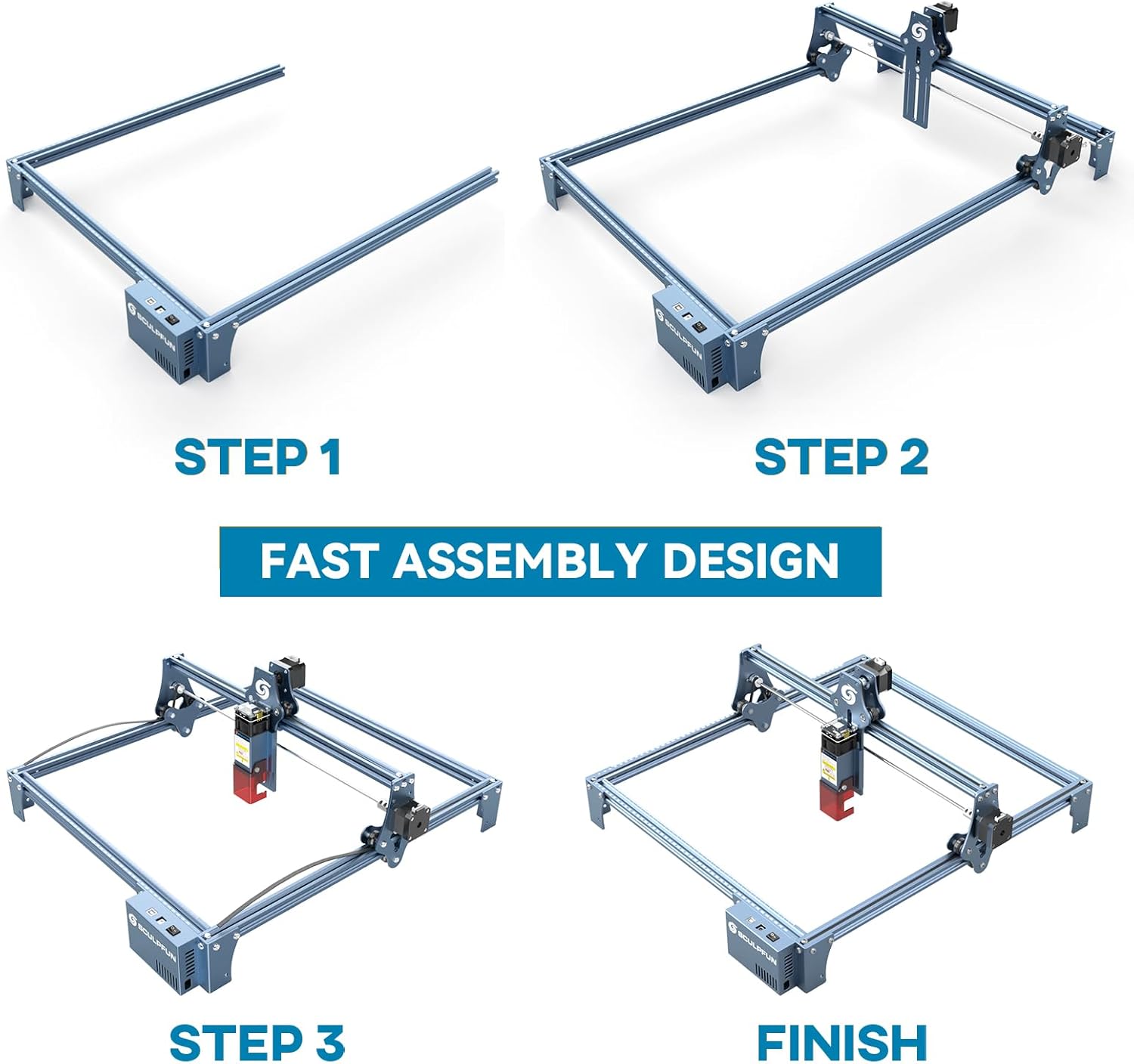
The full-metal structure enhances robustness and engraving accuracy. The X and Y axes include precise scale lines, forming a rectangular measuring ruler for quick object sizing.


2. Podešavanje fokusa
The S9 PRO features a quick fixed-focus design. The laser combines a fixed-focus lens with a sliding design for easy adjustment.
- Place the laser module over your material.
- Move the laser module up or down until the focus is achieved.
- Zategnite vijke kako biste pričvrstili laserski modul na mjesto.

Upute za rad
1. Kompatibilnost softvera
The SCULPFUN S9 PRO is compatible with various advanced engraving software:
- LaserGRBL (Windows)
- LightBurn (Windows, macOS, Linux)
- Benbox
- GrblController
- LiteFire
It supports engraving in PWM mode and various file formate uključujući JPG, PNG, DXF, SVG, AI, G-kod, NC i BMP.

2. Material Capabilities
The 10W laser module provides strong cutting and engraving capabilities across a wide range of materials:
- Rezanje: Up to 15mm thick wood, 10mm black acrylic.
- Graviranje: Wood, leather, ceramics, stainless steel, aluminum oxide, PCB board, paper, cardboard, dark stone, and more.


3. General Operation Workflow
- Dizajn: Create or import your design using compatible software (e.g., LightBurn, LaserGRBL).
- Postavljanje materijala: Place your material on the work surface, ensuring it is flat and secure. Use the integrated rulers for precise positioning.
- Podešavanje fokusa: Adjust the laser focus as described in the Setup section.
- Postavke softvera: Configure laser power, speed, and passes in your chosen software according to the material and desired effect. Refer to software documentation for detailed settings.
- Početak operacije: Pokrenite proces graviranja ili rezanja iz softvera. Nadzirite stroj tijekom rada.
- Završetak: Once the process is complete, turn off the machine and carefully remove your finished piece.
Održavanje
Regular maintenance ensures optimal performance and extends the lifespan of your SCULPFUN S9 PRO.
- Očistite lasersku leću: Periodically clean the laser lens with a soft, lint-free cloth and lens cleaning solution to maintain laser precision.
- Očistite radno područje: Remove debris and dust from the engraving area after each use to prevent interference with machine movement.
- Pregledajte remene i tračnice: Check the drive belts for tension and wear. Keep the guide rails clean and lubricated if necessary to ensure smooth movement of the laser module.
- Ažuriranja firmvera: Provjerite službeni SCULPFUN webweb-mjesto za sva dostupna ažuriranja firmvera kako biste osigurali da vaš uređaj ima najnovije značajke i poboljšanja.
Rješavanje problema
Ovaj odjeljak obrađuje uobičajene probleme s kojima se možete susresti.
- Laser ne okida:
- Check if the power cable is securely connected and the power switch is on.
- Verify that the USB cable is connected to your computer and the machine.
- Ensure the software is correctly configured and sending commands.
- Check the laser module connection.
- Loša kvaliteta graviranja/rezanja:
- Re-check the laser focus. An incorrect focus is a common cause of poor quality.
- Adjust laser power and speed settings in your software. Different materials require different settings.
- Pazite da je materijal ravan i sigurno postavljen.
- Očistite lasersku leću ako izgleda prljavo.
- Machine Not Moving Correctly:
- Check for any obstructions on the rails or belts.
- Ensure belts are properly tensioned and not slipping.
- Verify that all cables are securely connected.
- Ponovno pokrenite softver i uređaj.
- Problemi s povezivanjem softvera:
- Provjerite je li u vašem softveru odabran ispravan COM port.
- Try restarting your computer and the engraver.
- Reinstall the software or drivers if necessary.
For persistent issues, refer to the SCULPFUN support webstranicu ili se obratite službi za korisnike.
Tehnički podaci
| Marka | SCULPFUN |
| Broj modela | S9PRO10W-ELE |
| Snaga lasera | 10W (Diode Laser) |
| Lasersko fokusiranje | 0.06mm (Ultrafine) |
| Točnost graviranja | 0.01 mm |
| Područje graviranja | 400 x 410 mm |
| Izvor napajanja | AC |
| Dimenzije paketa | 61.79 x 38.4 x 13.4 cm |
| Težina paketa | 4.95 kg |
| Uključene komponente | 1 x SCULPFUN S9 Pro 10 W laser engraver |
| Kompatibilnost softvera | LaserGRBL, LightBurn, Benbox, GrblController, LiteFire |
| Podržani OS | Windows, macOS, Linux |
| Podržano File Formati | JPG, PNG, DXF, SVG, AI, G-code, NC, BMP |
Jamstvo i podrška
For warranty information, technical support, or service inquiries, please contact SCULPFUN customer support through their official webweb-mjesto ili prodavač gdje je proizvod kupljen. Sačuvajte račun kao dokaz o kupnji.
Proizvođač: SCULPFUN
Prvi dostupan datum: 29. studenog 2024