
Uvod
Thank you for choosing the Phomemo M221 Bluetooth Thermal Label Printer. This manual provides essential information for the safe and efficient operation of your device. Please read it thoroughly before use and retain it for future reference. The Phomemo M221 is designed for fast, clear, and smart label printing, supporting various label types and applications for small businesses, home, and school use.
Sigurnosne informacije
Za siguran rad i sprječavanje oštećenja, pridržavajte se sljedećih mjera opreza:
- Do not disassemble, repair, or modify the printer.
- Keep the printer away from water, moisture, and direct sunlight.
- Use only Phomemo-approved power adapters and accessories.
- Izbjegavajte dodirivanje glave za ispis odmah nakon ispisa jer može biti vruća.
- Store the printer and labels in a cool, dry place.
Sadržaj paketa
Provjerite jesu li svi artikli prisutni u vašem paketu:
- Phomemo M221 pisač naljepnica
- USB kabel za punjenje tipa C
- 1 roll of 40 x 30 mm thermal labels
- 1 roll of 50 x 80 mm thermal labels
- 1 roll of 70 x 80 mm thermal labels
- Prijenosna torbica za nošenje
- Korisnički priručnik (ovaj dokument)
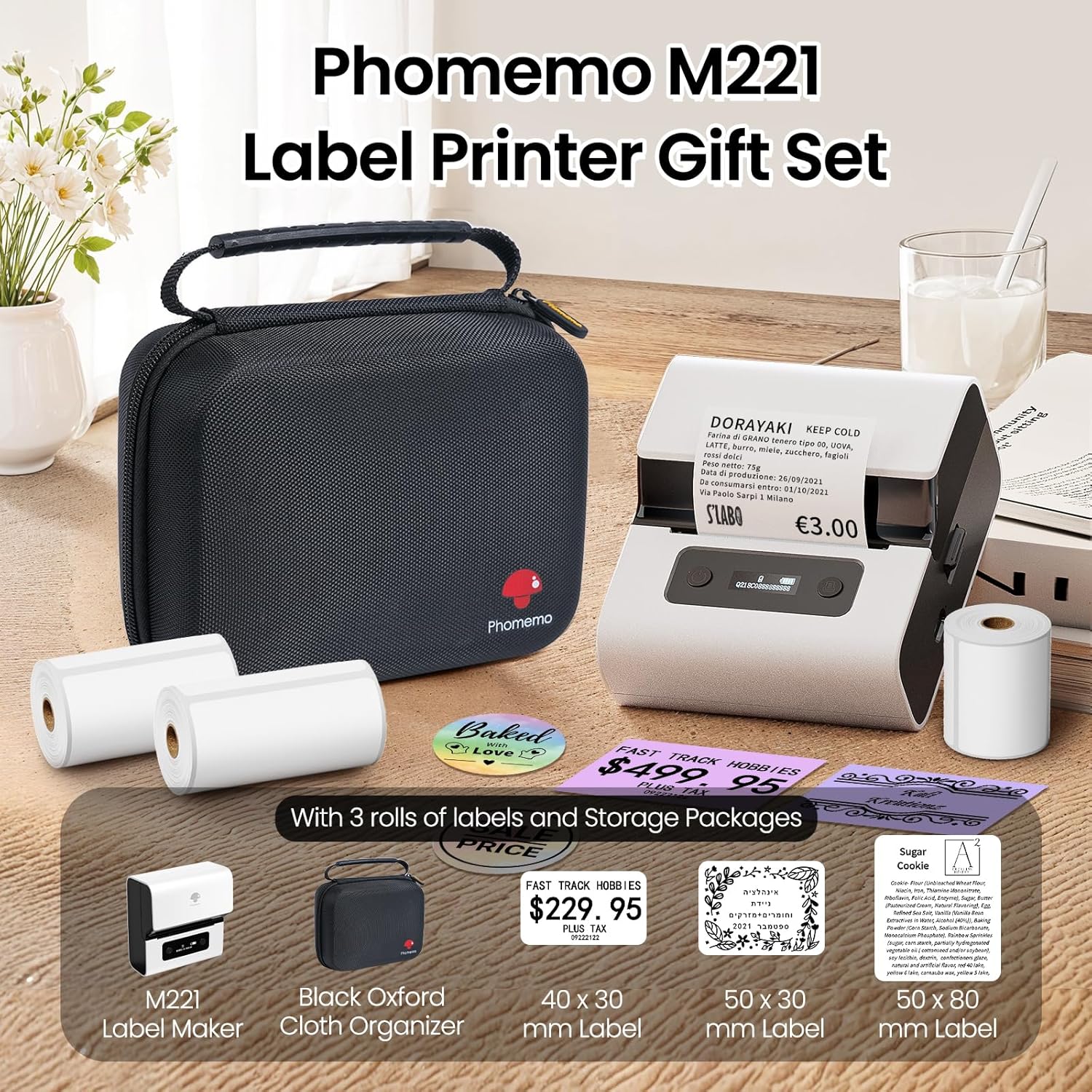
Image: Phomemo M221 Label Printer Gift Set, showing the printer, a black carrying case, and three rolls of white thermal labels.
Proizvod gotovview
The Phomemo M221 is a compact and efficient thermal label printer. Key features include:
- Tehnologija toplinskog ispisa: No ink or toner required.
- Kompatibilnost široke oznake: Supports labels from 20mm to 80mm (0.78" to 3.14") wide, including rectangular, round, transparent, and colored types.
- Povezivost: Bluetooth for iOS/Android smartphones and tablets, USB for Windows PCs.
- Baterija visokog kapaciteta: 2200 mAh battery with Type-C fast charging.
- Fast and Quiet Operation: Prints at 50 mm/s with reduced noise.
- Dizajn prilagođen korisniku: Easy label loading and automatic gap detection.

Image: Phomemo M221 Label Maker Set, illustrating its features such as no ink requirement, large battery capacity, Bluetooth wireless printing, and its suitability as a gift.
Postavljanje
1. Punjenje pisača
Before first use, fully charge the Phomemo M221 printer.
- Connect the provided USB Type-C cable to the printer's charging port.
- Drugi kraj kabela spojite na 5V USB adapter za napajanje (nije uključen) ili USB priključak računala.
- The indicator light will show charging status. A full charge typically takes several hours. The 2200 mAh battery supports extended use.
2. Učitavanje oznaka
The M221 features an integrated label fixing structure for easy loading.
- Otvorite poklopac pisača.
- Insert the label roll into the compartment, ensuring the printing side faces upwards and the labels feed smoothly.
- Adjust the side guide plates to secure the label roll in place.
- Close the printer cover. The printer will automatically detect and calibrate the label gap.
3. Povezivanje s vašim uređajem
The Phomemo M221 supports both Bluetooth and USB connections.
Bluetooth Connection (Smartphones/Tablets)
- Provjerite je li Bluetooth omogućen na vašem iOS ili Android uređaju.
- Download and install the "Print Master" application from your device's app store.
- Open the "Print Master" app and follow the on-screen instructions to search for and connect to your M221 printer.

Image: Phomemo M221 printer demonstrating Bluetooth wireless connection with a tablet and a smartphone.
USB Connection (Windows PC)
- Connect the USB Type-C cable from the printer to an available USB port on your Windows PC.
- Download and install the "Labelife" software and printer drivers from the official Phomemo webmjesto.
- Follow the software installation prompts. Once installed, you can select the M221 as your printer.

Image: Phomemo M221 printer connected to a laptop using a USB cable, indicating wired connectivity.
Upute za rad
1. Basic Printing with "Print Master" App (Mobile)
- Ensure your M221 printer is connected via Bluetooth to your mobile device.
- Open the "Print Master" app.
- Select a template or create a new label design. The app offers various templates for text, images, barcodes, QR codes, and more.
- Customize your label content.
- Tap the print icon. Confirm print settings such as quantity.
- The printer will begin printing your labels.
2. Printing with "Labelife" Software (PC)
- Ensure your M221 printer is connected via USB to your Windows PC.
- Open the "Labelife" software.
- Design your label using the software's features, including text, images, barcodes, and QR codes.
- Idi na "File" > "Print" or click the print icon.
- Select the Phomemo M221 from the list of available printers and adjust any necessary print settings.
- Click "Print" to start printing.
3. Grupni ispis
Both "Print Master" and "Labelife" support batch printing for efficiency.
- In the print dialogue, specify the desired number of copies.
- The printer will automatically print multiple labels consecutively.

Image: Phomemo M221 printer demonstrating its versatility with examples of address labels, price tags, ingredient labels, and gift tags.

Image: Phomemo M221 printer showcasing its compatibility with over 50 types of thermal labels, including various shapes and designs.
Održavanje
1. Čišćenje glave za ispis
Regular cleaning of the print head ensures optimal print quality.
- Isključite pisač i odspojite kabel za napajanje.
- Otvorite poklopac pisača.
- Lagano obrišite glavu za ispis vatom, laganoamps izopropilnim alkoholom.
- Allow the print head to dry completely before closing the cover and turning on the printer.
2. Skladištenje
Store the printer in a clean, dry environment, away from extreme temperatures and direct sunlight. When not in use for extended periods, ensure the printer is fully charged and then powered off.

Image: A man holding the Phomemo M221 printer's carrying case, illustrating its portable design.
Rješavanje problema
Printer Does Not Turn On or Charge
- Provjerite priključak napajanja: Ensure the USB Type-C cable is securely connected to both the printer and a working power source (5V adapter or PC USB port).
- Provjerite strujni adapter: Use a reliable 5V USB power adapter.
- Trajanje punjenja: Allow sufficient time for charging. The battery indicator should show charging status.
No Printing or Blank Output
- Check Label Orientation: Ensure the thermal labels are loaded correctly with the printing side facing upwards.
- Vrsta oznake: Confirm you are using thermal labels. The M221 does not use ink.
- Print Head Cleanliness: A dirty print head can cause blank lines or poor print quality. Refer to the Maintenance section for cleaning instructions.
- Poravnanje naljepnice: Ensure the label roll is properly seated and aligned by the side guide plates to prevent misalignment errors.
Problemi s Bluetooth vezom
- Printer On: Ensure the printer is powered on and within Bluetooth range of your device.
- Bluetooth omogućen: Verify Bluetooth is active on your smartphone or tablet.
- Veza aplikacije: Connect through the "Print Master" app, not directly through your device's Bluetooth settings.
- Ponovno pokretanje uređaja: Try restarting both the printer and your mobile device.
Loša kvaliteta ispisa
- Print Head Cleanliness: Očistite glavu za ispis kako je opisano u odjeljku Održavanje.
- Kvaliteta oznake: Use high-quality thermal labels.
- Print Density Settings: Adjust print density settings within the "Print Master" app or "Labelife" software if available.
Tehnički podaci
| Značajka | Detalj |
|---|---|
| Broj modela | M221 |
| Marka | Phomemo |
| Tehnologija povezivanja | Bluetooth, USB tip C |
| Tehnologija tiska | Toplinski |
| Ispis | Jednobojni |
| Maksimalna brzina ispisa (monokromatski) | 15.0 pages per minute (50 mm/s) |
| Maksimalna rezolucija ispisa (monokromatski) | 203 dpi |
| Podržana širina naljepnice | 20 mm - 80 mm (0.78" - 3.14") |
| Baterija | 2200 mAh (1 D - included) |
| Težina artikla | 820 gram |
| Dimenzije proizvoda (D x Š x V) | 12.9 x 6.7 x 11.9 centimetara |
| Control Device Type | Smartphone/PC |
| Vrsta medija | Etikete |
Jamstvo i podrška
For warranty information and technical support, please refer to the official Phomemo webweb-mjesto ili se izravno obratite njihovoj korisničkoj službi. Sačuvajte račun kao dokaz o kupnji.
Mrežni resursi: Posjetite Phomemo Store on Amazon for product updates and FAQs.