
Taiahiro Bk6301
Taiahiro Bk6301 Wireless Mechanical Gaming Keyboard and Mouse Combo User Manual
Model: Bk6301
1. Uvod
Thank you for choosing the Taiahiro Bk6301 Wireless Mechanical Gaming Keyboard and Mouse Combo. This manual provides detailed instructions for setting up, operating, and maintaining your new peripheral devices. This combo offers versatile connectivity options including 2.4G wireless, Bluetooth 5.0, and wired USB-C, ensuring compatibility with various devices.
2. Sadržaj paketa
Molimo provjerite jesu li svi artikli prisutni u vašem paketu:
- Taiahiro Bk6301 Wireless Mechanical Gaming Keyboard
- Taiahiro Wireless Gaming Mouse
- USB 2.4G Receiver (stored in mouse battery compartment)
- USB-C na USB-A kabel za punjenje/podatkovni kabel
- korisnički priručnik
- 1 AA Battery (for mouse, may be pre-installed or included separately)

Image 2.1: Contents of the Taiahiro Bk6301 Keyboard and Mouse Combo package, including the keyboard, mouse, USB receiver, and USB-C cable.
3. Proizvod je gotovview
3.1 Značajke tipkovnice
- Raspored sa 98 tipke: Compact design with a full numeric keypad.
- Mehanički plavi prekidači: Provide tactile and audible feedback for typing.
- RGB pozadinsko osvjetljenje: Prilagodljivi svjetlosni efekti.
- Podesivi stalak za klavijaturu: Allows for ergonomic positioning.
- Višemodna povezivost: Supports 2.4G wireless, Bluetooth 5.0, and wired USB-C.
- Punjiva baterija: Built-in 2000mAh battery for wireless operation.
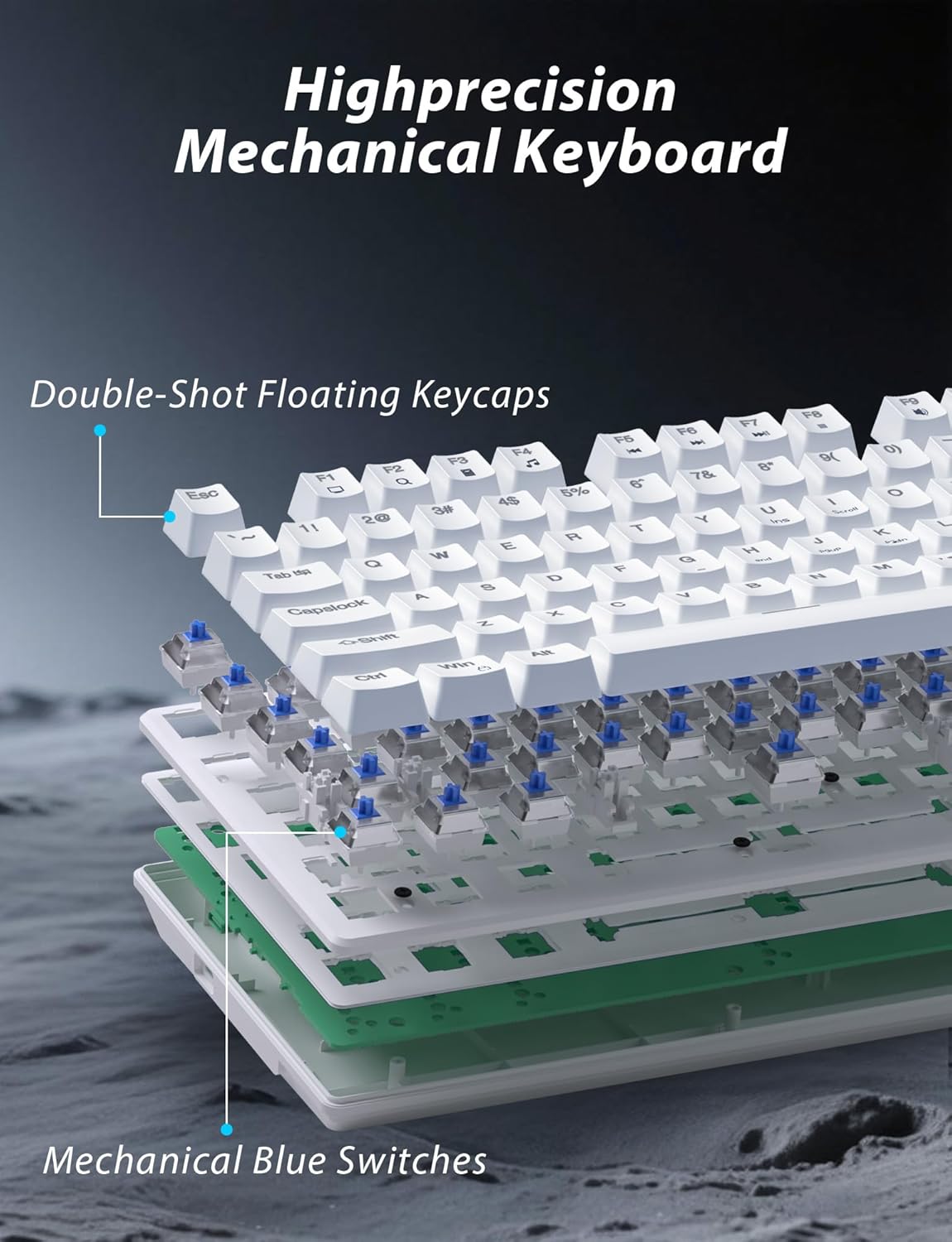
Slika 3.1: Rastavljeno view illustrating the internal structure of the mechanical keyboard, highlighting the double-shot floating keycaps and mechanical blue switches.

Slika 3.2: Bočna strana view of the keyboard demonstrating its ergonomic design and adjustable stand for comfortable use.
3.2 Značajke miša
- Ergonomski dizajn: Shaped for comfortable grip.
- Podesivi DPI: Four levels (800/1600/2400/3200) for precision control.
- Tipke Naprijed/Natrag: Convenient side buttons for navigation.
- Dvostruka povezivost: Supports 2.4G wireless and Bluetooth.

Image 3.3: The wireless gaming mouse, highlighting its ergonomic shape and four adjustable DPI levels.
4. Upute za postavljanje
4.1 Keyboard Connection
The keyboard supports three connection modes: 2.4G wireless, Bluetooth, and wired USB-C.

Image 4.1: The keyboard displaying its three connectivity options: Bluetooth, 2.4GHz wireless, and USB-C wired connection.
2.4G bežični način rada:
- Locate the USB 2.4G receiver, typically stored in the mouse's battery compartment.
- Umetnite USB prijemnik u slobodni USB priključak na računalu.
- On the keyboard, slide the mode switch (usually located on the top edge or bottom) to the '2.4G' position.
- Tipkovnica bi se trebala automatski povezati.
Bluetooth način rada:
- Slide the mode switch on the keyboard to the 'BT' (Bluetooth) position.
- Indikatorska lampica na tipkovnici će treptati, što označava da je u načinu rada za uparivanje.
- On your device (computer, laptop, smartphone), open Bluetooth settings and search for new devices.
- Select "Taiahiro Bk6301" or a similar name from the list of available devices to pair.
- Nakon uparivanja, indikatorska lampica će početi stalno svijetliti.
Wired USB-C Mode:
- Spojite priloženi USB-C kabel na USB-C priključak tipkovnice.
- Drugi kraj (USB-A) priključite na slobodni USB priključak na računalu.
- The keyboard will function as a wired device and will charge simultaneously.
4.2 Mouse Connection
Miš podržava 2.4G bežičnu i Bluetooth povezivost.

Image 4.2: The underside of the mouse, illustrating the battery compartment for one AA battery and the storage slot for the tiny USB receiver.
Ugradnja baterije:
- Otvorite odjeljak za baterije na donjoj strani miša.
- Umetnite jednu AA bateriju, pazeći na ispravan polaritet.
- Zatvorite odjeljak za baterije.
2.4G bežični način rada:
- Ensure the USB 2.4G receiver is plugged into your computer.
- Slide the mode switch on the underside of the mouse to the '2.4G' position.
- Miš bi se trebao automatski povezati.
Bluetooth način rada:
- Slide the mode switch on the underside of the mouse to the 'BT' (Bluetooth) position.
- Miš će ući u način rada za uparivanje.
- Na svom uređaju otvorite postavke Bluetootha i potražite nove uređaje.
- Select "Taiahiro Mouse" or a similar name from the list to pair.
5. Upute za rad
5.1 Funkcije tipkovnice
Kontrola pozadinskog osvjetljenja:
The keyboard features customizable RGB backlighting.
- Promjena načina pozadinskog osvjetljenja: Pritisnite Fn + Početna za cikličko mijenjanje 18 različitih svjetlosnih efekata.
- Podešavanje svjetline: Pritisnite Fn + ↑ (strelica gore) or Fn + ↓ (strelica prema dolje) to adjust between 5 brightness levels.
- Podesite brzinu: Pritisnite Fn + ← (strelica lijevo) or Fn + → (strelica desno) to adjust between 5 lighting speed levels.

Image 5.1: Keyboard layout highlighting the function key combinations for controlling backlight modes, brightness, and speed.
Multimedijske funkcije:
Pristupite multimedijskim kontrolama pritiskom na Fn key in combination with the designated F-keys (F1-F12).
- Fn+F1: Media Player
- Fn+F2: Stišaj zvuk
- Fn+F3: Povećaj glasnoću
- Fn+F4: Isključi zvuk
- Fn+F5: Stop
- Fn+F6: Prethodna pjesma
- Fn+F7: Reprodukcija/Pauza
- Fn+F8: Sljedeća pjesma
- Fn+F9: E-mail
- Fn+F10: Web preglednik
- Fn+F11: Moje računalo
- Fn+F12: Kalkulator
5.2 Funkcije miša
Podešavanje DPI-ja:
Pritisnite tipku DPI gumb (located behind the scroll wheel) to cycle through the four DPI settings: 800, 1600, 2400, and 3200. Each press changes the sensitivity, allowing you to adjust cursor speed to your preference.
6. Održavanje
6.1 Čišćenje
- Tipkovnica: Use a soft, dry cloth to wipe the surface. For deeper cleaning, use compressed air to remove debris from between keys. Avoid using harsh chemicals or abrasive materials.
- Miš: Wipe the mouse surface with a soft, slightly damp krpom. Pazite da tekućina ne uđe u unutarnje komponente.
6.2 Upravljanje baterijom
- Tipkovnica: The keyboard has a built-in rechargeable battery. Connect the USB-C cable to a power source (e.g., computer USB port, USB wall adapter) to charge. The indicator light will show charging status.
- Miš: The mouse uses one AA battery. Replace the battery when the mouse performance degrades or it stops responding. Ensure proper polarity when inserting a new battery.
7. Rješavanje problema
If you encounter issues with your Taiahiro keyboard and mouse combo, please refer to the following solutions:
| Problem | Moguće rješenje |
|---|---|
| Keyboard/Mouse not responding (2.4G) |
|
| Keyboard/Mouse not connecting (Bluetooth) |
|
| Keyboard backlight not working or stuck |
|
| Tipke ne reagiraju ili se tipkaju dvaput |
|
8. Specifikacije
| Značajka | Detalj |
|---|---|
| Broj modela | Bk6301 |
| Povezivost | Bluetooth 5.0, 2.4G bežični, USB-C žičani |
| Vrsta tipkovnice | Mehanička tipkovnica za igre |
| Raspored tipki | 98 Keys (with Numeric Keypad) |
| Tip prekidača | Mehanički plavi prekidači |
| Pozadinsko osvjetljenje tipkovnice | RGB (18 načina rada, 5 svjetline, 5 razina brzine) |
| Baterija za tipkovnicu | 2000 mAh punjiva |
| Razine DPI-ja miša | 800 / 1600 / 2400 / 3200 |
| Baterija za miš | 1 x AA baterija |
| Kompatibilni uređaji | Personal Computer, Laptop, Smartphone |
| Težina artikla | 2.72 funte (kombinirano) |
| Dimenzije paketa | 15 x 5.59 x 3.11 inča |
9. Jamstvo i podrška
9.1 Informacije o jamstvu
Taiahiro products are covered by a limited warranty from the date of purchase. Please refer to the warranty card included in your package or visit the official Taiahiro website for detailed warranty terms and conditions. This warranty typically covers manufacturing defects and material faults under normal use.
9.2 Korisnička podrška
For technical assistance, troubleshooting, or any questions regarding your Taiahiro Bk6301 combo, please contact our customer support team. You can find contact information on the Taiahiro official website or through your purchase platform. When contacting support, please have your product model number (Bk6301) and purchase details ready.
Ask a question about this manual
Ask about setup, troubleshooting, compatibility, parts, safety, or missing instructions. Manuals+ will review the question and use this page’s manual context to help answer it.