
Uvod
This manual provides essential information for the proper setup, operation, and maintenance of your My Arcade Sonic The Hedgehog Joystick Player. Please read this manual thoroughly before using the product to ensure a safe and enjoyable gaming experience.
Proizvod gotovview
The My Arcade Sonic The Hedgehog Joystick Player is a portable retro gaming console featuring classic SEGA titles. It offers an authentic arcade experience with a joystick and dedicated buttons.
Ključne karakteristike:
- Officially licensed SEGA game console.
- High-resolution 3.5-inch full-color display.
- Uključuje Sonic the Hedgehog i Jež Sonic 2.
- 3.5mm headphone jack for private audio.
- Ugrađeni zvučnik s kontrolom glasnoće.
- Podesiva svjetlina zaslona.
- Powered by 4 AA batteries (not included) or USB-C cable (not included).
Komponente:
- Gaming Console Unit
- Joystick
- Action Buttons (A, B, C)
- Gumb Početna
- Credit/Start Button
- Kontrola glasnoće (+/-)
- Kontrola svjetline
- 3.5 mm utičnica za slušalice
- USB-C Power Input (5V IN)
- Battery Compartment (requires 4 AA batteries)

The My Arcade Sonic The Hedgehog Joystick Player, a portable retro gaming console.
Postavljanje
Powering the Console:
- Ugradnja baterije: Locate the battery compartment on the back of the console. Insert 4 AA batteries (not included), ensuring correct polarity.
- USB-C Power (Optional): Alternatively, connect a USB-C cable (not included) to the 5V IN port on the back of the console to power it.
Početna uporaba:
- Peel off the protective screen sticker before use.
- Turn on the console using the power switch located on the back.

Stražnji view of the console, highlighting the battery compartment, USB-C port, and headphone jack.
Upute za rad
Game Selection and Start:
- Once powered on, use the joystick to navigate and select your desired game (Sonic the Hedgehog or Jež Sonic 2) from the main menu.
- Pritisnite tipku START/CREDIT button to add virtual coins and begin the game.
- To skip the Sonic demo mode, press the START/CREDIT dugme.
Kontrole:
- joystick: Controls character movement.
- Action Buttons (A, B, C): Perform in-game actions such as jumping or attacking.
- Kontrola glasnoće (+/-): Adjust the sound level of the built-in speaker using the buttons on the back of the console.
- Svjetlina zaslona: Adjust the screen brightness using the dedicated button on the back.
- Priključak za slušalice: For private listening, connect 3.5mm headphones to the headphone jack on the back.
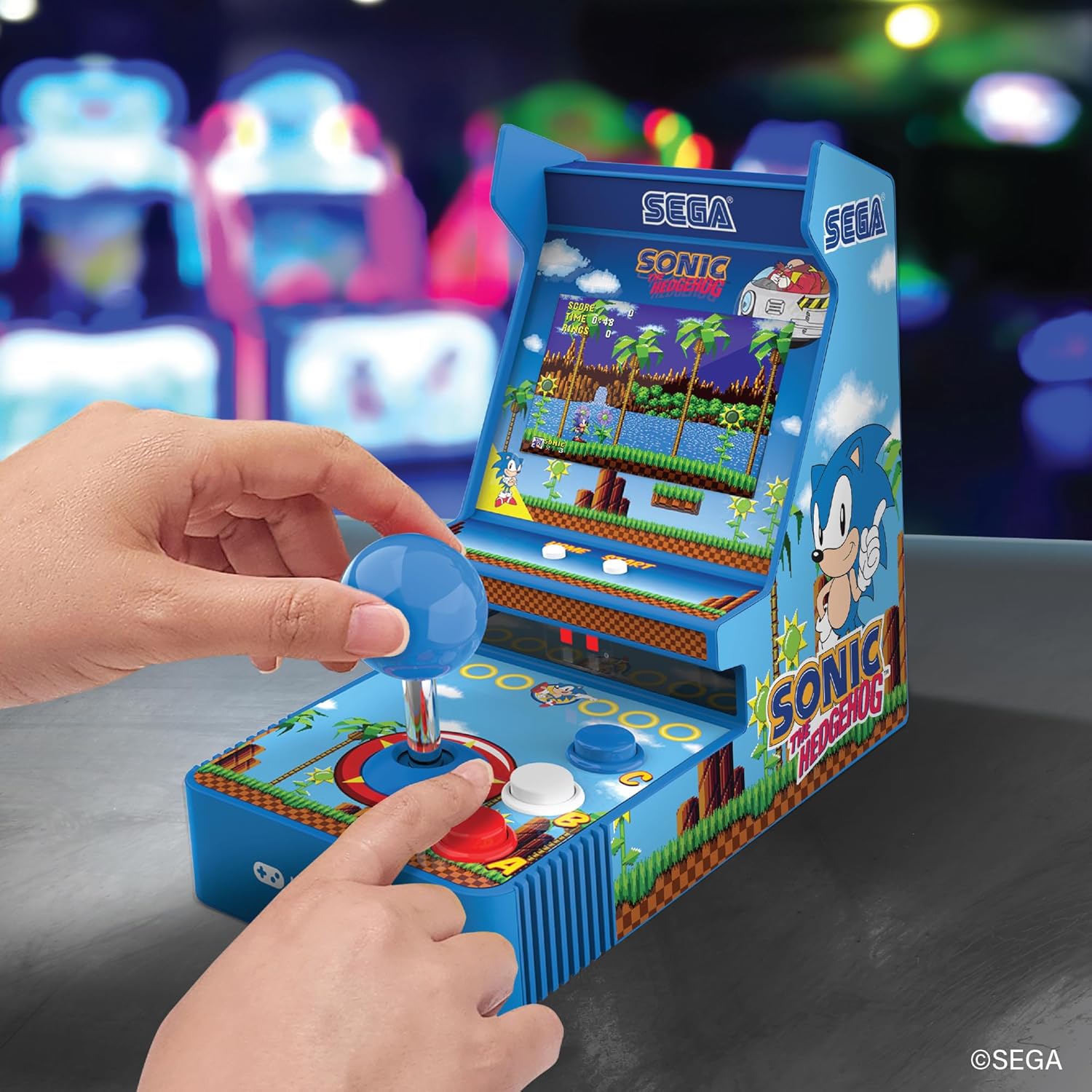
Ispred view of the console, showing the joystick, action buttons, and screen during gameplay.
Official video demonstrating the My Arcade Sonic Arcade Game in action, showcasing igranje i značajke.
Održavanje
To ensure the longevity of your My Arcade Sonic The Hedgehog Joystick Player, follow these simple maintenance guidelines:
- Keep the console clean by wiping it with a soft, dry cloth. Avoid using abrasive cleaners or solvents.
- Konzolu čuvajte na hladnom i suhom mjestu, dalje od izravne sunčeve svjetlosti i ekstremnih temperatura.
- If not in use for an extended period, remove the AA batteries to prevent leakage.
Rješavanje problema
If you encounter any issues with your My Arcade Sonic The Hedgehog Joystick Player, refer to the following common solutions:
- Konzola se ne uključuje: Ensure that fresh AA batteries are correctly installed or that the USB-C cable is securely connected to a power source.
- Game does not start from demo mode: Pritisnite tipku START/CREDIT button to exit demo mode and begin gameplay.
- Nema zvuka: Check the volume control buttons on the back of the console. If headphones are connected, ensure they are fully plugged in and functioning correctly.
- Screen is dim: Adjust the screen brightness using the dedicated button on the back of the console.
If problems persist, please contact My Arcade customer support for further assistance.
Tehnički podaci
| Značajka | Detalj |
|---|---|
| Dimenzije proizvoda | 4 cm D x 6.8 cm Š x 7.6 cm V |
| Vrsta kontrolera | Joystick |
| Težina artikla | 0.63 kilograma (1.39 funte) |
| Veličina zaslona | 3.5 inča |
| Izvor napajanja | 4 AA batteries (not included) or USB Type C (not included) |
| Hardversko sučelje | USB tipa C |
| Vrsta zaslona | LCD |
| Materijal | Plastični |
| Kapacitet pohrane memorije | 4 MB |
| Broj modela | DGUNL-7157 |
| UPC | 845620071579 |
Sigurnosne informacije
- Nije prikladno za djecu mlađu od 3 godine zbog sitnih dijelova.
- Uvijek nadzirite malu djecu tijekom uporabe.
- Do not expose the console to water or excessive moisture.
- Izbjegavajte ispuštanje ili izlaganje konzole jakim udarcima.
- Use only recommended battery types and ensure correct installation.
Jamstvo i podrška
For warranty information or technical support, please refer to the official My Arcade webweb-mjesto ili se obratite njihovoj službi za korisnike. Sačuvajte račun kao dokaz o kupnji.