
1. Uvod
This manual provides comprehensive instructions for the Saqico Q22 Charging Dock, designed to efficiently charge and organize your Meta Quest 2, Meta Quest 3, and Meta Quest 3S headsets and their respective controllers. This dock offers magnetic charging, integrated rechargeable batteries for controllers, customizable RGB lighting, and additional USB charging ports for a streamlined VR experience.
2. Sadržaj paketa
Molimo provjerite jesu li svi sljedeći artikli uključeni u vaš paket:
- 1 x priključna stanica za punjenje
- 1 x USB-C kabel
- 1 x USB-C Adapter (30W)
- 2 x AA punjivih baterija
- 1 x Quest 2 Battery Covers (for controllers)
- 1 x Quest 3 & 3S Battery Covers (for controllers)
- 1 x Mounting Pillar
- 4 x USB-C Magnetic Ports
- 1 x korisnički priručnik

Image: All components included in the Saqico Q22 Charging Dock package.
3. Upute za postavljanje
3.1. Ugradnja baterije kontrolera
- Open the battery compartment of your Meta Quest controllers.
- Remove the original disposable batteries.
- Insert the provided 2100mAh rechargeable AA batteries into each controller, ensuring correct polarity (+/-).
- Replace the original battery covers with the magnetic battery covers provided (Quest 2 or Quest 3/3S specific). Ensure the silver electrode area on the battery corresponds to the aluminum piece on the battery cover for proper charging.

Image: Step-by-step guide for installing the rechargeable batteries and magnetic covers into the controllers.
3.2. Headset Magnetic Charging Port Setup
- Insert one of the provided USB-C magnetic ports into the charging port of your Meta Quest headset. This allows for easy magnetic connection to the dock.

Image: Illustration of inserting the magnetic USB-C adapter into the headset's charging port.
3.3. Spajanje stanice za punjenje
- Connect the provided USB-C cable to the input port on the back of the charging dock.
- Plug the other end of the USB-C cable into the 30W USB-C adapter.
- Plug the adapter into a standard wall outlet. The dock's RGB lights will illuminate, indicating it is powered on.
Video: This video demonstrates the initial setup of the charging dock, including connecting the power and placing the headset and controllers. It highlights the magnetic connection and RGB lighting.
4. Upute za rad
4.1. Punjenje uređaja
- slušalice: Gently place your Meta Quest headset onto the central stand of the charging dock. The magnetic USB-C port you installed earlier will automatically align and connect, initiating charging. The indicator light for the headset will turn orange while charging and blue when fully charged.
- Upravljači: Place your controllers into their designated slots on either side of the dock. The magnetic battery covers will connect with the charging pins, and the controller indicator lights will turn orange while charging and blue when fully charged.

Image: The Meta Quest headset and controllers placed on the charging dock, illustrating simultaneous charging.
4.2. Upravljanje RGB rasvjetom
The charging dock features 7 RGB lighting modes to enhance your gaming environment. A dedicated button on the dock allows you to cycle through different colors or turn the lights on/off according to your preference.
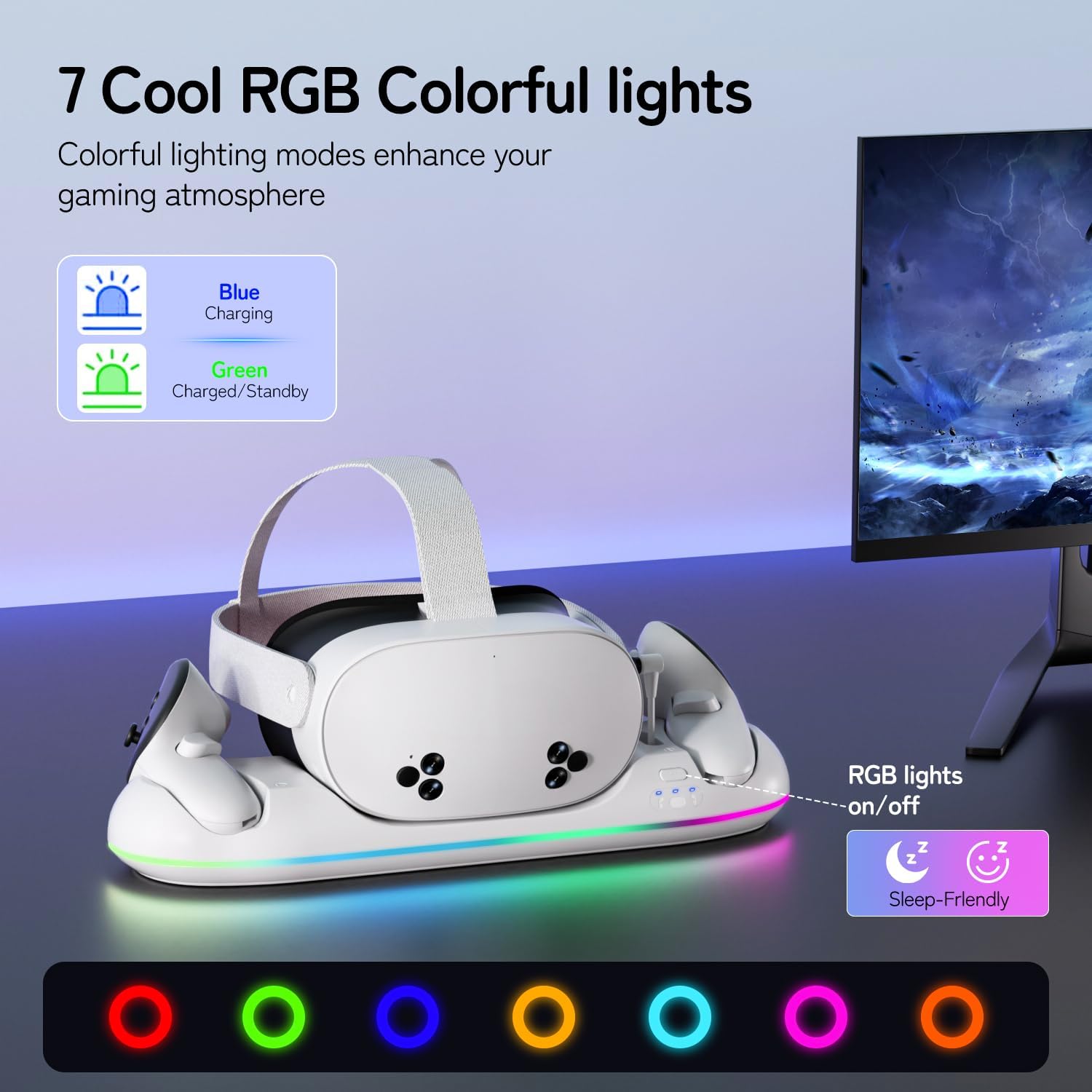
Image: The charging dock displaying various RGB lighting modes, with an explanation of the charging status indicators (blue for charging, green for charged/standby).
4.3. Additional USB Charging Ports
The upgraded version of this charging dock includes extra USB charging ports. These ports can be used to charge other devices such as smartphones, power banks, or speakers, providing additional convenience.

Image: The charging dock with a smartphone connected to an additional USB port, demonstrating its versatility.
5. Značajke punjenja
The Saqico Q22 Charging Dock is engineered for fast and efficient charging:
- Vrijeme punjenja slušalica: Otprilike 2-3 sata za potpuno punjenje.
- Vrijeme punjenja kontrolera: Otprilike 3 sata za potpuno punjenje.
- Magnetsko punjenje: The magnetic design ensures secure and hassle-free placement, reducing wear on ports.
- Punjive baterije: The included 2100mAh rechargeable batteries for controllers support over 2,000 charging cycles, offering long-term use and reducing the need for frequent replacements.

Image: Visual representation of the fast charging capabilities for both the Meta Quest headset and controllers.
6. Sigurnosne informacije
The charging dock incorporates multiple protection features to ensure the safety of your devices:
- Zaštita od prepunjavanja: Prevents batteries from being overcharged, extending their lifespan.
- Zaštita od preopterećenja: Zaštita od prekomjernog trošenja struje.
- Prekostrujna zaštita: Štiti od prenapona.
- Zaštita od kratkog spoja: Sprječava oštećenja od kratkih spojeva.

Image: Diagram illustrating the smart charging protection features, including overcharge and short-circuit protection.
7. Održavanje
To ensure optimal performance and longevity of your charging dock:
- Keep the charging dock and your devices clean and free from dust. Use a soft, dry cloth for cleaning.
- Ensure the charging pins on the dock and the magnetic contacts on the controller covers are clean. If necessary, gently clean with a cotton swab lightly damps alkoholom.
- Avoid using protective grip covers on your controllers that cover the battery compartment, as this may prevent proper charging.
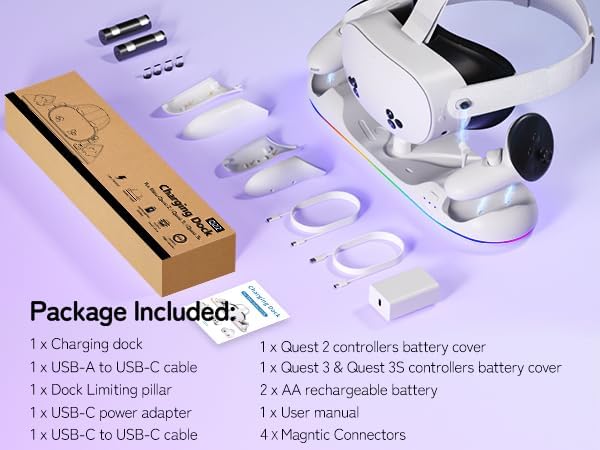
Image: Visual warning indicating that certain controller covers are not compatible with the charging dock due to interference with charging contacts.
8. Rješavanje problema
If you encounter issues with your charging dock, please refer to the following common solutions:
- Uređaj se ne puni: Ensure the power adapter is securely plugged into a wall outlet and the USB-C cable is firmly connected to the dock. Verify that the magnetic charging port is correctly inserted into the headset and that the controller battery covers are properly aligned with the dock's charging pins.
- RGB svjetla ne rade: Check if the power adapter is connected. Press the RGB button on the dock to cycle through modes or turn the lights on.
- Charging pins stuck or deformed: Carefully inspect the charging pins on the dock and the magnetic contacts on the controller covers. If any are stuck or deformed, contact customer support.
- Sporo punjenje: Ensure you are using the provided 30W USB-C adapter and cable. Using a lower wattage adapter may result in slower charging times.
9. Specifikacije
| Značajka | Detalj |
|---|---|
| Dimenzije proizvoda | 2.36 x 4.41 x 15.39 inča |
| Težina artikla | 1.5 funti |
| Broj modela artikla | P22 |
| Baterije | 2 AA punjivih baterija (uključeno) |
| Ulazna snaga | 30W USB-C adapter |
| Vrijeme punjenja slušalica | 2-3 sata |
| Vrijeme punjenja kontrolera | 3 sata |
| RGB načini osvjetljenja | 7 načina rada |
| Dodatni priključci | Extra USB charging ports |
| Kompatibilnost | Meta Quest 2, Meta Quest 3, Meta Quest 3S |
| Boja | Bijela |
10. Jamstvo i podrška
Ovaj proizvod dolazi s 24-MJESEČNA GARANCIJA. To activate your warranty or for any product support, please use the following contact information:
- Webstranica: www.dobe-us.com
- Email: support@dobe-us.com
Please contact us if you have any questions or concerns regarding your product. We aim to reply and resolve your problem within 24 hours.