
Uvod
Thank you for choosing the Casio MWA-300H Series watch. This manual provides essential information regarding the setup, operation, and maintenance of your new timepiece. Please read this manual carefully to ensure proper use and to fully understand the features of your watch.
The Casio MWA-300H is an analog watch featuring a chronograph, 100-meter water resistance, and luminous hands for enhanced readability. It is designed for versatile wear, suitable for both daily use and recreational water activities.
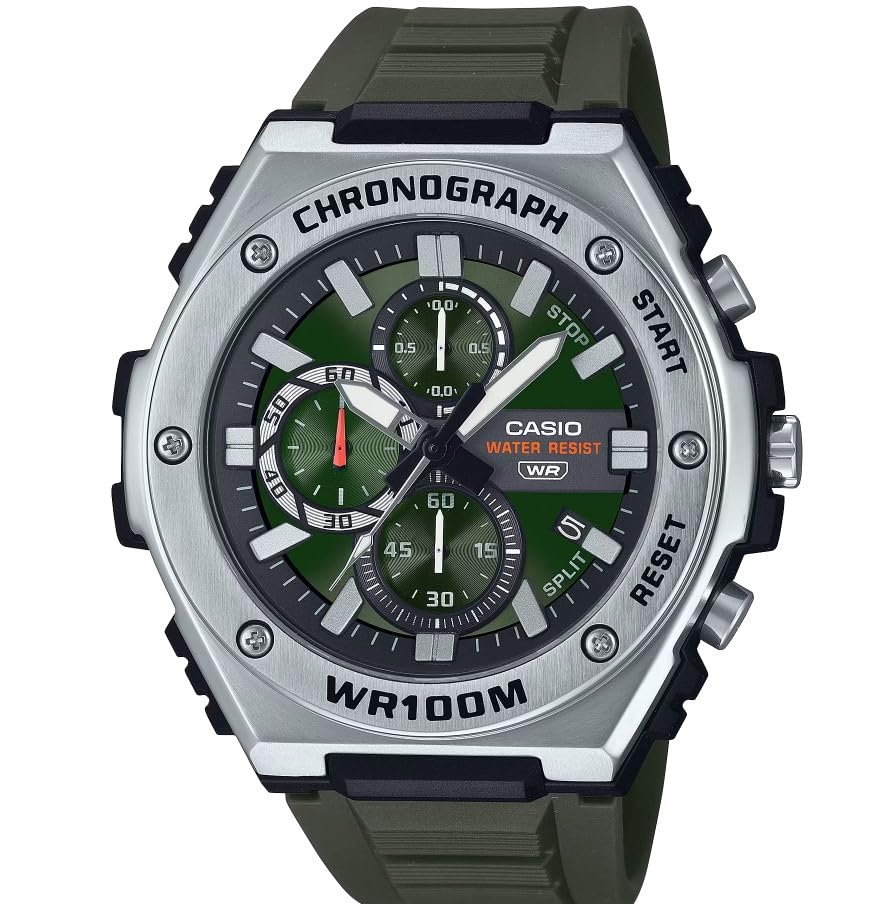
Slika: prednja strana view of the Casio MWA-300H Series watch, highlighting its green dial, chronograph sub-dials, and black resin band.
Setup: Initial Settings
Postavljanje vremena
- Pull the crown out to the second click (time setting position). The second hand will stop.
- Rotate the crown to set the hour and minute hands. Ensure the AM/PM setting is correct if your watch has a 24-hour indicator or date changes at midnight.
- Vratite krunicu u normalan položaj. Sekundarna kazaljka će se nastaviti kretati.
Postavljanje datuma
- Pull the crown out to the first click (date setting position).
- Rotate the crown to set the date. Avoid setting the date between 9:00 PM and 1:00 AM, as this may interfere with the automatic date change mechanism.
- Gurnite krunicu natrag u normalan položaj.
Podaci o bateriji
Your Casio MWA-300H watch is powered by 1 LR44 battery, which is included. The battery life is approximately 3 years. When the battery runs low, the watch may exhibit irregular movement or stop. It is recommended to have the battery replaced by a qualified watch technician to maintain water resistance.
Operating: Watch Functions
Korištenje kronografa (štoperice)
The chronograph function allows for precise timing of events. Your watch features a 1/10-second stopwatch that captures elapsed, split, and 1st/2nd place times across three dedicated sub-dials.
- Starting the Stopwatch: Press button A (typically the upper right button) to start the stopwatch.
- Stopping the Stopwatch: Press button A again to stop the stopwatch.
- Resetting the Stopwatch: After stopping, press button B (typically the lower right button) to reset the stopwatch hands to zero.
- Mjerenje razdvojenog vremena: While the stopwatch is running, press button B to measure split times. The stopwatch hands will momentarily stop to indicate the split time, then resume timing. Press button B again to release the split time and display the current elapsed time.
Note: Refer to the specific button layout on your watch for exact button assignments.
Water Resistance (100 Meters)
Your Casio MWA-300H watch is water resistant up to 100 meters (330 feet). This rating means the watch is suitable for swimming, showering, and recreational water activities. It is not suitable for diving or snorkeling where significant water pressure changes occur.
- Do not operate the crown or buttons while the watch is wet or submerged.
- Nakon izlaganja slanoj vodi, isperite sat slatkom vodom i obrišite ga suhom krpom.
Svjetleće kazaljke i markeri
The watch features luminous hands and markers that absorb light and glow in the dark, providing readability in low-light conditions. The intensity and duration of the glow depend on the amount and type of light exposure.
Održavanje
Opća njega
- Redovito brišite sat mekom, suhom krpom kako biste uklonili prljavštinu i vlagu.
- Izbjegavajte izlaganje sata ekstremnim temperaturama, izravnoj sunčevoj svjetlosti dulje vrijeme ili jakim magnetskim poljima.
- Keep the watch away from solvents, detergents, perfumes, and cosmetics, as these can damage the resin materials.
Zamjena baterije
When the battery needs replacement, it is highly recommended to take your watch to an authorized Casio service center or a reputable watch repair shop. This ensures that the watch is properly sealed and its water resistance is maintained after battery replacement.
Provjere vodootpornosti
To maintain the water resistance of your watch, it is advisable to have it inspected periodically (e.g., every 2-3 years) by an authorized service center, especially if it is frequently exposed to water.
Rješavanje problema
| Problem | Mogući uzrok | Otopina |
|---|---|---|
| Watch hands do not move or move irregularly. | Prazna baterija. | Zamijenite bateriju. Posavjetujte se s profesionalnim serviserom satova. |
| Vrijeme je netočno. | Time not set correctly; watch has stopped and restarted. | Reset the time according to the "Setting the Time" instructions. |
| Datum se mijenja u podne umjesto u ponoć. | Postavka AM/PM nije ispravna. | Pomaknite vrijeme za 12 sati unaprijed. |
| Kazaljke kronografa se ne resetiraju na nulu. | Neusklađenost kazaljki kronografa. | Consult the full Casio module manual for chronograph hand adjustment procedures, or contact customer support. |
| Vlaga unutar sata. | Crown or buttons operated underwater; seals compromised. | Odmah odnesite sat u ovlašteni servisni centar na pregled i popravak kako biste spriječili daljnja oštećenja. |
Tehnički podaci
| Naziv modela | MWA-300H |
| Vrsta zaslona | Analog |
| Vrsta kretanja | Kvarcni |
| Dubina vodootpornosti | 100 metara (330 stope) |
| Dodatne značajke | Kronograf, prikaz datuma, svjetleće kazaljke |
| Izvor napajanja | Battery Powered (1 x LR44 included) |
| Materijal kućišta | Smola |
| Materijal trake | Smola |
| Kristalni materijal | Smola |
| Promjer kućišta | 50.9 milimetara |
| Debljina kućišta | 14.3 milimetara |
| Širina trake | 22 milimetara |
| Vrsta kopče | Kopča |
Jamstvo i podrška
Ograničeno jamstvo
Your Casio MWA-300H watch comes with a limited warranty. Please refer to the warranty card included with your purchase for specific terms, conditions, and duration of coverage. The warranty typically covers manufacturing defects under normal use.
Korisnička podrška
For further assistance, technical support, or warranty claims, please contact Casio customer service. You can find contact information on the official Casio webweb-mjestu ili u dokumentaciji koja je isporučena s vašim satom.
For more detailed information, including specific module operations or advanced settings, please visit the official Casio support website or refer to the full module manual for your watch.