
1. Uvod
Thank you for choosing the Auusda T156A 15.6-inch Business Laptop. This manual provides essential information for setting up, operating, and maintaining your new laptop. Please read this manual thoroughly before using the device to ensure proper function and longevity. This laptop is designed for productivity and portability, featuring a 4-core processor, 8GB DDR4 RAM, and a 512GB M.2 PCIe NVMe SSD, all running on Windows 11 Pro.
2. Sadržaj paketa
Provjerite jesu li svi artikli prisutni u paketu:
- Auusda T156A Laptop
- Strujni adapter i kabel
- Transparent Keyboard Cover
- Spanish Keyboard Cover
- Upute za uporabu (ovaj dokument)

Image: The laptop, power adapter, and keyboard covers as included in the package.
3. Proizvod je gotovview
3.1 Ključne značajke
- Snažna izvedba: Equipped with a 4-core N95 processor (1.7-3.4 GHz) and 8GB DDR4 RAM for efficient multitasking.
- Ample Storage: Features a 512GB M.2 PCIe NVMe SSD for fast data access and sufficient storage.
- Vibrant Full HD Display: A 15.6" Full HD IPS LCD screen offers clear visuals with wide viewing kutova.
- Praktične značajke: Includes a backlit keyboard for low-light use and a fingerprint reader for secure access.
- Connectivity & Versatility: Offers Bluetooth, an SD card reader, and essential ports for various devices.

Slika: Prekoview of the Auusda T156A laptop with its main features labeled.
3.2 Procesor i memorija
The laptop is powered by an Intel N95 4-core processor, capable of speeds up to 3.4 GHz, ensuring smooth operation for business and academic tasks. It comes with 8GB of DDR4 RAM and a 512GB M.2 PCIe NVMe Solid State Drive (SSD) for quick boot times and application loading.

Image: A visual representation of the 4-core N95 processor chip.

Image: The laptop highlighting its 8GB RAM and 512GB SSD configuration.
3.3 Prikaz
Experience clear and vibrant visuals on the 15.6-inch Full HD (1920x1080) IPS LCD display. The screen features a narrow bezel and supports 16 million colors, providing an immersive viewing experience. A privacy shutter is integrated for the webnarančasta.

Image: The laptop's 15.6-inch Full HD IPS LCD display and its features.
3.4 Tipkovnica i dodirna podloga
The laptop features a full-size backlit keyboard, allowing comfortable typing in various lighting conditions. The integrated touchpad includes a fingerprint sensor for secure and quick login.

Image: The backlit keyboard and the fingerprint ID sensor on the touchpad.
3.5 Portovi i povezivost
The Auusda T156A offers a range of connectivity options:
- Ulaz istosmjerne struje
- USB-A Ports (multiple)
- HDMI izlaz
- čitač microSD kartica
- Utičnica za slušalice
- Bluetooth and Wi-Fi (802.11ac, 802.11ax)
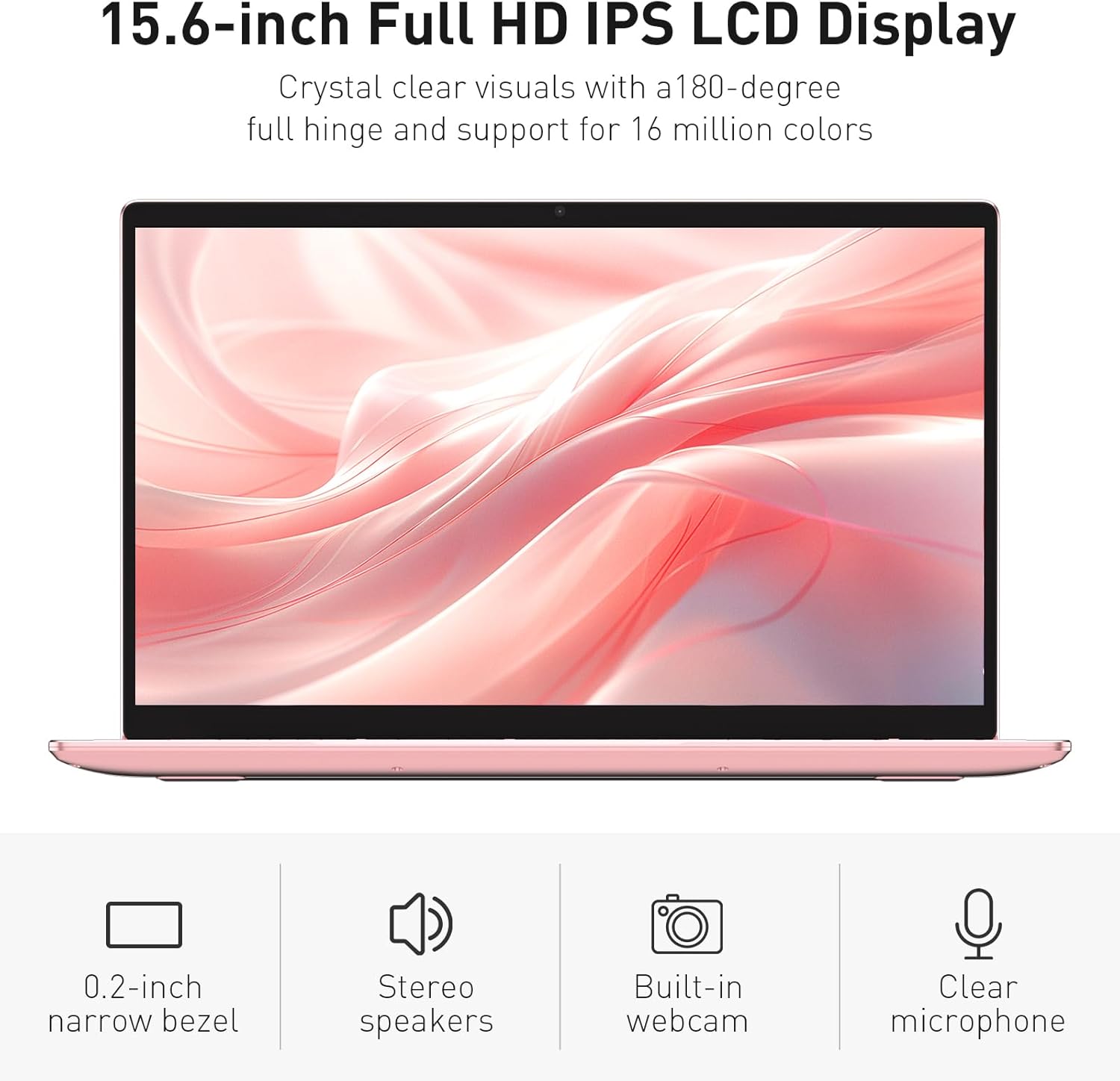
Image: The various ports available on the sides of the laptop.
4. Postavljanje
4.1 Početno uključivanje i punjenje
- Izvadite laptop i adapter za napajanje iz kutije.
- Connect the power adapter to the DC power input port on the laptop and then to a power outlet.
- Allow the laptop to charge for at least 30 minutes before initial use, or until the charging indicator light shows a full charge.
- Pritisnite gumb za uključivanje kako biste uključili prijenosno računalo.
4.2 Postavljanje sustava Windows 11 Pro
Follow the on-screen instructions to complete the initial Windows 11 Pro setup. This will include:
- Odabir regije i rasporeda tipkovnice.
- Spajanje na Wi-Fi mrežu.
- Prihvaćanje licencnog ugovora.
- Stvaranje korisničkog računa ili prijava s Microsoftovim računom.
4.3 Postavljanje senzora otiska prsta
For enhanced security, set up the fingerprint sensor:
- Nakon što je Windows instaliran, idite na Postavke > Računi > Opcije prijave.
- Pod "Windows Hello Fingerprint" kliknite Postaviti.
- Follow the on-screen prompts to register your fingerprint. You will be asked to lift and place your finger multiple times on the sensor until it is fully registered.
5. Upravljanje prijenosnim računalom
5.1 Osnovna upotreba
- Uključivanje/isključivanje: Pritisnite gumb za napajanje koji se nalazi u gornjem desnom kutu tipkovnice da biste uključili ili isključili prijenosno računalo.
- Stanje mirovanja: Zatvorite poklopac ili kratko pritisnite gumb za napajanje kako biste prijenosno računalo prebacili u stanje mirovanja.
- Restart/Shut Down: Access these options from the Start Menu in Windows.
5.2 Backlit Keyboard Control
The keyboard backlight can be adjusted or turned off using the function keys. Look for the key with a keyboard icon (often F5 or F6) to cycle through brightness levels or toggle the backlight on/off.
5.3 Webcam Privacy Shutter
Integrirani webcam includes a physical privacy shutter. Slide the small cover located directly above the webcam lens to open or close it, ensuring your privacy when the camera is not in use.
5.4 Spajanje vanjskih uređaja
Use the available ports to connect peripherals:
- USB uređaji: Plug USB drives, mice, or keyboards into the USB-A ports.
- Vanjski zaslon: Connect an external monitor or projector using the HDMI port.
- Audio: Use the headphone jack for headphones or external speakers.
- MicroSD kartica: Insert a microSD card into the dedicated slot for additional storage or data transfer.
5.5 Performanse u igrama
The Auusda T156A is capable of handling light gaming and provides a smooth experience for many popular titles. For optimal performance, ensure your drivers are updated and close unnecessary background applications.
Video: Demonstration of the Auusda T156A laptop's light gaming capabilities.
Video: Kratki isječakasing the laptop's performance during racing games.
6. Održavanje
- Čišćenje: Za čišćenje zaslona i vanjske površine koristite meku krpu koja ne ostavlja dlačice. Za tvrdokorne mrlje, dampOperite krpu vodom ili sredstvom za čišćenje ekrana. Izbjegavajte jake kemikalije.
- Njega baterije: To prolong battery life, avoid fully discharging the battery frequently. It is recommended to keep the battery charged between 20% and 80% when possible. Store the laptop in a cool, dry place.
- Ažuriranja softvera: Redovito provjeravajte i instalirajte ažuriranja za Windows i upravljačke programe kako biste osigurali optimalne performanse i sigurnost.
- Ventilacija: Provjerite da ventilacijski otvori prijenosnog računala nisu začepljeni kako biste spriječili pregrijavanje. Prijenosno računalo koristite na tvrdoj, ravnoj površini.
- Sigurnosna kopija podataka: Redovito izrađujte sigurnosne kopije važnih podataka na vanjski disk ili pohranu u oblaku kako biste spriječili gubitak podataka.
7. Rješavanje problema
This section addresses common issues you might encounter with your Auusda T156A laptop.
| Problem | Moguće rješenje |
|---|---|
| Laptop se ne uključuje. | Ensure the power adapter is securely connected and the outlet is working. Try charging the laptop for a while before attempting to power it on again. |
| Zaslon je prazan ili crn. | Check if the laptop is powered on. Try pressing Fn + F1 (or the display toggle key) to ensure the display is not turned off. Connect to an external monitor to check if the issue is with the laptop's screen. |
| Problemi s Wi-Fi vezom. | Provjerite je li Wi-Fi omogućen u postavkama sustava Windows. Ponovno pokrenite usmjerivač i prijenosno računalo. Provjerite ima li ažuriranih upravljačkih programa za Wi-Fi. |
| Senzor otiska prsta ne radi. | Ensure your finger is clean and dry. Re-register your fingerprint in Windows settings. Check for driver updates for the fingerprint sensor. |
| Pozadinsko osvjetljenje tipkovnice ne radi. | Press the dedicated backlight function key (e.g., Fn + F5 or F6) to toggle or adjust brightness. |
| Laptop radi sporo. | Close unnecessary applications. Check Task Manager for resource-intensive processes. Ensure sufficient free space on the SSD. Run a malware scan. |
8. Specifikacije
Detailed technical specifications for the Auusda T156A laptop:
| Značajka | Detalj |
|---|---|
| Marka | Auusda |
| Naziv modela | T156A |
| Veličina zaslona | 15.6 inča |
| Veličina tvrdog diska | 512 GB (SSD) |
| Model procesora | Intel N95 (4-Core, 1.7 GHz base, up to 3.4 GHz turbo) |
| Veličina instalirane RAM memorije | 8 GB DDR4 |
| Operativni sustav | Windows 11 Pro |
| Posebne značajke | Pozadinsko osvjetljenje tipkovnice, čitač otiska prsta |
| Grafički koprocesor | UHD Graphics (Integrated) |
| Tehnologija povezivanja | Bluetooth, Wi-Fi (802.11ac, 802.11ax) |
| Broj priključaka | 2 (USB-A, HDMI, microSD, Headphone Jack) |
| Vrsta baterije | Litij-polimer (6000 mAh) |
| Dimenzije predmeta (D x Š x debljina) | 14"D x 9"Š x 0.7"D |
| Izvorna razlučivost | 1920 x 1080 piksela |
| Brzina osvježavanja | 60 Hz |
| Webcam Capability | Yes (with privacy shutter) |
9. Jamstvo i podrška
9.1 Jamstvo za proizvod
The Auusda T156A laptop comes with a 2-godišnje jamstvo proizvođača. Please retain your proof of purchase for warranty claims. For detailed warranty terms and conditions, refer to the documentation provided with your product or contact Auusda customer support.
9.2 Korisnička podrška
For technical assistance, troubleshooting, or service inquiries, please visit the official Auusda Store or contact their customer support channels. You can find more information and support resources at the Auusda Official Store on Amazon.
Video: A short promotional video from the Auusda Official Store, showcasing the laptop's features for college students.


