
1. Uvod
This manual provides comprehensive instructions for the safe and effective use of your Flashpoint Zoom Li-on X PRO R2 TTL On-Camera Round Flash Speedlight for Sony and the Glow PS-B24K ParaSnap Octagonal Softbox. Please read this manual thoroughly before operating the equipment and retain it for future reference. Proper understanding of these instructions will ensure optimal performance and longevity of your product.
2. Sigurnosne informacije
- Do not disassemble or modify the product. Unauthorized repairs can cause damage and void the warranty.
- Proizvod držite suhim. Ne rukujte mokrim rukama niti ga uranjajte u vodu.
- Izbjegavajte izravno izlaganje očiju svjetlu bljeskalice.
- Čuvati izvan dohvata djece.
- Koristite samo navedenu bateriju i punjač.
- Osigurajte odgovarajuću ventilaciju tijekom rada kako biste spriječili pregrijavanje.
3. Sadržaj paketa
Provjerite jesu li svi artikli prisutni u vašem paketu:
- Flashpoint Zoom Li-on X PRO R2 TTL On-Camera Round Flash Speedlight
- Litij-ionska baterija
- Punjač baterija
- USB kabel za punjenje
- Mini stalak
- Zaštitna torbica
- Glow PS-B24K ParaSnap Octagonal Softbox (24")
- Flashpoint C-adapter for Round Head Flashes
- Softbox Carrying Bag
4. Proizvod je gotovview
The Flashpoint Zoom Li-on X PRO R2 TTL Flash is a versatile on-camera speedlight designed for Sony cameras, offering a round flash head for natural light distribution. It integrates with the R2 wireless system for advanced control. The Glow PS-B24K ParaSnap Octagonal Softbox is a portable light modifier that attaches to the flash via the C-adapter, providing soft, even illumination.
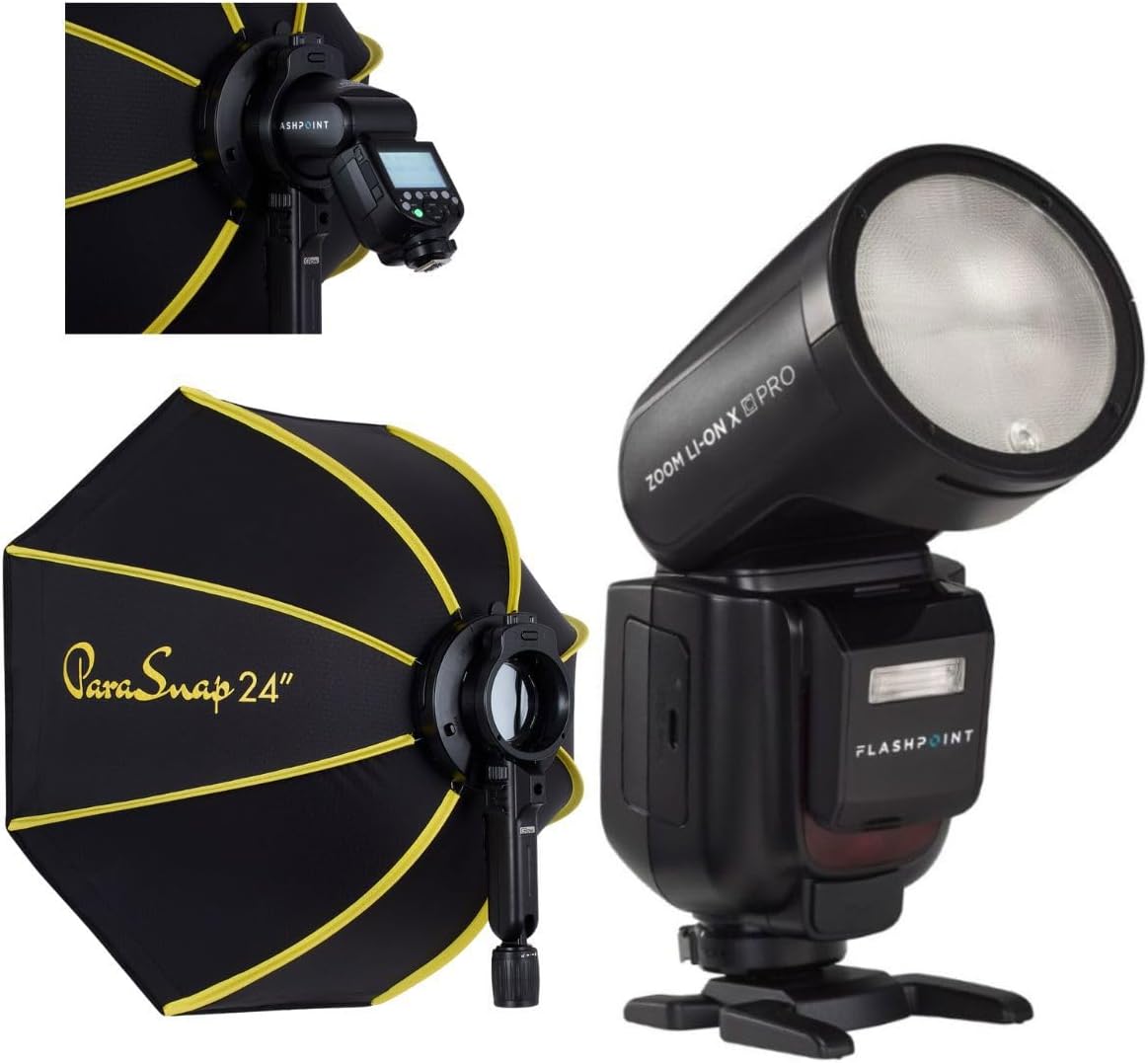
Image 1: The Flashpoint Zoom Li-on X PRO R2 TTL Flash shown alongside the Glow PS-B24K ParaSnap Octagonal Softbox, illustrating the complete kit.
4.1 Flash Unit (Zoom Li-on X PRO R2 TTL)
This unit features a round flash head, an LCD display for settings, control buttons, a hot shoe mount, and a battery compartment.

Slika 2: Krupni plan view of the Flashpoint Zoom Li-on X PRO R2 TTL Flash unit, highlighting its round head and control panel.
4.2 Glow PS-B24K ParaSnap Octagonalni Softbox
The softbox is designed for quick setup and breakdown, featuring an octagonal shape for pleasing catchlights and soft light. It includes a mounting bracket for the C-adapter.

Image 3: The Glow PS-B24K ParaSnap Octagonal Softbox in its open configuration, ready for use.
4.3 Flashpoint C-adapter
This adapter facilitates the connection of the round head flash to the softbox, ensuring a secure and stable mount.

Slika 4: A view of the Flashpoint C-adapter, which connects the round flash head to light modifiers.
5. Postavljanje
5.1 Ugradnja i punjenje baterije
- Open the battery compartment on the flash unit.
- Insert the Lithium-Ion battery, ensuring correct polarity.
- Čvrsto zatvorite odjeljak za baterije.
- To charge, connect the battery to the charger, then plug the charger into a power source. The indicator light will show charging status.
5.2 Attaching the Flash to Your Camera
- Umetnite nosač bljeskalice u priključak za bljeskalicu fotoaparata.
- Zategnite prsten za zaključavanje ili polugu na bljeskalici kako biste je pričvrstili na fotoaparat.
5.3 Assembling and Attaching the Softbox
- Unfold the Glow PS-B24K ParaSnap Octagonal Softbox. The internal rods will snap into place.
- Attach the Flashpoint C-adapter to the mounting bracket on the softbox.
- Insert the round head of the Flashpoint Zoom Li-on X PRO R2 TTL Flash into the C-adapter, ensuring it is securely seated.
- Optionally, attach the inner and outer diffusers to the softbox for softer light.

Image 5: The Flashpoint Zoom Li-on X PRO R2 TTL Flash integrated with the Glow PS-B24K ParaSnap Octagonal Softbox, demonstrating the assembled unit.

Slika 6: Prekoview of the Glow PS-B24K ParaSnap Octagonal Softbox components, including the softbox, C-adapter, and carrying bag.

Slika 7: Bočni profesionalacfile of the Flashpoint C-adapter, showing its design for connecting the flash to the softbox.
6. Upute za rad
6.1 Uključivanje/isključivanje
Press and hold the power button on the flash unit for approximately 2 seconds to turn it on or off.
6.2 načina bljeskalice
- TTL način rada: The flash automatically adjusts its output based on the camera's metering system for balanced exposure.
- Ručni (M) način rada: Allows you to manually set the flash power from 1/1 (full power) down to 1/256 in precise steps.
- Višestruki (stroboskopski) način rada: Okida niz brzih bljeskova tijekom jedne ekspozicije kako bi snimio više slika objekta u pokretu.
Use the mode button to cycle through available flash modes and the dial/buttons to adjust settings within each mode.
6.3 R2 Wireless System Operation
The Flashpoint Zoom Li-on X PRO R2 TTL Flash can operate as a master or slave unit within the Flashpoint R2 wireless system. Refer to the flash unit's display and controls to set the wireless mode, channel, and group. This allows for remote control of multiple R2-compatible flashes.
6.4 Using the Softbox
The Glow PS-B24K ParaSnap Octagonal Softbox diffuses the flash light, creating a softer, more even illumination with reduced harsh shadows. Position the softbox and flash unit to achieve the desired lighting effect on your subject.
7. Održavanje
- Clean the flash head and body with a soft, dry cloth. Do not use solvents or abrasive cleaners.
- Provjerite jesu li kontakti baterije čisti.
- When not in use for extended periods, remove the battery and store the flash and softbox in their protective cases in a cool, dry place.
8. Rješavanje problema
| Problem | Mogući uzrok | Otopina |
|---|---|---|
| Bljeskalica se ne aktivira. | Slaba baterija; neispravne postavke fotoaparata/bljeskalice; bljeskalica nije sigurno montirana. | Charge battery; check flash and camera settings (e.g., flash enabled, correct mode); re-mount flash securely. |
| Izlaz bljeskalice je nedosljedan. | Battery low; environmental factors; incorrect TTL compensation. | Ensure battery is fully charged; adjust flash exposure compensation; check for obstructions. |
| Softbox does not open/close smoothly. | Mechanism obstruction; bent rods. | Check for any fabric or debris obstructing the mechanism; gently straighten any bent rods if possible. |
9. Specifikacije
| Značajka | Detalj |
|---|---|
| Dimenzije proizvoda | 24.5 x 8.2 x 2.78 inča |
| Težina artikla | 4.52 funti |
| ASIN | B0DT4TGDN7 |
| Datum prve dostupnosti | 15. siječnja 2025 |
| Proizvođač | Plamište |
| Marka | Plamište |
| UPC | 192223270701 |
| Izlazna snaga | 1/1 to 1/256 in 81 steps |
| Vrijeme recikliranja | Approx. 1.5 seconds (full power) |
| Trajanje bljeskalice | 1/300 do 1/20000 sekundi |
| Baterija | 7.2V/2980mAh Lithium-Ion |
| Bežični sustav | Flashpoint R2 (2.4GHz) |
10. Jamstvo i podrška
Flashpoint products are designed for reliability and performance. For warranty information, technical support, or service inquiries, please refer to the official Flashpoint webstranicu ili se obratite ovlaštenom prodavaču. Sačuvajte račun kao dokaz o kupnji.
Posjetite Flashpoint Store za dodatne proizvode i resurse podrške.