
1. Uvod
The SingularXYZ E1 Lite GNSS RTK GPS Surveying Equipment is a high-precision solution designed for various applications including land survey, topographic mapping, and CORS correction. Featuring 1408 channels, robust signal tracking, and quick fixed solutions, this equipment ensures centimeter-level accuracy even in challenging environments. This manual provides essential information for the proper setup, operation, and maintenance of your E1 Lite GNSS RTK system.
2. Što je u kutiji
Your SingularXYZ E1 Lite GNSS RTK package includes the following components:
- 1 x E1 Lite GNSS Receiver
- 1 x Transport Case
- 1 x USB-Type-C kabel
- 1 x Super punjač
- 1 x Vodič za brzi početak
- 1 x kartica za brzi početak
- 1 x SC200 sakupljač podataka
- 1 x USB cable (for SC200)
- 1 x Super Charger (for SC200)
- 1 x nosač
- 1 x SingularPad Software
- 1 x Terminal antenna

Image: E1 Lite GNSS RTK components neatly organized within their transport case, including the receiver, data collector, cables, and accessories.
Video: This video demonstrates the unboxing process of the SingularXYZ E1 Lite GNSS RTK system, showcasing all included components and their packaging.
3. Proizvod je gotovview
3.1 Ključne značajke
- Full-Constellation Signal: Provides robust signal tracking and quick fixed solutions (within seconds) in challenging environments.
- Ultra-dugi domet: Built-in UHF radio offers up to 5km range; Bluetooth connection to local CORS stations extends to 50km range.
- Entry-Level IMU: Delivers solid performance for high-precision surveying with tilt measurement capabilities.
- Svestrana povezivost: Features NFC, Bluetooth, WiFi, USB Type-C, and 8GB onboard storage for seamless data transfer.
- IP67 Rugged Protection: Waterproof, dustproof, and drop-resistant casing ensures reliable performance in harsh conditions.
- Web Pristup korisničkom sučelju: Easily download static data, upgrade firmware, and configure settings via a WiFi-enabled web sučelje.
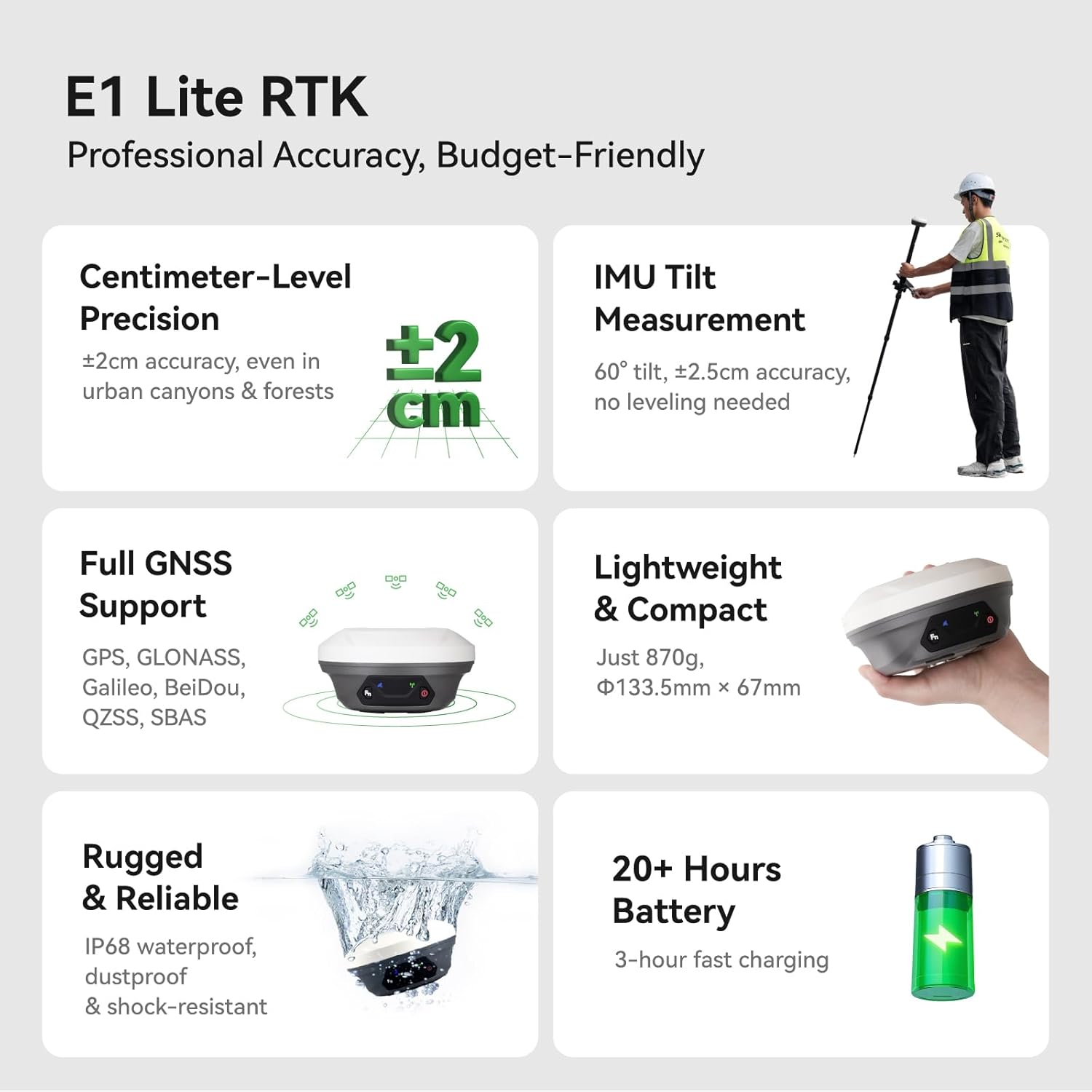
Image: A visual summary of the E1 Lite RTK's professional accuracy, centimeter-level precision, IMU tilt measurement, full GNSS support, lightweight design, ruggedness, and 20+ hours battery life.
3.2 Front Panel and Interfaces
The E1 Lite GNSS Receiver features an intuitive front panel and multiple interfaces for connectivity and operation:
- Pokazatelj satelitskog praćenja: Flashes to indicate the number of tracking satellites.
- Statički i mrežni indikator: Žuto svjetlo treperi prilikom snimanja statičkih podataka.
- Funkcijska tipka: Pritisnite dva puta zaredom za pokretanje/zaustavljanje snimanja statičkih podataka.
- Pokazatelj podataka o korekciji: Flashes when TX/RX correction data is active.
- Indikator napajanja: Red light indicates the receiver is turned on, red light flashes when battery is low (<10%), green light flashes when charging, and stays on when fully charged.
- Gumb za napajanje: Dugi pritisak za uključivanje/isključivanje prijemnika.
- NFC veza: For quick pairing with compatible devices.
- TNC konektor: For UHF Antenna.
- Sučelje tipa C: For charging and data download.
- 7-pinski Lemo RS232 serijski priključak: Za dodatnu povezivost.

Image: Detailed diagram illustrating the front panel indicators (Satellite Tracking, Static & Network, Correction Data, Power) and connectivity interfaces (NFC, TNC, USB Type-C, RS232) of the E1 Lite GNSS Receiver.
4. Postavljanje
4.1 Početna montaža
Assemble the E1 Lite GNSS Receiver with the SC200 Data Collector onto a range pole or tripod as required for your surveying task. Ensure all connections are secure.

Image: A professional surveyor utilizing the E1 Lite GNSS RTK equipment mounted on a range pole with the SC200 data collector attached, performing measurements in an outdoor environment.
4.2 Povezivanje uređaja
To connect your E1 Lite GNSS Receiver to the SC200 Data Collector:
- Uključite svoj GNSS uređaj.
- On the SC200, go to Uređaj >> Komunikacija da povežete svoj uređaj.
- Odaberite SingularXYZ >> RTK >> Bluetooth, then search for your device's Serial Number (SN) and connect.
Video: This tutorial demonstrates how to connect the SingularXYZ E1 Lite GNSS RTK receiver to the SC200 Data Collector via Bluetooth using the SingularPad software.
4.3 Izrada projekta
To create a new project in the SingularPad software:
- Idi na Projekt >> Voditelj projekta.
- Klik Novi za izradu novog projekta.
- Enter your project name and configure unit settings by clicking Više.
- Choose a predefined projected coordinate system or define your own by selecting Ellipsoid and Projection Parameters.
- If needed, add a geoid model via Parametar vertikalnog podešavanja.
Video: This tutorial guides users through creating a new project in SingularPad software, including setting up coordinate systems and project parameters.
4.4 Uvoz podataka
To import data into your project:
- Idi na Projekt >> Uvoz podataka.
- Select the data type (points, lines, code library) and the corresponding import file format.
- You can create a new custom format if your file type is not listed.
- Klik Sljedeći za odabir uvoza file put.
- Koristite prijeview option to verify the file format before importing.
Video: This tutorial demonstrates the process of importing data into the SingularPad software, covering file odabir formata i predviewing imported data.
5. Operacija
5.1 Napredno mjerenje nagiba IMU-a
The E1 Lite features an advanced IMU for tilt measurement, allowing for faster and smarter work with ±2.5cm accuracy at 60° tilt, eliminating the need for bubble leveling. This is ideal for uneven terrain, hidden locations, dangerous locations, and surveying under dense forests or near building corners.

Image: An illustration of a surveyor using the E1 Lite GNSS RTK with its IMU tilt measurement feature, demonstrating its effectiveness in surveying challenging spots like hidden locations, dangerous areas, under dense forests, and building corners.
5.2 Superior Performance in Challenging Environments
The E1 Lite GNSS RTK tracks over 30 satellites even under dense cover or urban structures, utilizing anti-obstruction technology to maintain accuracy. This provides reliable solutions with centimeter-level precision in seconds.

Image: The E1 Lite GNSS RTK set up in a challenging environment, showcasing its capability to track numerous satellites and provide accurate data despite obstructions, ensuring reliable surveying solutions.
5.3 Working with E1 Lite Rover + Base
For optimal performance, ensure the following conditions before configuration:
- You have two E1 Lite GNSS receivers; designate one as the base and the other as the rover.
- Spojite ih zasebno na svoj PDA uređaj putem Bluetootha.
- Place both E1 Lite base and rover in an open view od neba.
- Spojite žičanu antenu i na E1 Lite bazu i na rover.
Postavljanje baze:
- Spojite E1 Lite bazu na svoj PDA, idite na Device > Base.
- Za Osnovni način pokretanja, možete unijeti poznate koordinate točaka za postavljanje ili odabrati Jedna točka način rada za automatsko postavljanje.
- set Datoteka as Interni radio, and customize radio channels, frequency, and protocol according to your needs.
- Spremi postavke i Početna bazaStatusna traka će postati Osnovna.
Postavljanje Rovera:
- Disconnect E1 Lite base and connect to the rover in the software.
- Idi na Uređaj >> Rover, set Podatkovna veza as Interni radio.
- Uskladite i postavite isti protokol i frekvenciju kao osnovnu postavku.
- Klik Kolekcija za spremanje postavki i kliknite primijeniti.

Image: Step-by-step screenshots from the SingularPad software illustrating the configuration of both the E1 Lite Base and Rover units, including data link settings and startup modes.
5.4 Suradnja s korekcijskom službom CORS/RTK
Before configuring, please note:
- Kupite račun za CORS/RTK Correction Service u vašem lokalnom području.
- Ensure your PDA device (phone/tablet/data collector) can access network and supports Bluetooth connection.
- Place your E1 Lite GNSS receiver in an open view od neba.
Koraci:
- Otvorite softver SingularPad.
- Klik Komunikacija i povežite se sa serijskim brojem vašeg E1 Lite prijemnika putem Bluetootha.
- Klik Dobiti dobiti Mount-Point list and select appropriate one. Click Start i primijeniti.
- Klik Rover. Postavi Podatkovna veza as Telefonski internet, zatim idite na Način povezivanja i ispunite svoj CORS/RTK račun za korekcijsku službu.
Tip: Find the appropriate mount point via the weblokacija vašeg lokalnog pružatelja usluga korekcije CORS/RTK. Osigurajte da je osnovna linija unutar 50 km.

Image: Detailed screenshots from the SingularPad software demonstrating how to configure the E1 Lite GNSS RTK for use with a CORS/RTK Correction Service, including communication and mount point selection.
5.5 ViewStatus pozicioniranja RTK-a
After completing your E1 Lite RTK setup, check the current RTK solution status in the top left corner of the SingularPad software:
- FIKSNO: E1 Lite is receiving RTK corrections stably and obtaining a Fixed RTK solution with centimeter-level accuracy.
- PLOVAK: E1 Lite receives corrections from the base/CORS, but due to obstructions or magnetic field interference, the signal reception is not very stable and the accuracy is sub-meter level.
- AUTONOMNO: Satelitsko pozicioniranje u jednoj točki bez primanja RTK podataka za korekciju. Točnost je otprilike na razini metra.
Tip: Before surveying, make sure E1 Lite has a clear sky view, bez prepreka poput zgrada, drveća, automobila i ostalog.

Image: A visual guide explaining the different RTK positioning statuses (Fixed, Float, Autonomous) and providing a tip for ensuring clear sky view for best accuracy.
5.6 Web Pristup korisničkom sučelju
Access the E1 Lite's WiFi to conduct static data download, firmware upgrades, and configuration settings via its web stranica.

Image: A graphic depicting the E1 Lite GNSS Receiver connected via WiFi to a laptop, demonstrating how to access its Web UI for various management tasks.
6. Održavanje
6.1 Rugged Protection
The E1 Lite GNSS RTK features an IP67-rated casing, ensuring it is waterproof, dustproof, and drop-resistant. This robust design allows for reliable performance in harsh environmental conditions. Regularly inspect the device for any physical damage and keep ports clean.

Image: The E1 Lite GNSS RTK receiver partially submerged in water, illustrating its IP67 rugged protection against water and dust.
6.2 Podaci o bateriji
The device is powered by 3 Lithium Ion batteries (included) and offers up to 20 hours of battery life. It supports 3-hour fast charging. Ensure to use the provided Super Charger for optimal charging and battery longevity.
7. Rješavanje problema
7.1 FCC Radio License Note
Bilješka: U.S. users must apply for an FCC radio license for commercial use (e.g., surveying, construction) with the UHF function (450–470 MHz). The device is FCC certified, and supporting information can be provided if needed. Failure to obtain the necessary license may result in operational restrictions or penalties.
7.2 Optimizing Accuracy
If you experience issues with achieving centimeter-level accuracy (i.e., the status remains 'FLOAT' or 'AUTONOMOUS' for extended periods), ensure the following:
- The E1 Lite receiver has a clear, unobstructed view of the sky. Avoid areas with dense foliage, tall buildings, or other structures that may block satellite signals.
- All cables and antennas are securely connected.
- The base and rover units (if applicable) are configured correctly with matching protocols and frequencies.
- Your CORS/RTK Correction Service account is active and properly configured, and the baseline distance is within the recommended range (e.g., 50km).
8. Specifikacije
| Značajka | Detalj |
|---|---|
| Težina artikla | 7.82 funti |
| Dimenzije proizvoda | 2.64 x 5.26 x 5.26 inča |
| Broj modela artikla | E1 Lite GNSS RECEIVER |
| Baterije | Potrebne su 3 litij-ionske baterije (uključene) |
| Veličina zaslona | 1 Inches (for receiver indicators) |
| Trajanje baterije | 20 sata |
| Glasovna naredba | Gumbi |
| Marka | JedninaXYZ |
| Naziv modela | E1 Lite GNSS RECEIVER |
| Posebna značajka | Bluetooth, NFC, Waterproof |
| Tehnologija povezivanja | Bluetooth, Ethernet, USB, Wi-Fi |
| Vrsta karte | Širom svijeta |
| Vrsta montaže | Nosač za ploču |
| Operativni sustav (SC200) | Android |
9. Jamstvo i podrška
The SingularXYZ E1 Lite GNSS RTK GPS Surveying Equipment comes with a Jamstvo 1 godine from the date of purchase. For technical assistance, troubleshooting, or warranty claims, please contact SingularXYZ customer support. SingularXYZ is committed to providing reliable products and solutions, backed by a dedicated support team.
For further information and support, please visit the official SingularXYZ website or refer to the contact details provided in your Quick Start Guide.


