
Augnner B005
Augnner Sound Machine Alarm Clock User Manual
Model: B005
Uvod
Thank you for choosing the Augnner Sound Machine Alarm Clock. This device combines a white noise sound machine, alarm clock, night light, and Bluetooth speaker into one compact unit, designed to enhance your sleep environment and daily routine. This manual provides detailed instructions for setup, operation, and maintenance.

The Augnner Sound Machine Alarm Clock, a compact device designed for sleep and daily use.
Značajke proizvoda
The Augnner Sound Machine Alarm Clock offers a versatile set of features:
- 32 Non-Looping Soothing Sounds: Includes white noise, brown noise, pink noise, and natural sounds like rain, streams, birdsong, waves, and more, designed to create an optimal sleep environment.
- Dimmable Alarm Clock: Features a clock display with adjustable brightness (off, 10%, 50%, 100%). Set alarms with 32 gentle natural wake-up sounds that gradually increase in volume. Includes a 9-minute snooze function.
- Multi-functional Night Light: Offers 8 unique light modes, RGB breathing, and 3000 adjustable color temperatures. Infinite dimming and color changes are controllable via the app. Can be used as a bedside lamp or wake-up light.
- Bluetooth zvučnik: Connects via Bluetooth 5.3 for fast and stable audio streaming.
- Pametna kontrola aplikacije: Control all functions including sound, volume, light color, brightness, and auto-off timer via a dedicated mobile application (available for iOS and Android).
- Prijenosni dizajn: Compact size (3.15 x 3.15 x 1.85 inches) makes it suitable for home, office, or travel.
- Long-lasting Battery & Memory Function: Equipped with an 800 mAh built-in battery, providing 8+ hours of continuous use after 1-2 hours of Type-C charging. Remembers previous settings for volume, brightness, tracks, alarm, and timers.

The device functions as a sound machine, alarm clock, Bluetooth speaker, and night light.
Sadržaj paketa
Molimo označite okvir za sljedeće stavke:
- Augnner Sound Machine Alarm Clock (Model: B005)
- USB kabel za punjenje tipa C
- korisnički priručnik
Product Controls and Overview
Familiarize yourself with the buttons and ports on your Augnner Sound Machine Alarm Clock:

Vrh view of the Augnner Sound Machine with labeled controls.

A detailed diagram illustrating the function of each button on the device.
| Gumb/ikona | Funkcija | Akcijski |
|---|---|---|
| + | Volume Up / Previous Sound | Short press: Increase volume. Long press: Go to previous track. |
| - | Volume Down / Next Sound | Short press: Decrease volume. Long press: Go to next track. |
| ► || | Play/Pause / Bluetooth Pairing | Short press: Play/Pause sound. Long press (2+ seconds): Enter Bluetooth mode. |
| 🔔 (Bell Icon) | Gumb za budilicu | Short press: Turn alarm on/off. Long press (2 seconds): Enter alarm settings. Short press again: Cycle through settings (hour, minute, ringtone, volume, workday). Adjust values with +/- keys. |
| 🕑 (Clock Icon) | Postavka vremena | Long press to enter time setting mode. Adjust values with +/- keys. |
| 💡 (Light Bulb Icon) | Light Control / Snooze | Short press: Cycle through light modes/brightness. When alarm sounds, short press for 9-minute snooze. |
| ⏺ (Timer Icon) | Gumb mjerača vremena | Short press: Start timer. Short press again: Cycle through auto-off durations (30/60/90/120/240 minutes/OFF). |
| ⏺ (Power Icon) | Power Switch / Display Dimmer | Short press: Adjust clock display brightness (Off-10%-50%-100%). Long press: Power On/Off. |
Postavljanje
1. Punjenje uređaja
Before first use, fully charge the device. Connect the provided USB Type-C cable to the charging port on the back of the device and plug the other end into a USB power adapter (not included) or a computer USB port.
- Potpuno punjenje traje otprilike 1-2 sata.
- The device can operate for 8+ hours on a full charge.
- The app displays the exact battery status.
2. Uključivanje/isključivanje
Za uključivanje uređaja, dugo pritisnite tipku ⏺ (Power Icon) button. To power off, long press the same button again.
3. Preuzimanje aplikacije i povezivanje
For smart control and extended features, download the companion app. Tražiti "White Whisper" in your app store or scan the QR codes below:

Scan the QR codes to download the "White Whisper" app from various app stores.
- iOS App Store: Preuzmite za iOS
- Trgovina Google Play: Download for Android (Google Play)
- Alternative Android App Store: Download for Android (Alternative)
Once the app is installed:
- Provjerite je li Bluetooth omogućen na vašem pametnom telefonu.
- Open the "White Whisper" app.
- The app will automatically search for and connect to your Augnner Sound Machine. If prompted, confirm the connection.
Upute za rad
1. Sound Playback
- Reprodukcija zvukova: The device will typically start playing a default sound upon power-on.
- Promjena zvukova: Dugo pritisnite + button for the previous sound or the - button for the next sound. There are 32 soothing sounds available.
- Podešavanje glasnoće: Kratko pritisnite + button to increase volume or the - gumb za smanjenje glasnoće.
- Pauza/reprodukcija: Kratko pritisnite ► || gumb za pauziranje ili nastavak reprodukcije.

A visual representation of the 32 soothing sounds available, including various types of noise and natural sounds.
2. Night Light Control
- Changing Light Modes/Brightness: Kratko pritisnite 💡 (Light Bulb Icon) button to cycle through 8 unique light modes and adjust brightness.
- Kontrola aplikacije: For infinite dimming, RGB breathing, and 3000 adjustable color temperatures, use the "White Whisper" app.
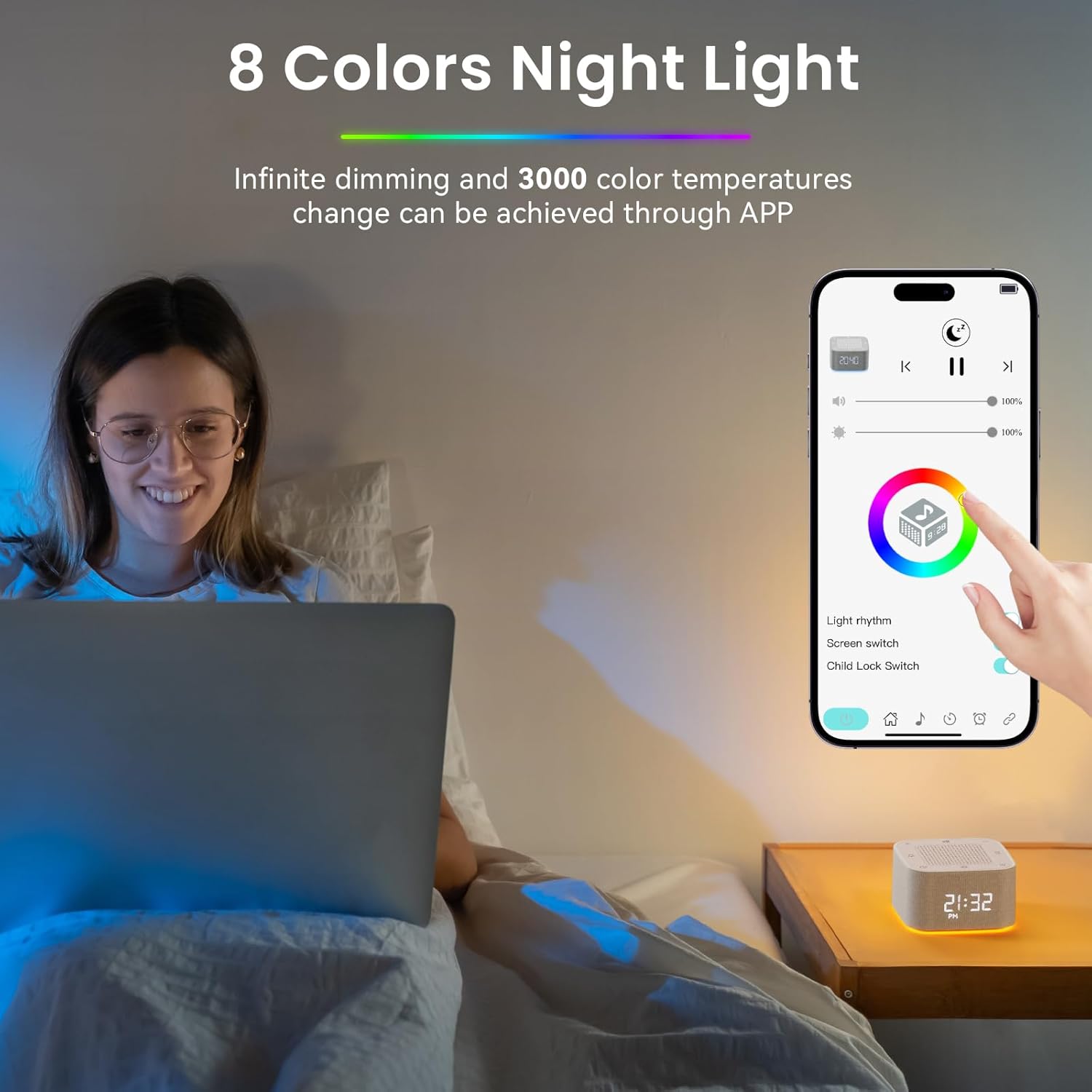
The mobile app interface for controlling the night light's colors and brightness.
3. Postavke budilice
- Postavljanje alarma: Dugo pritisnite 🔔 (Bell Icon) button for 2 seconds to enter alarm settings.
- Podešavanje postavki: Kratko pritisnite 🔔 button again to cycle through settings: hour, minute, ringtone (choose from 32 sounds), alarm volume, and workday settings. Use the + i - gumbe za podešavanje vrijednosti.
- Uključivanje/isključivanje alarma: Kratko pritisnite 🔔 (Bell Icon) button to toggle the alarm on or off.
- Odgoda funkcija: When the alarm sounds, short press the 💡 (Light Bulb Icon) button for a 9-minute snooze.

The device's smart alarm clock features, including app control for setting multiple alarms and choosing wake-up sounds.
4. Auto-off Timer
- Postavljanje mjerača vremena: Kratko pritisnite ⏺ (Timer Icon) button to activate the auto-off timer.
- Cycling Durations: Kratko pritisnite ⏺ button again to cycle through preset durations: 30, 60, 90, 120, 240 minutes, or OFF.
- Kontrola aplikacije: The app allows you to set the auto-off timer for any custom duration.
5. Prikaz sata
- Podešavanje svjetline: Kratko pritisnite ⏺ (Power Icon) button to cycle through clock display brightness levels: Off, 10%, 50%, 100%.
- Format vremena: The device supports both 12-hour and 24-hour time formats. This can typically be adjusted via the app or during initial time setting.

Visual representation of the clock display at different brightness levels: Off, 10%, 50%, and 100%.

Examples of the clock display in both 12-hour (AM/PM) and 24-hour formats.
6. Funkcija Bluetooth zvučnika
- Ulazak u Bluetooth način rada: Dugo pritisnite ► || button for more than 2 seconds. The device will indicate it's ready for pairing (e.g., a sound prompt or flashing light).
- Uparivanje: On your smartphone or other Bluetooth-enabled device, search for "Augnner B005" (or similar name) in the Bluetooth settings and select it to pair.
- Reprodukcija: Once paired, you can play audio from your connected device through the Augnner Sound Machine.
7. Funkcija memorije
The device is equipped with a memory function that remembers your last settings for volume, brightness, tracks, alarm, and timers, even after being powered off. This ensures your preferred settings are retained for convenience.

An icon representing the memory function, indicating the device remembers your last settings.
Održavanje
- Čišćenje: Obrišite uređaj mekom, suhom krpom. Nemojte koristiti abrazivna sredstva za čišćenje ili otapala.
- Skladištenje: Uređaj čuvajte na hladnom i suhom mjestu kada se ne koristi dulje vrijeme.
- Njega baterije: Kako biste produžili vijek trajanja baterije, izbjegavajte često potpuno pražnjenje baterije. Redovito punite uređaj, čak i ako ga ne koristite stalno.
Rješavanje problema
| Problem | Mogući uzrok | Otopina |
|---|---|---|
| Uređaj se ne uključuje. | Slaba baterija ili nema punjenja. | Connect the device to a power source using the USB Type-C cable and allow it to charge for at least 30 minutes before attempting to power on again. |
| Nema zvuka ili je glasnoća niska. | Volume is too low; device is paused; incorrect sound selected. | Povećajte glasnoću pomoću + dugme. Kratki pritisak ► || to ensure it's not paused. Cycle through sounds using + / - dugi pritisak. |
| Problemi s Bluetooth vezom. | Uređaj nije u načinu uparivanja; Bluetooth isključen na telefonu; smetnje. | Dugi pritisak ► || to enter Bluetooth pairing mode. Ensure Bluetooth is enabled on your phone. Move closer to the device and away from other wireless devices. |
| Alarm se ne oglašava. | Alarm is off; volume is too low; incorrect time set. | Kratki pritisak 🔔 to ensure alarm is enabled. Check alarm volume. Verify alarm time is correctly set. |
| Clock display is off or too dim. | Brightness set to off or lowest level. | Kratko pritisnite ⏺ (Power Icon) button to cycle through brightness levels. |
| Aplikacija se ne može povezati s uređajem. | Bluetooth not enabled; app not updated; device not powered on. | Ensure device is powered on and Bluetooth is enabled on your phone. Restart the app. Try restarting the device. |
Tehnički podaci
| Značajka | Detalj |
|---|---|
| Broj modela | B005 |
| Marka | Augnner |
| Dimenzije | 3.15 x 3.15 x 1.85 inča (približno) |
| Boja | Yellowwhite |
| Materijal | Plastični |
| Izvor napajanja | Battery Powered (800 mAh built-in battery) |
| Priključak za punjenje | USB Type-C |
| Bluetooth verzija | 5.3 |
| Zvučna biblioteka | 32 umirujućih zvukova bez ponavljanja |
| Noćno svjetlo | 8 Light Modes + RGB Breathing, 3000 Adjustable Color Temperatures |

The compact dimensions of the Augnner Sound Machine, highlighting its portability.
Sigurnosne informacije
Molimo pročitajte i pridržavajte se sljedećih sigurnosnih smjernica:
- Do not use the device near water or in excessively humid environments.
- To prevent hearing damage, avoid using the device at high volumes for prolonged periods.
- This product is not a toy. Keep it out of reach of children when not in use to prevent accidental damage or injury.
- Ne pokušavajte sami rastavljati, popravljati ili modificirati uređaj. Za sve servisne radove obratite se kvalificiranom osoblju.
- Za punjenje koristite samo priloženi ili certificirani USB Type-C kabel.
Izjave o dodacima prehrani nisu ocijenjene od strane FDA i nisu namijenjene dijagnosticiranju, liječenju, liječenju ili prevenciji bilo koje bolesti ili zdravstvenog stanja.
Jamstvo i podrška
Augnner products are manufactured with high-quality standards. For any questions, technical support, or warranty claims, please contact Augnner customer service through the retailer where the product was purchased or visit the official Augnner webstranica za kontakt podatke.
Molimo sačuvajte dokaz o kupnji u svrhu jamstva.
Ask a question about this manual
Ask about setup, troubleshooting, compatibility, parts, safety, or missing instructions. Manuals+ will review the question and use this page’s manual context to help answer it.