
Uvod
This manual provides detailed instructions for the setup, operation, maintenance, and troubleshooting of your Generic G70 Wired RGB 60% Mini Gaming Keyboard. Please read this manual carefully before using the product to ensure proper functionality and longevity.
Postavljanje
To set up your G70 keyboard, follow these simple steps:
- Raspakirajte tipkovnicu: Pažljivo izvadite tipkovnicu iz ambalaže.
- Spojite USB kabel: Locate the USB-C cable attached to the keyboard. Plug the USB-A end of the cable into an available USB port on your computer or laptop.
- Instalacija upravljačkog programa: Tipkovnica je plug-and-play. Vaš operativni sustav trebao bi automatski prepoznati i instalirati potrebne upravljačke programe. Obično nije potrebna instalacija dodatnog softvera.
- Provjerite vezu: Once connected, the keyboard's RGB backlighting should illuminate, indicating a successful connection. You can now begin using your keyboard.

Image: The Generic G70 Wired RGB 60% Mini Gaming Keyboard, showing its compact design and wired USB-C connection.
Upute za rad
Osnovno tipkanje
The G70 keyboard functions as a standard QWERTY keyboard for all basic typing needs. Its 60% layout is designed for compactness while retaining essential keys.
RGB kontrola pozadinskog osvjetljenja
The keyboard features dynamic RGB backlighting with multiple modes and brightness levels. Use the following key combinations to adjust the lighting:
- FN + U: Increase streamer speed (for dynamic lighting effects).
- FN + J: Decrease streamer speed.
- FN + O or FN + L: Podesite svjetlinu pozadinskog osvjetljenja (5 razina).
- FN + I: Toggle backlight on/off or cycle through different stream light modes (4 kinds).
- FN + K: Switch between different backlight effects (8 kinds).
- FN + M: Cycle through solid color light options.

Image: Detailed diagram illustrating the FN key combinations for multimedia, function keys, and lighting controls.
Compound Key Functions (FN Combinations)
Due to its compact 60% layout, many standard keys are accessed via the Function (FN) key. Refer to the diagram above and the following list for common combinations:
- FN + Esc: Accesses the tilde (~) key.
- FN + 1: Accesses F1. Similarly, FN + 2 for F2, up to FN + 0 for F10, FN + - for F11, and FN + = for F12.
- FN + R: Smanjite glasnoću.
- FN + T: Glasnoća.
- FN + Y: Isključi zvuk.
- FN + Backspace: Funkcija brisanja.

Image: The G70 keyboard displaying its vibrant RGB colorful light effects in both black and white color variants.
Video: An official product video demonstrating the features and RGB lighting of the Wired RGB Gaming Keyboard.
Ergonomski dizajn
The G70 keyboard features an ergonomic high-low key design, providing a comfortable typing experience and reducing wrist strain during extended use. The arc button design contributes to a natural feel.
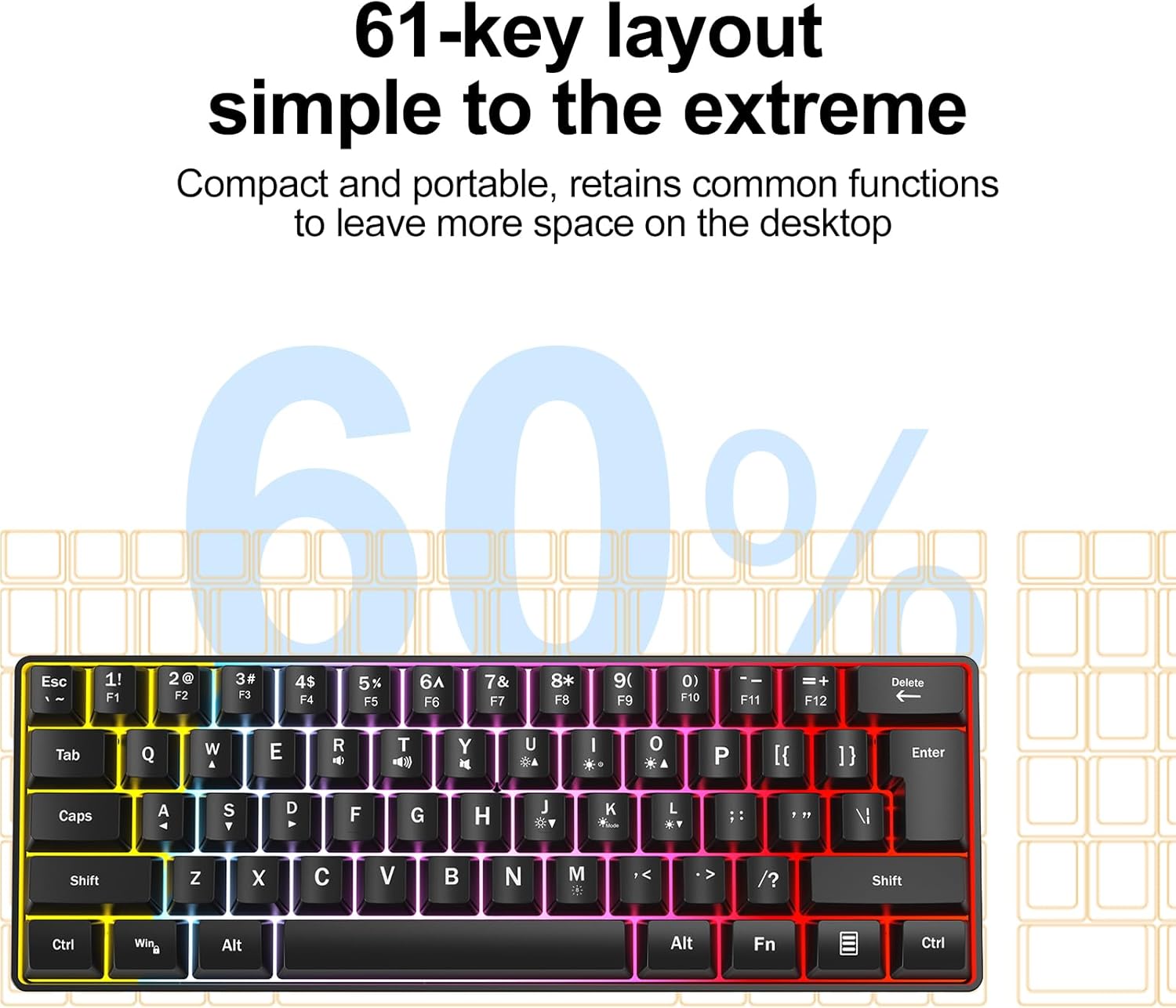
Image: A visual representation of the ergonomic high and low key design, demonstrating how it supports comfortable hand positioning.
Održavanje
Kako biste osigurali dugotrajnost i optimalne performanse svoje tipkovnice, slijedite ove smjernice za održavanje:
- Čišćenje: Use a soft, dry cloth to wipe the surface of the keyboard. For deeper cleaning, use a slightly damp krpu s blagom otopinom za čišćenje, pazeći da tekućina ne uđe u tipkovnicu.
- Izbjegavajte tekućine: Ne prolijevajte tekućinu po tipkovnici. U slučaju prolijevanja, odmah isključite tipkovnicu i pustite da se potpuno osuši prije ponovnog spajanja.
- Uklanjanje prašine: Pomoću komprimiranog zraka uklonite prašinu i ostatke između tipki.
- Skladištenje: Tipkovnicu čuvajte na hladnom i suhom mjestu, dalje od izravne sunčeve svjetlosti i ekstremnih temperatura.
Rješavanje problema
If you encounter any issues with your G70 keyboard, please refer to the following common problems and solutions:
- Tipkovnica ne reagira:
- Provjerite je li USB kabel sigurno priključen i na tipkovnicu i na računalo.
- Pokušajte priključiti tipkovnicu u drugi USB priključak na računalu.
- Ponovno pokrenite računalo.
- RGB Backlight Not Working or Incorrect:
- Check if the backlight is turned off using the FN + I key combination.
- Cycle through different lighting modes and brightness levels using the FN key combinations described in the Operating Instructions section.
- Provjerite da USB priključak vašeg računala osigurava dovoljno napajanja.
- Određene tipke ne rade:
- Clean around the affected key to remove any debris that might be obstructing its movement.
- For FN key combinations, ensure you are pressing the FN key simultaneously with the desired function key.
Tehnički podaci
Key technical specifications for the Generic G70 Wired RGB 60% Mini Gaming Keyboard:
| Značajka | Detalj |
|---|---|
| Marka | Generički |
| Broj modela | G70 |
| Tehnologija povezivanja | USB-C (žični) |
| Opis tipkovnice | Membrana |
| Raspored tipki | 60% Mini (61-key) |
| Pozadinsko osvjetljenje | RGB (8 kinds backlight, 4 kinds stream light, 5 levels brightness) |
| Ergonomski dizajn | High-low key profile |
| Kompatibilni uređaji | Laptop, PC |
| Težina artikla | 0.82 funti |
| Boja | White Case + Grey Keycaps |

Image: The G70 keyboard with its dimensions clearly marked for reference.
Jamstvo i podrška
Information regarding specific warranty terms and direct customer support contact details for the Generic G70 keyboard were not provided in the product data. For any quality problems or questions during use, please refer to the seller's return policy or contact the seller directly through the platform where the product was purchased.