1. Proizvod je gotovview
The TABWEE T20 is a versatile 10-inch Android tablet designed for both productivity and entertainment. It features a high-resolution Incell display, a powerful Octa-Core processor, and ample memory and storage, making it suitable for a wide range of applications from content creation to multimedia consumption.
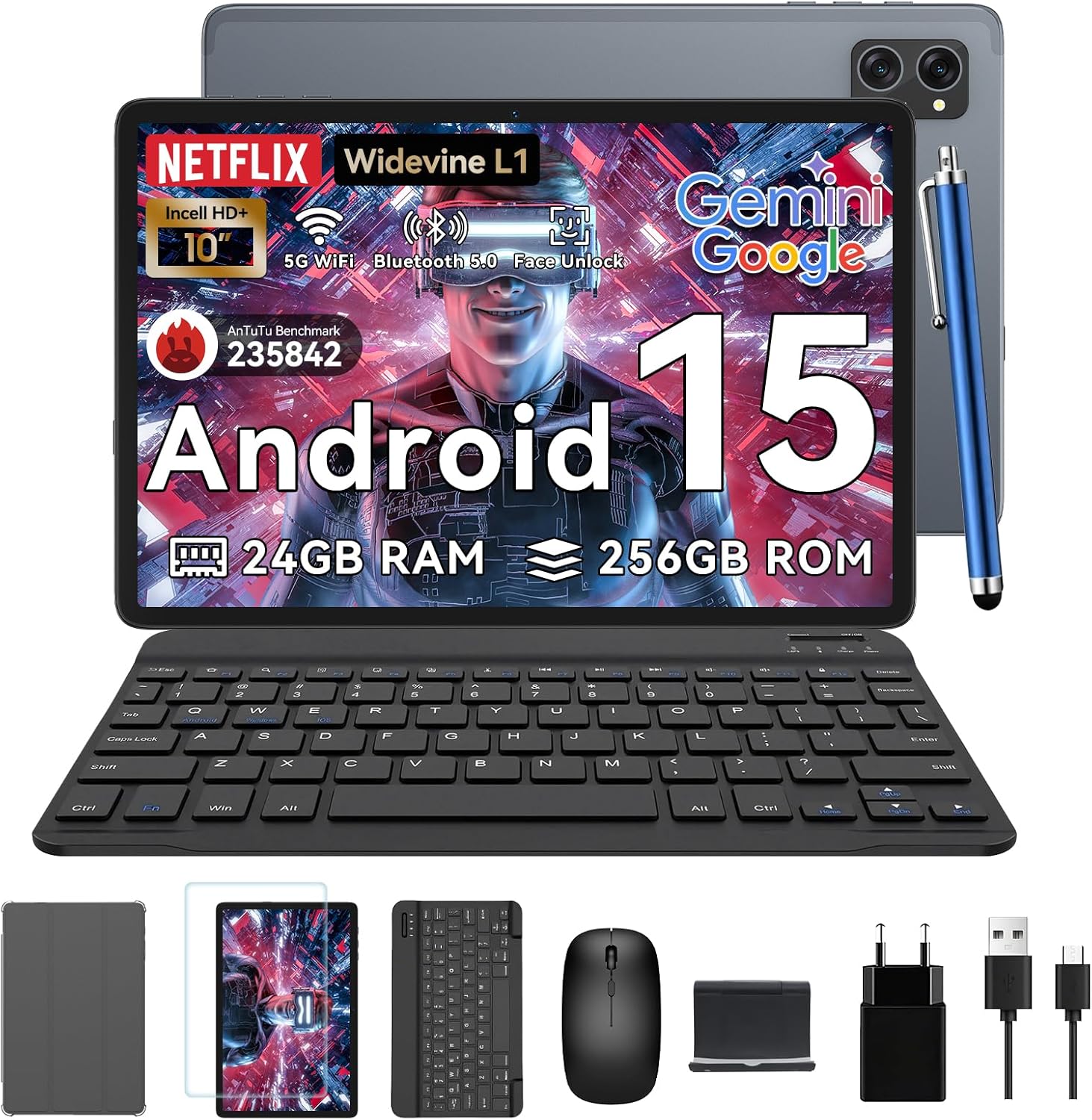
Figure 1.1: TABWEE T20 Tablet and its complete accessory package, including a Bluetooth keyboard, mouse, stylus, protective case, screen protector, charger, and USB cable.
Što je u kutiji
Upon unboxing your TABWEE T20 Tablet, verify that all components are present:

Figure 1.2: Contents of the TABWEE T20 Tablet retail package.
- 1x TABWEE T20 Tablet
- 1x Bluetooth tipkovnica
- 1x miš
- 1x olovka
- 1x zaštitna torbica
- 1x Screen Protector
- 1x Tablet Stand
- 1x punjač
- 1x USB kabel
2. Postavljanje i početna upotreba
Punjenje tableta
Before first use, fully charge the tablet using the provided charger and USB cable. Connect the charger to a power outlet and the USB cable to the tablet's charging port. The charging indicator will illuminate.
Uključivanje/isključivanje
- Za uključivanje: Press and hold the Power button until the TABWEE logo appears on the screen.
- Za isključivanje: Pritisnite i držite gumb za uključivanje/isključivanje dok se ne pojavi izbornik s opcijama napajanja. Odaberite "Isključi" i potvrdite.
- Ponovo pokrenuti: U izborniku opcija napajanja odaberite "Ponovno pokretanje" i potvrdite.
Čarobnjak za početno postavljanje
Prilikom prvog uključivanja, tablet će vas voditi kroz čarobnjaka za početno postavljanje. Slijedite upute na zaslonu za:
- Odaberite svoj jezik.
- Povežite se s Wi-Fi mrežom.
- Prijavite se sa svojim Google računom ili stvorite novi.
- Postavite zaključavanje zaslona (PIN, uzorak, lozinka ili otključavanje licem).
- Review i prihvatite uvjete i odredbe.
Spajanje dodatne opreme
The TABWEE T20 comes with a Bluetooth keyboard and mouse for enhanced productivity.
- Bluetooth tipkovnica:
- Provjerite je li tipkovnica napunjena i uključena.
- Na tabletu idite na Postavke > Povezani uređaji > Bluetooth.
- Turn on Bluetooth and tap "Pair new device".
- Select the keyboard from the list of available devices and follow pairing instructions.
- Bluetooth miš:
- Provjerite je li miš uključen i u načinu uparivanja.
- Na tabletu idite na Postavke > Povezani uređaji > Bluetooth.
- Tap "Pair new device" and select the mouse from the list.
- Olovka: The included stylus can be used directly on the screen for navigation, drawing, and note-taking. It features palm-rejection precision.
3. Upravljanje tabletom
Operativni sustav Android 15
The TABWEE T20 runs on Android 15, offering enhanced privacy controls, seamless cross-device collaboration, and improved multitasking capabilities.

Slika 3.1: Ključne značajke operativnog sustava Android 15.
Integracija umjetne inteligencije Geminija
The tablet integrates Google Gemini AI, which intelligently optimizes tasks, from photo editing to document formatting, while prioritizing security with a dedicated encrypted privacy space.

Slika 3.2: Gotovoview of Gemini AI capabilities on the tablet.
Display and Multimedia
The 10.1-inch Incell HD+ display (1280x800 resolution) provides vivid colors and crisp details. With Widevine L1 certification, you can enjoy 1080P streaming on platforms like Netflix, Disney+, and Hulu.

Figure 3.3: Display features and eye-friendly modes.
The tablet also features Dual Smart-K Box Speakers for an immersive audio experience.

Figure 3.4: Dual Smart-K Box Speakers for enhanced audio.
Značajke kamere
Equipped with an 8MP rear camera and a 5MP front camera, the tablet supports Google Lens integration for smart scanning and object recognition. Face Unlock is also supported for convenient security.

Figure 3.5: Camera specifications and features.

Figure 3.6: Smart Google Lens functionalities.
Povezivost
The TABWEE T20 supports dual-band 5G WiFi and Bluetooth 5.0 for fast and stable connections.
- Wi-Fi: Connect to 2.4GHz or 5GHz networks for seamless streaming and quick downloads.
- Bluetooth 5.0: Pair with wireless earbuds, speakers, or other Bluetooth-enabled devices with 20% faster data transfer speed.
- OTG podrška: Allows for easy transfer of files to and from external storage devices.

Figure 3.7: Advanced Bluetooth 5.0 connectivity.

Figure 3.8: Lightning Fast WiFi 5 Technology.
4. Održavanje i njega
Proper maintenance ensures the longevity and optimal performance of your TABWEE T20 Tablet.
Upravljanje baterijom
The 5000mAh battery provides extended usage times. To maximize battery life:
- Izbjegavajte ekstremne temperature.
- Use the provided charger.
- Enable smart power-saving modes in settings.
- Zatvorite nekorištene aplikacije koje rade u pozadini.

Figure 4.1: 5000mAh Mega Battery performance metrics.
Čišćenje tableta
- Za čišćenje zaslona i kućišta koristite meku krpu koja ne ostavlja dlačice.
- Za tvrdokorne mrlje, lagano dampobrišite krpu vodom ili sredstvom za čišćenje ekrana.
- Izbjegavajte korištenje jakih kemikalija ili abrazivnih materijala.
Upravljanje pohranom i memorijom
The tablet comes with 256GB of internal storage and supports up to 2TB TF card expansion. It also features 24GB RAM (8GB physical + 16GB virtual) for smooth multitasking.

Figure 4.2: Storage and RAM expansion capabilities.
To optimize performance and storage:
- Regularly clear cache and temporary files.
- Deinstalirajte nekorištene aplikacije.
- Utilize the 2TB TF card slot for large files like 4K videos and design documents.
5. Rješavanje problema
This section addresses common issues you might encounter with your TABWEE T20 Tablet.
| Problem | Mogući uzrok | Otopina |
|---|
| Tablet se ne uključuje. | Slaba baterija; pad sustava. | Punite tablet najmanje 30 minuta. Ako i dalje ne reagira, pritisnite i držite gumb za uključivanje/isključivanje 10-15 sekundi da biste ga prisilno ponovno pokrenuli. |
| Problemi s Wi-Fi vezom. | Netočna lozinka; problemi s usmjerivačem; izvan dometa. | Verify Wi-Fi password. Restart your router. Ensure tablet is within Wi-Fi range. Forget the network and reconnect. |
| Bluetooth pribor se ne uparuje. | Accessory not in pairing mode; Bluetooth off on tablet. | Ensure accessory is in pairing mode. Turn Bluetooth off and on again on the tablet. Restart both devices. |
| Slow performance or app crashes. | Previše pokrenutih aplikacija; malo prostora za pohranu; zastarjeli softver. | Close background apps. Clear app caches. Free up storage space. Check for system updates in Postavke > Sustav > Ažuriranje sustava. |
| Zaslon ne reagira. | Privremeni softverski kvar. | Force restart the tablet by holding the Power button for 10-15 seconds. |
Ako problem i dalje postoji nakon isprobavanja ovih rješenja, obratite se korisničkoj podršci.
7. Jamstvo i podrška
TABWEE is committed to providing excellent customer service and support for your T20 Tablet.
Informacije o jamstvu
Your TABWEE T20 Tablet is covered by a 2-godišnje jamstvo from the date of purchase. This warranty covers manufacturing defects and ensures risk-free ownership.
Korisnička podrška
For any technical assistance, troubleshooting, or warranty claims, please contact our support team:
- Podrška e-poštom: serviceplus.linda@gmail.com
- Online Call Support: Available 24/7 for US/CA customers.
- Repair Support: 2-Year Repair Support is provided.

Figure 7.1: TABWEE Customer Support Services.
Please have your purchase details and tablet model number ready when contacting support to expedite the process.

