
1. Uvod
This manual provides detailed instructions for the installation, operation, and maintenance of your ESX Vision VMX900DAB Universal 1-DIN Multimedia Receiver. Please read this manual thoroughly before using the device to ensure proper functionality and to maximize your user experience.
The ESX Vision VMX900DAB is a versatile 1-DIN multimedia receiver featuring a 9-inch multi-angle touchscreen display. It integrates advanced connectivity options including wireless Apple CarPlay and Android Auto, DAB+ digital radio, Bluetooth hands-free calling and audio streaming, and a comprehensive media player. The unit is designed for universal compatibility and offers a removable monitor for enhanced security.
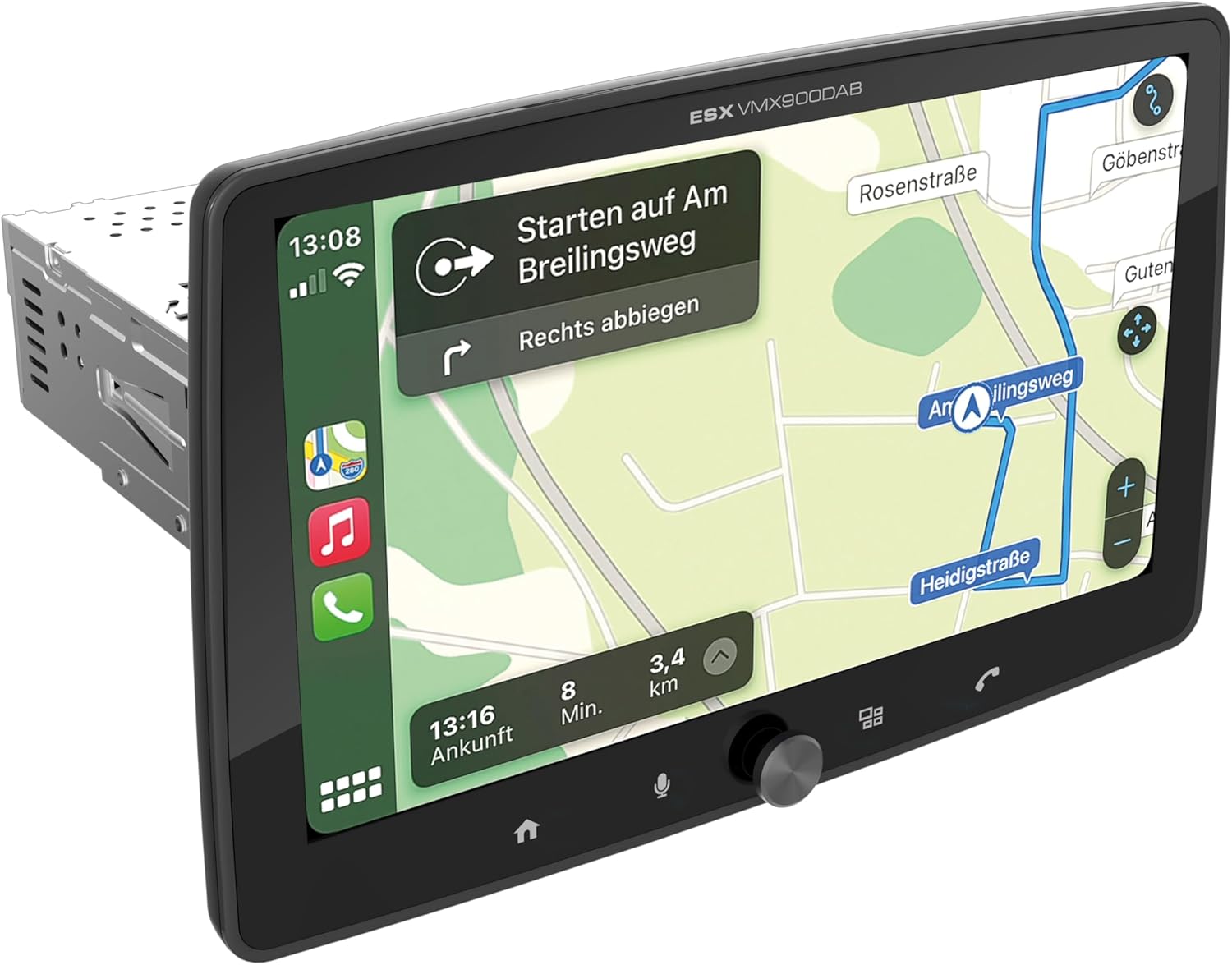
Figure 1.1: ESX Vision VMX900DAB with navigation interface.
2. Postavljanje i instalacija
2.1 Sadržaj paketa
Prije instalacije provjerite jesu li sve komponente prisutne:
- ESX Vision VMX900DAB Main Unit
- Detachable 9-inch Touchscreen Monitor
- Kabelski svežanj za napajanje/zvučnik
- Vanjski mikrofon
- GPS antena
- DAB+ antena
- USB produžni kabeli
- Pribor za montažu (nosači, vijci)
- Korisnički priručnik (ovaj dokument)

Slika 2.1: Uključeni pribor i komponente.
2.2 Montiranje glavne jedinice
- Prije početka instalacije provjerite je li akumulator vozila isključen.
- Insert the 1-DIN main unit into the vehicle's dashboard opening.
- Secure the main unit using the provided mounting brackets and screws.
2.3 Spajanje monitora
The 9-inch monitor is detachable and connects to the main unit via a click system.
- Align the monitor's connector with the slot on the main unit.
- Gently push the monitor until it clicks securely into place.
- To remove, press the release button (if applicable) and pull the monitor away.

Figure 2.2: Detachable monitor with click system.
2.4 Spajanje ožičenja
Refer to the wiring diagram provided with the unit for specific connections. Key connections include:
- Power and Speakers: Connect the main wiring harness to the vehicle's power supply and speakers.
- Vanjski mikrofon: Plug the external microphone into its dedicated input for optimal hands-free call quality.
- GPS antena: Spojite GPS antenu i montirajte je na mjesto s jasnim view neba za precizno pozicioniranje.
- DAB+ Antenna: Connect the DAB+ antenna for digital radio reception.
- USB priključci: Two USB-A ports are available. One for media playback and charging (1.5A), and another specifically for Apple CarPlay/Android Auto and charging (1.5A).
- RCA predamplificirani izlazi: Six 4V RCA outputs (FL/FR/RL/RR/SUB1/SUB2) are available for connecting external amplifiri.
- AUX RCA Inputs: Stereo audio and video inputs (L/R/VIDEO) for external audio/video sources.
- Camera RCA Inputs: Namjenski ulazi za prednju i stražnju kameru.
- Kontrola na upravljaču: Analog steering wheel remote control input (learnable) for integration with vehicle controls.
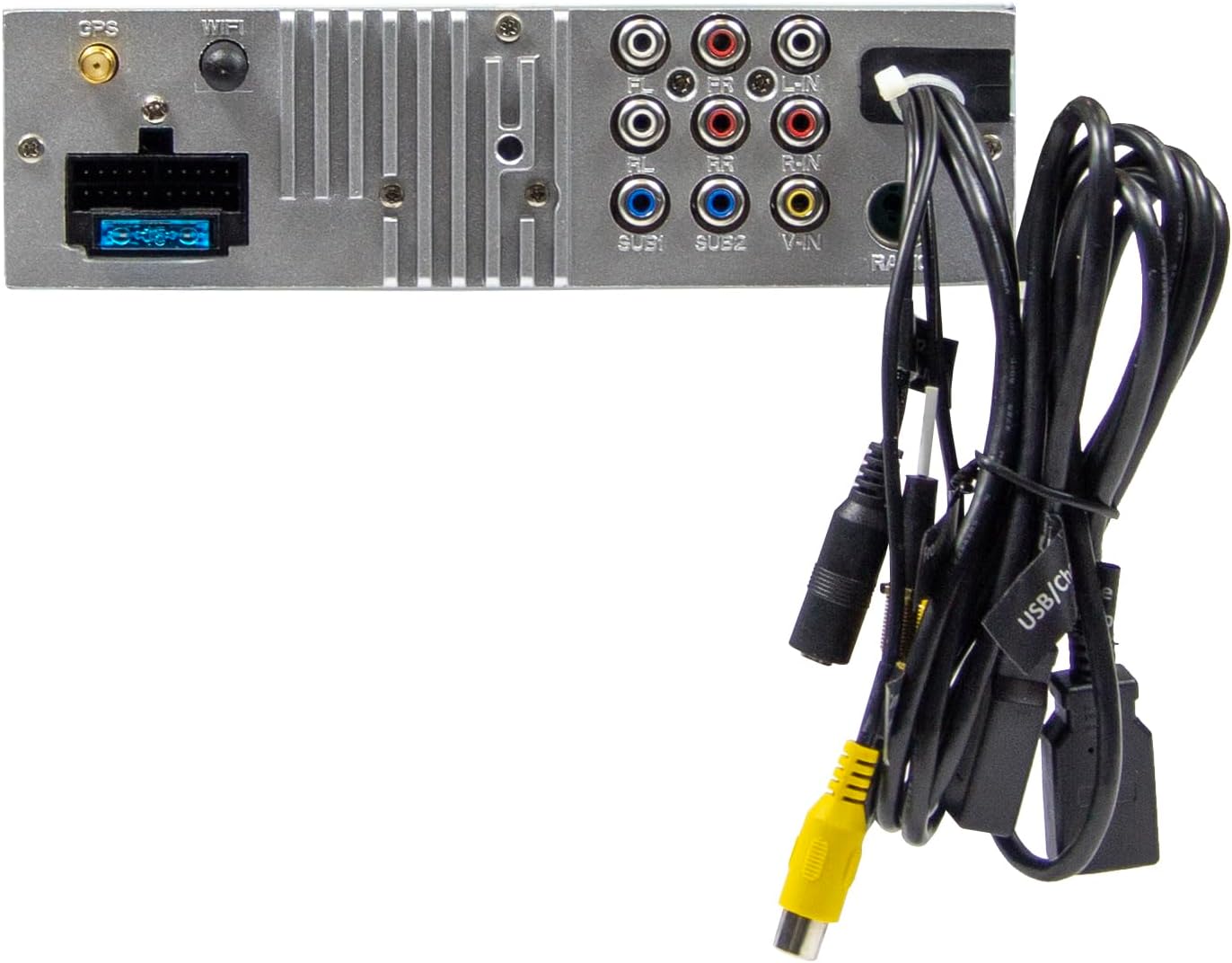
Figure 2.3: Rear connections of the main unit.
3. Upute za rad
3.1 Uključivanje/isključivanje i osnovne kontrole
- Uključivanje: The unit will power on automatically with the vehicle's ignition.
- Isključivanje: The unit will power off automatically with the vehicle's ignition.
- Kontrola glasnoće: Use the large rotary knob on the front panel to adjust the volume.
- Funkcijske tipke: Four function keys on the front panel provide quick access to common features.
- Zaslon osjetljiv na dodir: All primary functions are controlled via the 9-inch touchscreen.
3.2 Početni zaslon i navigacija
The home screen provides access to all main functions and applications.

Figure 3.1: Main menu/home screen.
3.3 Apple CarPlay i Android Auto
The VMX900DAB supports both wireless and wired (via USB) Apple CarPlay and Android Auto.
- Bežična veza: Enable Bluetooth and Wi-Fi on your smartphone and follow the on-screen prompts to connect.
- Žičana veza: Connect your smartphone to the dedicated USB-A port using a compatible USB cable.
- Once connected, your smartphone's compatible apps (navigation, music, calls, messages) will be mirrored on the receiver's display.

Figure 3.2: Apple CarPlay interface.
3.4 Radio Functions (DAB+/FM/AM)
- DAB+ radio: Select the DAB+ icon from the home screen. The unit will scan for available digital radio stations.
- FM/AM radio: Select the Radio icon. Use the touchscreen to tune to stations, save presets, and access RDS functions.
3.5 Bluetooth Hands-Free and Audio Streaming
- Uparivanje: Enable Bluetooth on your smartphone and search for the VMX900DAB. Select the device and confirm pairing.
- Hands-free pozivanje: Once paired, you can make and receive calls directly through the receiver. The external microphone ensures clear voice transmission. Your phonebook can be synchronized.
- Audio streaming: Stream music wirelessly from your smartphone to the receiver.
3.6 Reprodukcija medija
The unit supports various audio, video, and photo formats via USB.
- Podržano File Formati: AVI, FLV, MOV, MKV, WMV, WMA, MP3, FLAC, JPEG, PNG, BMP.
- Insert a USB drive into the media USB-A port. Select the USB icon from the home screen to browse and play media files.
3.7 Monitor Adjustment
The monitor can be tilted and adjusted in height to achieve the optimal viewing angle and prevent obstruction of vehicle controls.

Figure 3.3: Adjustable monitor mechanism.
NIKADA Prilagodba
- Startup Logo: Customize the startup logo in the settings menu.
- RGB Key Illumination: Select from various RGB colors and animation effects for the key illumination.
- Jezici izbornika: Supported languages include DEU, ENG, SWE, ITA.
4. Održavanje
4.1 Čišćenje jedinice
- Use a soft, dry cloth to wipe the display and unit surfaces.
- For stubborn marks on the screen, use a screen cleaner specifically designed for electronic displays and a microfiber cloth.
- Do not use abrasive cleaners, solvents, or harsh chemicals, as these can damage the finish or screen.
4.2 Opća briga
- Izbjegavajte izlaganje uređaja ekstremnim temperaturama, izravnoj sunčevoj svjetlosti dulje vrijeme ili visokoj vlažnosti.
- Osigurajte odgovarajuću ventilaciju oko jedinice kako biste spriječili pregrijavanje.
- When removing the monitor, handle it carefully to avoid damage to the connectors.
5. Rješavanje problema
If you encounter issues with your VMX900DAB, refer to the following common problems and solutions:
| Problem | Mogući uzrok | Otopina |
|---|---|---|
| Nema struje | Neispravno ožičenje; Pregorjeli osigurač; Paljenje vozila isključeno | Check power connections; Replace fuse; Turn on vehicle ignition |
| Nema zvuka | Glasnoća preniska; Utišavanje uključeno; Problem s ožičenjem zvučnika | Povećajte glasnoću; Isključite zvuk; Provjerite priključke zvučnika |
| Bluetooth se ne povezuje | Bluetooth isključen na telefonu/uređaju; Nepravilan postupak uparivanja | Ensure Bluetooth is on; Re-attempt pairing process |
| Apple CarPlay/Android Auto se ne pokreće | Incorrect USB port; Faulty USB cable; Phone not compatible/configured | Use the dedicated USB port; Try a different USB cable; Check phone settings for CarPlay/Android Auto |
| Loš radio prijem | Antenna not connected; Poor antenna placement; Weak signal area | Check antenna connection; Adjust antenna position; Try in a different location |
| Monitor ne prikazuje | Monitor not securely attached; Connector issue | Ensure monitor is fully clicked into place; Check for debris in connector |
If the problem persists after attempting these solutions, please contact ESX customer support or your authorized dealer.
6. Specifikacije
| Značajka | Specifikacija |
|---|---|
| Broj modela | VMX900DAB |
| Prikaz | 9-inch Multi-angle Touchscreen |
| Form Factor | 1-DIN Universal |
| Povezivost | USB, Bluetooth, Auxiliary |
| Posebne značajke | Wireless Apple CarPlay, Wireless Android Auto, Detachable Monitor with Click System |
| Radio tuner | DAB+ (Digital Radio), FM/AM with RDS |
| Bluetooth | Hands-free function, Audio Streaming |
| USB priključci | 2x USB-A (1.5A charging, one dedicated for CarPlay/Android Auto) |
| Max Music Power | 4 x 80 W |
| prijeamplificirani izlazi | 6x RCA (4V) (FL/FR/RL/RR/SUB1/SUB2) |
| AUX ulazi | RCA (L/R/VIDEO) |
| Ulazi za kameru | RCA (Front/Rear) |
| Podržano File Formati | AVI, FLV, MOV, MKV, WMV, WMA, MP3, FLAC, JPEG, PNG, BMP |
| Vanjski mikrofon | Uključeno |
| Kontrola na upravljaču | Analog (learnable) |
| GPS prijemnik | Uključeno |
| Jezici izbornika | DEU, ENG, SWE, ITA |
| Ukupna izlazna snaga | 320 vata |
| Konfiguracija kanala surround zvuka | 4.2 |
| Način audio izlaza | Stereo |
7. Jamstvo i podrška
For warranty information, please refer to the documentation provided at the time of purchase or contact your authorized ESX dealer. Warranty terms and conditions may vary by region and retailer.
For technical support or further assistance, please contact ESX customer service or visit the official ESX webmjesto za resurse podrške.