
SYSTEMTREFF 30242342-a
SYSTEMTREFF High-End Gaming PC
korisnički priručnik

Image: The SYSTEMTREFF High-End Gaming PC tower, showcasing its transparent side panel with vibrant internal RGB lighting and cooling fans.
1. Proizvod je gotovview
The SYSTEMTREFF High-End Gaming PC is engineered for demanding gaming, streaming, and professional applications. It features an AMD Ryzen 7 9800X3D processor, AMD Radeon RX 9070 XT graphics, 32GB DDR5 RAM, and a fast 1TB M.2 NVMe SSD, ensuring exceptional performance and responsiveness. This system comes with Windows 11 Pro pre-installed, ready for immediate use.
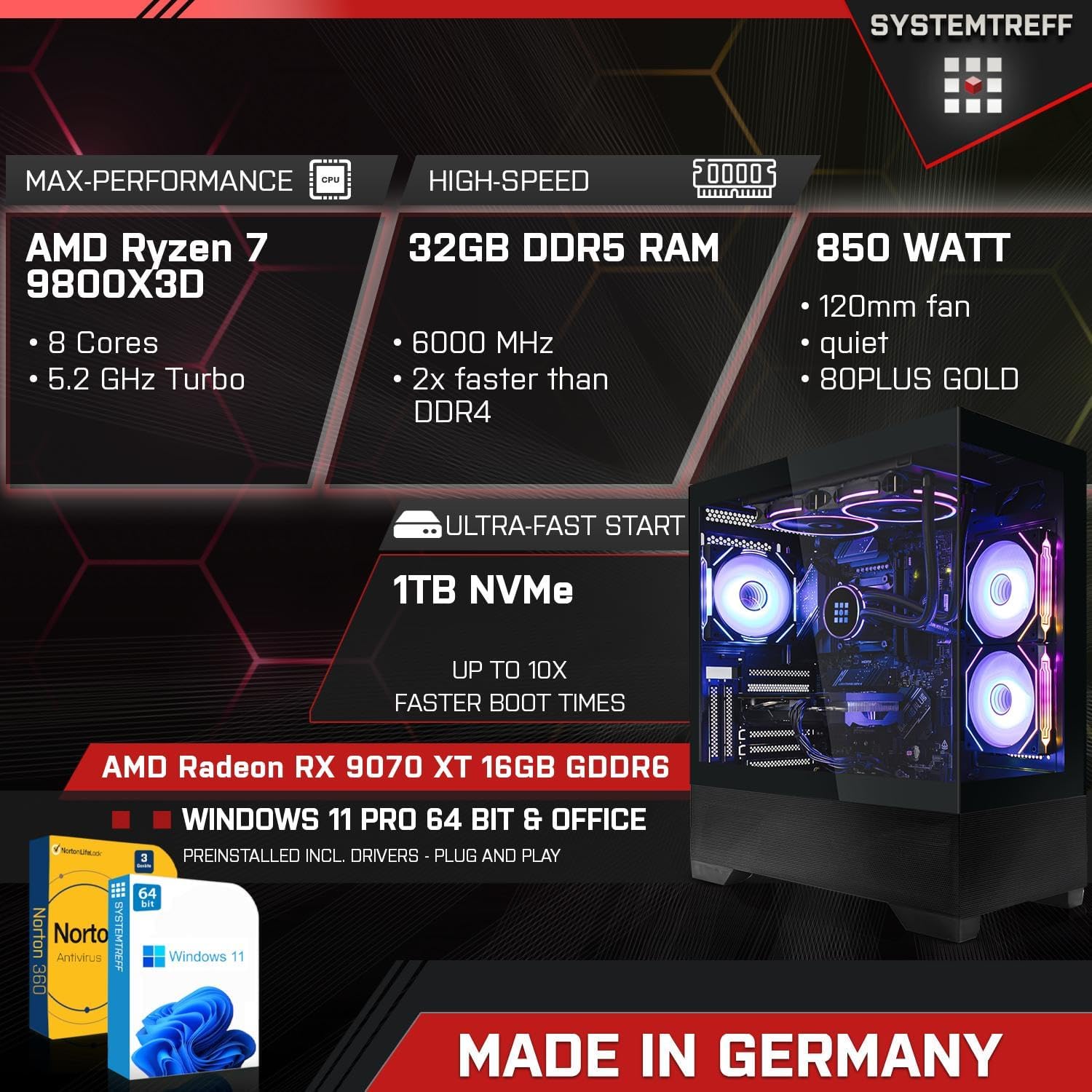
Image: An infographic highlighting the PC's core specifications: AMD Ryzen 7 9800X3D (8 Cores, 5.2GHz Turbo), 32GB DDR5 RAM (6000 MHz), 850 Watt PSU, 1TB NVMe SSD, AMD Radeon RX 9070 XT 16GB GDDR6, Windows 11 Pro, and Norton 360 Security.
2. Vodič za postavljanje
Follow these steps to set up your new SYSTEMTREFF Gaming PC:
- Raspakiranje: Pažljivo izvadite računalo iz ambalaže. Sačuvajte sav ambalažni materijal za budući transport ili servis.
- Plasman: Place the PC on a stable, flat surface with adequate ventilation around the chassis. Ensure no vents are obstructed.
- Povezivanje perifernih uređaja:
- Connect your monitor(s) to the graphics card's DisplayPort or HDMI outputs.
- Priključite tipkovnicu i miš na dostupne USB priključke.
- Spojite sve ostale periferne uređaje poput zvučnika, slušalica ili vanjskih pogona.
- Priključak za napajanje: Spojite kabel za napajanje na jedinicu za napajanje (PSU) na stražnjoj strani računala, a zatim drugi kraj uključite u uzemljenu električnu utičnicu.
- Mrežna veza: For wired internet, connect an Ethernet cable to the LAN port. For wireless internet, the integrated WLAN module will allow connection after initial setup.

Image: A diagram illustrating the various connectivity options, including front ports (2x USB 3.0, 1x USB-C, Audio & Mic, Power button) and rear ports (DisplayPort 1.4, HDMI 4K HD, USB 3.2 Gen 1, USB 3.2 Gen 2 10Gbps, USB 3.2 Gen 2x2 20Gbps, 2x USB 2.0, Wi-Fi 6E, Gigabit 2.5G LAN, HD 7.1 Sound).
3. Upute za rad
Your SYSTEMTREFF Gaming PC is designed for high performance and ease of use.
- Početno pokretanje: Press the power button located on the front of the chassis. The system will boot into Windows 11 Pro. Follow the on-screen prompts for initial Windows setup.
- Igre i multimedija: The AMD Radeon RX 9070 XT 16GB GDDR6 graphics card provides excellent performance for 4K gaming and video editing. The system supports up to three monitors simultaneously.
- Povezivost: Utilize the integrated WLAN and Bluetooth for wireless connections. The numerous USB 3.2 ports offer high-speed data transfer for external devices.
- Hlađenje i protok zraka: The chassis features a top cooling system and optimized airflow, supporting up to 9 x 120mm fans for efficient heat dissipation. The RGB lighting can be controlled via a dedicated button on the case.

Image: An illustration showing the PC's capability for high-end gaming in 3D/4K, with examples of games like Elden Ring and Metro Exodus. It also highlights suitability for professional applications (Adobe Illustrator, InDesign, Photoshop, video editing, CAD software) and multimedia/office use (4K streaming, audiobooks, Word, Excel, Teams, AutoCAD).
4. Održavanje
Regular maintenance ensures the longevity and optimal performance of your PC:
- Čišćenje: Regularly clean the exterior of the PC with a soft, dry cloth. Use compressed air to clear dust from vents and fan grilles. Ensure the PC is powered off and unplugged before cleaning.
- Ažuriranja softvera: Keep your Windows operating system and all drivers updated. Windows Update will handle OS updates, and graphics card drivers can be updated via AMD's official webmjesto.
- Antivirusna zaštita: Your system includes Norton 360 Security with Game Optimizer for 1 year. Ensure it is active and performing regular scans to protect against malware.
- Uprava za kabele: While the internal cable management is intuitive, ensure external cables are tidy and not obstructing airflow or ports.

Slika: Interni view of the PC case, emphasizing the top cooling system, intuitive cable management, dual chamber design, and the power button with USB 3.0, USB-C, and mic/headset ports. It also shows the lower part made of mesh for improved airflow.
5. Rješavanje problema
Ako naiđete na probleme, isprobajte ove osnovne korake za rješavanje problema:
- Bez napajanja:
- Provjerite je li kabel za napajanje sigurno spojen i na računalo i na zidnu utičnicu.
- Ensure the power switch on the PSU (at the back of the PC) is in the 'ON' position.
- Pokušajte s drugom utičnicom.
- Nema zaslona:
- Verify that the monitor is powered on and the video cable is securely connected to the graphics card (not the motherboard's video outputs).
- Pokušajte s drugim video kabelom ili monitorom ako je dostupan.
- Usporavanje sustava:
- Check Task Manager (Ctrl+Shift+Esc) for high CPU, RAM, or disk usage by specific applications.
- Provjerite jesu li svi upravljački programi i Windows ažurirani.
- Pokrenite potpuno skeniranje sustava pomoću antivirusnog softvera.
- Periferni uređaj ne radi:
- Pokušajte spojiti periferni uređaj na drugi USB priključak.
- Reinstall or update the peripheral's drivers.
Ako ovi koraci ne riješe problem, pogledajte odjeljak za podršku.
6. Specifikacije
Detailed technical specifications for your SYSTEMTREFF Gaming PC:
| komponenta | Specifikacija |
| Procesor | AMD Ryzen 7 9800X3D (8 Cores, 4.7 GHz base, up to 5.2 GHz Turbo) |
| CPU hladnjak | Corsair Nautilus 240 RS ARGB 240mm (Black) |
| Matična ploča | ASUS TUF GAMING B650-E WIFI - AM5 |
| OVAN | 32GB DDR5-6000 CL30 Kingston FURY Beast (2x16GB), expandable up to 192GB (4 slots total, 2 free) |
| Grafička kartica | AMD Radeon RX 9070 XT 16GB GDDR6 (4K, DX12, FSR 3, PCIe 5.0) |
| Skladištenje | 1000GB M.2 SSD NVMe (5000 MB/s read, 4200 MB/s write) |
| Operativni sustav | Windows 11 Pro (pre-installed with drivers) |
| Antivirus | Norton 360 Security with Game Optimizer (1 year protection for 3 devices) |
| Mreža | Realtek 2.5 Gigabit LAN Controller (2500Mbit/s), Integrated WLAN |
| Audio | 7.1-Channel High Definition Audio with Audio Boost |
| Šasija | Systemtreff Gaming Mid Tower AirForce GT1 Black (44.8cm x 21.5cm x 48.8cm), tempered glass window, RGB lighting |
| Napajanje | 850W MSI MAG A850GL PCIE5, 120mm fan, 80 PLUS GOLD (90% efficiency) |
| Težina | 12 kilogram |

Image: A visual representation of the PC case dimensions: 44.8 cm (depth), 21.5 cm (width), and 48.8 cm (height).
7. Jamstvo i podrška
SYSTEMTREFF is committed to providing high-quality products and excellent customer service.
- Osiguranje kvalitete: All SYSTEMTREFF systems are assembled and tested in Germany, ensuring rigorous quality control before delivery.
- Jamstvo: Your SYSTEMTREFF Gaming PC comes with a Jamstvo 3 godine on all components. Please retain your invoice as proof of purchase.
- Korisnička podrška: For any technical assistance or inquiries, our customer support team is available 24 hours via email. Refer to the contact information provided in your purchase documentation or on the SYSTEMTREFF official webmjesto.

Image: An infographic stating "Made in Germany - Assembly & Testing", "Since 2008 on the market", "70,000 satisfied customers", and "3 Years Warranty on all components". It also features a customer support representative and mentions 24-hour email support.
Ask a question about this manual
Ask about setup, troubleshooting, compatibility, parts, safety, or missing instructions. Manuals+ will review the question and use this page’s manual context to help answer it.