
1. Uvod
Hvala na kupnjiasing the JVC XS-N3214PB Portable Bluetooth Party Speaker. This manual provides important information regarding the setup, operation, and maintenance of your speaker. Please read it thoroughly before using the product to ensure proper function and to maximize your listening experience. Keep this manual for future reference.
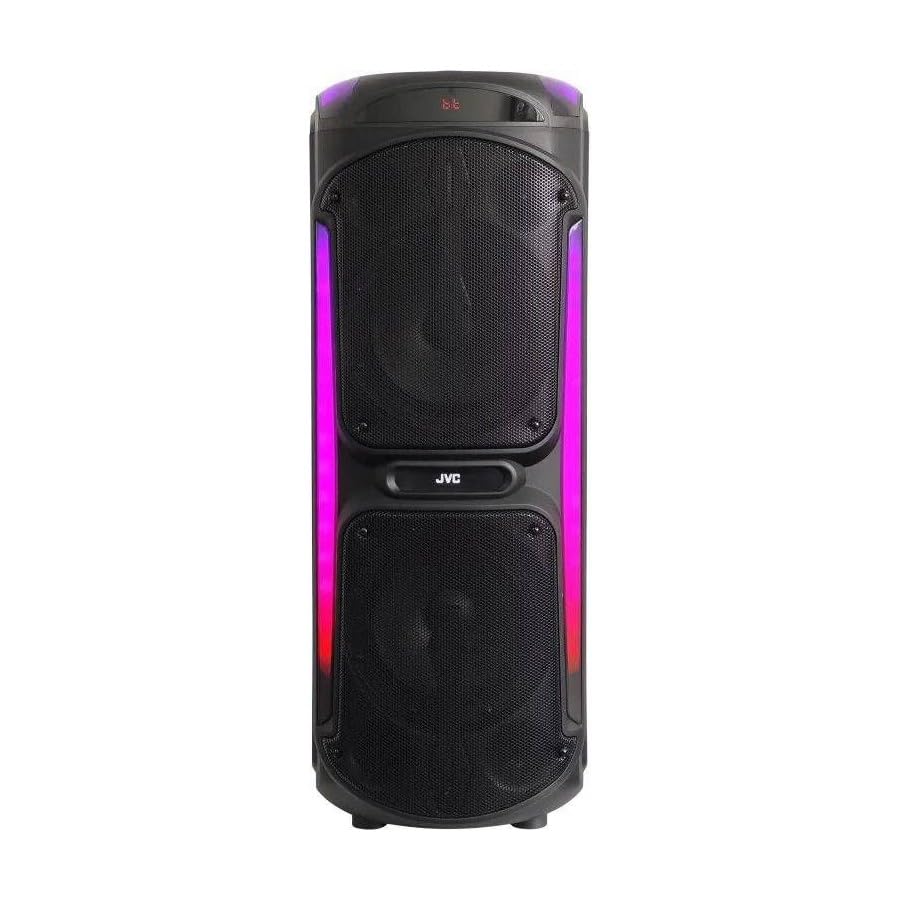
Image: The JVC XS-N3214PB Portable Bluetooth Party Speaker, shown with two microphones, highlighting its versatile connectivity options including Bluetooth, FM Radio, MP3 playback, AUX input, and USB input. The speaker features integrated LED lighting.
2. Sigurnosne informacije
Kako biste osigurali siguran rad i spriječili oštećenja, pridržavajte se sljedećih mjera opreza:
- Ne izlažite zvučnik vodi, vlazi ili ekstremnim temperaturama.
- Ne pokušavajte rastavljati ili modificirati zvučnik. Za sve servisne radove obratite se kvalificiranom osoblju.
- Držite zvučnik dalje od izvora topline, izravne sunčeve svjetlosti i zapaljivih materijala.
- Koristite samo navedeni adapter za punjenje.
- Izbjegavajte stavljanje teških predmeta na zvučnik.
- Očistite zvučnik mekom, suhom krpom. Nemojte koristiti tekuća sredstva za čišćenje ili aerosole.
- Osigurajte pravilnu ventilaciju oko zvučnika tijekom upotrebe.
3. Sadržaj paketa
Provjerite jesu li svi artikli prisutni u paketu:
- JVC XS-N3214PB Portable Bluetooth Party Speaker (1 unit)
- Power Adapter/Charging Cable (1 unit)
- Daljinski upravljač (1 jedinica)
- Korisnički priručnik (ovaj dokument)
- (Optional: Microphone, if included with your specific purchase)
4. Proizvod je gotovview
4.1. Značajke
- Powerful 800W Audio Output
- Bluetooth bežična veza
- Ugrađena punjiva baterija za prijenos
- Integrated LED Party Lights
- FM radio tuner
- USB reprodukcija
- AUX ulaz
- Microphone Input for Karaoke
- Rad daljinskog upravljača
- Deep Bass Performance
4.2. Kontrole i priključci
Familiarize yourself with the speaker's control panel and connection ports. (Refer to diagrams in the full printed manual for exact locations).
- Gumb za napajanje: Uključuje/isključuje zvučnik.
- Gumb za način rada: Prebacuje se između Bluetooth, FM, USB i AUX načina rada.
- Kontrola glasnoće: Podešava glavnu glasnoću.
- Gumb za reprodukciju/pauzu: Kontrolira reprodukciju medija.
- Gumbi za prethodnu/sljedeću pjesmu: Navigacija kroz pjesme ili FM stanice.
- LED tipka za svjetlo: Toggles LED lighting effects.
- Kontrole glasnoće/jeke mikrofona: Adjusts microphone input and echo effect.
- USB priključak: Za reprodukciju s USB pogona.
- AUX ulaz (3.5 mm): Za spajanje vanjskih audio uređaja.
- Ulaz za mikrofon (6.35 mm): Za spajanje žičanog mikrofona.
- DC IN priključak: For connecting the power adapter to charge the speaker.
5. Postavljanje
5.1. Punjenje zvučnika
- Connect the power adapter to the DC IN port on the speaker.
- Uključite drugi kraj strujnog adaptera u zidnu utičnicu.
- The charging indicator light will illuminate (color may vary) to show the speaker is charging.
- Allow approximately 4-6 hours for a full charge. The indicator light may change or turn off when fully charged.
- Disconnect the power adapter once charging is complete or when using the speaker on battery power.
5.2. Uključivanje/isključivanje
- Za uključivanje: Pritisnite i držite gumb za napajanje nekoliko sekundi dok se zaslon ne osvijetli.
- Za isključivanje: Ponovno pritisnite i držite gumb za napajanje nekoliko sekundi dok se zaslon ne isključi.
6. Upute za rad
6.1. Bluetooth uparivanje
- Power on the speaker. It will automatically enter Bluetooth pairing mode, indicated by a flashing Bluetooth icon or voice prompt.
- Na svom mobilnom uređaju (pametnom telefonu, tabletu itd.) omogućite Bluetooth i potražite dostupne uređaje.
- Select "JVC XS-N3214PB" from the list of devices.
- Once paired, the speaker will confirm with an audible tone or a solid Bluetooth icon.
- Sada možete reproducirati zvuk s uređaja putem zvučnika.
6.2. FM radio
- Press the Mode button until "FM" is displayed.
- Pritisnite gumb Reproduciraj/Pauziraj za automatsko skeniranje i spremanje dostupnih FM postaja.
- Za navigaciju između spremljenih stanica koristite gumbe Prethodna/Sljedeća pjesma.
6.3. Reprodukcija s USB-a
- Umetnite USB flash pogon (formatiran u FAT32) koji sadrži MP3 audio files u USB priključak.
- The speaker will automatically switch to USB mode and begin playing the first track. If not, press the Mode button to select USB.
- Za upravljanje reprodukcijom koristite tipke Reproduciraj/Pauziraj i Prethodna/Sljedeća pjesma.
6.4. AUX ulaz
- Spojite jedan kraj 3.5 mm audio kabela (nije uključen) na AUX IN priključak na zvučniku.
- Connect the other end of the cable to the audio output of your external device (e.g., MP3 player, laptop).
- Press the Mode button until "AUX" is displayed.
- Upravljajte reprodukcijom i glasnoćom s vanjskog uređaja.
6.5. Microphone and Karaoke Function
- Connect a wired microphone (not included) to the Microphone Input port.
- Adjust the microphone volume and echo effect using the dedicated controls on the speaker.
- Play music via Bluetooth, USB, or AUX, and sing along through the microphone.
6.6. LED svjetla za zabave
Press the LED Light button to cycle through different lighting modes or to turn the lights off.
6.7. Daljinski upravljač
The included remote control allows for convenient operation of the speaker from a distance. Functions include power on/off, mode selection, volume adjustment, track control, and LED light control. Ensure the remote control has working batteries and is pointed towards the speaker's sensor.
7. Održavanje
- Čišćenje: Obrišite vanjski dio zvučnika mekom, suhom krpom koja ne ostavlja dlačice. Nemojte koristiti abrazivna sredstva za čišćenje, voskove ili otapala.
- Skladištenje: If storing the speaker for an extended period, ensure it is fully charged, then power it off. Store in a cool, dry place away from direct sunlight. Recharge the battery every few months to maintain its lifespan.
- Njega baterije: To prolong battery life, avoid fully discharging the speaker frequently. Charge it before the battery is completely depleted.
8. Rješavanje problema
| Problem | Mogući uzrok | Otopina |
|---|---|---|
| Zvučnik se ne uključuje. | Baterija je prazna. Kabel za napajanje nije spojen. | Charge the speaker. Ensure power cable is securely connected to both speaker and outlet. |
| Nema zvuka. | Volume is too low. Incorrect mode selected. Device not paired (Bluetooth). AUX cable loose. | Increase volume on speaker and source device. Press Mode button to select correct input. Re-pair Bluetooth device. Check AUX cable connection. |
| Bluetooth uređaj se ne može upariti. | Zvučnik nije u načinu uparivanja. Uređaj je previše udaljen. Smetnje. | Ensure speaker is in Bluetooth mode and flashing. Move device closer to speaker. Turn off other Bluetooth devices. |
| Reprodukcija s USB-a ne radi. | USB drive not formatted correctly (FAT32). Unsupported file format. USB drive faulty. | Ensure USB drive is FAT32 and contains MP3 files. Pokušajte s drugim USB pogonom. |
| Daljinski upravljač ne radi. | Batteries depleted. Obstruction between remote and speaker. | Replace remote control batteries. Ensure clear line of sight to speaker's IR sensor. |
9. Specifikacije
| Broj modela | XS-N3214PB |
| Marka | JVC |
| Izlazna snaga | 800 W (vršno) |
| Povezivost | Bluetooth, USB, AUX (3.5mm), FM Radio, Microphone Input (6.35mm) |
| Način audio izlaza | Stereo |
| Materijal | Plastični |
| Vrsta montaže | Podni stalak |
| Metoda kontrole | Daljinski, Gumb |
| Dimenzije (D x Š x V) | 35 D x 31 Š x 94 V centimetara |
| Uključene komponente | 1 x JVC XS-N3214PB 800W Party Portable Bluetooth Speaker, Power Adapter, Remote Control, User Manual |
10. Jamstvo i podrška
10.1. Informacije o jamstvu
This JVC XS-N3214PB speaker comes with a 1 godina jamstva od datuma kupnje. Ovo jamstvo pokriva nedostatke u proizvodnji i izradi pri normalnoj uporabi. Ne pokriva štetu uzrokovanu nepravilnom upotrebom, nezgodama, neovlaštenim preinakama ili normalnim habanjem. Molimo sačuvajte dokaz o kupnji za reklamacije.
10.2. Korisnička podrška
For technical assistance, warranty claims, or product inquiries, please contact JVC customer support through the retailer where the product was purchased or visit the official JVC webstranicu za kontakt informacije specifične za vašu regiju.