
Thundeal TD93 Pro
Thundeal TD93 Pro Mini Projector User Manual
Model: TD93 Pro | Brand: Thundeal
1. Uvod
This manual provides detailed instructions for the setup, operation, and maintenance of your Thundeal TD93 Pro Mini Projector. Please read this manual thoroughly before using the product to ensure proper functionality and to extend its lifespan.

Image 1.1: Thundeal TD93 Pro Mini Projector overview.
2. Što je u kutiji
Provjerite jesu li sve dolje navedene stavke uključene u vaš paket:
- Thundeal TD93 Pro Projector
- Daljinski upravljač
- Kabel za napajanje
- Korisnički priručnik (ovaj dokument)
- AV kabel
- HDMI kabel
- Poklopac objektiva projektora

Image 2.1: Package contents of the TD93 Pro Projector.
3. Product Specifications and Features
3.1. Tehničke specifikacije
| Broj modela | TD93 Pro (Item Model Number: TD97) |
| Izvorna razlučivost | 1920 x 1080 (puni HD) |
| Podrška za maksimalnu rezoluciju | 2K 4K UHD (from HD Signal) |
| Svjetlina | 12000 lumena |
| Omjer kontrasta | 15000:1 |
| Omjer slike | 4:3 / 16:9 / Automatski |
| Operativni sustav | Android 9.0 OS |
| Bežično povezivanje | 2.4G / 5G WiFi, Bluetooth-compatible |
| Memorija | RAM 1G DDR3 + ROM 8G |
| Ispravak ključa | 6D Keystone (4-point corner +/- 60°, Vertical +/- 60°) |
| Funkcija zumiranja | 50-100% Proportional Reduction |
| Veličina projekcije | 49 to 300 inches (recommended 93-150 inches) |
| Udaljenost projekcije | 1.6 to 6.5 meters (recommended 3-5 meters) |
| Lamp Životni vijek | 50,000 sata |
| Audio | Built-in 5W stereo speakers with SRS sound system |
| Posebne značajke | 3D-Ready (Red-Blue 3D), Auto Horizontal Keystone, Built-In Wi-Fi, Portable, Dust Removal Net |
3.2. Ključne značajke
- High Definition Visuals: Native 1080P resolution with support for 2K/4K UHD signals, delivering clear and vibrant images.
- Pametni Android OS: Integrated Android 9.0 operating system allows direct app downloads and streaming.
- Dvopojasni WiFi: 2.4G and 5G WiFi connectivity for stable and fast wireless streaming and screen mirroring.
- Bluetooth povezivanje: Spojite vanjske Bluetooth zvučnike ili slušalice za poboljšani zvuk.
- Advanced Image Correction: 6D Keystone correction (4-point and vertical) for flexible placement and precise image alignment.
- Fleksibilna projekcija: Adjustable zoom from 50% to 100% and support for screen sizes up to 300 inches.
- Dugotrajni Lamp: LED lamp designed for up to 50,000 hours of operation.
- Multi-Media Compatibility: Supports various input sources including HDMI, USB, AV, and direct office file reprodukcija putem USB-a.

Image 3.1: Visual comparison of projector brightness and resolution.
4. Vodič za postavljanje
4.1. Postavljanje projektora
Projektor se može postaviti u različite položaje kako bi odgovarao vašim potrebama viewokruženje:
- Na radnom stolu: Postavite projektor na stabilnu, ravnu površinu.
- Na tronošcu: Utilize the 6mm screw hole on the bottom for tripod mounting.
- Ceiling Hoisting: Mount the projector to the ceiling using a compatible hanger.
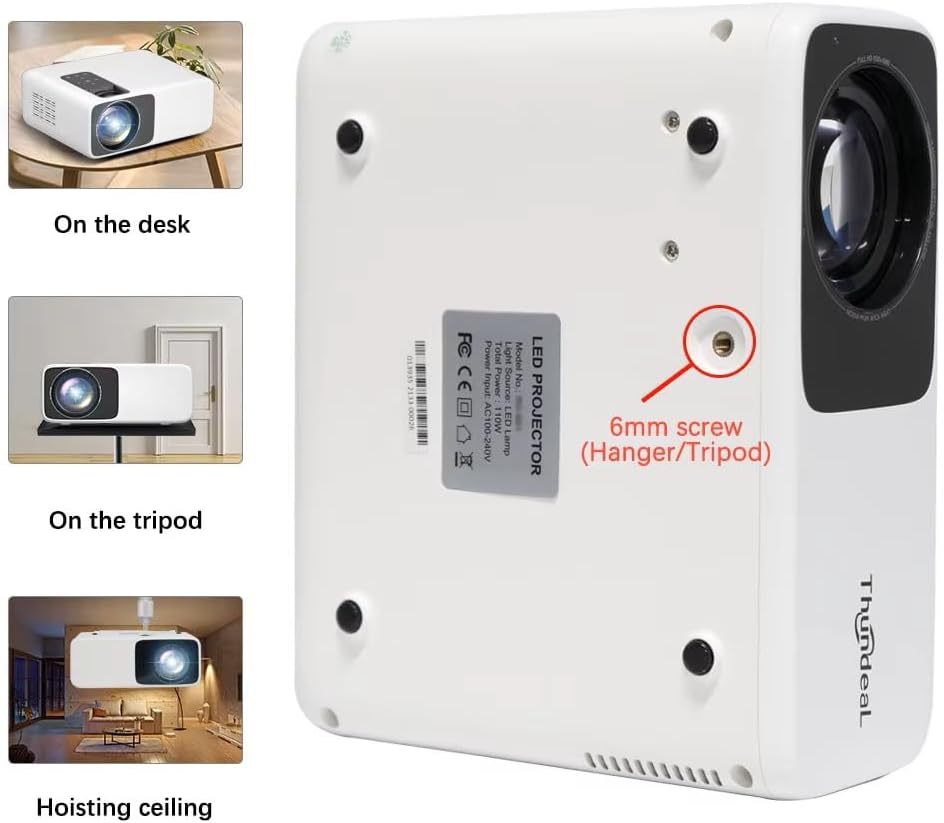
Image 4.1: Projector placement options and mounting point.
Za optimalno viewing, ensure the projector is positioned perpendicular to the screen or wall. Adjust the projection distance (1.6 to 6.5 meters) to achieve your desired screen size (49 to 300 inches). A distance of 3-5 meters for a 93-150 inch screen is recommended for eye comfort.
4.2. Priključak za napajanje
- Spojite kabel za napajanje na ulazni priključak za napajanje projektora.
- Drugi kraj kabela za napajanje uključite u standardnu električnu utičnicu.
- Pritisnite gumb za napajanje na projektoru ili daljinskom upravljaču da biste ga uključili.
5. Upute za rad
5.1. Multi-Media Connections
The TD93 Pro projector offers various ports for connecting external devices:
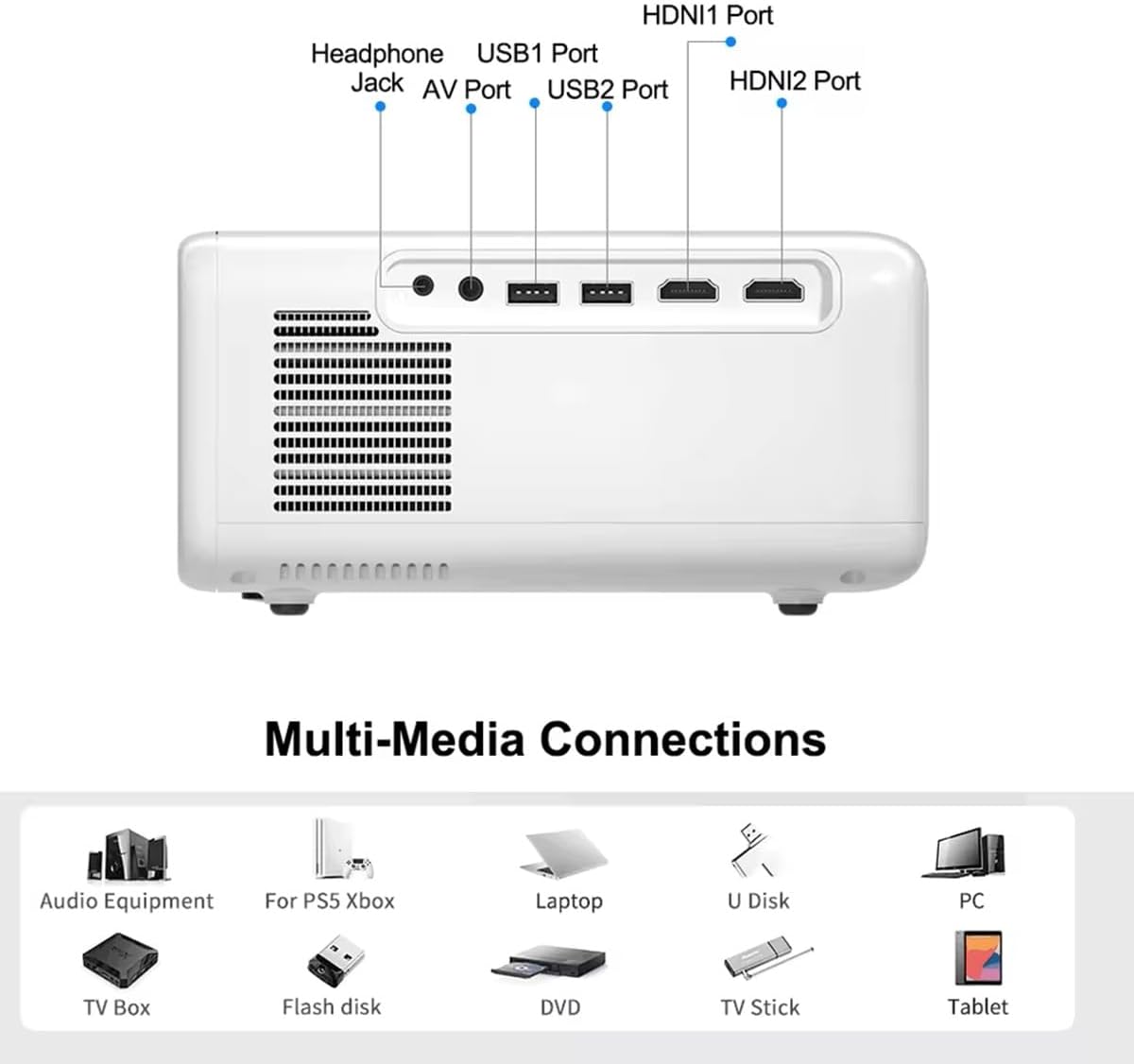
Image 5.1: Available multimedia connection ports.
- HDMI priključci (HDMI1, HDMI2): Connect devices such as TV boxes, gaming consoles (PS5, Xbox), laptops, or Blu-ray players.
- USB portovi (USB1, USB2): Connect USB flash drives for direct media playback (photos, videos, office documents).
- AV priključak: Starije uređaje spojite pomoću priloženog AV kabela.
- Priključak za slušalice (3.5 mm): Spojite vanjske slušalice ili zvučnike.
To switch input sources, use the "Source" button on the remote control or the projector's control panel and select the desired input (HDMI1, HDMI2, AV, USB).
5.2. Bežično povezivanje
5.2.1. WiFi Connection (2.4G/5G)
The projector supports dual-band WiFi for internet access and network features:
- Navigate to the "Settings" menu on the projector's Android interface.
- Odaberite "Mreža i internet", a zatim "Wi-Fi".
- Uključite Wi-Fi i odaberite željenu mrežu s popisa.
- Unesite lozinku ako se to od vas zatraži i povežite se.
5.2.2. Bluetooth veza
Connect Bluetooth-compatible audio devices like speakers or headphones:
- Go to "Settings" > "Connected devices" > "Bluetooth".
- Uključi Bluetooth.
- Uključite Bluetooth uređaj u način uparivanja.
- Odaberite svoj uređaj s popisa dostupnih uređaja za uparivanje.
5.3. Screen Mirroring (Airplay/WiFi-Display)
Wirelessly display content from your Android or iOS phone:

Image 5.2: Screen mirroring from iOS and Android devices.
- Ensure both your projector and mobile device are connected to the same Wi-Fi network.
- On the projector's main interface, select the "Screen Mirroring" or "Airplay/WiFi-Display" application.
- For iOS devices: Open Control Center, tap "Screen Mirroring" or "AirPlay Mirroring", and select the projector from the list.
- For Android devices: Open the notification panel, find "Cast", "Smart View", "Wireless Display", or similar function, and select the projector.
5.4. Podešavanje slike
5.4.1. Keystone Correction (6D)
The projector features 6D keystone correction to adjust image shape:
- Vertikalno kaljenje: Adjust +/- 60 degrees vertically using the remote control.
- 4-Point Corner Keystone: Adjust each of the four corners independently by +/- 60 degrees for side projection or irregular surfaces. This allows for precise rectangular image alignment.
Access keystone settings via the projector's menu or dedicated buttons on the remote.
5.4.2. Funkcija zumiranja
Adjust the display size from 50% to 100% proportionally without moving the projector. This feature is useful for fine-tuning the image size to fit your screen or wall.
Access the zoom function through the projector's menu settings.
5.5. Android OS and App Usage
The integrated Android 9.0 OS allows you to download and install applications directly from the Play Store. Ensure the projector is connected to Wi-Fi to access online services and apps.
- Trgovina Play: Access the Google Play Store to download streaming apps, games, and utilities.
- Reprodukcija medija: Use pre-installed media players or download alternatives (e.g., VLC player for AC3 audio support).
6. Održavanje
6.1. Uklanjanje prašine
The projector is equipped with a built-in dust net for easy cleaning. Regularly clean the dust net to maintain optimal performance and prevent overheating. Press to pop out the dust net for cleaning.
6.2. Sustav hlađenja
The advanced cooling system is designed to dissipate heat efficiently and extend the lamp's lifespan. Ensure proper ventilation around the projector and avoid blocking air vents during operation.
6.3. Lamp Životni vijek
LED lamp has an estimated lifespan of 50,000 hours. No lamp replacement is typically required during the product's operational life under normal usage conditions.
7. Rješavanje problema
7.1. No Image Displayed
- Provjerite je li projektor uključen.
- Verify the input source is correctly selected (e.g., HDMI1, USB).
- Provjerite jesu li svi kabeli dobro spojeni.
- Adjust focus and keystone correction.
7.2. Nema zvuka
- Provjerite razinu glasnoće na projektoru i spojenom izvornom uređaju.
- Ensure external speakers or headphones are properly connected and powered on if used.
- Ako koristite vanjski izvor, provjerite njegove postavke audio izlaza.
- For AC3 audio, ensure you are using a compatible player like VLC.
7.3. Connectivity Issues (WiFi/Bluetooth)
- Ensure WiFi is enabled and you are connected to the correct network.
- Ponovno pokrenite projektor i usmjerivač/Bluetooth uređaj.
- For screen mirroring, confirm both devices are on the same Wi-Fi network.
7.4. Slika je mutna ili iskrivljena
- Podesite prsten za fokusiranje na leći projektora.
- Use the keystone correction features to correct any trapezoidal distortion.
- Provjerite je li površina za projekciju ravna i glatka.
8. Jamstvo i podrška
Za informacije o jamstvu i tehničkoj podršci, molimo pogledajte dokumentaciju koju ste dobili prilikom kupnje ili se obratite prodavaču. Sačuvajte račun kao dokaz o kupnji.
Ask a question about this manual
Ask about setup, troubleshooting, compatibility, parts, safety, or missing instructions. Manuals+ will review the question and use this page’s manual context to help answer it.