
1. Uvod
Thank you for choosing the PELONIS 40-Inch Tower Fan. This oscillating fan features an innovative washable design, providing 2000 CFM airflow at 28ft/s, 4 speeds, 2 modes, and 90° oscillation with a quiet 23dB operation. This manual provides important information for the safe and efficient use of your new tower fan. Please read it thoroughly before operation and retain it for future reference.

Figure 1: PELONIS 40-Inch Tower Fan (Model PSFZ40DR5ALG)
2. Važne sigurnosne upute
Pri korištenju električnih uređaja uvijek se trebaju pridržavati osnovnih mjera opreza kako bi se smanjio rizik od požara, strujnog udara i ozljeda osoba, uključujući sljedeće:
- Prije uporabe ovog ventilatora pročitajte sve upute.
- Use this fan only as described in this manual. Other uses not recommended by the manufacturer may cause fire, electric shock, or injury to persons.
- Do not operate the fan with a damaged cord or plug. Discard the fan or return to an authorized service facility for examination and/or repair.
- Nemojte provlačiti kabel ispod tepiha. Nemojte pokrivati kabel prostirkama, stazama ili sličnim pokrivalima. Postavite kabel dalje od područja prometa i na mjesto gdje se neće spotaknuti.
- Za isključivanje ventilatora, isključite kontrole, a zatim izvucite utikač iz utičnice.
- Ne ubacujte niti dopustite da strani predmeti uđu u bilo koji ventilacijski ili ispušni otvor jer to može uzrokovati strujni udar ili požar ili oštetiti ventilator.
- Do not operate in areas where gasoline, paint, or flammable liquids are used or stored.
- Always unplug the fan before moving, cleaning, or when not in use.
- Ovaj ventilator je namijenjen samo za upotrebu u kućanstvu.
3. Sadržaj paketa
Molimo provjerite sadržaj paketa nakon otvaranja. Ako bilo koji predmet nedostaje ili je oštećen, obratite se korisničkoj podršci.
- PELONIS 40-Inch Tower Fan Unit
- Fan Base (2 parts)
- Daljinski upravljač
- Korisnički priručnik (ovaj dokument)
4. Postavljanje i sastavljanje
Slijedite ove korake za sastavljanje vašeg PELONIS tornjastog ventilatora:
- Sastavite bazu: Spojite dvije polovice baze ventilatora. Pazite da se sigurno uglave na svoje mjesto.
- Attach Base to Fan Unit: Align the assembled base with the bottom of the main fan unit. Secure the base to the fan unit using the provided nut, turning clockwise until tight. Route the power cord through the designated channel in the base for stability.
- Baterija daljinskog upravljača: Open the battery compartment on the remote control and insert the required batteries (not always included, check packaging).
- Plasman: Place the fan on a firm, level surface. Ensure there is adequate space around the fan for proper airflow and oscillation.
- Priključak za napajanje: Uključite kabel za napajanje u standardnu električnu utičnicu od 120 V AC.

Figure 2: Effortless Setup - Twist Lock and Lift the Upper Body
Video 1: How to install Pelonis Washable Tower Fan. This video demonstrates the assembly process for the PELONIS tower fan, including attaching the base and preparing it for use.
5. Upute za rad
Your PELONIS Tower Fan can be operated using the control panel on the top of the unit or the included remote control.
Funkcije upravljačke ploče i daljinskog upravljača:
- Gumb za napajanje (⏻): Uključuje ili isključuje ventilator.
- Gumb za brzinu (⇌): Cycles through 4 fan speeds (Low, Medium, High, Turbo).
- Gumb za način rada (☽): Selects between 2 wind modes:
- Normalni način rada: Osigurava stalan protok zraka.
- Stanje mirovanja: Postupno smanjuje brzinu ventilatora za tihi rad tijekom spavanja.
- Tipka za oscilaciju (↻): Activates or deactivates the 90° oscillation feature, distributing air across a wider area.
- Gumb tajmera (⏱): Sets the auto-off timer for up to 7 hours. Press repeatedly to cycle through timer settings.

Figure 3: Remote Control and Fan Settings

Figure 4: 90° Oscillation for Wide Coverage
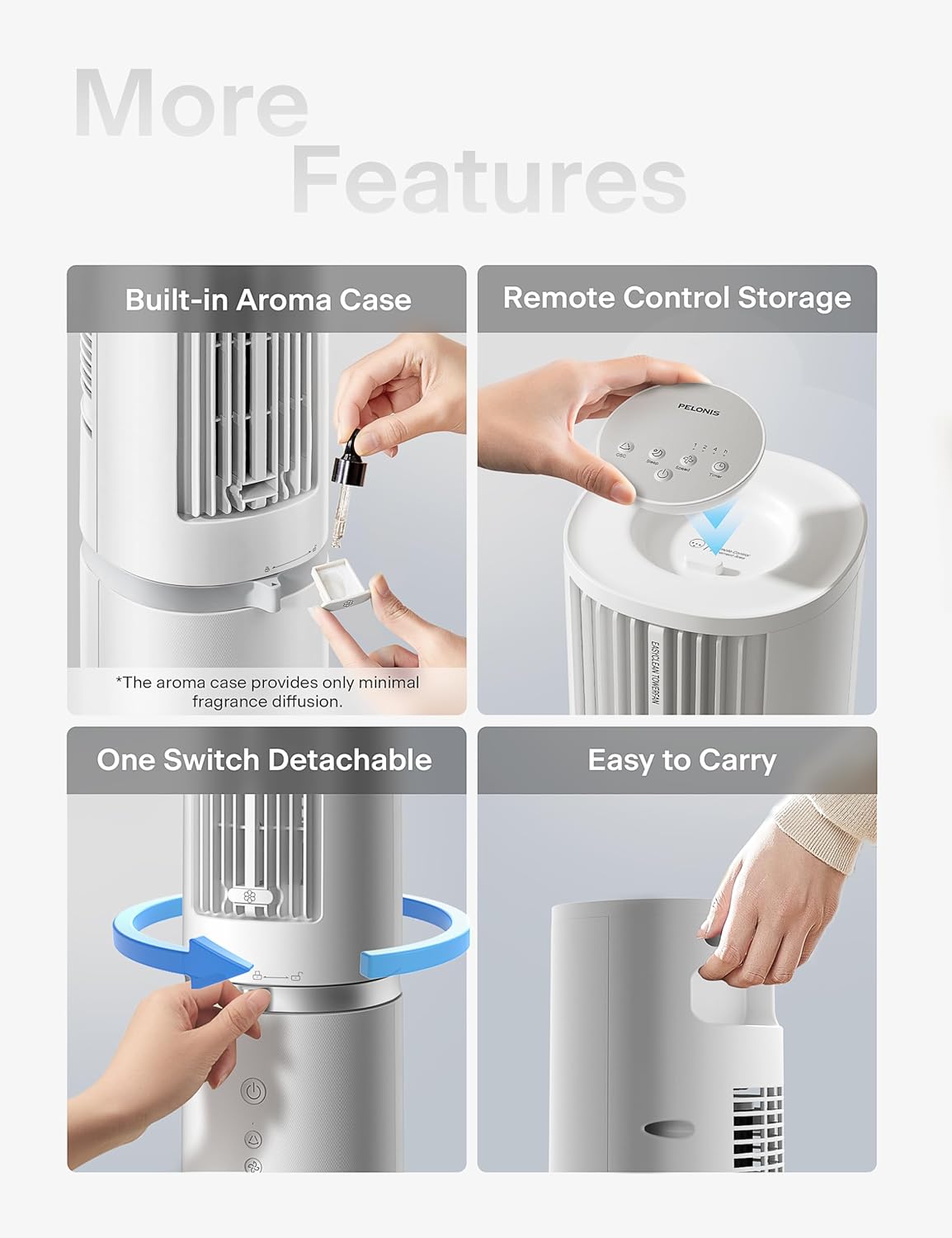
Figure 5: Additional Features including Aroma Case and Remote Storage
6. Održavanje i čišćenje
The PELONIS Tower Fan features an innovative washable design for easy cleaning. Regular cleaning ensures optimal performance and extends the life of your fan.
Upute za čišćenje:
- Isključite ventilator iz struje: Prije čišćenja uvijek provjerite je li ventilator isključen iz električne utičnice.
- Detach Upper Body: The fan's upper body is detachable for thorough cleaning. Twist the lock mechanism at the base of the upper section and lift it off the motor unit.
- Perive komponente: The detachable upper body, including the air outlet grille and internal components, can be washed directly with water. Use mild soap and a soft cloth or sponge if necessary. Ensure no electronic components are exposed to water.
- Temeljito osušite: Allow all washed parts to air dry completely before reassembling. Ensure no moisture remains, especially in crevices.
- Osnovna jedinica za brisanje: Obrišite bazu motora mekom,amp tkanina. Nemojte uranjati baznu jedinicu u vodu.
- Ponovno sastavite: Once all parts are dry, carefully reattach the upper body to the motor unit, ensuring it locks securely into place.
Note: The aroma case (if present) can be cleaned by wiping it with a damp tkanina. Nemojte koristiti jake kemikalije.
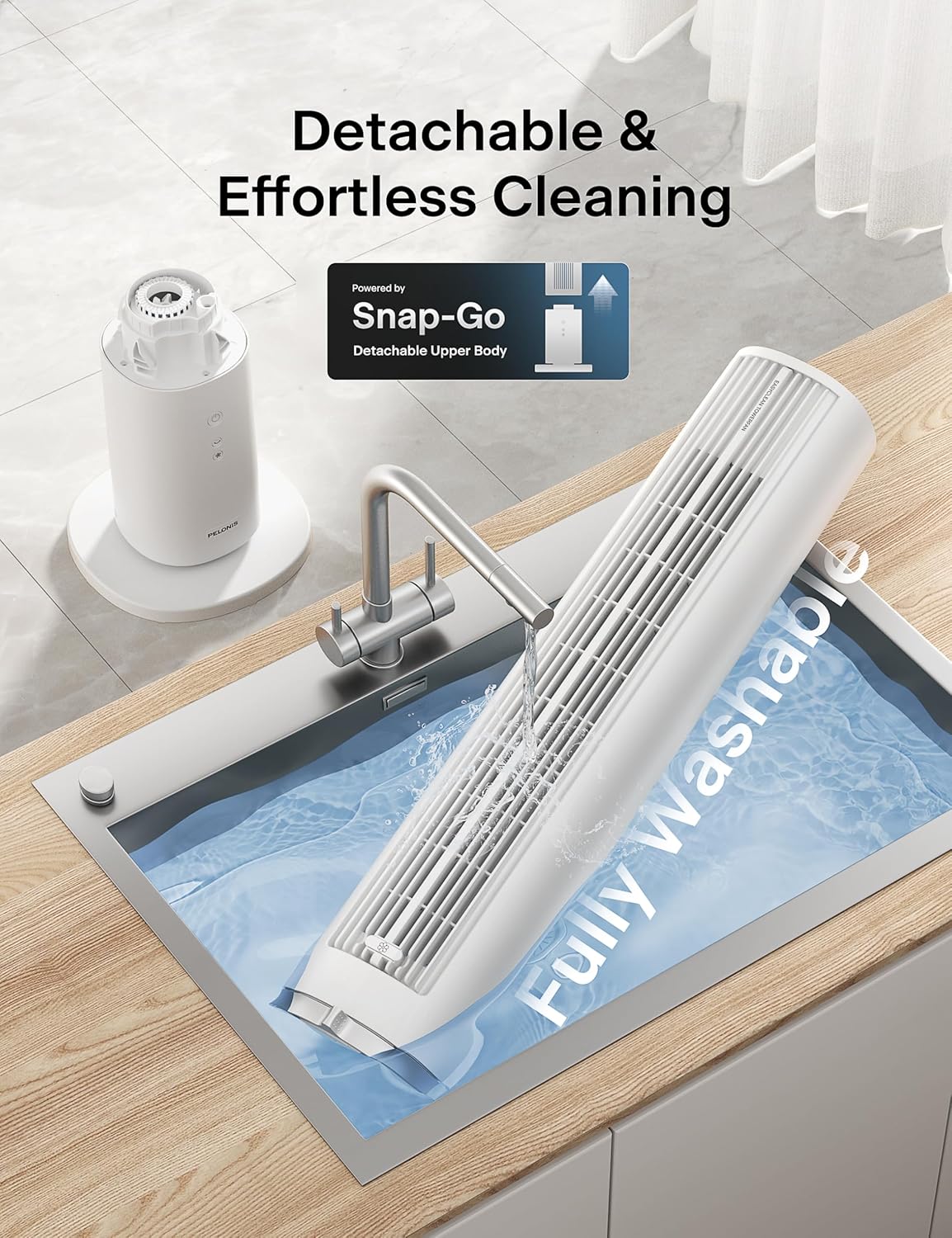
Figure 6: Detachable and Fully Washable Design

Figure 7: One-Twist Detachable Mechanism
7. Vodič za rješavanje problema
Ako vaš ventilator ne radi ispravno, pogledajte sljedeće uobičajene probleme i rješenja:
| Problem | Mogući uzrok | Otopina |
|---|---|---|
| Ventilator se ne uključuje. | Nije uključeno; utičnica ne radi; gumb za uključivanje/isključivanje nije pritisnut. | Provjerite je li ventilator sigurno uključen u ispravnu utičnicu. Pritisnite gumb za napajanje. |
| Slab ili nikakav protok zraka. | Fan speed too low; air intake/outlet blocked; internal components dirty. | Increase fan speed. Check for obstructions. Clean the fan as per maintenance instructions. |
| Fan is noisy during operation. | Fan not on a level surface; internal components dirty; foreign object inside. | Place fan on a flat, stable surface. Clean the fan. If noise persists, contact support. |
| Daljinski upravljač ne radi. | Baterije su prazne ili nepravilno umetnute; daljinski upravljač nije usmjeren prema prijemniku. | Replace batteries. Ensure correct polarity. Point remote towards the fan's control panel. |
| Oscilacija ne radi. | Funkcija oscilacije nije aktivirana. | Pritisnite gumb za oscilaciju na upravljačkoj ploči ili daljinskom upravljaču. |
8. Specifikacije proizvoda
| Značajka | Detalj |
|---|---|
| Marka | PELONIS |
| Naziv modela | PSFZ40DR5ALG |
| Broj modela | PSFZ40DR5ALG |
| Boja | Bijela |
| Stil | Upgraded with Washable Design |
| Dimenzije proizvoda (D x Š x V) | 10.82"D x 10.82"Š x 40.6"V |
| Težina artikla | 7.03 kilogram |
| Izvor napajanja | AC/DC |
| Wattage | 45 vata |
| Voltage | 120 volti |
| Broj brzina | 4 |
| Načini vjetra | Normal, Sleep |
| Oscilacija | 90° |
| Razina buke | 23 decibela |
| Kapacitet protoka zraka | 2000 kubičnih stopa po minuti (CFM) |
| Brzina zraka | 28 stopa u sekundi (ft/s) |
| Odbrojavanje vremena | Do 7 sati |
| Metoda kontrole | Upravljanje gumbima, Daljinski upravljač |
| Uključene komponente | Daljinski |
| Unutarnja/vanjska upotreba | Zatvoreni |
9. Jamstvo i korisnička podrška
PELONIS products are manufactured to the highest quality standards. For specific warranty information, please refer to the warranty card included with your product or visit the official PELONIS webmjesto.
If you encounter any issues or have questions regarding your PELONIS 40-Inch Tower Fan, please contact our customer support team:
- Mrežna podrška: Posjetite PELONIS trgovina na Amazonu za često postavljana pitanja i informacije o proizvodu.
- Podaci za kontakt: Refer to your product packaging or the official PELONIS website for direct customer service contact details (phone, email).
Please have your model number (PSFZ40DR5ALG) and purchase date ready when contacting support.