
1. Uvod
The RODEDIO V300/V519 OBD2 Scanner is a versatile and user-friendly diagnostic tool designed to help you monitor your vehicle's health. This device allows you to read and clear engine fault codes, view live sensor data, check I/M readiness status, and perform battery voltage tests. It is compatible with most vehicles manufactured after 1996 that support OBD-II/EOBD protocols. Its intuitive interface and robust design make it suitable for both automotive enthusiasts and professional mechanics.
This manual provides detailed instructions on how to set up, operate, and maintain your OBD2 scanner, along with troubleshooting tips and technical specifications.
2. Proizvod je gotovview
2.1 Sadržaj paketa
- RODEDIO V300/V519 OBD2 Scanner (fuselage)
- Integrated OBD-II Cable
2.2 Raspored i kontrole uređaja
The V300/V519 scanner features a clear LCD display and dedicated buttons for easy navigation and operation.

Slika 2.1: Prednja strana view of the RODEDIO V300/V519 OBD2 Scanner, showing the LCD screen, DTC, OK, EXIT buttons, and navigation arrows.
- LCD zaslon: Shows diagnostic data, menus, and results.
- Gumb DTC: Directly accesses Diagnostic Trouble Code lookup.
- Gumb OK: Potvrđuje odabire ili ulazi u podizbornike.
- Gumb EXIT: Povratak na prethodni izbornik ili izlaz iz funkcije.
- Gumbi sa strelicama gore/dolje: Navigacija kroz opcije izbornika.
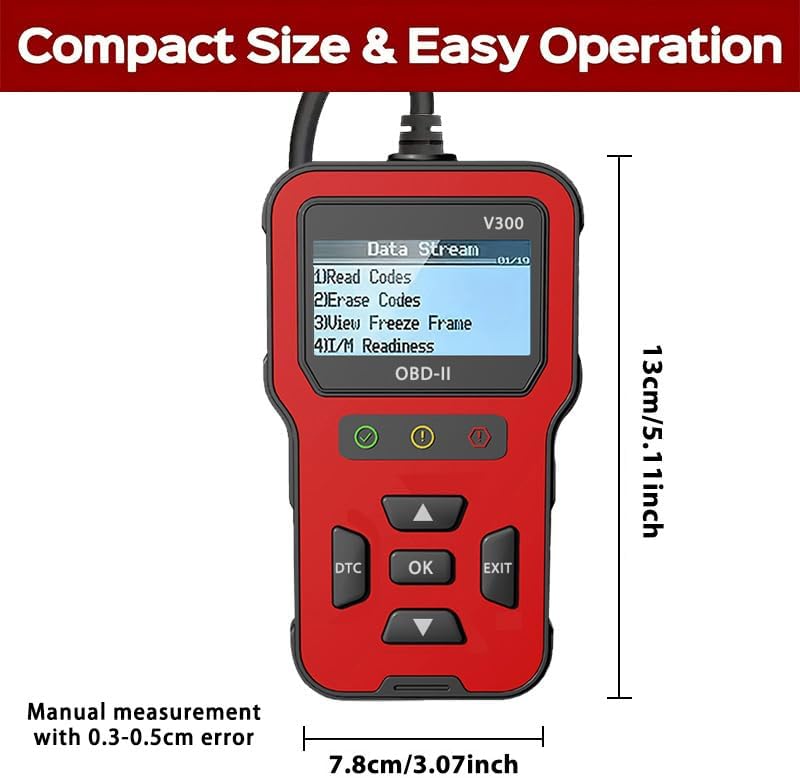
Figure 2.2: Dimensions of the RODEDIO V300/V519 OBD2 Scanner, approximately 13cm (5.11 inches) in length and 7.8cm (3.07 inches) in width.
3. Postavljanje
3.1 Početno povezivanje
The RODEDIO V300/V519 OBD2 Scanner is designed for plug-and-play operation. No batteries or external power sources are required as it draws power directly from your vehicle's OBD-II port.
- Locate the 16-pin Data Link Connector (DLC) in your vehicle. This port is typically located under the dashboard on the driver's side.
- Provjerite je li paljenje vozila u položaju ISKLJUČENO položaj.
- Firmly plug the scanner's OBD-II cable into the vehicle's DLC.
- Okrenite paljenje vozila u položaj ON position (engine off). The scanner will automatically power on and begin communicating with the vehicle's onboard computer.

Figure 3.1: The OBD2 scanner being held in a user's hand, demonstrating its compact size and ease of use within a vehicle's interior.
4. Operacija
4.1 Osnovna navigacija
Once powered on, the scanner will display the main menu. Use the Up i dolje tipke sa strelicama za pomicanje kroz opcije izbornika. Pritisnite OK button to select an option or enter a sub-menu. Press the EXIT gumb za povratak na prethodni zaslon ili izbornik.
Figure 4.1: The scanner's main menu displaying options such as "Read Codes", "Erase Codes", "View Freeze Frame", and "I/M Readiness".
4.2 Očitavanje dijagnostičkih kodova grešaka (DTC)
This function allows you to retrieve stored Diagnostic Trouble Codes (DTCs) from the vehicle's computer, which indicate specific issues.
- U glavnom izborniku odaberite "Pročitaj kodove" i pritisnite OK.
- The scanner will display any stored DTCs. If multiple codes are present, use the arrow buttons to scroll through them.
- Each code will typically be accompanied by a brief description.
4.3 erasing Dijagnostički kodovi grešaka (DTC)
Clearing DTCs will turn off the Check Engine Light (MIL) and erase all diagnostic data from the vehicle's memory. Bilješka: Only clear codes after addressing the underlying issue, otherwise, the codes will reappear.
- U glavnom izborniku odaberite "Izbriši kodove" i pritisnite OK.
- Potvrdite svoj odabir kada se to od vas zatraži.
- The scanner will indicate if the codes have been successfully erased. The Check Engine Light should turn off.

Figure 4.2: Illustration of the scanner's ability to identify engine problems and clear fault codes, thereby turning off the check engine light.
4.4 Viewing Freeze Frame podataka
Freeze Frame Data is a snapshot of the vehicle's operating conditions at the moment a fault code was set. This data can help in diagnosing intermittent problems.
- U glavnom izborniku odaberite "View Freeze Frame" i pritisnite OK.
- The scanner will display various parameters recorded when the DTC occurred.
4.5 Status spremnosti I/M-a
I/M Readiness (Inspection/Maintenance Readiness) indicates whether the various emissions-related systems on the vehicle are operating correctly and have completed their self-tests. This is useful for emissions testing.
- U glavnom izborniku odaberite "I/M spremnost" i pritisnite OK.
- The scanner will display the status of various monitors (e.g., O2 Sensor, EVAP System). A "Ready" status indicates the monitor has completed its test.
4.6 Prijenos podataka uživo
The Live Data Stream function displays real-time sensor data from the vehicle's engine control unit (ECU). This can include engine RPM, vehicle speed, coolant temperature, oxygen sensor readings, and more.
- U glavnom izborniku odaberite "Tok podataka" or "Podaci uživo" i pritisnite OK.
- The scanner will display a list of available data parameters. Use the arrow buttons to scroll and view različite vrijednosti.
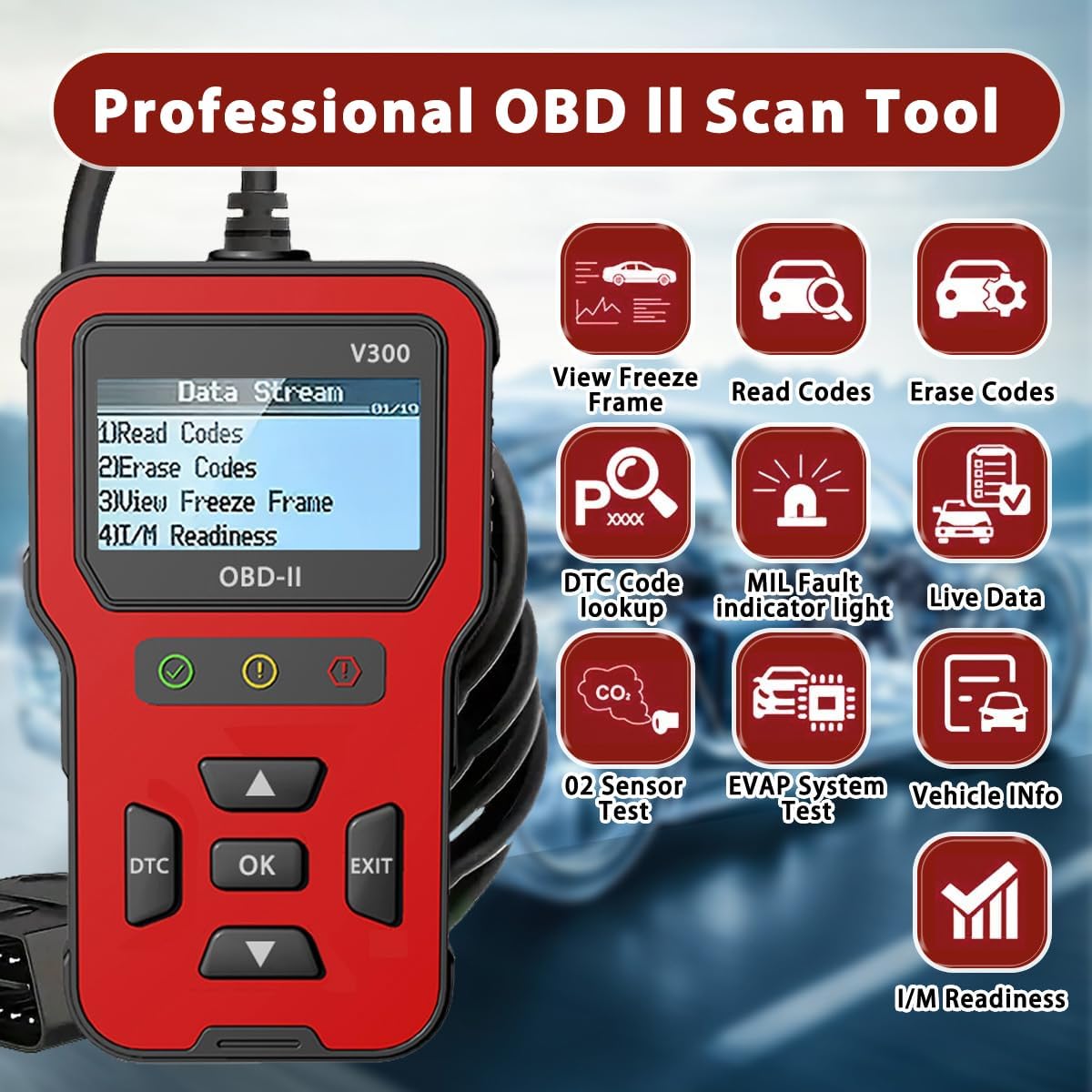
Slika 4.3: Prekoview of the professional OBD II scan tool's capabilities, including View Freeze Frame, Read Codes, Erase Codes, DTC Code Lookup, MIL Fault Indicator Light, Live Data, O2 Sensor Test, EVAP System Test, Vehicle Info, and I/M Readiness.
4.7 Vol. Baterijetage Test
This function allows you to check the vehicle's battery voltage, providing a quick assessment of its health.
- From the main menu, select the option related to "Battery Voltage Test" i pritisnite OK.
- Skener će prikazati trenutni kapacitet baterijetage.
4.8 DTC traženje
If you have a specific DTC code, you can use the DTC Lookup function to get a detailed description of the code.
- Pritisnite namjenski DTC gumb ili odaberite "Traženje DTC-a" iz izbornika.
- Enter the DTC code using the arrow buttons to navigate characters and OK odabrati.
- The scanner will display the definition of the code.
5. Kompatibilnost
5.1 Supported Vehicles
The RODEDIO V300/V519 OBD2 Scanner is compatible with most vehicles that support the OBD-II/EOBD protocols. This generally includes:
- Američka vozila: All vehicles manufactured after 1996.
- EU Vehicles: All vehicles manufactured after 2002.
- Azijska vozila: All vehicles manufactured after 2008.
It supports all full OBDII modes.

Figure 5.1: Compatibility details for the scanner, indicating support for most vehicles after 1996 and listing various supported OBD protocols for diesel vehicles.
5.2 Important Limitations
Imajte na umu sljedeća ograničenja:
- Ovaj proizvod does not support ABS, SRS, or TPMS detection. It is primarily for engine-related diagnostics.
- For diesel vehicles, please ensure your vehicle supports one of the following protocols, otherwise, this product may not be compatible:
- SAE J1850 PWM (41.6KBaud)
- SAE J1850 VPW (10.4KBaud)
- ISO9141-2 (5 baud init, 10.4KBaud)
- ISO14230-4 KWP (početak od 5 bauda, 10.4 Kbauda)
- ISO14230-4 KWP (brzo pokretanje, 10.4 KBaud)
- ISO15765-4 CAN (11-bitni ID, 500 KBaud)
- ISO15765-4 CAN (29-bitni ID, 500 KBaud)
- ISO15765-4 CAN (11-bitni ID, 250 KBaud)
- ISO15765-4 CAN (29-bitni ID, 250 KBaud)
6. Tehničke specifikacije
| Značajka | Specifikacija |
|---|---|
| Marka | RODEDIO |
| Model | V519 (also referred to as V300) |
| Dimenzije proizvoda | 5.1"D x 1.5"Š x 7.8"V (otprilike 13 cm x 3.8 cm x 19.8 cm) |
| Težina artikla | 8 unci (približno 227 grama) |
| Razlučivost zaslona | 128 x 64 LCD |
| Operating System (for PC connection, if applicable) | Windows XP (Note: Device is plug-and-play, no PC software typically required for basic operation) |
| Automobilska vrsta | Universal Fit (OBD2/EOBD compliant vehicles) |
| Zemlja podrijetla | Kina |
7. Rješavanje problema
If you encounter issues while using your RODEDIO OBD2 Scanner, please refer to the following common problems and solutions:
- Skener se ne uključuje:
- Ensure the scanner's cable is firmly connected to the vehicle's 16-pin DLC.
- Verify the vehicle's ignition is in the ON position (engine off).
- Check the vehicle's fuse for the OBD-II port (consult your vehicle's owner's manual for fuse box location and diagram).
- Poruka "Pogreška veze" ili "Pogreška komunikacije":
- Confirm the vehicle is OBD-II compliant (most vehicles after 1996 in the US, 2002 in EU, 2008 in Asia).
- Ensure the ignition is ON and the engine is off.
- Try connecting the scanner to a different OBD-II compliant vehicle to rule out a scanner issue.
- Check for any aftermarket devices connected to the OBD-II port that might interfere with communication.
- Ne mogu obrisati kodove:
- Ensure the ignition is ON and the engine is off.
- Codes cannot be cleared if the underlying fault is still present. Diagnose and repair the issue first, then attempt to clear codes.
- Netočna očitanja:
- Ensure the vehicle's battery voltage je stabilan.
- Verify the scanner's connection is secure.
- If possible, compare readings with another known good scanner.
8. Održavanje
To ensure the longevity and optimal performance of your RODEDIO OBD2 Scanner, follow these maintenance guidelines:
- Uređaj održavajte čistim brisanjem mekom, suhom krpom. Izbjegavajte korištenje abrazivnih sredstava za čišćenje ili otapala.
- Skener čuvajte na hladnom i suhom mjestu, dalje od izravne sunčeve svjetlosti i ekstremnih temperatura.
- Ne izlažite uređaj vodi ili prekomjernoj vlazi.
- Izbjegavajte ispuštanje skenera ili izlaganje jakim udarcima.
- Do not attempt to disassemble or repair the unit yourself, as this will void any potential warranty.
9. Jamstvo i podrška
For warranty information or technical support, please contact RODEDIO customer service through the retailer where you purchased the product or refer to the contact information provided with your purchase. Please have your product model number (V300/V519) and purchase details ready when contacting support.