
1. Uvod
This manual provides detailed instructions for the installation, operation, and maintenance of your Potegrap Outdoor Security Camera (Model T-CQ1052-W20V). Please read this manual thoroughly before using the product to ensure proper function and safety. Keep this manual for future reference.
The Potegrap T-CQ1052-W20V is a high-definition outdoor security camera designed for comprehensive home surveillance. It features 2K resolution, dual-band 2.4GHz and 5GHz WiFi connectivity, 360-degree pan and tilt functionality, advanced motion detection with tracking, color night vision, two-way audio, and optional AI-powered features with cloud storage.
2. Sigurnosne informacije
- Ensure the power adapter is suitable for your local power supply and is properly grounded.
- Ne izlažite kameru ekstremnim temperaturama izvan njenog radnog raspona (-4°F do 122°F / -20°C do 50°C).
- Izbjegavajte postavljanje kamere u blizinu jakih elektromagnetskih polja.
- Ne pokušavajte rastavljati ili modificirati kameru. Time ćete poništiti jamstvo.
- Držite kameru i njezinu dodatnu opremu izvan dohvata djece.
- Clean the camera lens with a soft, dry cloth only.
3. Sadržaj paketa
Molimo provjerite paket za sljedeće stavke:
- Potegrap Outdoor Security Camera (Model T-CQ1052-W20V) - 2 units
- Strujni adapteri
- Montažni vijci i sidra
- Predložak za montažu
- Korisnički priručnik (ovaj dokument)

Slika 3.1: Two Potegrap T-CQ1052-W20V outdoor security cameras, highlighting their 2K resolution, 5G WiFi capability, and US-based cloud storage option. A smartphone screen displays a live view iz fotoaparata.
4. Proizvod je gotovview
4.1 Ključne značajke
- 2K HD rezolucija: Pruža jasne i detaljne video zapisetage (2560x1440).
- Dvopojasni WiFi: Supports both 2.4GHz and 5GHz networks for flexible and stable connectivity.
- 360° pokrivenost: Features 355° horizontal pan and 90° vertical tilt for comprehensive area monitoring.
- Advanced Motion Detection & Tracking: Automatically detects and follows moving objects.
- Noćni vid u boji: Pruža video u punoj boji čak i u uvjetima slabog osvjetljenja.
- Dvosmjerni zvuk: Ugrađeni mikrofon i zvučnik za komunikaciju u stvarnom vremenu.
- Način privatnosti: Physically rotates the camera lens for enhanced privacy when needed.
- Fleksibilna pohrana: Supports local TF (Micro SD) card storage (up to 128GB, not included) and optional US-based cloud storage.
- AI Features (Subscription Required): Includes person, vehicle, and animal detection, along with a 911 emergency alarm integration.
- Otporan na vremenske uvjete: Designed to operate in various outdoor conditions, from -4°F to 122°F (-20°C to 50°C).

Slika 4.1: A banner image promoting the Potegrap AI-Powered WiFi Camera, emphasizing its smart and safe features including 911 Emergency Alarm, US-Based Cloud storage, and integrated AI capabilities.

Slika 4.2: This image explains the camera's dual-band WiFi support, indicating that it can connect to both 2.4GHz (longer transmission distance) and 5GHz (superior network performance) networks.
5. Postavljanje
5.1 Instalacija aplikacije i stvaranje računa
- Download the official Potegrap security camera application from your smartphone's app store (available for iOS and Android).
- Otvorite aplikaciju i slijedite upute na zaslonu za izradu novog računa ili se prijavite ako ga već imate.
5.2 Fizička instalacija
The camera is designed for both indoor and outdoor use. Choose a location that provides the desired viewing angle and has access to a power outlet.
- Use the provided mounting template to mark the drill holes on your chosen surface (wall or ceiling).
- Drill holes and insert the wall anchors if mounting on drywall or masonry.
- Secure the camera's mounting bracket using the provided screws.
- Pričvrstite kameru na montažni nosač.
- Spojite adapter za napajanje na kameru i uključite ga u utičnicu.

Slika 5.1: This banner emphasizes the camera's easy installation for both indoor and outdoor environments, showing a person installing it outdoors and examples of its placement inside a home and outside.
5.3 Povezivanje na Wi-Fi
- Ensure your smartphone is connected to the same Wi-Fi network (2.4GHz or 5GHz) you intend to connect the camera to.
- U aplikaciji dodirnite 'Dodaj uređaj' ili ikonu '+'.
- Select your camera model and follow the in-app instructions, which typically involve scanning a QR code displayed on your phone with the camera or entering Wi-Fi credentials.
- Wait for the camera to connect to the network. A voice prompt or LED indicator will confirm successful connection.
5.4 Ugradnja SD kartice (opcionalno)
For local storage, insert a TF (Micro SD) card (up to 128GB, not included) into the designated slot on the camera. Ensure the camera is powered off before inserting or removing the card. Format the SD card via the app after installation for optimal performance.
6. Upravljanje kamerom
6.1 Uživo View i upravljanje panoramiranjem/nagibom
Open the Potegrap app and select your camera to access the live view. Use the on-screen controls to pan (rotate horizontally 355°) and tilt (rotate vertically 90°) the camera lens to adjust your viewing kut.
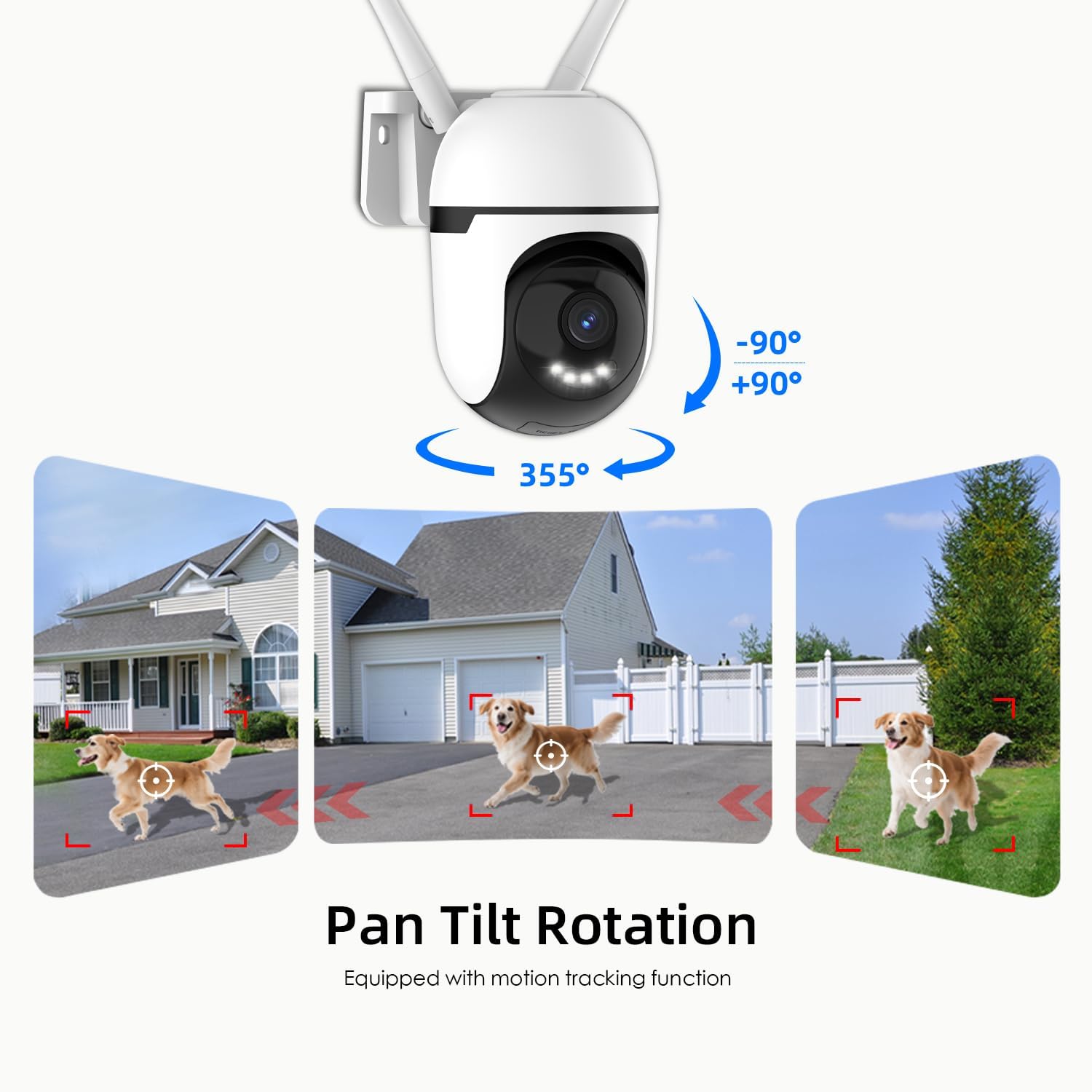
Slika 6.1: This graphic demonstrates the camera's pan and tilt functionality, allowing for a 360-degree horizontal view (355°) and vertical adjustment (90°), illustrated by different perspectives of a dog in a yard.

Slika 6.2: This image highlights the camera's 360-degree coverage (355° pan, 90° tilt) and motion tracking, showing its ability to monitor a wide area including children playing and a dog.
6.2 Detekcija i praćenje pokreta
The camera can detect motion and automatically track moving objects within its field of view. You will receive real-time alerts on your smartphone when motion is detected.
- Omogući/onemogući: Access camera settings in the app to turn motion detection on or off.
- Osjetljivost: Podesite osjetljivost detekcije pokreta kako biste smanjili lažne alarme.
- Detekcijske zone: Postavite određena područja unutar kamere view for motion detection to focus on, ignoring irrelevant areas.

Slika 6.3: This image illustrates the camera's auto-tracking motion detection, showing the camera following a moving subject (a child) within its field of view.

Slika 6.4: An illustration of how to set up custom detection zones to reduce unnecessary alerts, showing a dog within a defined zone and a corresponding motion detection notification.
6.3 2-Way Talk
Use the two-way audio feature to communicate with individuals near the camera. Tap the microphone icon in the live view govoriti i slušati putem zvučnika kamere.

Slika 6.5: This image illustrates the two-way talk feature, enabling real-time audio communication between a person near the camera outdoors and another person using the mobile app indoors.
6.4 Noćni vid
Kamera nudi više načina noćnog vida:
- Classic IR Night Vision: Standardni crno-bijeli infracrveni view.
- Noćni vid u boji: Utilizes built-in lights to provide full-color video in low-light conditions.
- Inteligentni noćni vid: Stays in IR mode and switches to color night vision upon detection of motion.
Adjust night vision settings in the app to suit your preferences.

Slika 6.6: This image compares the camera's night vision capabilities: classic infrared (black and white), full-color night vision, and intelligent night vision that activates color upon detection.
6.5 Način privatnosti
Activate Privacy Mode via the app to physically rotate the camera lens downwards, ensuring your privacy when the camera is not needed for surveillance.

Slika 6.7: The camera's privacy mode is shown, where the lens physically rotates to obscure the view, and the mobile application confirms the mode is active.
6.6 Snimanje i pohranjivanje
The camera supports 24/7 continuous recording and event-triggered recording. Footage se može pohraniti na dva načina:
- Local TF Card Storage: Insert a Micro SD card (up to 128GB) for local storage without a subscription. Ensure the card is formatted through the app.
- US-Based Cloud Storage: An optional subscription service provides cloud storage, often including advanced AI analysis features.
Pristup snimljenom footage through the playback section of the Potegrap app.

Slika 6.8: This image details the storage options: US-based cloud storage (subscription needed for AI functions) and local TF card storage (up to 128GB, not included) for secure data.
6.7 AI Features (Subscription Required)
Enhance your security with AI-powered features, available with a cloud storage subscription:
- Otkrivanje osobe: Differentiates human shapes from other moving objects.
- Detekcija vozila: Identifies vehicles, reducing irrelevant alerts.
- Animal Detection: Recognizes animals, useful for pet monitoring or filtering wildlife alerts.
- 911 Emergency Alarm: Integrates with emergency services for rapid response during critical events.

Slika 6.9: The camera's intelligent alarm feature is depicted, showing a detected person and an option within the mobile application to initiate a 911 emergency call.
7. Održavanje
- Čišćenje: Redovito brišite objektiv i kućište fotoaparata mekom, suhom krpom kako biste uklonili prašinu i prljavštinu. Nemojte koristiti jake kemikalije ili abrazivna sredstva za čišćenje.
- Ažuriranja firmvera: Check the app periodically for firmware updates. Keeping your camera's firmware updated ensures optimal performance and security.
- Ciklus snage: Ako kamera ima problema, pokušajte je isključiti iz napajanja na 10 sekundi, a zatim je ponovno uključiti.
8. Rješavanje problema
| Problem | Mogući uzrok | Otopina |
|---|---|---|
| Kamera se ne uspijeva povezati s Wi-Fi mrežom. | Incorrect Wi-Fi password; camera too far from router; router settings (e.g., firewall). | Verify Wi-Fi password. Move camera closer to router. Ensure router supports 2.4GHz or 5GHz. Temporarily disable firewall for setup. Reset camera and try again. |
| Poor video quality or blurry image. | Prljava leća; nedovoljno osvjetljenje; problemi s propusnošću mreže. | Clean the camera lens. Ensure adequate lighting for optimal color night vision. Check your internet speed. |
| Upozorenja o detekciji pokreta su prečesta ili ne rade. | Sensitivity set too high/low; detection zone not configured correctly. | Adjust motion detection sensitivity in the app. Configure specific detection zones to focus on relevant areas. |
| Ne može view snimljeno footage from SD card. | SD card not formatted; SD card full or corrupted; app issue. | Ensure the SD card is correctly inserted and formatted via the app. Check if the SD card is full. Some advanced playback features or continuous recording may require a cloud subscription. |
| AI features (person/vehicle detection, 911 alarm) are not active. | Subscription required for AI features. | These advanced AI features typically require an active cloud storage subscription. Check your subscription status in the app. |
| Kamera ne reagira. | Problem s napajanjem; softverski kvar. | Check power connection. Perform a power cycle (unplug and replug). If issues persist, perform a factory reset (refer to app for instructions). |
9. Specifikacije
| Značajka | Detalj |
|---|---|
| Broj modela | T-CQ1052-W20V |
| Marka | Potegrap |
| Rezolucija | 2K HD (2560x1440), 3 MP |
| Povezivost | Dual-band 2.4GHz & 5GHz WiFi |
| Izvor napajanja | Električni na kabel |
| Pan/Tilt raspon | 355° vodoravno, 90° okomito |
| Noćni vid | Color Night Vision, IR Night Vision, Intelligent Night Vision |
| Mogućnosti pohrane | TF (Micro SD) Card (up to 128GB, not included), US-Based Cloud Storage (subscription required) |
| Audio | Two-Way Talk (Built-in microphone and speaker) |
| Radna temperatura | -4°F do 122°F (-20°C do 50°C) |
| Dimenzije (D x Š x V) | 3.9 x 3.1 x 4.3 inča |
| Težina artikla | 1.57 funti (0.71 kilograma) |
| Kompatibilni uređaji | Pametni telefon (iOS, Android) |
10. Jamstvo i podrška
For warranty information, please refer to the documentation included with your purchase or contact Potegrap customer support. Protection plans may be available for extended coverage.
If you encounter any issues or have questions regarding your Potegrap security camera, please contact our customer support team through the official Potegrap webweb-mjesto ili kontaktne podatke navedene u aplikaciji.