
1. Uvod
This user manual provides detailed instructions for the KTC M27P6 27-inch MiniLED Gaming Monitor. Please read this manual thoroughly before operating the device to ensure proper usage and optimal performance. Keep this manual for future reference.
The KTC M27P6 is a high-performance gaming monitor featuring a 27-inch MiniLED panel with 1152 local dimming zones, offering exceptional contrast and brightness up to HDR1400. It supports dual display modes: 4K resolution at 160Hz and Full HD resolution at 320Hz, providing versatility for various gaming and professional needs. Key features include a 1ms GtG response time, Adaptive Sync technology, and comprehensive connectivity options including USB-C with 65W power delivery and KVM functionality.

Slika: Prekoview of KTC M27P6 monitor's key features including MiniLED, 1152 local dimming zones, dual mode 4K@160Hz/FHD@320Hz, USB-C, KVM, HDR1400, 145% sRGB, Fast IPS, and Adaptive-Sync.
2. Sigurnosne informacije
- Monitor uvijek postavljajte na stabilnu, ravnu površinu kako biste spriječili njegov pad.
- Ne izlažite monitor kiši ili vlazi kako biste izbjegli strujni udar ili požar.
- Držite monitor dalje od izravne sunčeve svjetlosti, izvora topline ili ekstremnih temperatura.
- Osigurajte pravilnu ventilaciju oko monitora. Ne blokirajte ventilacijske otvore.
- Koristite samo adapter za napajanje i kabele koje je isporučio ili preporučio proizvođač.
- Unplug the power cord from the outlet if the monitor will not be used for a long period.
- Ne pokušavajte sami popravljati monitor. Sve servisne radove prepustite kvalificiranom servisnom osoblju.
- Izbjegavajte dodirivanje zaslona oštrim predmetima.
3. Sadržaj paketa
Verify that all components are present in your package. If any items are missing or damaged, contact your retailer.
- KTC M27P6 27-inch MiniLED Gaming Monitor
- Stalak za monitor (baza i krak)
- Adapter napajanja
- Kabel za napajanje
- HDMI kabel
- DisplayPort kabel
- USB-C kabel
- USB-B to USB-A Cable (for KVM/USB Hub)
- Korisnički priručnik (ovaj dokument)
- Jamstveni list
4. Monitor Overview
4.1 Prednja strana View
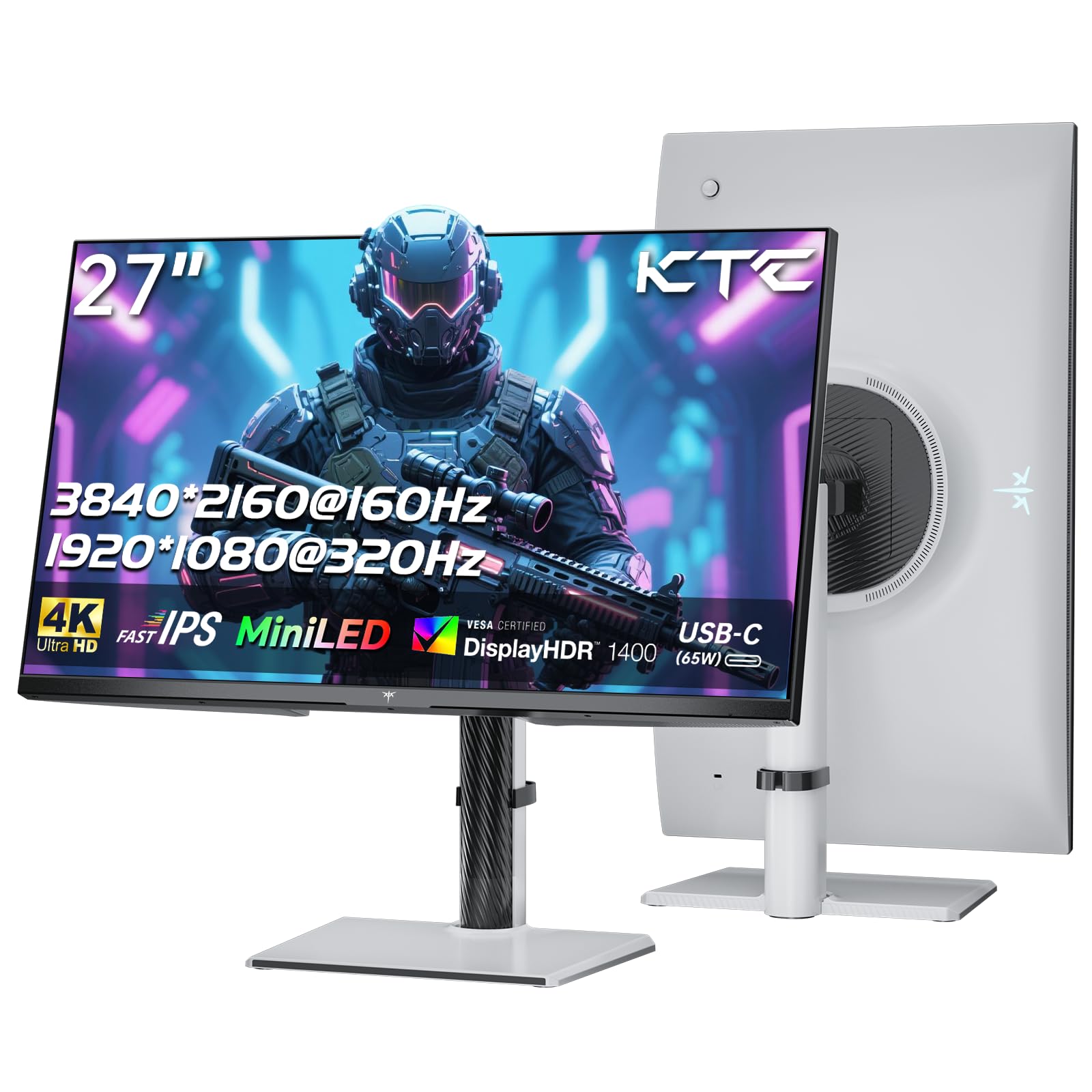
Slika: prednja strana view of the KTC M27P6 27-inch MiniLED Gaming Monitor.
The front of the monitor features the 27-inch MiniLED display panel. The KTC logo is typically located at the bottom center bezel.
4.2 Stražnji View i luke

Slika: Stražnja strana view of the KTC M27P6 monitor, highlighting the various input/output ports and the adjustable stand.
The rear of the monitor houses the input/output ports and the stand attachment point. The ports include:
- Ulazna snaga: Za spajanje strujnog adaptera.
- HDMI 2.1 priključci (x2): For connecting to devices supporting HDMI 2.1 (4K@160Hz / FHD@320Hz).
- DisplayPort 1.4 Ports (x2): For connecting to devices supporting DisplayPort 1.4 (4K@160Hz / FHD@320Hz).
- USB-C priključak (x1): Full-function port supporting video input (4K@160Hz / FHD@320Hz) and 65W Power Delivery.
- USB-B Upstream Port (x1): For connecting the monitor's USB hub to your computer, enabling the downstream USB-A ports and KVM functionality.
- USB-A 3.0 Downstream Ports (x3): Za spajanje perifernih uređaja poput tipkovnica, miševa ili USB pogona.
- 3.5 mm audio izlaz: Za spajanje slušalica ili vanjskih zvučnika.
Video: Prekorview of the KTC M27P6 monitor's features and design, including its connectivity options and adjustable stand.
5. Postavljanje
5.1 Sastavljanje postolja
- Pažljivo izvadite komponente monitora i postolja iz pakiranja.
- Attach the stand arm to the monitor panel by aligning the mounting points and securing with screws (if applicable).
- Attach the stand base to the stand arm, ensuring it is firmly connected.
- Sastavljeni monitor postavite na stabilnu, ravnu površinu.
The monitor also supports VESA mounting (100x100mm) for use with compatible wall mounts or monitor arms. Ensure the VESA mount is rated for the monitor's weight.

Image: Diagram illustrating the multi-angle adjustment capabilities of the KTC M27P6 monitor stand, including height, tilt, swivel, and pivot.
5.2 Spojni kabeli
- Priključak za napajanje: Connect the power adapter to the monitor's power input, then plug the power cable into a power outlet.
- Video veza:
- For PC/Gaming Console: Connect one end of the HDMI or DisplayPort cable to your device's output and the other end to the corresponding port on the monitor.
- For USB-C Compatible Devices: Connect the USB-C cable from your device to the monitor's USB-C port for video, data, and power delivery.
- USB Hub/KVM Connection: To use the monitor's USB-A ports and KVM functionality, connect the USB-B to USB-A cable from the monitor's USB-B upstream port to a USB-A port on your computer.
- Audio veza: If using external headphones or speakers, connect them to the 3.5mm audio out port on the monitor.
6. Upute za rad
6.1 Uključivanje/isključivanje
Press the power button (usually located on the back or bottom of the monitor) to turn the monitor on or off. The power indicator light will illuminate when the monitor is on.
6.2 Navigacija kroz OSD izbornik
The On-Screen Display (OSD) menu allows you to adjust various monitor settings. Use the joystick or buttons (refer to your monitor's physical layout) to navigate the OSD menu:
- Press Joystick/Button: Enter OSD menu or confirm selection.
- Pomicanje upravljačke palice gore/dolje: Krećite se kroz opcije izbornika.
- Pomicanje upravljačke palice lijevo/desno: Prilagodite vrijednosti ili se pomaknite na podizbornike.
- Gumb za izlaz: Izlaz iz trenutnog izbornika ili OSD-a.
6.3 Dual Mode Switching (4K@160Hz / FHD@320Hz)
The KTC M27P6 supports seamless switching between two display modes: 4K (3840x2160) at 160Hz and Full HD (1920x1080) at 320Hz. This allows you to optimize performance based on your content (e.g., high-resolution graphics for AAA games or ultra-high refresh rate for competitive FPS games).
To switch modes, access the OSD menu and navigate to the "Display" or "Gaming" settings. Select the desired resolution and refresh rate. Your connected device must also support these resolutions and refresh rates for optimal performance.

Image: Illustration of the KTC M27P6 monitor's seamless dual mode switching capability, showing a 4K@160Hz gaming scene and a FHD@320Hz gaming scene.
6.4 Adaptivna sinkronizacija
The monitor supports Adaptive Sync (AMD FreeSync and NVIDIA G-Sync compatible) to eliminate screen tearing and stuttering, providing a smoother gaming experience. Ensure Adaptive Sync is enabled in the monitor's OSD settings and in your graphics card control panel.

Image: Visual representation of Adaptive Sync technology, showing how it prevents screen tearing by synchronizing the monitor's refresh rate with the GPU's frame rate.
6.5 KVM funkcionalnost
The integrated KVM (Keyboard, Video, Mouse) switch allows you to control multiple computers or devices connected to the monitor using a single keyboard and mouse. To use KVM:
- Connect your primary computer to the monitor via DisplayPort/HDMI and the USB-B upstream cable.
- Connect your secondary device (e.g., laptop via USB-C) to the monitor.
- Connect your keyboard and mouse to the USB-A downstream ports on the monitor.
- Switch between connected devices using the KVM hotkey or OSD menu option.
6.6 Color Settings and HDR1400
The monitor features a MiniLED panel with 1152 local dimming zones and VESA DisplayHDR 1400 certification, providing high contrast and vibrant colors. You can adjust color settings (brightness, contrast, color temperature, gamma) through the OSD menu. For HDR content, ensure HDR is enabled in your operating system and the monitor's OSD. The monitor supports 10-bit color depth and a wide color gamut (145% sRGB / 99% DCI-P3).

Image: Visual comparison demonstrating the enhanced dynamic range and detail provided by HDR1400 on the KTC M27P6 monitor.
7. Održavanje
- Čišćenje ekrana: Nježno obrišite zaslon mekom krpom koja ne ostavlja dlačice. Za tvrdokorne mrlje, dampen the cloth with a small amount of screen cleaner (non-ammonia based). Do not spray cleaner directly onto the screen.
- Čišćenje C-aasing: Za brisanje monitora koristite meku, suhu krpu.asing. Izbjegavajte korištenje abrazivnih sredstava za čišćenje ili otapala.
- Ventilacija: Ensure the ventilation openings on the monitor are clear of dust and debris to prevent overheating.
8. Rješavanje problema
| Problem | Mogući uzrok | Otopina |
|---|---|---|
| Nema slike na ekranu | Kabel za napajanje isključen; video kabel isključen; neispravan ulazni izvor. | Check power and video cable connections. Select the correct input source via the OSD menu. |
| Slika je mutna ili iskrivljena | Incorrect resolution; Faulty video cable. | Set the display resolution to the native 3840x2160 or 1920x1080. Try a different video cable. |
| Trzanje ili trzanje zaslona u igrama | Adaptive Sync not enabled; Graphics card driver issues. | Enable Adaptive Sync in monitor OSD and graphics card settings. Update graphics drivers. |
| USB priključci ne rade | USB-B upstream cable not connected; Driver issues. | Ensure the USB-B upstream cable is connected from the monitor to your computer. Check computer's USB drivers. |
| Nema zvuka iz audio izlaza | Incorrect audio output selected; Volume too low. | Check audio output settings on your computer. Adjust monitor and device volume. |
9. Specifikacije
| Značajka | Detalj |
|---|---|
| Marka | KTC |
| Naziv modela | M27P6 |
| Veličina zaslona | 27 Pollici (27 inches) |
| Vrsta ploče | MiniLED, Fast IPS |
| Resolution (Native) | 3840 x 2160 (4K UHD) |
| Maksimalna brzina osvježavanja (4K) | 160 Hz |
| Maksimalna brzina osvježavanja (FHD) | 320 Hz |
| Vrijeme odziva | 1ms GtG |
| Lokalne zone zatamnjenja | 1152 zone |
| HDR certifikat | VESA DisplayHDR 1400 |
| Svjetlina | 1400 cd / m² (vrh) |
| Omjer kontrasta | 1,000,000:1 (dinamički) |
| Raspon boja | 145% sRGB, 99% DCI-P3 |
| Dubina boje | 10-bitni |
| Adaptivna sinkronizacija | AMD FreeSync, NVIDIA G-Sync Compatible |
| Viewing kut | 178 stupnja |
| Povezivost | 2x HDMI 2.1, 2x DisplayPort 1.4, 1x USB-C (65W PD), 1x USB-B Upstream, 3x USB-A 3.0 Downstream, 1x 3.5mm Audio Out |
| KVM podrška | Da |
| Podešavanje stanja | Visina, nagib, okretanje, okretanje |
| VESA nosač | 100 x 100 mm |
| Dimenzije (DxŠxV) | 21.1P x 61.7D x 54.7V cm |
10. Jamstvo i podrška
KTC products are covered by a limited warranty. Please refer to the warranty card included in your package for specific terms and conditions. For technical support, troubleshooting assistance, or warranty claims, please contact KTC customer service or visit the official KTC webmjesto.
You can find more information and contact details on the KTC official store page: KTC Store.