
1. Uvod
Thank you for choosing the TELESIN Creator Kit. This comprehensive 2-in-1 kit is designed to enhance your mobile photography and videography experience, providing stability, lighting, and remote control for professional-quality content creation. This manual will guide you through the setup, operation, and maintenance of your new device.
2. Što je u kutiji
- Magnetni držač za kameru za telefon Fun Shot
- C03 Magnetic Selfie Light (White)
- Magnetic Ring (for non-MagSafe compatible phones)
- USB-C kabel za punjenje
- korisnički priručnik

Image: The TELESIN Creator Kit, showing the magnetic phone camera grip, the C03 magnetic selfie light, and a phone mounted on a tripod.
3. Ključne značajke
- Dizajn 2-u-1: Combines a phone camera grip with a wireless shutter and a magnetic selfie light.
- Instant Magnetic Mount: Securely attaches to MagSafe-compatible phones or via the included magnetic ring for Android devices.
- Integrated Selfie Light: Features an LED ring light with 360° rotation, 180° flip, and a built-in mirror for front-facing camera use.
- Wireless Shutter Remote: Detachable remote for convenient photo and video capture from up to 10 meters away.
- Ergonomski rukohvat: Designed for comfortable and stable shooting.
- Svestrana upotreba: Components can be used individually or combined for various creative needs.
- Kompaktan i prijenosan: Lightweight design for easy travel.

Slika: Detaljna view kontrola na hvatištu, uključujući dvatage shutter, zoom lever, and mode switch.

Image: The dual-sided magnetic fill light in use, highlighting its versatility.

Image: Illustration of the strong magnetic attachment, ensuring secure phone mounting.
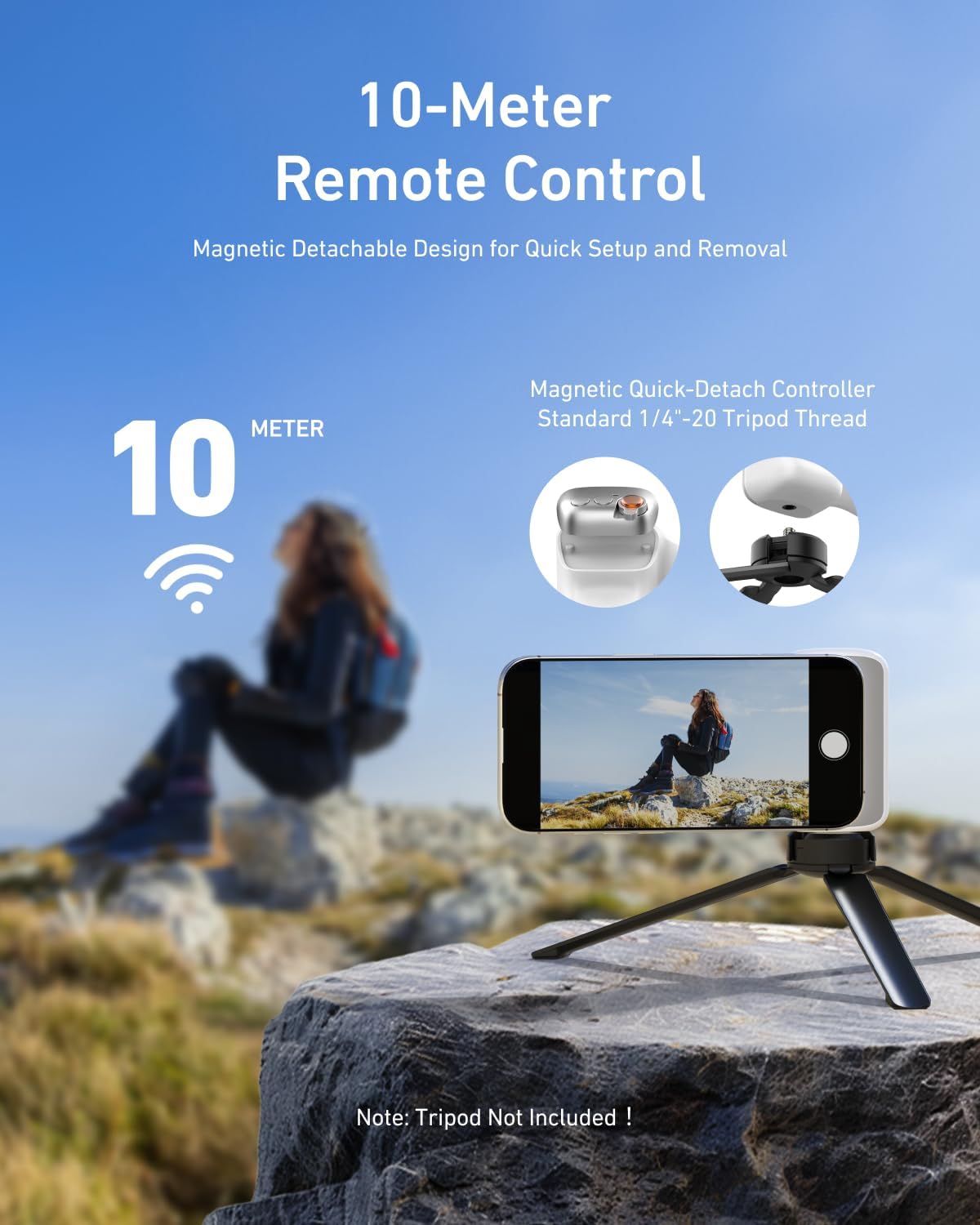
Image: The detachable remote control, enabling photography from a distance.
4. Vodič za postavljanje
4.1 Attaching the Grip and Light
- Ensure your phone is MagSafe compatible or attach the included magnetic ring to the back of your phone.
- Align the magnetic phone camera grip with the magnetic area on your phone and allow it to snap into place.
- The C03 Magnetic Selfie Light can be magnetically attached to the back of the phone, or to the grip itself, allowing for flexible positioning.
4.2 Bluetooth Pairing (Quick Setup)
The TELESIN Creator Kit utilizes Bluetooth for its wireless shutter functionality.
Za korisnike Androida:
- Go to your phone's postavke.
- Odaberite Bluetooth.
- Uključi Bluetooth.
- Tražiti available devices and select the TELESIN device to pair.
- Once paired, you can use the grip's shutter button directly.
Za korisnike iPhonea:
After the first connection, enable the Zoom function for full functionality.
- Go to your phone's postavke.
- Odaberite Pristupačnost.
- Idite do Zum.
- Press to activate the Zoom button. When Zoom is enabled, the screen will magnify.
- Double-tap with three fingers to restore the normal view. Other settings remain unchanged.

Image: Visual guide for quick setup, including Bluetooth pairing for Android and Zoom function activation for iPhone.
5. Upute za rad
5.1 Using the Phone Camera Grip
- Gumb okidača: Press the main button on the grip to take photos. A half-press may activate focus, similar to a DSLR camera.
- Ručica za zumiranje: Use the integrated lever to zoom in or out within your camera application.
- Prekidač načina rada: Depending on your phone's camera app, this switch may allow you to toggle between photo and video modes.
- Orijentacija: The magnetic attachment allows for quick switching between portrait and landscape orientations.
5.2 Using the Magnetic Selfie Light
- Uključivanje/isključivanje: Press and hold the power button on the selfie light to turn it on or off.
- Podešavanje svjetline: Short press the power button to cycle through different brightness levels (e.g., White, Natural, Warm).
- Funkcija zrcala: The built-in mirror allows you to frame yourself when using the phone's rear camera for higher quality selfies or vlogs.
- Rotation & Flip: Adjust the light's angle using its 360° rotation and 180° flip design to achieve optimal lighting.
6. Održavanje
- Čišćenje: Wipe the surfaces of the grip and light with a soft, dry cloth. Avoid using harsh chemicals or abrasive materials.
- Skladištenje: Komplet čuvajte na hladnom i suhom mjestu, zaštićeno od izravne sunčeve svjetlosti i ekstremnih temperatura.
- Punjenje: Charge the grip and light using the provided USB-C cable. Do not overcharge.
- Njega baterije: For optimal battery life, avoid fully discharging the devices frequently. Charge them regularly, even if not in use for extended periods.
7. Rješavanje problema
- Uređaj se ne uparuje:
- Ensure both the grip/light and your phone have sufficient battery.
- Make sure Bluetooth is enabled on your phone and the device is in pairing mode.
- Pokušajte zaboraviti uređaj u Bluetooth postavkama telefona i ponovno ga upariti.
- Restart your phone and the TELESIN device.
- Shutter button not working:
- Potvrdite uspješnu Bluetooth vezu.
- Check if the grip's battery is charged.
- For iPhone, ensure the Accessibility Zoom function is correctly configured as per the setup guide.
- Selfie light not turning on:
- Ensure the selfie light is charged.
- Pritisnite i držite gumb za napajanje nekoliko sekundi da biste ga uključili.
- Magnetsko pričvršćivanje je slabo:
- Ensure your phone is MagSafe compatible or that the magnetic ring is properly attached and aligned.
- Uklonite sve debele futrole koje bi mogle ometati magnetsku vezu.
8. Specifikacije
| komponenta | Specifikacija |
|---|---|
| Magnetni držač Fun Shot | |
| Naziv proizvoda | Magnetni držač Fun Shot |
| Materijal | ABS + PC + aluminijska legura |
| Dimenzije | 124.7 mm × 79.6 mm × 37.7 mm (4.91 inča × 3.13 inča × 1.48 inča) |
| Težina | 109g |
| Kapacitet baterije | 130 mAh |
| Bluetooth kompatibilnost | Common phone models (iPhone & Android) |
| Magnetsko svjetlo za punjenje | |
| Dimenzije proizvoda | 75mm*60mm*19mm (2.95x2.36x0.75in) |
| Težina | 80g |
| CRI | ≥95 |
| Temperatura boje | Trostruki 2500-7500K |
| Parametri punjenja | 500mAh 5V/1A tip-C |
| Runtime | ≥45 min (maksimalna svjetlina), ≥500 min (minimalna svjetlina) |
| Overall Kit | |
| Dimenzije paketa | 6.69 x 5.51 x 3.27 inča |
| Ukupna težina artikla | 11.7 unci |
| Proizvođač | TELESIN |
9. Jamstvo i podrška
TELESIN products are manufactured to high-quality standards. For specific warranty information, please refer to the warranty card included with your product or visit the official TELESIN website. For technical support, product inquiries, or warranty claims, please contact TELESIN customer service through their official channels.
Napomena: Sačuvajte račun kao dokaz o kupnji u svrhu jamstva.